Microsoft Adds Execution Boundaries to AI Agents

At its Windows and Surface launch event, Microsoft highlighted the MXC SDK, a policy-driven controlled execution container for AI Agents. It aims to address the core question of whether Agents can safely access local files, tools, and networks, but the full technical details and availability timeline have not yet been announced.
Microsoft Gives AI Agents Execution Boundaries
Microsoft is bringing the secure execution of AI agents directly into Windows’ system capabilities.
According to a report published on October 8, Microsoft highlighted the MXC (Microsoft Execution Containers) SDK at its Windows and Surface launch event, positioning it as part of its Windows AI strategy. MXC is not intended to make agents better conversationalists. Its goal is to enable them to run code, invoke tools, and complete local tasks in a controlled, isolated execution environment while minimizing access to user data that should not be exposed.
The value of this approach lies in a fundamental shift: as AI agents move from “answering questions” to “taking action on behalf of users,” the real challenge is no longer whether a model can generate a piece of code, but what that code is actually allowed to access.
The More Useful an Agent Becomes, the Greater the Permission Risk
Most AI assistants in the past were confined to chat interfaces. A user asked a question, the model returned text, and at most it invoked a search or calculation tool. Even when the model was wrong, the issue was usually limited to answer quality.
Agents are different. An agent capable of actually completing tasks often needs to read project directories, modify files, execute scripts, install dependencies, access the network, invoke internal enterprise APIs, and even remain active for minutes or hours. The closer its capabilities come to those of a “digital employee,” the closer its permissions come to those of a real employee.
This creates several problems:
- Model-generated code may contain instructions to delete files, overwrite configurations, or modify system settings;
- Plugins and third-party tools may behave in ways that exceed expectations;
- To complete a task, an agent may send the contents of sensitive files to external services;
- Once a local development assistant receives network access, it may be able to reach corporate intranets, cloud services, or credential systems;
- Users cannot realistically review every line of code and every tool call generated by an agent.
This is why the security boundaries of AI coding tools increasingly resemble an operating system problem, not merely a model alignment problem. Encouraging a model to “avoid doing harmful things” is one layer of defense. Restricting it so that “even if it tries, it cannot do them” is another. MXC clearly falls closer to the latter.
MXC Is About Agent Execution, Not Container Deployment
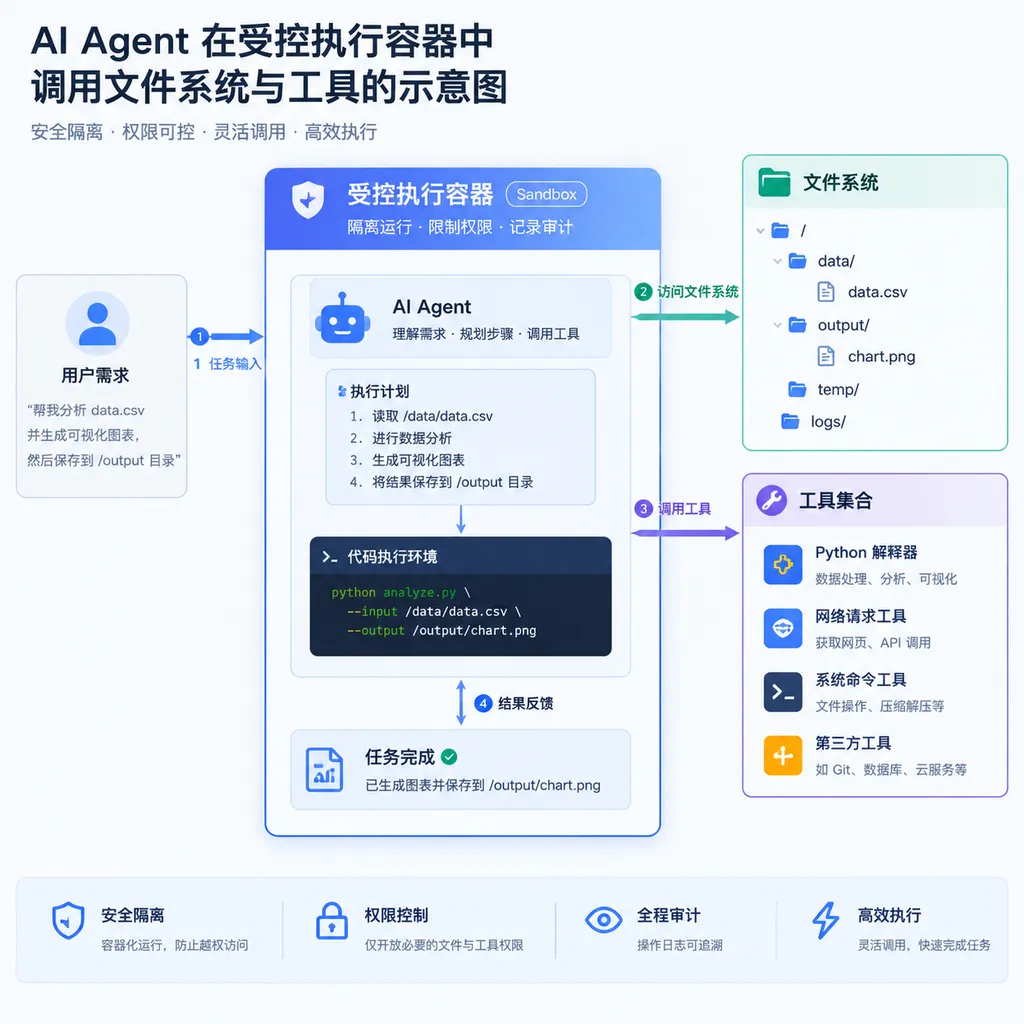
Based on the information Microsoft has released so far, the MXC SDK provides AI agents with a relatively independent execution environment. Developers can define policies for files, networks, and other system resources, allowing agents to execute code and invoke tools within set boundaries.
The key term here is “controlled,” rather than “virtual machine” in the traditional sense.
Conventional containers primarily address application packaging, environment consistency, and process isolation. Developers focus on how to build images, install dependencies, and deploy services. An agent execution environment must address a different category of questions: Which directories should a piece of temporarily generated, not entirely trustworthy code be allowed to read? Can it write files? Can it access the internet? Can it connect to corporate databases? How should files and state created during the task be cleaned up afterward?
These permissions are often not fixed during deployment, but change dynamically with each task. A code repair agent may need to read an entire project but should only be able to write to the current workspace. A data analysis agent may be permitted to access a designated dataset but not the user’s SSH keys. A desktop automation agent may need to control a specific application without receiving administrator privileges over the entire system.
MXC aims to turn these constraints into execution policies that developers can declare and manage, instead of requiring every agent team to assemble its own sandboxing, permission controls, network isolation, and process cleanup logic.
A Foundational Piece of the Windows AI Strategy
Microsoft CEO Satya Nadella has previously described trust, intelligence, and “AI woven into human ambition” as key pillars of the frontier ecosystem. Within this framework, products such as Agent 365 and Microsoft IQ provide capabilities at the application and organizational levels, while MXC addresses a more fundamental issue: once an agent gains the ability to act, how does the system control it?
This is also why MXC was introduced as part of the Windows AI strategy.
If AI is only responsible for generating text, model providers can rely primarily on content safety, permission prompts, and product-level warnings to reduce risk. Once AI begins operating a local computer, however, model providers must work with the operating system. The operating system knows where files, processes, network interfaces, and user permissions reside, and can enforce hard boundaries that the model itself cannot provide.
For Windows, this capability also has broader product significance. Microsoft wants Windows to be more than a desktop operating system that runs AI applications. It also wants it to become the foundational platform on which agents execute tasks. In the future, users may ask agents to organize their Downloads folders, modify spreadsheets, run tests, configure development environments, or even complete a sequence of operations across multiple applications. Without system-level execution isolation, the more powerful these features become, the harder it will be to introduce them into the everyday environments of enterprises and developers.
The Most Practical Impact on Developers
If MXC is implemented in the direction Microsoft has described, three categories of applications will be affected first.
AI Coding Assistants
AI coding tools need to run tests, build projects, and execute scripts. Otherwise, they can only generate code without verifying the results. However, allowing a model to execute commands directly on the host machine carries significant risk.
The ideal execution model would allow an agent to access the current project directory, write temporary build artifacts, and run language runtimes and testing tools, while preventing it from reading credential files in the user’s home directory or accessing internal network services without authorization. Once the task is complete, the environment could be destroyed, preventing temporary files, environment variables, and process state from remaining behind.
This is closer to real-world requirements than simply displaying a “Do you want to allow this command to run?” confirmation dialog. A confirmation dialog addresses a single interaction; a container policy governs the entire task lifecycle.
Plugin and Tool Ecosystems
Agents often depend on tools such as search engines, browsers, databases, code executors, and file managers. The more tools involved, the greater the risks created by their combination. A seemingly harmless plugin may indirectly obtain sensitive data through another tool.
If each tool operates within clearly defined execution boundaries, developers can replace a broad model in which “the entire agent can access everything” with a more granular model in which “a specific tool can access only a specific category of resources.” This supports finer-grained permission models and reduces the potential impact of failures in third-party plugins.
Enterprise Automation and Local Agents
Enterprise users are often unwilling to hand all their data to cloud-based agents, but local agents face more complex permission management requirements. For example, an organization may want an agent to generate reports within an employee-designated directory without scanning the entire computer. It may want the agent to access an internal knowledge base without allowing it to connect to financial systems.
If MXC can consolidate file, network, and process permissions into auditable policies, it will be far more reliable in these scenarios than simply “instructing the model to obey the system prompt.”
Cross-Platform Abstraction Is a Strength, but Also a Challenge
Supplementary information suggests that MXC may be designed to separate policies from the underlying sandbox implementation and select the appropriate backend for each operating system. Related materials mention platforms including Windows, Linux, and macOS, as well as isolation mechanisms such as AppContainer, Bubblewrap, LXC, Seatbelt, and microVMs.
If this direction ultimately becomes an official capability, developers could describe execution boundaries using a relatively unified policy model, without having to separately understand Windows application containers, Linux namespaces and permission mechanisms, and macOS sandbox configurations.
However, a “unified SDK” does not mean “uniform security capabilities.” Operating systems differ significantly in network isolation, file permissions, process control, and kernel attack surfaces. A policy that works on Windows may not provide the same strength of guarantees on Linux or macOS. MicroVMs generally provide stronger isolation, but they also affect startup times, resource consumption, and device access. Lightweight sandboxes start faster but may depend more heavily on the host kernel and system configuration.
MXC’s usability therefore should not be judged solely by whether its API is unified. It must also clearly tell developers which isolation backend is being used on the current platform, which policies are strictly enforced, which are merely advisory, and what happens when permissions are misconfigured.
The Biggest Current Problem: There Are Not Enough Details
MXC’s direction is clear, but Microsoft has not yet published complete technical details, availability information, or an official release schedule. Several critical questions remain unanswered for developers:
- Will the MXC SDK be available to ordinary Windows applications, or will it initially serve only Microsoft’s own products?
- Can file system permissions be controlled at the directory and individual file levels?
- Can network policies be restricted by domain, IP address, port, or specific network adapter?
- Can agents request temporary permissions at runtime, subject to approval by users or enterprise policies?
- How will credentials, environment variables, and clipboard data be handled inside containers?
- What are the protection boundaries against sandbox escapes, side-channel attacks, and attacks on the host?
- How will MXC work with the Windows App SDK, Microsoft Defender, and enterprise device management policies?
- Will developers be able to view complete execution logs and audit tool calls?
The answers to these questions will determine whether MXC becomes production-ready infrastructure or remains a security concept presented at a launch event.
Network isolation deserves particular attention. Giving many agents access to local files may not immediately cause serious consequences, but once they can access a corporate intranet, file access, credential theft, and lateral movement can become linked into a single attack chain. In enterprise scenarios, the ability to precisely block intranet access while preserving necessary access to the public internet or approved services may be far more important than a binary “allow network access” switch.
Microsoft Is Betting on Agent “Executability”
From a product competition perspective, MXC is not an isolated container SDK. It reflects Microsoft’s view of the next generation of AI applications: an agent’s competitiveness will depend not only on how accurately its model answers questions, but also on whether it can safely complete tasks in real-world environments.
This will push competition from the model layer down into the operating system and runtime layers. Model providers such as OpenAI, Anthropic, and Google can provide tool calling and agent frameworks, but access to file systems, processes, networks, and hardware is ultimately controlled by the operating system. Whoever can package these capabilities more simply and securely will have a better chance of becoming the foundation of the agent ecosystem.
Microsoft’s advantage lies in Windows’ position at the system level, its enterprise software stack, and its developer toolchain. It can connect MXC with Windows applications, Visual Studio, GitHub Copilot, Microsoft 365, and enterprise device management systems. For developers, once this integration is complete, it may offer more practical value than integrating a standalone cloud-based agent SDK.
However, Microsoft must also confront a basic reality: developers will not automatically trust a system simply because it is described as a “container.” MXC’s influence will depend on whether its policy model is sufficiently clear, its default configuration is sufficiently secure, its cross-platform behavior is sufficiently consistent, and its performance overhead is acceptable.
Assessment: Necessary Infrastructure, but Not Yet a Ready-Made Answer
MXC deserves attention because it addresses one of the most practical bottlenecks in agent adoption: permissions and execution environments. A model that can only chat does not require many system permissions. An agent that can actually operate a computer on a user’s behalf must strike a balance between “having enough permissions” and “being unable to exceed them.”
Microsoft is attempting to solve this problem with controlled containers at the operating system level. The direction is sound and offers more engineering value than relying solely on prompts, manual confirmation, or model self-restraint. Isolated execution environments are likely to become standard for AI coding assistants, enterprise automation, and local agents.
For now, however, MXC looks more like infrastructure that is still being assembled than a complete product developers can confidently rely on today. Without publicly available policy formats, isolation backends, performance data, auditing mechanisms, and a release plan, it is still impossible to determine whether its security strength will be comparable to a browser sandbox, a container runtime, or a microVM.
What matters next is not how many more concepts Microsoft can attach to MXC, but when it will release the SDK, whether it can provide verifiable permission boundaries, and exactly what an agent can and cannot do under the default configuration. For developers, those answers matter more than its positioning at a launch event.
References
- ITHome: Microsoft Highlights the MXC SDK, Providing a Controlled Execution Environment for AI Agents — A report on Microsoft’s presentation of the MXC SDK at its Windows and Surface launch event.
- Related Microsoft Developer Documentation — Supplementary information on the positioning of the Microsoft Execution Containers SDK and related capabilities for Windows developers.
- Microsoft MXC Project Materials — Public information on the MXC project’s code, SDK structure, and direction for cross-platform execution isolation.