Doubao Work Launches a New Canvas and Image Generation Model

On October 9, Doubao Work added an infinite canvas and step-by-step editing capabilities, and integrated Seedream 5.0 Flash. Doubao 2.1 Lite also launched simultaneously, focusing on frequently used office tasks such as documents, spreadsheets, and PPTs.
Doubao Work Is Starting to Evolve from a “Chat Box” into a “Workspace”
On October 9, Doubao Work announced that canvas functionality had been added to task mode. It also introduced the new image model Seedream 5.0 Flash, while Doubao 2.1 Lite went live at the same time.
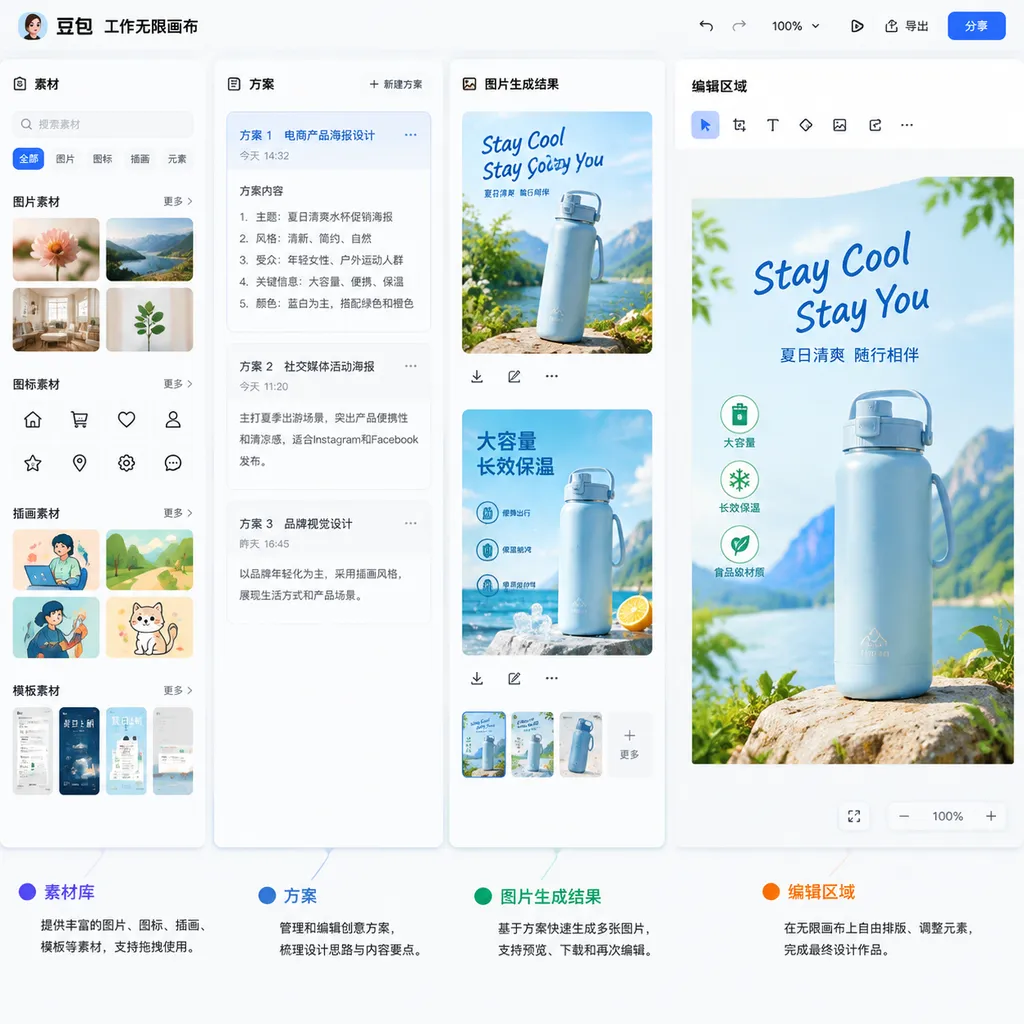
The focus of this update is not simply the addition of another model entry point. Rather, Doubao Work is beginning to fill in the “intermediate process” for complex tasks: users can place materials, proposals, and generated results on the same infinite canvas, viewing, comparing, and modifying them as they go, instead of returning to the chat box and describing everything again each time they make an adjustment.
For developers and frequent AI users, this change is particularly noteworthy. In the past, AI workflows often followed the pattern of “enter a prompt—wait for the result—identify problems—ask follow-up questions.” This works well for one-off text generation, but is less suitable for tasks such as developing proposals, layout design, and visual creation that require repeated iteration. The addition of a canvas moves AI away from being merely a window that responds to messages and toward something more like a lightweight workspace.
The Infinite Canvas Solves More Than Just the Problem of “Seeing a Wider Area”
According to Doubao Work’s official introduction, the new canvas allows users to lay out materials, proposals, and creative results in the same space. Users can view, compare, and organize them at any time, and continue expanding an idea into more versions.
This may sound like an interaction-layer upgrade, but it actually addresses a long-standing problem in AI tasks: context is easily lost.
In a traditional chat interface, users can usually only move downward along a single message timeline. Comparing two versions requires repeated scrolling; consulting multiple materials at the same time requires switching between browser tabs, folders, and the chat window; returning to a proposal from several rounds earlier often requires describing the requirements again. The more complex the task, the more likely the information is to become fragmented.
An infinite canvas provides another way to organize information:
- Centralize input materials: Documents, images, reference examples, and user requirements can be placed in the same workspace.
- Preserve multiple result versions: Different styles, color schemes, or layout proposals for the same theme can be generated and compared side by side.
- Allow ideas to branch: An initial idea can be further developed into a poster, a PPT slide, a social media graphic, or a product proposal.
- Reduce the cost of context switching: Users do not need to repeatedly recall previous prompts and modification requirements.
For developers, this experience is somewhat similar to a multi-file workspace in a code editor. Truly efficient development does not involve opening only one file and continuously appending code. Instead, developers simultaneously review configuration files, logs, test results, and implementation files. The same applies to AI processing complex content: a single conversational stream has difficulty accommodating multiple types of information objects.
Of course, a canvas itself does not automatically make a model more intelligent. Its value lies in making the model’s capabilities easier to organize. If the underlying model can only generate isolated results, the canvas may ultimately be nothing more than a larger “results display area.” Only when the model can continuously edit content, understand local elements, and maintain an overall style will the canvas truly become a productivity tool.
From “Generating Once” to “Editing Step by Step”
Doubao Work also emphasized step-by-step editing in this update. After generating content, users can continue adjusting the text, color scheme, and layout, making gradual changes from the overall style down to local details.
This means the interaction logic has changed: AI is no longer responsible only for delivering a final answer, but also participates in subsequent revisions.
When using image-generation models in the past, users often faced two choices. The first was to accept the current result, even if certain details were unsatisfactory. The second was to regenerate it, but regeneration could also alter parts that were already satisfactory. For example, a user might want to change only the title color, while the model changes the person, background, and composition as well; or the user might want to adjust the position of one object, only to find that the overall style has also drifted.
The goal of step-by-step editing is to limit modifications as much as possible to the areas or dimensions specified by the user. Although the reference materials do not disclose specific technical details about Seedream 5.0 Flash’s local editing, layer control, or region-locking capabilities, the path provided by Doubao Work—“continue adjusting after generation”—suggests that the product is attempting to turn image generation from a one-off output into a continuous creative process.
This is particularly important in actual production. Design work usually does not end with “generate one image.” Instead, it involves constantly handling details:
- First determine the overall style and composition;
- Then adjust the proportions and position of the main subject;
- Next refine the title, font, and colors;
- Finally handle edges, materials, and local decorative elements.
If every step requires regenerating the entire image, both the time cost and uncertainty increase significantly. Being able to preserve an existing result and continue modifying it—even if it merely cuts the number of reworks in half—would be more valuable than simply improving the quality of a single generation.
From this perspective, Doubao Work’s addition of canvas and editing capabilities is better understood as a “workflow transformation” than as conventional feature accumulation.
Seedream 5.0 Flash: A Speed-First Entry Point for Image Creation
The model introduced to Doubao Work this time is Seedream 5.0 Flash. The official information currently available is limited. Its main purpose is to provide more options for image creation and support rapid exploration and adjustment within the canvas.
Judging from the product name, Flash is more likely to take on the role of handling frequent experimentation, rapid drafts, and interactive modification. It may not replace higher-positioned Pro or Lite versions in all complex scenarios, but rapid feedback is itself part of productivity in a workflow.
The biggest problem in image creation is often waiting. Users usually do not know what the final proposal will look like from the outset. Instead, they need multiple generations to determine a direction: first testing the composition, then the style, and finally the details. If each exploration requires a long wait, users will tend to reduce the number of attempts, and the final result is more likely to remain at the level of “good enough to use.”
The practical value of the Flash model may be reflected in the following types of scenarios:
- Concept sketches: Quickly validate the visual direction of advertisements, posters, or pages.
- Style exploration: Test forms of expression such as photography, illustration, 3D, and retro styles using different prompts.
- Multi-version comparison: Quickly generate multiple color schemes, compositions, and title layouts for the same theme.
- In-canvas iteration: Make continuous modifications based on existing results instead of starting from scratch each time.
- Visuals for office content: Generate supporting visual elements for presentations, course documents, and product introductions.
It should be noted that faster does not mean higher performance across all quality metrics. For tasks requiring precise text layout, complex infographics, strict brand guidelines, or highly detailed portrait rendering, users still need to pay attention to the model’s text rendering, subject consistency, and local controllability. Flash is more like a high-frequency “draft engine” within a workflow, rather than the definitive answer to every professional design task.
This may also be how it differs from higher-specification models: use a fast model to explore directions, and a more capable model to complete the final deliverable. For AI products, this kind of division of labor is more consistent with real usage habits than simply pursuing a single “universal model.”
Doubao 2.1 Lite Also Updated, with a Focus on Everyday Office Efficiency
In addition to image capabilities, Doubao 2.1 Lite has also gone live in Doubao Work. The official positioning emphasizes that it consumes fewer credits and delivers results faster, while also highlighting its comprehensive multimodal capabilities across frequent scenarios such as document drafting, spreadsheet processing, and PPT creation.
The significance of a Lite model is easy to understand: not every task requires the most powerful model.
Writing a well-structured email, organizing meeting minutes, extracting trends from a spreadsheet, or generating PPT slides from an outline—these tasks generally have clear formats and relatively stable procedures. If a high-specification model is used for every request, both costs and response times will increase, while users may not receive proportional benefits.
In enterprise and team scenarios, a Lite model is particularly suitable for handling large volumes of “low-risk, high-frequency” work. For example:
- Organizing a batch of meeting notes into a standardized format;
- Generating basic analyses and presentation outlines from sales data;
- Condensing long documents into departmental weekly reports or project briefs;
- Converting a written outline into a PPT slide structure;
- Classifying, summarizing, and extracting information from multiple files;
- Modifying wording, layout suggestions, and writing style based on existing templates.
The key metrics for these tasks are not whether the model can perform extremely difficult reasoning, but rather response speed, format stability, long-document processing capabilities, and the experience of making multiple rounds of revisions. If the Lite model can remain stable in these areas, it can cover a large number of real-world office requests.
However, “using fewer credits” also means that users need to make model selections more carefully. For complex data reasoning, professional code analysis, in-depth cross-document verification, or high-risk decision-making, the Lite model should not be treated as a complete substitute for a high-specification model. A more reasonable approach is to break tasks down: first use Lite to organize materials, structure information, and generate a draft, then hand critical steps over to a more capable model for review.
Doubao Work Is Filling in the “Execution Interface” for AI Agents
Viewed within the broader product trend, this update shows Doubao Work shifting from “displaying model capabilities” toward becoming a “task execution interface.”
In the past, competition among AI products often centered on parameter size, benchmark performance, and single-turn generation quality. But as model capabilities gradually converge, the differences users actually feel increasingly concern how tasks are organized, how results are modified, and whether the model can fit into existing workflows.
The canvas provides a spatial method for organizing tasks, Seedream 5.0 Flash enables rapid visual generation, and Doubao 2.1 Lite handles high-frequency office tasks. Together, they point to a more complete workflow:
Materials enter the workspace → the model generates a draft → the user reviews and compares it → further editing and adjustments → the final result is delivered.
This workflow is closer to real work than the traditional chat model. Real work rarely consists of “one question and one answer.” Instead, it involves constantly gathering materials, creating drafts, comparing proposals, refining details, and confirming versions. The product that can compress these steps into a single continuous interface will have a greater chance of improving user retention.
However, this also means Doubao Work will face higher expectations going forward. The canvas is not the endpoint. Users will continue to ask: Can context be shared across different tasks? Can generated documents and images reference one another? Are modifications precise enough? Can multiple results be compared automatically? Is team collaboration, version rollback, and permission management supported?
If these capabilities do not keep pace, the canvas may remain at the stage of “placing multiple results together” rather than becoming a true collaborative production environment.
What This Means for Developers and Professional Users
Although this update took place within a product interface such as Doubao Work, it also offers useful reference points for developers.
First, the focus of AI applications is shifting from one-off calls to state management. An application that can genuinely handle complex tasks needs to preserve materials, context, versions, and user modifications, rather than treating every request as an independent conversation. The canvas is simply the visual representation of this state management on the front end.
Second, model routing will become increasingly important. Using different models for different tasks will become a fundamental way to control costs and response times. Fast models can handle exploration and batch processing, more capable models can handle complex reasoning and final review, and image models can generate visual content. Products do not necessarily need to put every capability into one model; instead, they need to make model switching imperceptible to users.
Third, editing capabilities may determine a product’s value more than its initial generation capabilities. Generating an image that “looks good” is no longer particularly novel. The difficult part is accurately modifying one section without damaging the overall result. The same applies to office products: generating a first draft is only the beginning. Whether the product can reliably revise content based on feedback determines whether it can enter real-world workflows.
For developers who want to experience multi-model workflows, OpenAI Hub and similar aggregation platforms compatible with the OpenAI format can serve as testing entry points for comparing model response speeds, output styles, and task suitability. However, the core of this Doubao Work update remains its in-product canvas and task experience, and should not simply be equated with an upgrade to open API capabilities.
Conclusion: The Value of This Update Lies in Connecting “Generation” to “Modification”
Overall, this update to Doubao Work is not simply a model replacement, but a product upgrade centered on complex-task workflows.
The infinite canvas addresses information organization, step-by-step editing addresses result rework, Seedream 5.0 Flash enables faster visual exploration, and Doubao 2.1 Lite covers office tasks that are more frequent and place greater emphasis on cost and speed. Together, they point to a conclusion: the next stage of competition among AI products will not be only about “who generates better results,” but also about “who can help users spend less time away from their work environment.”
At present, public information about Seedream 5.0 Flash’s specific parameters, evaluation results, pricing, and API availability remains limited. Therefore, this update is better understood as an experience upgrade on the Doubao Work side rather than a model release that can be definitively assessed directly through benchmark scores.
However, the direction is clear from the usage path: AI is gradually moving beyond answering questions and entering the work process of organizing materials, generating proposals, and continuously making revisions. For developers, what is truly worth observing is not the term “canvas” itself, but whether it can help models maintain context during complex tasks, reduce rework, and transform one-off generation into a sustainable iterative production process.
References
- IT Home: Doubao Work Gets an Update with Canvas Support and Further Model Upgrades — Introduces the official information on Doubao Work’s new infinite canvas, step-by-step editing, Seedream 5.0 Flash, and Doubao 2.1 Lite.