Qwen-Image-2.1 API is now live today
The Qwen AI Platform announces the official availability of the Qwen-Image-2.1 Pro and Turbo APIs, enabling developers to integrate image generation, localized editing, multi-image references, and 2K creation capabilities into their applications. Turbo weights are also being released simultaneously.
Qwen-Image-2.1 Pro and Turbo APIs Officially Launched
On October 11, the Qwen AI platform announced that the Qwen-Image-2.1 Pro and Qwen-Image-2.1-Turbo APIs had officially launched. Developers can now integrate image generation and editing capabilities into their own products through the platform APIs, without having to deploy models themselves, configure GPU environments, or maintain inference services.
At the same time, the model weights for Qwen-Image-2.1-Turbo were also made available. In other words, this update covers two paths: one is direct access to cloud APIs, suitable for teams that want to launch features quickly; the other is downloading the weights and deploying the model independently, suitable for developers who require greater control over data, latency, inference costs, and workflows.
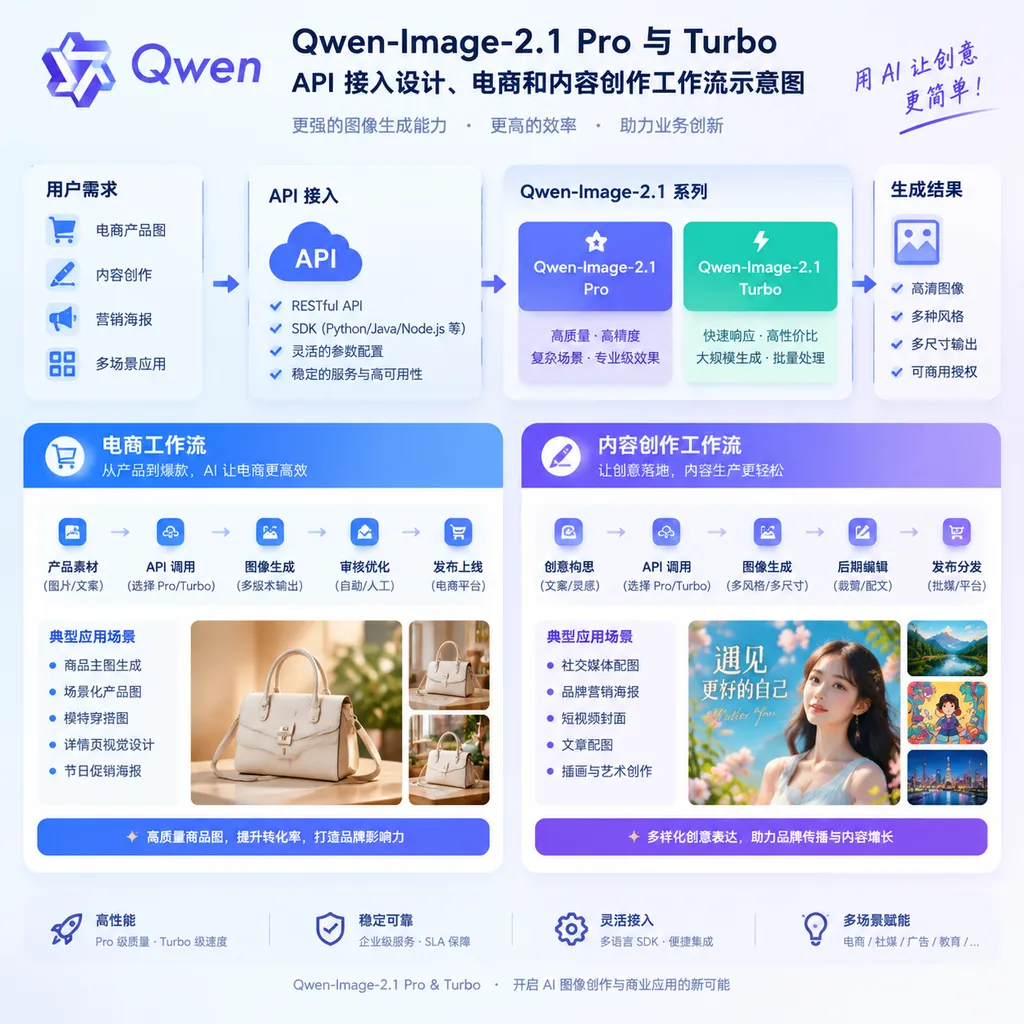
In terms of product form, Qwen is not simply adding another text-to-image interface this time. Instead, it is packaging Qwen-Image-2.1’s generation and editing capabilities as infrastructure that can be more easily embedded into business applications. For developers, the key question is not merely whether “the model can generate an attractive image,” but whether it can reliably enter an existing asset production pipeline and allow users to continue making modifications, rather than starting from scratch every time.
From “Generating an Image” to “Continuously Modifying an Image”
The core change in Qwen-Image-2.1 is that it places image generation and image editing within the same capability framework.
The traditional AI image-generation workflow is often: enter a prompt, generate images, and select one usable result. If users want to change a person’s clothing, modify a product background, or adjust text on a poster, they typically need to regenerate the image or import it into tools such as Photoshop or CapCut for further processing. Regeneration can easily damage the original composition, while external editing requires users to have a certain level of design expertise.
Qwen-Image-2.1 is closer to a visual editor that users can communicate with repeatedly. Developers can organize the original image, reference images, editing instructions, and masked areas, allowing users to complete the cycle of “generate first, modify next, and confirm afterward” within the application.
The model supports up to 10 reference images and allows users to specify editing areas through selections, brush strokes, and independent masks. This means an application can let users control which content must be preserved and which areas may change, rather than relying entirely on the model to make that judgment.
Consider a practical scenario: An e-commerce merchant uploads a product image on a white background, a model photo, and several brand-style reference images, then enters the instruction: “Place the product in an outdoor autumn scene while keeping the text, color, and shape of the bottle unchanged.” The model is not simply generating a similar product image from scratch; it must combine multiple inputs while preserving the product’s identifying characteristics as much as possible.
This type of capability is more valuable for design tools and marketing platforms. In real business scenarios, users typically do not ask only to “generate an image.” Instead, they make a series of modification requests: change the background, adjust the aspect ratio, change the clothing, modify the lighting, preserve the logo, or update the event date. Whether the model can maintain subject consistency across multiple rounds of editing is often more important than whether the first image is impressive.
Portrait and Product Consistency Are Key Areas of This Update
According to official information, Qwen-Image-2.1 has improved consistency in portrait and product editing.
For portrait editing, the model places greater emphasis on preserving facial identity features. When clothing, hairstyles, poses, and scenes change, this means developers can build a continuous body of visual content around the same person, rather than getting results that “look like the same person but have actually changed faces” after each edit.
Product editing places greater emphasis on the stability of text, textures, and shapes. Brand lettering on bottles, packaging boxes, clothing tags, and electronic products has long been one of the areas where image models are most prone to errors. The Qwen-Image series has previously attracted attention for its text-layout capabilities, and version 2.1 continues to apply these capabilities to real-world product assets and marketing design scenarios.
Of course, this does not mean that the model has completely solved every issue involving text and fine details. Small text, complex logos, occlusion relationships, and localized distortions after multiple rounds of editing still require developers to design review, retry, and manual correction mechanisms. In production environments, it is best to treat model outputs as “high-success-rate first drafts,” rather than final deliverables that require no inspection.
The Value of Turbo: Bringing Inference Speed into a Usable Range
Qwen-Image-2.1-Turbo is based on Qwen-Image-2.1’s 7B visual-generation architecture. It reduces the denoising process for image generation and editing to 8 steps while retaining the ability to create 2K images.
When diffusion models generate images, the denoising steps can be understood as gradually reconstructing an image from a mass of noise. More steps generally provide more opportunities to refine details, but inference time and computational costs also increase. The idea behind the Turbo version is to use fewer steps in exchange for lower latency, transforming the model from something “suitable for slowly creating one image” into something that can be embedded in interactive products.
This is particularly important for API-based applications. If users have to wait a long time to see the result after modifying a prompt in a web editor, the product experience quickly turns into that of a batch-processing tool. If a preview can be returned within several to a dozen seconds, developers have an opportunity to design multi-round trial-and-error, batch generation, and real-time editing features.
Turbo is better suited to the following tasks:
- Batch generation of product scene images and advertising variants for e-commerce;
- Rapid generation of multiple poster versions based on different copy for marketing platforms;
- Low-cost sketch exploration and composition previews in design tools;
- Batch generation of storyboards, covers, and social media graphics for content-creation applications;
- Online image-editing features that require high concurrency and short response times.
However, “8 steps” does not mean that all tasks can be completed at the same speed and quality. Actual processing time is also affected by the number of input images, resolution, concurrency, queue scheduling, and platform service policies. For tasks with higher detail-quality requirements, developers still need to make trade-offs between Pro and Turbo and provide users with a two-level workflow consisting of previews and high-resolution images.
Pro and Turbo Are Not Simply High-End and Low-End Versions
The platform currently provides both the Qwen-Image-2.1 Pro and Turbo APIs. Developers need to choose a model based on the product stage rather than simply looking at the words “Pro” or “Turbo” in the model names.
Turbo’s strengths are speed and efficiency, making it more like an instant rendering engine for online workflows. Pro is better suited to tasks with higher requirements for image quality, complex instruction comprehension, and final delivery results. For an e-commerce backend, for example, Turbo can first be used to generate multiple low-cost candidate images, after which the selected design can be processed by a higher-quality model. For one-off, high-value content such as posters and brand key visuals, it may be preferable to test Pro directly.
This type of tiered routing is more reasonable than using the same model for every request. The cost of an image application typically comes not only from model calls, but also from storage, moderation, failed retries, user wait times, and manual rework. A faster solution that requires multiple retries may not be cheaper than a high-quality generation that succeeds on the first attempt. Conversely, for early-stage ideation and batch experimentation, a high-quality model may create unnecessary cost.
A practical product workflow could be designed as follows:
User enters assets and description
        ↓
Turbo quickly generates candidate results
        ↓
User selects an area and submits modification requests
        ↓
Turbo performs multiple rounds of preview editing
        ↓
User confirms the composition and content
        ↓
Pro outputs the final deliverable
This is not a prescribed calling method from the Qwen platform, but rather a model-routing strategy suitable for image products. During actual integration, developers will also need to implement the solution based on the models’ available parameters, input formats, resolution limits, concurrency rules, and content-safety requirements.
What Do the APIs Mean for Developers?
The value of an image-model API is not simply bringing an image-generation button into an application. It allows developers to reorganize the creative workflow.
E-Commerce and Brand Content
Developers can build automated asset-production pipelines around product reference images, scene descriptions, and campaign themes. After a merchant uploads a product, the system can batch-generate livestream backgrounds, product-detail-page hero images, holiday promotion posters, and social media graphics, then use editing instructions to adjust colors, composition, and text information consistently.
The truly valuable part is maintaining consistency of the main product across different scenes. Otherwise, if the product’s shape, color, or packaging text changes with every generation, merchants will still need extensive manual rework.
Marketing and Graphic Design
Marketing applications can send campaign themes, advertising copy, and brand guidelines to the model together, first exploring multiple visual directions and then continuing to edit the selected design. Compared with standalone text-to-image tools, this approach is closer to how designers work: diverge first, converge later, and handle the details at the end.
There is also a challenge here: a poster is not sufficient simply because it looks attractive. Headlines, prices, dates, disclaimers, and brand logos must all be accurate. Developers need to consider text editability, result review, and template fallbacks, rather than assigning all layout responsibilities to the model.
Character and Fashion Content Creation
By combining character photos, clothing reference images, and scene assets, applications can generate outfit concepts, virtual try-on results, or continuous character imagery. Multi-image references and portrait-consistency capabilities can reduce obvious changes in a character’s appearance across different images.
This scenario also involves portrait rights, asset licensing, and content safety. When making the product publicly available, applications need to make clear that users possess the corresponding rights to uploaded images and establish moderation mechanisms for minors, public figures, and sensitive content.
Content Creation and Visual Storytelling
For short-video, comic, game, and educational content tools, the model can assist with storyboards, infographics, character designs, and cover creation. Developers can use character settings, scene descriptions, and existing frames from a script as context, allowing generated results to serve continuous content rather than isolated images.
Consistency and controllability are the biggest challenges in these applications. It is not difficult for a model to occasionally generate one impressive image. The difficult part is keeping a character’s clothing, hairstyle, and identity consistent across ten shots, while ensuring that the text, structure, and data in an infographic can all be edited later.
Open Weights Provide Greater Deployment Flexibility, but the Barrier Remains
The simultaneous release of the Qwen-Image-2.1-Turbo weights gives developers another option beyond the API. Self-hosting can provide stronger data control and make it easier for teams to integrate the model with ComfyUI, internal asset systems, or customized inference services.
However, open weights do not mean zero deployment costs. Although the 7B scale lowers the hardware barrier, 2K image generation and editing still require substantial VRAM, sensible VRAM-optimization strategies, and stable inference services. Developers also need to handle model downloads, version upgrades, queue scheduling, VRAM release, failed retries, and result storage.
In addition, before using the model commercially, developers must carefully verify the model license, the scope of permitted weight usage, and the platform’s service terms. In particular, for commercial scenarios such as e-commerce, advertising, and outsourced design, developers cannot assume that all outputs and deployment methods are unrestricted simply because the model weights are available for download.
What Does This Update Mean?
The launch of the Qwen-Image-2.1 Pro and Turbo APIs indicates that competition among image models is shifting from the quality of a “single image” to whether a model can enter a complete business workflow. Multi-image references, localized editing, continuous modification, and 2K output are all key capabilities that can transform a model from a creative toy into a production tool.
Qwen’s strengths lie in its open-source ecosystem, adaptation to Chinese-language scenarios, and relatively clear developer-integration path. The Turbo version, meanwhile, attempts to address the long-standing speed problem of image models. Whether it can comprehensively outperform closed-source flagship models in complex photorealism, portrait details, and extreme text scenarios still requires more real-world business testing; conclusions should not be drawn solely from demonstration images.
For developers in China, however, this launch already has sufficient practical significance: whether using the API directly or building a self-hosted service based on the open weights, Qwen-Image-2.1 provides a unified entry point covering both generation and editing. Going forward, the real differentiator will not be the model itself alone, but whether developers can connect asset management, prompt orchestration, localized editing, moderation, and delivery into a stable product.
References
- ITHome: Qwen-Image-2.1 Pro and Turbo APIs Launch on the Qwen AI Platform — Public information on the API launch, Turbo weight release, reference-image input, localized editing, and 2K capabilities.
- Qwen Official GitHub Page — The entry point for code and technical materials related to Qwen models and open-source projects.
- Qwen Official Organization on Hugging Face — The entry point for Qwen’s open model weights and model-card information.