
Claude Desktop can finally connect to third‑party APIs.
Claude Desktop recently enabled custom API endpoint configuration, allowing users to forward requests to third-party or local model services. However, issues such as hardcoded sub-agent models and Windows compatibility remain to be resolved.
Anthropic’s desktop client, Claude Desktop, has quietly unlocked a long-awaited feature for developers — custom API endpoints. Simply put, you can now forward Claude Desktop’s requests to any backend compatible with the Anthropic Messages protocol, whether it’s a third-party API aggregator, a self-hosted proxy, or a model service running locally.
This wasn’t a grand official launch, but more of a silent rollout. The news first surfaced in the Linux.do community, where developers quickly began tinkering with configurations, hitting pitfalls, and sharing experiences. But precisely because it’s not an official feature launch, there are still quite a few issues.
What has changed
Previously, Claude Desktop was a fairly “closed” client. It was tied to Anthropic’s official API — users either subscribed (Pro/Team) or used an official API key, with no other options. Want to use cheaper third-party credits? Hook up your self-hosted model? Sorry, Claude Desktop didn’t support that.
Now things have changed: Claude Desktop now respects the ANTHROPIC_BASE_URL environment variable.
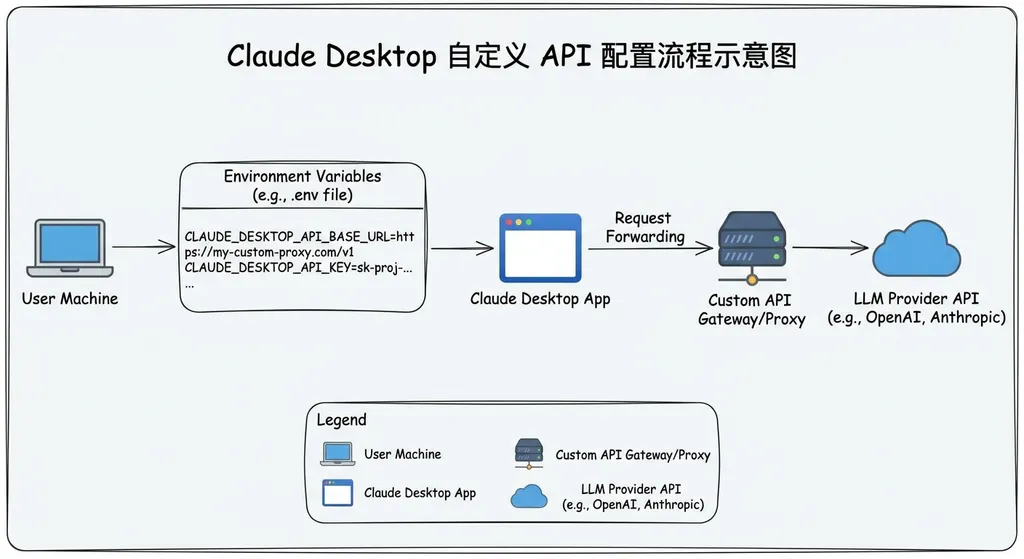
This means you can change the target address of API requests from https://api.anthropic.com to any endpoint you like. Combined with setting ANTHROPIC_AUTH_TOKEN to the corresponding key, Claude Desktop will send all model requests to your specified destination.
This mechanism is consistent with Claude Code (Anthropic’s command-line programming tool). Claude Code has long supported configuring custom endpoints via environment variables—what’s known as the “LLM Gateway” mode. Now the desktop client has caught up, following the same logic.
How to configure
Configuration methods differ by operating system, but the core is to set two environment variables.
On macOS, the simplest way is to set the environment variables in the terminal before launching Claude Desktop:
# Set a custom API endpoint
export ANTHROPIC_BASE_URL=https://your-api-provider.com
export ANTHROPIC_AUTH_TOKEN=your-api-key-here

# Launch Claude Desktop (macOS)
open -a "Claude"
If you want the settings to persist, add these lines to your ~/.zshrc or ~/.bash_profile.
For persistent configuration, you can also set environment variables via launchctl:
launchctl setenv ANTHROPIC_BASE_URL https://your-api-provider.com
launchctl setenv ANTHROPIC_AUTH_TOKEN your-api-key-here
Another approach is to directly modify Claude Desktop’s configuration file. On macOS, it’s usually found at:
~/Library/Application Support/Claude/config.json
Some developers report that custom endpoints can be specified in this file with a structure like this:
{
  "apiBaseUrl": "https://your-api-provider.com",
  "apiKey": "your-api-key-here"
}
However, note that the schema of this config file isn’t officially documented by Anthropic, and may differ across versions. For now, environment variables are the most reliable method.
How well does it work in practice
First, let’s talk about what works.
If your third-party API service is fully compatible with the Anthropic Messages protocol (/v1/messages endpoint), core chat functionality should work fine — sending messages, receiving responses, streaming output, etc. For users using Claude Desktop for writing, text editing, or coding help, the experience is nearly identical to the official API.
Many API aggregator platforms in China already support the Anthropic protocol, allowing direct access without a VPN. Platforms like OpenAI Hub already support Anthropic-compatible forwarding for Claude models, making configuration fairly straightforward.
But there are real pitfalls — and some are significant.
Issue #1: Hard-coded sub-agent models
This is the most common complaint from the community. When using features in Claude Desktop that involve sub-agent calls, the client attempts to request hard-coded model names — for example, claude-haiku-4-5-20251001.
The problem is that your third-party API provider might not support that exact model version. You’ll then see an error like:
There's an issue with the selected model (claude-haiku-4-5-20251001).
It may not exist or you may not have access to it.
This issue also exists in Claude Code. Some developers noted that Claude Code’s CLI at least falls back when sub-agent retrieval fails, but the Desktop client’s fallback seems incomplete.
A possible workaround is to implement model name mapping at your API proxy layer — mapping precise versioned names like claude-haiku-4-5-20251001 to a model you actually have access to. However, that requires custom routing logic in your proxy, which is not easy for most users to set up.
In Claude Code’s CLI, some developers found they could “force inject” custom model aliases by editing the config JSON, redirecting sub-agent requests to specific models. Whether such a configuration entry exists for the Desktop app is still under exploration.
Issue #2: Uncertain Windows support
Numerous Windows users report that after setting environment variables the same way, opening Claude Desktop still only shows the standard login screen — implying that the custom API configuration failed to take effect.
This might relate to how environment variables work on Windows — they must be set via the system settings panel, or within PowerShell using $env:ANTHROPIC_BASE_URL = "..." before launching the app in the same session. Even so, some users still can’t get it to work.
For now, macOS seems to be the “first-class citizen” for this feature, while Windows support may come in later versions.
Issue #3: No easy switch between official and custom APIs
This is a usability problem. Once you configure a custom endpoint, all of Claude Desktop’s requests go there. Want to temporarily switch back to Anthropic’s official API? You’ll have to edit environment variables and relaunch the app.
Community members are already asking:
“Is there any way to quickly switch between the official Claude API and others?”
Currently, no. Unlike Claude Code, Claude Desktop doesn’t support a --model flag or any multi-endpoint management in the UI. That’s a clear product gap.
Comparison with Claude Code
It’s worth directly comparing Claude Desktop and Claude Code regarding custom API support because the maturity difference is quite large.
As a command-line tool, Claude Code is already far ahead in supporting multiple models and endpoints. It supports these configuration variables:
ANTHROPIC_BASE_URL: Custom API endpointANTHROPIC_AUTH_TOKEN: Custom authentication keyANTHROPIC_MODEL: Specify the main modelANTHROPIC_SMALL_FAST_MODEL: Specify a lightweight sub-modelAPI_TIMEOUT_MS: Request timeoutCLAUDE_CODE_DISABLE_NONESSENTIAL_TRAFFIC: Disable nonessential traffic
A typical third-party model configuration for Claude Code looks like:
# Example using Fish Shell
set -gx ANTHROPIC_BASE_URL https://api.deepseek.com/anthropic
set -gx ANTHROPIC_AUTH_TOKEN your-deepseek-key
set -gx API_TIMEOUT_MS 600000
set -gx ANTHROPIC_MODEL deepseek-chat
set -gx ANTHROPIC_SMALL_FAST_MODEL deepseek-chat
set -gx CLAUDE_CODE_DISABLE_NONESSENTIAL_TRAFFIC 1
Note the last variable, CLAUDE_CODE_DISABLE_NONESSENTIAL_TRAFFIC, which prevents Claude Code from sending telemetry or other nonessential requests to Anthropic’s servers — very useful for purely third-party setups.
The community has also developed routing tools such as Claude Code Router (CCR), which acts as a local proxy that distributes requests to different providers by task type:
{
  "Router": {
    "default": "deepseek,deepseek-chat",
    "background": "ollama,qwen2.5-coder:latest",
    "think": "deepseek,deepseek-reasoner",
    "longContext": "openrouter,google/gemini-2.5-pro-preview",
    "longContextThreshold": 60000,
    "webSearch": "gemini,gemini-2.5-flash"
  }
}
This configuration means: standard tasks go to DeepSeek, background jobs go to a local Ollama model, deeper reasoning goes to DeepSeek-Reasoner, long context to Gemini 2.5 Pro, and search tasks to Gemini Flash — effectively optimizing both cost and performance.
There are also GUI tools like CC-Switch, which provide a visual interface to manage multiple configurations and switch between API keys and providers with one click.
By contrast, Claude Desktop’s custom API support is still in its very early stage — functional but rough. No model selection, no routing, no quick switching, and broken sub-agent handling.
Why this matters
On the surface, this may seem like a small update — merely letting the client use a custom API endpoint. But in a broader context, it reflects several important trends.
First, Anthropic is gradually opening its ecosystem. Claude Desktop has long been a “walled garden,” restricted to Anthropic’s own services. By enabling custom endpoints, Anthropic acknowledges developers’ need for flexibility. This interestingly contrasts with OpenAI’s ChatGPT client, which still lacks such custom API capabilities.
Second, protocol compatibility is becoming a key theme of AI infrastructure. The Anthropic Messages protocol (/v1/messages) and OpenAI Chat Completions protocol (/v1/chat/completions) are the two most dominant LLM API standards today. Increasingly, model providers support both, meaning that any client with a configurable endpoint can connect to nearly any model. This standardization at the protocol level decouples “which client to use” from “which model to use.”
Third, cost optimization is a real driver. Claude 3.5 Sonnet costs $3 per million input tokens and $15 per million output tokens, while Claude 3 Opus is even pricier. For high-volume developers, getting cheaper rates through third-party channels or mixing models with different price tiers is a practical need. Claude Desktop’s custom API support makes this directly feasible.
Tips for those who want to try it out
If you’re ready to experiment, here are some practical suggestions:
- Start with macOS. Windows compatibility issues are still unresolved and may waste your time.
- Ensure your provider supports the Anthropic Messages protocol. Not every aggregator handles both OpenAI and Anthropic formats; check first. If it only supports
/v1/chat/completions, it won’t work with Claude Desktop. - Be prepared for sub-agent errors. For simple text-based usage, it’s fine. But advanced features like Artifacts and Projects may frequently trigger “model not found” errors.
- Try it first in Claude Code. Get the configuration working on the CLI, verify your provider’s compatibility, then migrate to Desktop. Debugging is easier in the CLI.
- Consider setting up a local proxy to handle model name mapping. Even a simple Nginx reverse proxy using
sub_filterfor string substitution can fix many mismatched model name issues.
What’s next
Judging from the community buzz, demand for this feature is clear. Anthropic will likely refine it in future versions—at minimum, adding proper Windows support and easier official/custom API switching.
Even better would be if Claude Desktop supported ANTHROPIC_MODEL and ANTHROPIC_SMALL_FAST_MODEL environment variables like Claude Code does, letting users specify both main and sub-agent models directly — which would fix the hard-coded model issue.
In the long run, if Anthropic adds a built-in multi-endpoint management UI in the Desktop settings — similar to what CC-Switch offers — it would significantly improve user-friendliness. After all, not everyone wants to tinker with environment variables and JSON files.
That said, Anthropic’s stance on this has been somewhat ambiguous. Allowing custom endpoints essentially lets users bypass official paid channels, which conflicts with Anthropic’s business interests. So whether this feature will be widely promoted or remain quietly “available but unadvertised” remains to be seen.
For developers, regardless of Anthropic’s motives, the ability to customize endpoints is a good thing. Control returns to the user — and that’s always the right direction.
References:
- Claude Desktop Custom API - Linux.do community discussion — Practical experiences and feedback from developers configuring Claude Desktop custom APIs
- Two Approaches for Integrating Claude Code with Local/Third-Party Models - Zhihu — Detailed explanation of Claude Code’s LLM Gateway mode and custom
base_urlconfiguration - How to Set Up Claude Code with Multiple AI Models - Reddit — CLI configuration guide for multi-model switching in Claude Code


