
Copilot finally allows custom interfaces, and VS Code no longer locks the model.

The built-in GitHub Copilot in VS Code now officially supports custom Base URLs and API Keys, allowing developers to connect to any OpenAI-compatible large model service — marking the end of the "walled garden" era for AI programming assistants.
GitHub Copilot has finally done something that should’ve been done long ago—it’s giving developers back the right to choose their models.
Recently, VS Code’s official documentation updated the “Bring your own language model key” page, officially confirming that GitHub Copilot now supports custom Base URLs and API Keys. In other words, you’re no longer locked into the few prebuilt models Copilot offers—any large model that’s compatible with the OpenAI API format can now be plugged directly into VS Code’s Copilot panel.
DeepSeek, Kimi, Qwen (Tongyi), locally deployed Ollama... In theory, as long as your server outputs an OpenAI-compatible response format, Copilot will accept it.
It’s not some groundbreaking new feature—but for the world’s most widely used AI coding tool, this step is a pretty big deal.
What happened
Specifically, Copilot in VS Code now adds an “OAI Compatible” option in the model selection interface. Once you click into it, you can configure three things:
- Base URL: the address of your model service
- API Key: the authentication token
- Model ID: the specific model name you want to call
Once configured, the custom model will appear in Copilot Chat’s dropdown list, right alongside prebuilt models like GPT-4o and Claude Sonnet.
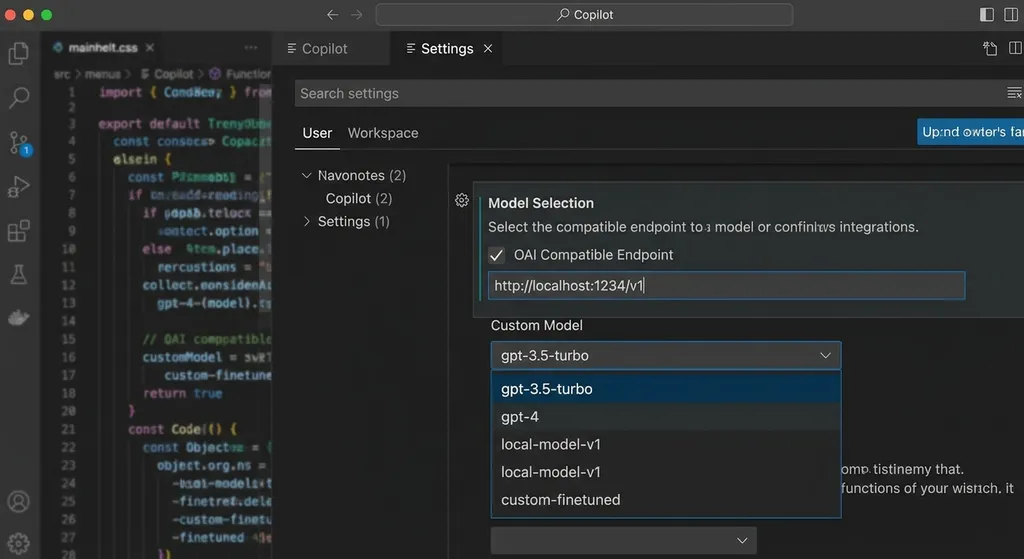
The workflow is straightforward: open the Copilot Chat panel → click the model selector → choose “Manage Models” → find “OAI Compatible” → fill in your Base URL, API Key, and model name. No extra extensions required, no manual editing of JSON config files—just a few clicks in the GUI.
Notably, this feature uses VS Code’s Language Model API, not a proprietary implementation by a third-party plugin. That means it’s a first-class citizen—it benefits from the same context injection and tool-calling capabilities as built-in models.
Why it’s worth talking about
You might say, “Hasn’t this been possible for ages?”
Technically, yes. The community has long had various workarounds—editing the Copilot plugin’s package.json, using hidden settings in Insider builds, or installing third-party plugins like Continue or Cline. Developers in the Linux.do forum already noted that prototype versions supported custom models.
But “possible” and “officially supported” are two different things.
Those earlier methods either depended on hacky file edits (which could break on update), required extra extensions (adding potential points of failure), or were limited to preview versions. Now Copilot makes this capability part of the official GUI in the stable release—lowering the barrier to nearly zero.
More importantly, it sends a signal.
GitHub Copilot is the most widely used AI coding assistant, by far. According to GitHub’s own data, paid users have already exceeded one million. For such a dominant product to open its interface to competing models says one thing: “model lock-in” is losing traction.
Developers don’t care about a single model; they want the best model inside their existing workflow. Write front-end code with Claude today, switch to DeepSeek for algorithm work tomorrow, run a local model for a privacy-sensitive project the day after—that’s real-world use. If Copilot keeps locking down models, users will vote with their feet and move to Cursor, Windsurf, or other more open tools.
What it means for developers
Immediate upside for developers in China
This feature is especially valuable for developers in regions with network restrictions.
Copilot’s built-in models—GPT-4o, Claude Sonnet, Gemini—all face varying degrees of connectivity issues from inside China. Until now, you had to use proxies or endure long delays, both making the experience frustrating.
Now you can point your Base URL to a local-accessible API service like DeepSeek’s official API, Alibaba Cloud’s Qwen (Tongyi), Moonshot’s Kimi, or an aggregation platform like OpenAI Hub. One Key can switch across models—set your Base URL once, and you’re done. No more repeatedly reconfiguring settings across providers.
Latency drops from several seconds down to a few hundred milliseconds—an absolute game changer in real-time scenarios like code completion.
Local models finally get first-class treatment
Developers using Ollama or LM Studio will be delighted.
Previously, using local models in VS Code meant relying on third-party plugins like Continue or LLM-LS. Now, you can just set your Base URL to http://localhost:11434/v1, and plug models like Qwen, Llama, or DeepSeek directly into Copilot.
This is especially useful for scenarios such as:
- Internal networks where code can’t leave company servers
- Offline environments—airplanes, secure projects
- Specialized fine-tuned models for specific domains
Of course, your local model’s quality and speed depend on hardware. A 3060 GPU is fine for a 7B model running code completions; don’t expect miracles with a 70B model.
New possibilities for team collaboration
For technical teams, this opens up a fascinating new space: unified model gateways.
Teams can set up an internal OpenAI-compatible proxy that connects to multiple back-end models for load balancing, cost control, or audit logging. Then just distribute a common Base URL and API Key—everyone configures Copilot to use it uniformly.
Much cleaner than everyone maintaining their own random plugin setups.
Competitors have done this for a while—Copilot’s late to the game
To be fair, Copilot isn’t leading here; it’s catching up.
Cursor supported custom model integration from day one—and went further. Its tab completion, Composer multi-file edits, and code-base indexing can all run on custom models. Windsurf (formerly Codeium) supports custom API endpoints too. The open-source Continue plugin even made “model freedom” its defining principle.
And inside VS Code’s own ecosystem, agent-style plugins like Cline or Roo Code already support custom Base URLs—and their agentic coding capabilities are more aggressive than Copilot Chat’s, with autonomous file editing, terminal execution, and test runs.
So this Copilot update isn’t innovation—it’s remediation.
But remediation has its advantages. Copilot’s user base and VS Code’s market share are huge. When a “can be hacked together” feature becomes “works out of the box,” the impact multiplies. Many users simply didn’t want to tinker—now, with lowered barriers, they’ll join in.
Some details worth noticing
Feature boundaries
Currently, custom models are used primarily for Copilot Chat (conversational interaction), not Inline Completion (gray suggestions as you type). In other words, the inline completions still rely on Copilot’s own model for now.
This distinction matters: for most developers, inline completion is Copilot’s core value. Chat is secondary. Without inline support, the real-world impact is limited.
From a technical standpoint though, inline prediction requires extremely low latency (under 200ms) and special FIM (Fill-in-the-Middle) capability—not every chat model qualifies. It’s understandable that Copilot keeps control of that layer.
ACP protocol ambitions
Community developers have highlighted ACP (Agent Communication Protocol) as the real game changer behind the scenes.
ACP is a GitHub framework allowing third-party tools to plug into Copilot’s agent system via standardized protocol. If Base URL customization solves the “what model to use” question, ACP addresses “what tools can that model call.”
Together, they effectively turn Copilot from “an AI assistant” into “an AI development platform.” Models interchangeable, tools pluggable, VS Code merely providing the framework and UI.
If this direction pans out, it’ll reshape the entire AI developer tooling ecosystem far more than simple model customization.
Subtle shift in the business model
Copilot allowing external models also hints at a commercial evolution.
Previously, the logic was: you pay monthly, we provide compute. Now: you can use your own model (and pay its API costs separately), but still subscribe for the integrated workflow Copilot provides inside VS Code.
In other words, Copilot is pivoting from “selling compute” to “selling workflow.”
Cursor does the same—Pro users can use their own API keys, but the seamless completion and multi-file editing experiences are the premium.
For developers, that’s not a bad thing—it means you don’t have to switch IDEs just to switch models.
How to configure it
It’s simple, but here are the steps anyway:
- Make sure VS Code and the GitHub Copilot extension are updated to the latest version.
- Open the Copilot Chat panel (
Ctrl+Shift+IorCmd+Shift+I). - Click the model selector above the chat input box.
- Choose “Manage Models.”
- Find “OAI Compatible” in the list and click configure.
- Fill in your Base URL, API Key, and Model ID.
- After saving, the new model appears in the dropdown list.
If you’re using an API aggregator, simply fill in the service’s endpoint as the Base URL. For example, with OpenAI Hub, set its endpoint, and input your model name—deepseek-chat, claude-sonnet-4-20250514, etc. One key switches different models.
For a local Ollama instance:
Base URL → http://localhost:11434/v1
API Key → any string (Ollama doesn’t check by default)
Model ID → your downloaded model name.
Final thoughts
The competition among AI coding tools is shifting—from “whose model is stronger” to “whose ecosystem is more open.”
Copilot opening custom interfaces isn’t because its own models are weak—it’s because it realizes that in a fast-evolving market with new models appearing all the time, locking users in is the dumbest strategy. Today Claude might code best; tomorrow it might be DeepSeek—or something not yet released. The constant is developers’ need for workflow continuity.
For developers, this is great news. More choice, less hassle. Your VS Code might finally not need five different AI plugins—at least in theory.
Whether Copilot can hold onto its market share with this move still depends on execution: when inline completion opens up to custom models, whether the ACP ecosystem matures, and whether its agents can catch up with Cursor or Cline—those are the real battles ahead.
References:
- Linux.do community discussion: VS Code Copilot supports custom BaseURL and API Key — community developers’ reactions and evaluations
- Zhihu: How to make VS Code Copilot support third-party LLMs — analysis of previous limitations and workarounds
- Linux.do: About integrating custom models into GitHub Copilot in VS Code — early file-modification method for model customization


