
Adobe Firefly AI Assistant Public Beta: One Sentence to Command the Full Suite of Creative Apps

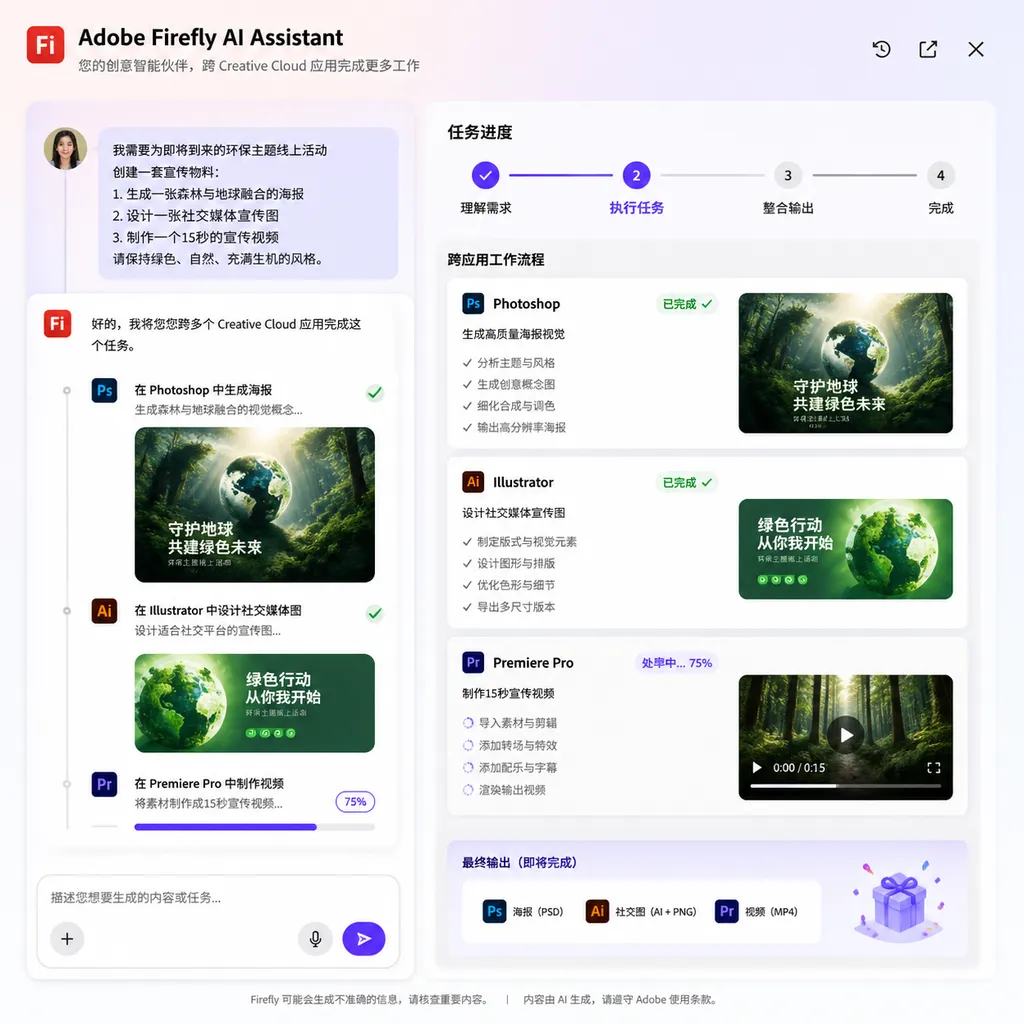
Adobe has opened the global public beta of Firefly AI Assistant today. This AI agent works across applications such as Photoshop, Premiere, and Illustrator, allowing users to describe their needs in natural language to automatically organize multi-step creative workflows.
Adobe Has Finally Integrated “AI Agents” into Its Entire Creative Suite
On April 28, Adobe officially announced that Firefly AI Assistant has entered its Public Beta stage and will gradually roll out to users worldwide. The first to get access are Creative Cloud Pro users, as well as subscribers of the Firefly Pro, Pro Plus, and Premium paid plans.
This isn’t just another AI-wrapped filter tool. Firefly AI Assistant is positioned as a cross-application agent. You don’t need to know which menu hides “Content-Aware Fill” in Photoshop, nor memorize the shortcut keys in Premiere. Simply describe the result you want in one sentence—it will decide which app to open, which steps to execute, and in what order to deliver the final product.
Readers who follow AI industry trends may recall that this is Project Moonlight, previewed at last year’s Adobe MAX, now entering its official public beta after months of private testing.
What Can It Actually Do? From “Using Tools” to “Stating Needs”
Let’s start with the core change: the interaction paradigm is different.
In a traditional Adobe workflow, even with AI features added, it’s still essentially you operate the tools, AI assists you. No matter how powerful Generative Fill is, you still have to open Photoshop, select an area, and input a prompt. Each AI feature is locked within its own app—they don’t talk to each other.
Firefly AI Assistant breaks that shell. It offers a unified conversational interface connected to Photoshop, Premiere, Lightroom, Illustrator, Express, Firefly, and more. If you say, “Change this product photo’s background to a forest scene, then crop it to Instagram and Xiaohongshu sizes, and export it,” it automatically decomposes the task:
- Replaces and refines the background in Photoshop
- Uses Generative Extend to expand the canvas for different aspect ratios
- Crops and optimizes file sizes according to each platform’s requirements
- Saves the final files to Creative Cloud storage
You can watch the process—or grab a cup of coffee.
This idea is somewhat similar to tools like ChatGPT’s Canvas or Cursor: shifting AI from passive response to active planning. But Adobe’s advantage lies in owning the industry’s most comprehensive creative toolchain. The agent isn’t calling a generic model—it’s controlling Photoshop’s native engine. Outputs are PSD, AI, and PRPROJ files, fully editable afterward with no “AI-generated and uneditable” issue.
Creative Skills: Not Templates, but Reusable Task Packages
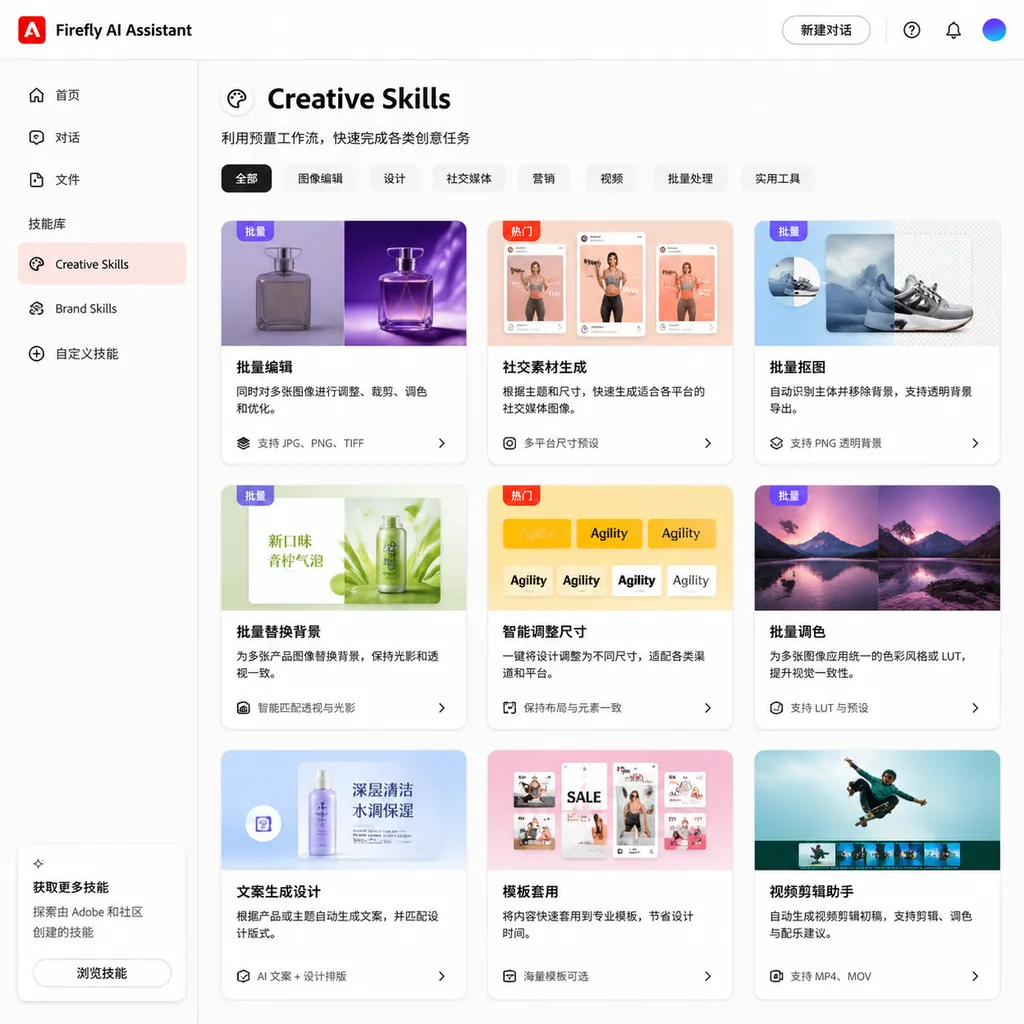
Accompanying the public beta is a new feature called Creative Skills.
This concept can easily be mistaken for “presets” or “one-click filters,” but it’s actually closer to a set of preconfigured multi-step workflows. Each Skill packages a coherent sequence of operations that can be triggered with a prompt.
Known Skills currently cover several common scenarios:
- Batch photo editing – unified color correction, cropping, and export, ideal for e-commerce image processing
- Mood board creation – from asset gathering to layout composition, generate a board in one line
- Portrait retouching – a standardized process for skin smoothing, lighting, and background treatment
- Social asset generation – automatically adapts one main image to multiple platforms’ dimensions and formats
- Static to animation – converts still images into short animations for social media content
Crucially, these Skills are customizable. You can tweak steps, modify parameters, or even combine them into new workflows. For design teams with standard output procedures, this means turning their SOPs directly into Skills—greatly reducing onboarding time for new members.
Simply put, Adobe’s goal isn’t just “AI doing the work for you,” but “AI helping standardize how work is done.”
Context Awareness: Knowing What You’re Doing, Not Just What You Say
Another noteworthy capability of Firefly AI Assistant is context maintenance.
Creative work typically involves multiple revision rounds. You might first say, “Replace the background with blue sky,” see the result, then add, “It’s too saturated—soften it a bit.” In traditional tools, each modification is an isolated operation; AI doesn’t know what you did before.
Firefly AI Assistant maintains full conversational context. It remembers previous descriptions, executed operations, and the current project state. So when you say “soften it a bit,” it understands you’re referring to the saturation of the blue-sky background, not the entire composition.
Even more interesting is cross-application context continuity. When you switch from the conversational interface to Photoshop for pixel-level edits, the context follows. If you tweak something manually in Photoshop and return to the chat interface for the next step, the agent knows what you changed—no need to start over or re-describe.
That’s technically challenging, as it requires Adobe to synchronize state across multiple apps. The agent must understand both natural language input and in-app behavior.
Adobe also mentioned an intriguing detail: the agent possesses situational awareness, recognizing the type and structure of the current content. For example, when editing a product photo in a forest background, it can proactively offer a slider to adjust the amount of surrounding trees and foliage. This isn’t a preset UI element—it’s a dynamically generated control based on scene analysis.
It’s an imaginative direction, though questions remain: how precise can these ad hoc tools be? Will they misunderstand complex scenes? User feedback during public beta will provide answers.
The Boundary Between Human and AI: AI Executes, You Decide
Adobe repeatedly stressed in its announcement that Firefly AI Assistant will not take full control of the creative process.
This isn’t just marketing talk. During multi-step automation, users can intervene at any point—adjust layouts, modify assets, or fine-tune visuals. The agent acts as a powerful executor, not a self-appointed “creative director.”
This is a pragmatic choice. Creative work differs from coding—there’s no objective “right” answer. Whether a poster’s tone is warm or cool, or a transition hard cuts or fades, depends heavily on personal taste. AI can propose options and speed up execution, but the final say must remain human.
Adobe also noted that the agent gradually learns user preferences—frequently used tools, workflow habits, aesthetic tendencies. The more you use it, the more it aligns with you. But there’s an important caveat: memorizing preferences isn’t the same as understanding aesthetics. It might remember your favorite tones or compositions, but not why you like them. That distinction usually doesn’t affect daily use—but don’t expect it to bring creative surprises.
Through Frame.io integration, team collaboration is also part of the plan. Projects can be shared for feedback, and the agent can apply revisions based on reviewers’ comments. For agencies or design studios juggling constant revision cycles, the efficiency gain is tangible.
In Comparison: Adobe’s Competitive Edge
Let’s view Firefly AI Assistant in a broader competitive context.
The AI creative tools space is already crowded. Midjourney keeps improving image generation, Runway leads in video generation, Canva lowers design barriers with AI, and various niche tools tackle specific tasks.
But they all share one limitation: each focuses on either generation or a single stage of creation. Midjourney can generate stunning images, but you still need Photoshop for retouching. Runway produces video clips, but editing, color grading, and compositing still rely on Premiere or DaVinci.
Adobe’s differentiation lies exactly here: it’s not competing on isolated features but connecting the entire creative workflow with an intelligent agent—from ideation to execution to delivery. Because it runs on native engines like Photoshop and Premiere, Adobe’s output quality and editability remain unmatched by pure AI generators.
That said, Adobe has weaknesses too. Firefly’s generative capabilities still trail Midjourney and DALL·E 3 in creativity. But Adobe seems to have realized: instead of chasing top-tier generation, it’s better to build a moat through workflow integration.
Notably, Adobe previewed a key direction: Firefly AI Assistant will support third-party AI models, including Anthropic’s Claude. This suggests Adobe doesn’t intend to lock itself solely to Firefly, but to evolve into an open creative agent platform. If realized, this could significantly elevate the assistant’s capabilities.
What It Means for Developers
Although Firefly AI Assistant targets designers and creators, developers should also take note.
First is the reference value of its agent architecture. Adobe demonstrates what an industrial-grade multi-application agent can look like: unified conversational entry, cross-app state synchronization, interruptible/resumable task execution, and continuous context maintenance. These design patterns are valuable for teams building their own AI agents.
Second is the customizability of Creative Skills. If Adobe later opens an API or SDK for developers to build and distribute custom Skills, it could evolve into a workflow ecosystem. Imagine an e-commerce company’s dev team creating a dedicated product-photo Skill allowing designers to process image batches by prompt—no scripting or Photoshop Actions required.
Finally, the integration of third-party models. Adobe already confirmed plans to connect external models like Claude. For teams developing at the application layer of AI, this could make Adobe’s creative ecosystem a major model deployment surface.
Open Questions
As the public beta begins, several points warrant continued attention:
Performance and latency. Coordinating multiple heavy apps in the background increases the chance of lag and failure as task chains grow. Private testing may have concealed issues that public beta will reveal.
Interpretation accuracy. Natural-language creative requests are inherently ambiguous. “Make this image look more premium”—what does that even mean? The agent’s handling of such prompts will determine the upper bound of user experience.
Pricing. For now, beta access is limited to paying users—and Creative Cloud Pro isn’t cheap. If Firefly AI Assistant becomes a core feature later, Adobe’s pricing will directly affect adoption.
Privacy and copyright. The assistant learns from user preferences and creative assets. How are these data stored and used? Are they involved in model training? Adobe must clarify, especially for enterprise users.
Summary
The Firefly AI Assistant public beta marks Adobe’s shift from adding AI features to redefining how tools are used through AI. This is not incremental improvement—it’s a fundamental interaction redesign.
It’s not perfect, and the early beta will surely show rough edges. But the direction is right: creative professionals don’t need more AI buttons—they need an intelligent assistant that understands intent and executes across tools.
With the world’s largest creative ecosystem, if Firefly AI Assistant proves viable in public beta, its impact on creative workflows could outlast any single generative AI tool.
References
- Adobe Publicly Tests Firefly AI Assistant: Orchestrating Photoshop and Other Apps to Accelerate Creativity – ITHome: ITHome’s detailed report on Firefly AI Assistant’s public beta, including feature overview and initial rollout details.


