
Cursor releases official SDK, ushering the AI IDE into the programmable era

Cursor officially open-sourced @cursor/sdk, allowing developers to use TypeScript code to call the capabilities of the Cursor Agent, extending AI programming beyond the IDE interface to CI/CD, internal platforms, and automated workflows — the boundaries of the AI IDE are being redefined.
Cursor Releases Official SDK: The AI IDE Enters the Programmable Era
Cursor has released something developers have been waiting for—a official SDK.
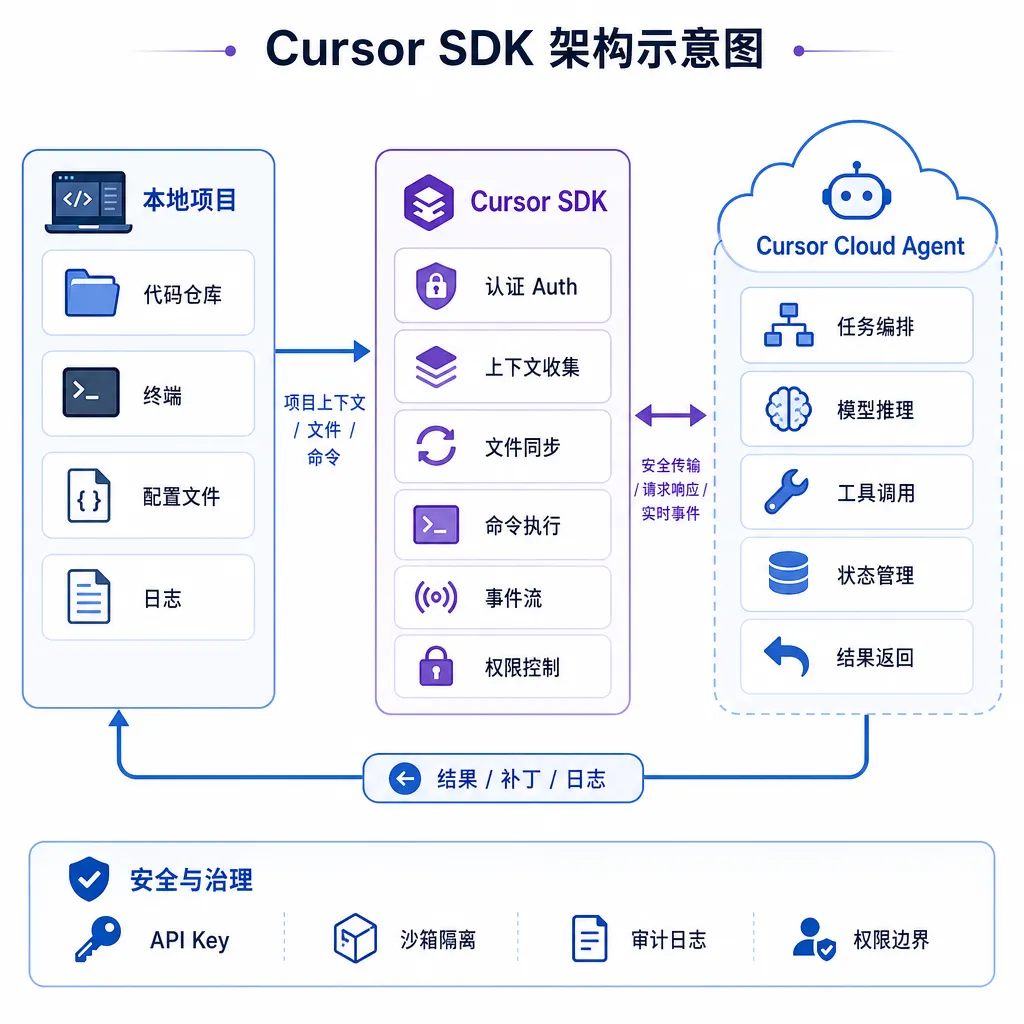
This TypeScript package, called @cursor/sdk, allows developers, for the first time, to call Cursor’s Agent capabilities directly in their own code. No need to open the IDE or manually type prompts in the chat box—you can write a script that lets Cursor Agent analyze code, generate files, or even attempt to fix bugs.
The significance isn’t in how complex the SDK is—it’s quite the opposite. The API design is extremely simple. The real meaning lies in this shift: the AI IDE is evolving from “a desktop software you use in front of you” to “a programmable capability that other systems can call upon.”
Let’s Start with Code: Run an Agent in Five Lines
A minimal demo looks like this:
import { Agent } from "@cursor/sdk";

const agent = await Agent.create({
  apiKey: process.env.CURSOR_API_KEY!,
  model: { id: "composer-2" },
  local: { cwd: process.cwd() },
});

const run = await agent.send("Summarize what this repository does");

for await (const event of run.stream()) {
  console.log(event);
}
A few key points:
- The model used is
composer-2, Cursor’s in-house programming model launched in March, optimized for multi-file editing and long-context scenarios - Supports streaming output —
run.stream()returns anAsyncIterable, allowing you to capture Agent execution events in real time local.cwddesignates the working directory — the Agent interprets project context based on this directory
The entire API feels similar to OpenAI’s SDK: create an instance, send a message, receive streamed output. For developers already familiar with LLM applications, the learning curve is almost zero.
Cookbook: Four Demos Illustrate the Use Cases
Cursor also opened a cursor/cookbook repository with four example projects that essentially cover the SDK’s core use cases:
| Example | Description |
|----------|-------------|
| sdk/quickstart | Minimal Node.js example demonstrating Agent invocation |
| sdk/app-builder | Local prototyping tool that uses an Agent to generate and iterate a React app |
| sdk/agent-kanban | Kanban dashboard for managing Cursor Cloud Agents |
| sdk/coding-agent-cli | CLI tool to launch a coding agent from the terminal |
Among these, app-builder and coding-agent-cli deserve special attention.
app-builder demonstrates this scenario: you write a description, the Agent generates a React app, and you can continue iterating using natural language—“change the navbar to a sidebar,” “add dark mode.” This happens outside the IDE; it’s an independent local tool, with the SDK driving the Agent behind the scenes to generate and modify code.
coding-agent-cli is even more direct—it launches a coding agent from the terminal. Imagine running a CI pipeline script where the Agent analyzes build failures and even attempts to fix them and submit a PR. This is no longer “assisted coding”; it’s “automated coding.”
The Real Value: Unlocking Agent Capabilities from the IDE
Before the SDK’s release, Cursor’s Agent capabilities were locked inside the IDE interface. You had to open Cursor, manually type commands, wait for results, and approve them manually. Fine for individual developers, but a bottleneck for teams or engineered workflows.
With the SDK, possible use cases become clear:
- CI/CD integration: Automatically trigger the Agent to analyze logs on build failure, locate the issue, and even create a fix PR
- Internal development platforms: Trigger Agents from ticket systems to take tasks, read code, write code, and commit
- Repository inspection: Periodic codebase scanning for vulnerabilities, outdated dependencies, or linting issues
- Batch engineering tasks: e.g., upgrading a shared SDK across 50 microservices—something too context-heavy for simple scripts, but manageable for an Agent
Essentially, this is the same step GitHub took when it opened its API: turning a GUI-only product into one programmable by other tools. The difference? GitHub’s API manipulates repository metadata (PRs, Issues, Webhooks), while Cursor’s SDK manipulates the ability to understand and generate code.
That’s a fundamental shift.
A Clear Limitation: Only Works with Cursor’s Own Key
There’s one noteworthy limitation.
In the SDK demo, you’ll see CURSOR_API_KEY—this key comes from the Cursor Dashboard and is tied to your subscription account. Currently, you can’t use your own API keys—no OpenAI, Claude, or custom model keys.
This means:
- Usage and cost depend on your Cursor plan. If you run many Agent tasks in CI, you must ensure your quota is sufficient.
- Model choice is locked in. Currently, only
composer-2and supported Cursor models are available—you can’t switch to your own models. - Data compliance may be an issue for enterprises. Your code goes through Cursor’s cloud, so you’ll need to assess implications for sensitive projects.
This limitation is understandable—Cursor must monetize SDK usage rather than letting users bypass subscriptions and hit underlying models directly. Still, for deep integrations, it’s a trade-off to consider.
Cursor will likely add more flexible key configurations later—at least in enterprise editions with custom model endpoints—but for now, it’s “usable, but with a ceiling.”
In the Bigger Picture: The Third Evolution of AI IDEs
To grasp the importance of the SDK release, it must be seen in the context of Cursor’s broader 2026 roadmap.
In early April 2026, Cursor released version 3.0, codenamed “Glass,” a major rebuild from the ground up. The team formally described the three eras of AI coding:
| Era | Timeframe | Core Paradigm | Developer Role | |------|------------|---------------|----------------| | First Era | 2023–2024 | Tab completion | Code author | | Second Era | 2024–2025 | Agent assistance | Code reviewer | | Third Era | 2026– | Intelligent agent clusters | Agent orchestrator |
Cursor 3 introduced several key upgrades:
- Multi-Agent parallelism: run multiple Agents simultaneously—one modifying frontend, one writing tests, one fixing bugs
- Seamless local–cloud switching: tasks can migrate from local to cloud so you can shut down your laptop without interruption
- Built-in browser: Agents can open and test generated frontends within the IDE
- Composer 2 model integration: a custom model for coding optimized for multi-file editing and long context management
According to the official Cursor podcast, more users now use Agent mode than tab completion, indicating a genuine workflow transformation—from “I write, AI completes” to “I describe, Agent executes.”
The SDK release is a natural extension of that. Once Agents become the main programming method, the next logical step is to make them programmably callable instead of being manually triggered by a human in front of an IDE.
Competitive Landscape: Who Else Is Doing This?
Across the AI coding space, Cursor’s SDK launch isn’t happening in isolation.
Claude Code has long been a CLI tool, inherently scriptable. Anthropic’s philosophy is to make Agents command-line-first, not IDE-dependent—flexible, but lacking deep, IDE-level project context.
GitHub Copilot, backed by Microsoft and GitHub, is most deeply integrated into VS Code. However, Copilot doesn’t yet offer a comparable SDK—its Agent capabilities (Copilot Workspace) are more GitHub-platform-oriented.
In China, Tencent’s CodeBuddy positions itself as an end-to-end AI IDE covering product design, UI, code gen, and deployment. Internally, 90% of Tencent’s developers use it, with 43% of code AI-generated. But CodeBuddy currently follows an integrated-platform model and hasn’t yet opened SDK-level programmability.
Amazon launched the Kiro AI IDE, while Google acquired the Windsurf core team for $2.4 B. The tech giants are all betting on AI IDEs—but in terms of programmability, Cursor appears to be leading.
The SDK elevates Cursor from an IDE product to a platform. That’s a strategic pivot—while competitors optimize in-IDE experiences, Cursor is already building an ecosystem outside the IDE.
What It Means for Developers
Practically speaking:
If you’re an individual developer, the SDK’s direct value may be limited—using the Agent inside the IDE is enough. But for those into automation side projects—say, a bot that automatically handles GitHub issues—the SDK gives you a ready-made “code-writing brain.”
If you’re a team Tech Lead, the SDK’s power lies in embedding AI coding into engineering infrastructure: automated CI fixes, AI-assisted code reviews, or onboarding tools that explain code—all possible through the SDK.
If you’re building an internal development platform (IDP), the SDK could be a missing puzzle piece. You can embed an “AI engineer” into task flows—taking tickets, generating code, writing tests.
But be clear-eyed: the SWE-CI paper points out that AI Agents perform well on one-off tasks but degrade in long-term maintenance. The SDK makes calling Agents easier, not infallible. The practical approach is to use Agents for tasks with clear boundaries and verifiable results.
Practical Tips
If you plan to try Cursor’s SDK, a few suggestions:
- Start with the quickstart demo — get the basics running, understand Agent input/output
- Use it in low-risk scenarios first — analysis, docs, testing, not production code edits
- Monitor your quota — SDK calls consume your Cursor subscription usage; batch jobs can drain it quickly
- Leverage Cursor Rules — place a
.cursor/rulesfile in your project root to provide contextual constraints, which the SDK also respects - Watch the cookbook repo for updates — Cursor will likely add new examples, especially for CI and team workflows
In Closing
The release of Cursor’s SDK marks a shift from “interactive tool” to “programmable platform.” It’s not a small feature upgrade—it’s a fundamental expansion of the product’s form.
When AI Agent capabilities become callable via API, they’re no longer merely “smart editors,” but programmable coding intelligence that can plug into any software engineering workflow. CI/CD, internal dev platforms, automation pipelines—the possibilities are now open.
Of course, the SDK is still in its early phase—API key restrictions, limited model choice, and enterprise-level compliance still need polishing. But the direction is clear: the boundaries of IDEs are dissolving, and AI coding capabilities are overflowing into the broader engineering infrastructure.
This could be one of the most important trends in AI programming for 2026.
References
- Cursor SDK Discussion Thread — Linux.do community discussion on the Cursor SDK release
- Cursor 3 Major Release: AI Programming Enters the “Agent Cluster” Era — Juejin, detailed breakdown of Cursor 3.0


