
Rosie Open Source: One tool to manage ten AI coding assistants

Astro co-founder Matthew Phillips open-sourced Rosie, an AI agent skill package manager written in C. It supports unified installation and synchronization of skills for 10 coding assistants, including Claude Code, Cursor, and Codex. Its lockfile mechanism is extremely team-friendly for collaboration.
Rosie Open Source: One Tool to Manage Ten AI Coding Assistants — The New Bet from Astro’s Co‑Founder
The Gist
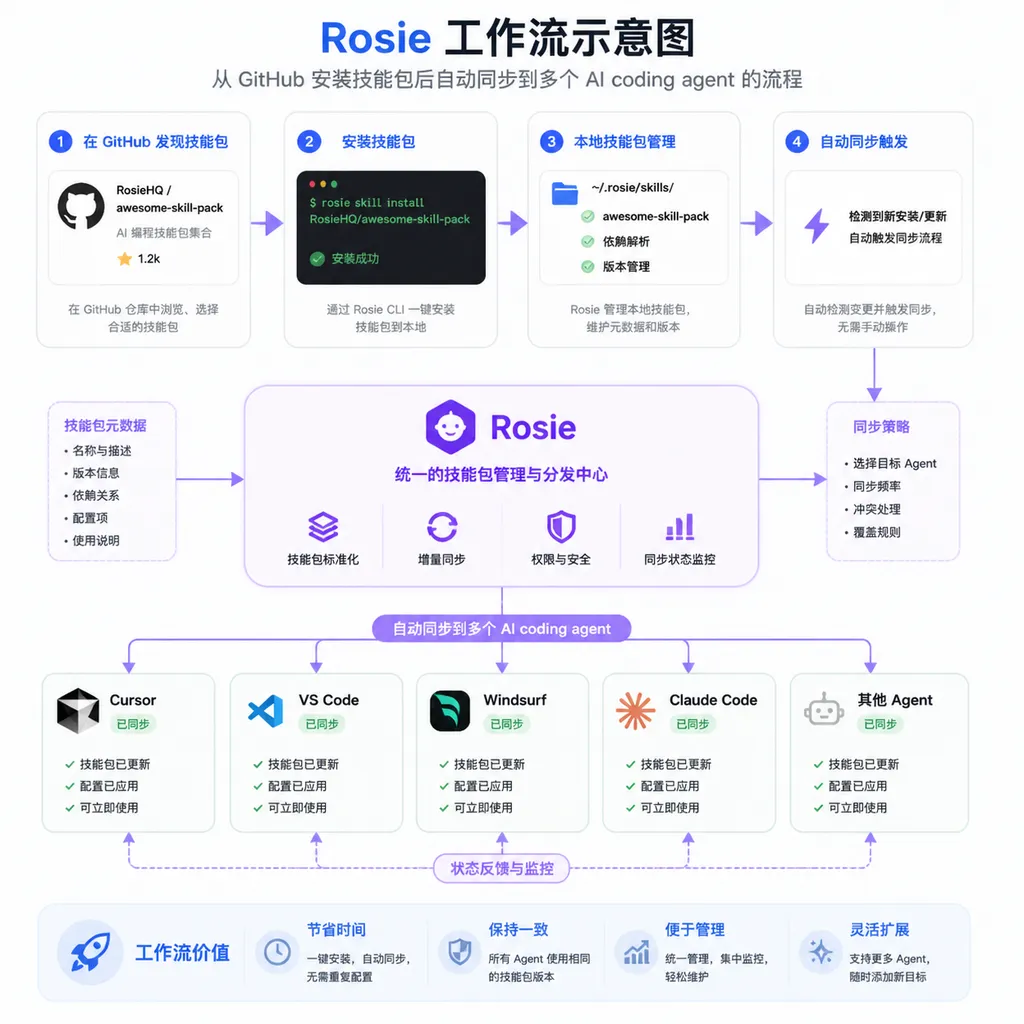
Matthew Phillips, co‑founder of the Astro framework, has just open‑sourced a command‑line tool called Rosie — it’s not another AI coding assistant, but rather a sort of “package manager” for all AI coding assistants. You can use Claude Code for the backend, Cursor for the frontend, Copilot for review; Rosie installs one set of skill rules once and automatically syncs them to all three (and seven others) agents.
It’s worth talking about because it addresses a real and painful problem in AI‑assisted coding today: tool fragmentation.
The Pain Point
Since 2025, the number of AI coding assistants has exploded. Mainstream tools include Claude Code, Cursor, GitHub Copilot, Windsurf, Codex, Aider, Zed, Continue, Cline, and OpenCode. Many developers don’t use just one—different tools excel in different contexts, so mixing them is common.
Here’s the problem.
Each agent has its own “skills” configuration. Claude Code uses Markdown files in the .claude/ directory, Cursor uses .cursor/rules/, Copilot uses .github/copilot-instructions.md … the formats, paths, and management approaches all differ. If you want every agent to follow the same coding standards and understand the same project context, you have to manually maintain ten sets of config files—and hope you don’t miss one.
It gets worse for teams. Should you commit skill files to Git? If yes, dumping all ten agents’ config directories into the repo makes it bloated and messy. If no, new members who clone the repo get nothing, leaving their agents “naked.”
That’s exactly what Rosie aims to solve.
How Rosie Works
Installing a Skill: One Command
rosie install owner/repo
This single command does three things:
- Fetches the skill package from the specified GitHub repo
- Automatically detects which coding agents you have installed locally
- Syncs the skill files to the correct config directory for each agent
You don’t need to tell Rosie “I have Cursor and Claude Code”—it scans automatically. The detection logic is straightforward: it checks for the presence of config directories or executables.
Supported 10 Agents
Rosie currently supports these coding assistants:
| Agent | Config path |
|-------|--------------|
| Claude Code | .claude/ |
| Cursor | .cursor/rules/ |
| Codex | .codex/ |
| Windsurf | .windsurf/rules/ |
| Aider | .aider/ |
| Zed | .zed/ |
| Continue | .continue/ |
| Cline | .cline/rules/ |
| OpenCode | .opencode/ |
| GitHub Copilot | .github/copilot-instructions.md |
This list basically covers today’s active AI coding assistants. If you use a more niche tool, Rosie’s open architecture leaves room for extensions—it’s open source after all.
Core Design: Lockfile Mechanism
This is Rosie’s most noteworthy design decision.
After skill installation, Rosie creates a .agents/rosie.lock file in the project root. It looks like this:
owner/repo@v1.2.3 abc1234def5678
other-owner/other-repo@v2.0.0 987654321abcde
Each line records the repo name, version, and commit SHA. The format is Git‑diff friendly. When two people install different skills and later merge, conflicts are clear and easy to resolve—just like merging a package-lock.json.
The actual skill files live in the .agents/skills/ directory and are symlinked to each agent’s config directory. This means:
.agents/skills/can go in.gitignore, keeping the repo clean.agents/rosie.lockis committed to version control- Team members just run
rosie installafter cloning, and all skills restore automatically
If you’ve used npm, pip, or cargo, this workflow will feel familiar. Matthew Phillips is clearly borrowing proven package‑management ideas from frontend ecosystems.
# Typical team workflow
git clone your-project
cd your-project
rosie install          # restore all skills from the lockfile
# all agents automatically get the project config
Version Management: Auto and Pin Modes
Rosie supports two versioning modes.
Auto mode (default):
rosie install owner/repo
If no version is specified, Rosie fetches the latest semver tag. Later, rosie update upgrades to the newest version automatically—good for trusted, actively maintained skill packages.
Pin mode:
rosie install owner/repo@v1.2.3
When a version is pinned, rosie update only refreshes the commit SHA (to the latest commit under the same tag) but won’t change versions. Ideal for production or tightly controlled environments.
Distinguishing between these matters. Skill packages aren’t normal dependencies—changing a prompt rule can alter an agent’s behavior. For critical projects, you don’t want your agent suddenly changing code style after a routine rosie update.
Global Installation
Rosie also supports a global mode:
rosie install --global owner/repo
This installs skills to the user‑level directory for all projects, fitting for universal coding standards like “always use TypeScript strict mode” or “commit messages follow Conventional Commits”.
Technical Implementation: Why C?
This is an interesting choice.
In an era when CLI tools are mostly written in Rust, Go, or TypeScript, Matthew Phillips chose C. It only depends on libcurl (for network requests) and libarchive (for decompression). License: BSD‑3‑Clause.
Why? Likely for zero dependency anxiety.
Rosie is developer‑infrastructure tooling. It needs to run on macOS, Linux, and FreeBSD, compile fast, be small, and have zero startup latency. C excels at all that. libcurl and libarchive are system‑level libraries, often pre‑installed or easily available via package managers.
The trade‑off is development speed and memory safety—but for a clearly scoped CLI tool, it’s acceptable.
Installation options are broad:
# macOS
brew install matthewp/tap/rosie

# Debian/Ubuntu
sudo apt install rosie

# Arch Linux
yay -S rosie

# FreeBSD
pkg install rosie

# or build from source
git clone https://github.com/matthewp/rosie.git
cd rosie
make && sudo make install
Why This Matters
AI Coding Assistants Are Becoming OS‑Level
In 2024, everyone was debating “are AI coding assistants even useful?”
By 2025–2026, the question became “which one, how to configure it, how to roll it out to the team.”
When the discussion shifts from whether to use to how to manage, it means the category has crossed early adoption and entered the engineering phase. Rosie is a sign of that shift.
Analogy: npm to Node.js, pip to Python. When a package manager appears, the ecosystem is maturing. Rosie is early, but the direction is right: AI agent configurations and skills must be managed like code dependencies.
“Skill Packages” Could Be the Next AI Coding Assistant Battleground
Most AI coding assistant differentiation currently lies in model performance and IDE integration. But as base models converge (everyone uses Claude or GPT variants), prompt engineering, project context, and coding conventions become key differentiators.
In other words, even with the same Claude 3.5 Sonnet model underneath, an agent equipped with a well‑tuned skill package will far outperform a “bare” one.
Rosie turns skill packages into shareable, versioned, cross‑tool assets. Imagine GitHub hosting public skill packages for React best practices, Go microservice guidelines, or security auditing rules—creating a plugin ecosystem for AI coding assistants.
Team Collaboration Impact
This might be Rosie’s biggest real‑world value.
Picture a 10‑person development team, each using different AI assistants. Before Rosie, to align everyone’s agent configs the tech lead had to:
- Write separate configs for each agent
- Commit them all to the repo
- Write docs explaining manual sync steps
- Repeat for every guideline update
With Rosie:
- Publish a skill package to a GitHub repo
- Run
rosie install team/coding-standardsin the project - Commit the lockfile
- Done
Onboarding a new hire? Clone → rosie install → all agents configured. A tangible improvement in workflow.
Limitations and Unknowns
Some caveats.
Skill package quality control. npm taught us this lesson—when anyone can publish, malicious or low‑quality packages appear. Rosie pulls directly from GitHub with no central review. The lockfile records SHAs for integrity checks, but content safety auditing doesn’t yet exist.
Depth of agent support varies. Config mechanisms differ per tool—Markdown, YAML, proprietary formats. Whether Rosie’s symlink scheme covers all edge cases remains to be seen in real use.
Cold start problem. Even the best tool needs a strong ecosystem of skill packages. That depends on whether developers are willing to share their fine‑tuning setups. Matthew Phillips has influence in the Astro community, but Rosie targets a broader audience—cross‑community adoption will depend on outreach.
Using C raises contribution barriers. Open‑source health relies on contributions. Writing in C means fewer potential contributors (though perhaps more seasoned ones).
Comparison With Existing Approaches
Before Rosie, developers managed AI agent configs mainly via:
| Method | Pros | Cons | |---------|------|------| | Manually maintain each agent’s configs | Fully controllable | Tedious, error‑prone | | Dotfiles repo + scripts | Versionable | Scripts vary, hard to standardize | | Team wiki for rules | Documented | Drifts from actual configs, high maintenance | | Rosie | Standardized, automated, cross‑agent | New tool, ecosystem still forming |
There’s no direct competitor yet. That’s both opportunity—Rosie is defining a new category—and risk—if the problem isn’t big enough, it may stay niche.
Nonetheless, early community feedback is positive. Threads on Linux.do gained traction quickly, and posts on Twitter/X spread fast.
Getting Started
Curious? Here’s how:
# 1. Install Rosie (example: Homebrew)
brew install matthewp/tap/rosie

# 2. Install a skill package in your project
cd your-project
rosie install some-org/coding-standards

# 3. List installed skills
rosie list

# 4. Update all skills
rosie update

# 5. Commit the lockfile
git add .agents/rosie.lock
git commit -m "chore: add rosie lockfile"

# 6. Ignore the skill files directory
echo ".agents/skills/" >> .gitignore
To publish your own skill package, just create a GitHub repo, organize files per Rosie’s spec, and tag releases with semver. See Rosie’s GitHub documentation for details.
Final Thoughts
Rosie isn’t a “wow” product. It won’t make you code faster or your models smarter. But it solves a real and increasingly pressing engineering problem brought by the spread of AI coding assistants.
When building Astro, Matthew Phillips showed this same instinct—not chasing flashiness, but finding workflow friction points and eliminating them through engineering design. Rosie continues that philosophy.
If AI coding assistants are truly becoming standard equipment for every developer (and that trend looks irreversible), then managing them will become a requirement. Rosie might be the first serious attempt at doing exactly that.
Whether it becomes the “npm” of AI coding tools is too soon to tell—but the direction is right. What remains is execution and ecosystem growth. Definitely worth watching.
References
- Astro co‑founder open‑sources Rosie: install once, auto‑sync to 10 AI coding assistants — Linux.do community discussion with feature overview and feedback
- GitHub - matthewp/rosie: Agent package manager — official Rosie repo with docs and source code


