
Let AI directly control terminal programs — this open-source MCP project made it possible.
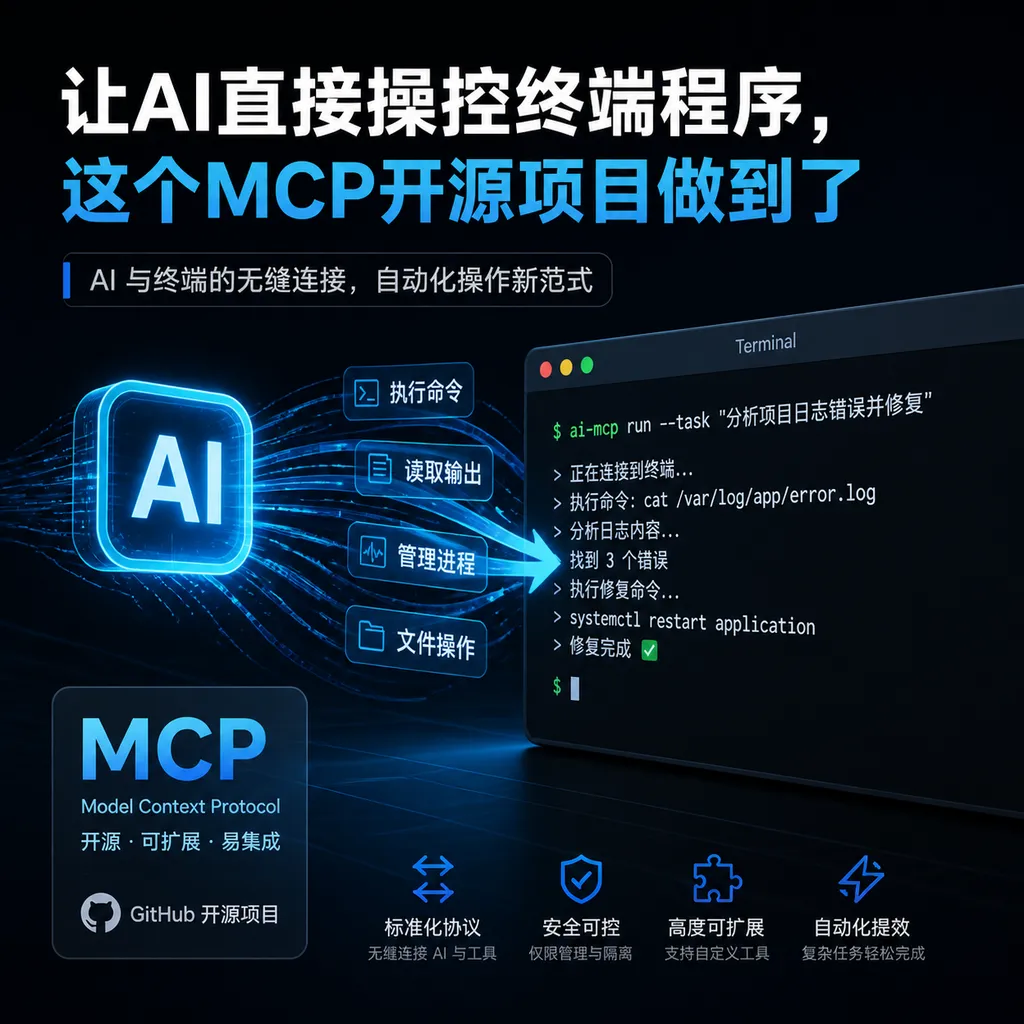
The open-source project **interactive-process-mcp** provides AI Agents with interactive terminal control capabilities through the MCP protocol, solving the issue of AIs being unable to continuously operate interactive programs such as **impacket** and **evil-winrm**, thereby making unified management of process sessions a reality.
Letting AI Directly Control Terminal Programs — This MCP Open Source Project Makes It Possible
A Real Pain Point for Security Engineers
Anyone who has done AI‑driven automated penetration testing has probably felt the same frustration: when you ask Claude or GPT to run a full penetration test workflow, everything goes smoothly until it needs to call interactive tools like impacket or evil‑winrm — then the AI freezes.
The reason is simple — these programs aren’t “one‑shot” command‑line tools. Once launched, they stay running, waiting for commands, reading outputs, and taking new input. This is a stateful interactive process. However, most current AI Agent tool‑calling models are stateless: one call, one result, done. Each call starts a new process, and all prior context is lost.
That’s what directly motivated developer UserB1ank to open‑source interactive‑process‑mcp. As he explained in a post on the LINUX DO community: “Instead of building an MCP for every program, why not create an I/O wrapper layer around a process, and let AI focus purely on input and output?”
It’s a simple idea — but one that addresses a widespread, very real need.
What Problem Does It Actually Solve?
To understand this project’s value, we need to examine several key contradictions in how AI Agents interact with terminal programs.
Contradiction 1: Stateless Calls vs Stateful Processes
Most MCP tools are designed functionally — you pass in parameters and get a return value. Commands like ls -la fit that model perfectly. But what about the python3 interpreter? The mysql client? An ssh session? These programs enter a continuous interactive loop once started — you must read and write repeatedly within the same process.
Traditionally, every time the AI needs to act, it spawns a new process. That means any established connections, logged‑in sessions, or environment variables — all gone. For penetration testing, where maintaining continuous context is critical, that’s essentially unusable.
Contradiction 2: Single Tool vs Diverse Ecosystem
There are hundreds of commonly used security tools, each with unique interaction patterns. To make AI capable of using all of them, the traditional route is to write a dedicated MCP Server for each tool. The workload is astronomical — and can never keep up with the ecosystem’s evolution.
Contradiction 3: AI’s Understanding vs Tool Complexity
Modern large models already understand most command‑line tools — they know how to use nmap and Metasploit’s syntax. The missing piece isn’t knowledge, it’s a control channel. AI has “hands,” but they can’t reach the keyboard.
The interactive‑process‑mcp solution adds a universal intermediary layer between AI and the terminal: a process manager built on the MCP protocol. It doesn’t care what program you’re using — it simply does three things: launch processes, forward input/output, and maintain session state.
Technical Implementation: How It Works
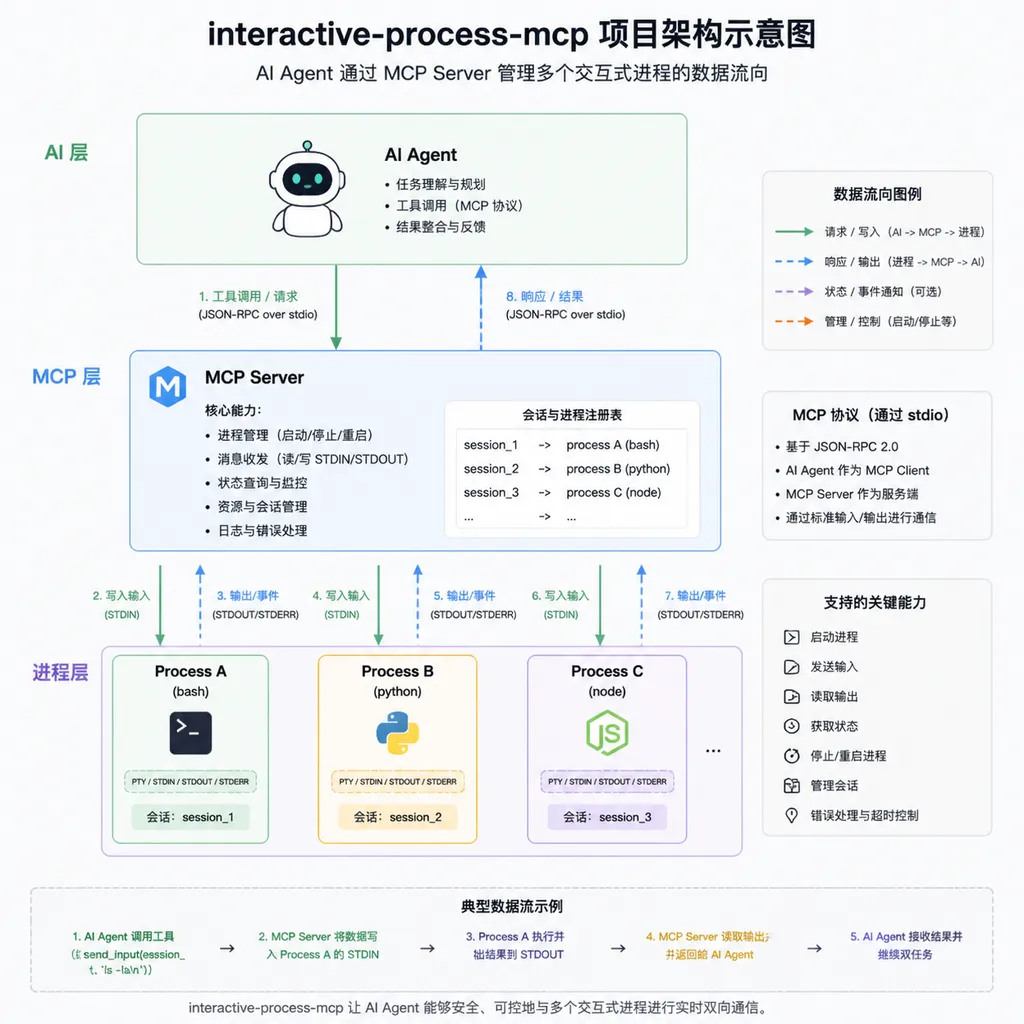
The project’s core idea can be summarized in one sentence: abstract an interactive process’s stdin/stdout/stderr as an MCP tool‑call interface.
Specifically, interactive‑process‑mcp provides several key capabilities:
1. Process Lifecycle Management
AI Agents can use MCP tool calls to start new interactive processes, such as:
- Launching a Python interpreter
- Opening an SSH connection
- Running impacket’s
psexec.py - Starting an evil‑winrm session
The critical part is that these processes don’t immediately exit. They are held by the MCP Server, kept alive, waiting for further input.
2. Input/Output Forwarding
Once a process starts, the AI can:
- Send commands to the process’s stdin
- Read outputs from its stdout/stderr
- Decide the next step based on the output
That forms a complete interactive loop. The AI is no longer “blind‑firing” commands — it can see the results, react, and make decisions just like a human at the terminal.
3. Concurrent Multi‑Process Management
In real penetration testing or operations, you often need multiple simultaneous sessions — one SSH connection to a target, one local listener, one database client. interactive‑process‑mcp supports managing multiple processes at once, each with an independent identifier, allowing the AI to switch between them freely.
4. Session Persistence
This is the most important point. With the traditional command execution model, every call is a new process. interactive‑process‑mcp maintains long‑lived session processes. If you run USE database; in the MySQL client, the next SELECT still runs in the same session — no lost context.
Architecturally, the project’s design is clear:
┌─────────────┐     MCP Protocol     ┌──────────────────────┐
│  AI Agent   │ ◄──────────────────► │ interactive-process  │
│ (Claude etc.)│                     │      MCP Server      │
└─────────────┘                      └──────────┬───────────┘
                                                 │
                                     ┌───────────┼───────────┐
                                     │           │           │
                                     ▼           ▼           ▼
                                  ┌──────┐  ┌──────┐  ┌──────┐
                                  │ ssh  │  │ mysql│  │python│
                                  │sess.1│  │sess.2│  │sess.3│
                                  └──────┘  └──────┘  └──────┘
The AI Agent communicates with the Server via the standard MCP protocol. The Server manages multiple underlying interactive processes. For the AI, every program is operated the same way: send input, read output.
Why MCP?
If you’ve followed the AI Agent ecosystem in the past six months, you’ve surely heard of MCP (Model Context Protocol).
MCP was proposed by Anthropic in late 2024 and dubbed the “USB‑C for AI.” Its goal is to provide a standardized protocol that allows AI Agents to connect to external tools and data sources uniformly. Just as USB‑C lets a laptop use the same port for monitors, drives, and chargers, MCP lets AI Agents use one protocol to query databases, operate files, call APIs, and more.
By 2025, MCP has achieved wide industry adoption. Anthropic’s Claude fully supports it, and OpenAI has joined the MCP camp. Agent frameworks like LangChain, CrewAI, and AutoGen also added support. Earlier this year, OpenAI and Anthropic even proposed MCP Apps (SEP‑1865), expanding MCP beyond text to support visual interfaces.
Choosing MCP as the protocol layer means interactive‑process‑mcp is naturally compatible with all MCP‑enabled AI clients. You can use it with Claude Code, Cursor, or any LangChain‑based custom Agent. This compatibility isn’t built manually — it’s the benefit of standardization.
Real‑World Scenarios
Though the author built this project with security testing in mind, its applications extend far beyond that.
Scenario 1: Automated Penetration Testing
The most direct use case — an AI Agent can:
- Start nmap to scan ports
- Launch exploitation tools based on results
- Operate within the acquired shell
- Maintain session continuity throughout
Tasks that once needed a human operator can now be performed autonomously by AI — as long as it’s within authorized testing scopes, of course.
Scenario 2: Interactive Debugging
AI‑assisted coding is common, but mostly on the “writing code” side. With interactive process management, AI can:
- Start Python/Node.js REPL environments
- Execute code step by step, observing intermediate states
- Adjust strategy based on output
- Use debuggers (like gdb or pdb) to set breakpoints and inspect variables
This goes far beyond simple code generation — AI can now run, observe, and debug code.
Scenario 3: Interactive Database Queries
Once connected to MySQL, PostgreSQL, or Redis clients, AI can execute a sequence of related queries within the same session, without reconnecting each time — essential for complex data analysis tasks.
Scenario 4: Operations Automation
Managing remote servers via SSH, automatically filling interactive configuration wizards, or operating multi‑step confirmation system tools — all typical DevOps tasks that traditional AI execution models struggle with.
Scenario 5: Teaching and Demonstrations
AI can demonstrate interactive operations step by step with real system outputs — far more vivid than static text tutorials.
How Does It Compare to Existing Solutions?
Current approaches for AI‑terminal interaction mostly fall into several categories:
Option 1: Write a dedicated MCP Server for each tool. Examples include Git MCP Server and Docker MCP Server. Strong specialization, but limited scope and heavy maintenance. interactive‑process‑mcp flips that idea — it doesn’t care which tool, only the I/O pipeline.
Option 2: Execute simple shell commands. Many Agent frameworks support shell execution, but these are typically one‑time exec calls — no session persistence or interactivity. Fine for simple commands, useless for complex workflows.
Option 3: Specialized systems like Kali MCP. These projects predefine interactions for certain security tools, but flexibility is limited by those built‑in lists. When new tools appear, you must wait for updates.
The advantage of interactive‑process‑mcp is generality — it isn’t tied to any specific tool. In theory, any terminal‑run interactive program can be controlled through it. This “do nothing specific, just handle the pipeline” philosophy often proves more durable than “do everything” solutions.
Of course, generality also means no tool‑specific optimizations. When using it with Metasploit, for example, the AI must interpret its output format and command syntax itself — but modern models are quite adept at that already.
Issues Worth Attention
Having covered the strengths, let’s discuss current limitations and cautions.
Security Risks
This one’s obvious — granting an AI Agent control of terminal processes is giving it a key to the system. If its reasoning fails or prompts are poisoned with malicious commands, the consequences can go far beyond a bad code output — these are real operations.
Using such tools in production demands strict access control and audit logging. The project is still early‑stage; these protections will need community contributions.
Output Parsing Challenges
Interactive programs produce messy outputs — color codes, progress bars, tables, even binary data. AI must extract meaningful signals from this “noise.” That’s a non‑trivial comprehension challenge, especially with ANSI escape sequences, which can easily confuse models.
Timeout and Exception Handling
Interactive processes may hang, crash, or wait indefinitely for input. The MCP Server needs solid timeout and recovery mechanisms — an unavoidable engineering concern.
Project Maturity
As a newly open‑sourced personal project, interactive‑process‑mcp is still small and early in community adoption. The LINUX DO post only appeared recently. Anyone planning production use should test it thoroughly in an isolated environment first.
The Bigger Picture
Zooming out, interactive‑process‑mcp represents an expansion of AI Agents’ capability boundaries — from calling APIs to controlling processes.
From 2024 to 2025, AI Agents quickly evolved: starting with simple function calling, then connecting standardized tools via MCP, and now moving toward real system process control. Each step brings AI closer to human‑like operations.
The endpoint? Likely an AI Agent that behaves like a skilled engineer — sitting at a terminal, launching tools as needed, switching sessions, and adapting to live feedback. What interactive‑process‑mcp does is take one step forward on that path.
Interestingly, this project also illustrates a pattern in open‑source communities: truly useful innovations often arise from practitioners’ “spur‑of‑the‑moment” ideas. The author said on LINUX DO that this was a “recent spontaneous project,” but behind that spontaneity lies real pain points and precise insight into the problem.
For AI Agent developers, interactive‑process‑mcp offers at least one key takeaway: don’t try to adapt every tool — build a universal interactive layer instead. The same philosophy could apply elsewhere — enabling AI to operate GUI programs, hardware devices, and more.
How to Get Started
If you want to try it yourself, clone the GitHub repo:
git clone https://github.com/UserB1ank/interactive-process-mcp.git
The project is MCP‑based, so it’s theoretically compatible with all MCP‑enabled AI clients. The easiest way to experience it now is with Claude Code — just add this Server to your MCP configuration, and Claude can start controlling all kinds of interactive terminal programs for you.
For setup details and examples, check the project’s README. As a new project, documentation may still be evolving, but the core functionality should already be clear.
Editor’s Note: This is a small yet sharp project tackling a problem many overlook but definitely encounter. It won’t redefine the AI Agent paradigm, but it fills an important capability gap. If your work involves AI‑based automated ops, security testing, or any scenario requiring AI to operate interactive programs, this project is worth attention. The MCP ecosystem is expanding fast — expect more of these “small tool, big impact” projects.
References
- interactive-process-mcp GitHub Repository — Source code and documentation
- LINUX DO Community Post: Giving Agents the Ability to Operate Interactive Processes — Author’s introduction and motivation
- MCP: A Universal Connector for Building Smarter, Modular AI Agents — Zhihu — Deep dive into MCP protocol and framework integration


