
Qianwen PC version launches voice input: Hold down the right Alt key to command the AI to work

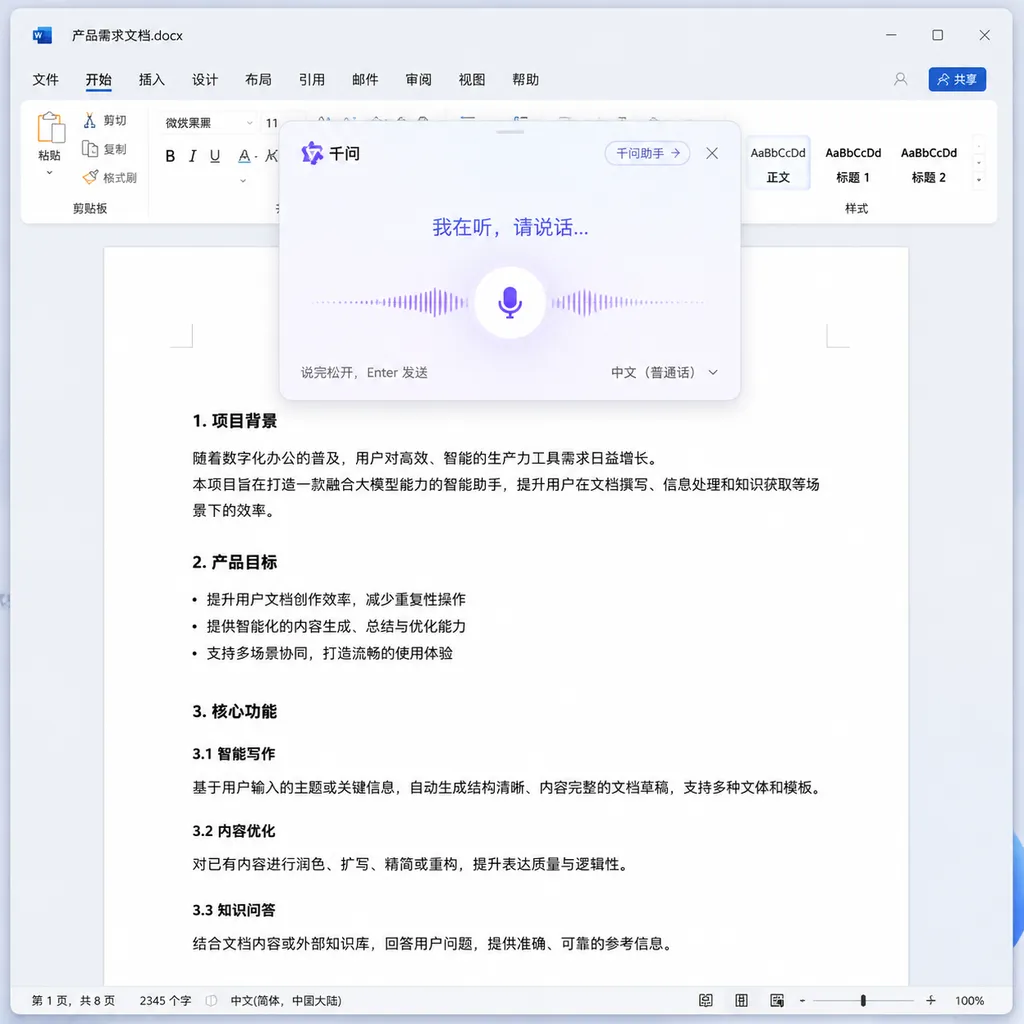
On May 7, Alibaba’s Qianwen launched AI voice input on the PC. With a shortcut key, it can be invoked in any desktop application. Press and hold to transcribe, double-click to issue a command — Qianwen aims not to be just a voice typing tool, but a cross-application AI task scheduling hub.
On May 7, Alibaba’s Qianwen quietly launched a new capability on PC: AI voice input.
No press conference, no flashy promo videos—just a hotkey and an update log. The feature was fully rolled out and made free for all users.
But if you treat it merely as “voice typing,” it’s basically a wasted launch. Its ambitions clearly go far beyond that.
A Task Scheduler Hidden Under the Name “Input Method”
Let’s first look at the two sets of hotkey designs Qianwen introduced this time—they reveal exactly what the product team is thinking:
- Hold the hotkey (Right Alt on Windows, Right Command on Mac, customizable): enters voice input mode. You speak a passage, and the system automatically removes filler words like “um,” “like,” “you know,” corrects slips of the tongue, segments sentences by meaning, and organizes the speech stream into structured text—inserted directly into the active text field.
- Double-tap the hotkey: switches to AI command mode. Now what you say isn’t text to be written down, but an instruction for the AI to act on—search for information, draft an email reply, translate a document, generate meeting minutes, and so on.
The difference seems like just “hold” versus “double-tap,” but logically they’re completely different things. The former translates speech into text; the latter translates speech into tasks.
This explains why the name “Qianwen Voice Input Method” is a bit misleading—users might instinctively compare it to iFlytek Input or Sogou Voice. But in reality, it feels more like an AI entry point disguised as an input method, using that familiar format to bypass the “you must open the Qianwen app” barrier.
Why Make It “Cross-Application”?
Over the past year, AI assistants everywhere have faced the same dilemma: users have to switch contexts.
For instance, you’re writing a document and want the AI to refine a paragraph—you have to copy it out, open ChatGPT or Qianwen’s web version, paste it in, generate output, copy it back, and paste again. By the time you finish, your inspiration has cooled.
Qianwen’s solution is to embed AI at the system level. Whether you’re in Word, Feishu Docs, Chrome, WeChat, or VS Code—press the hotkey, an overlay pops up, you speak, and the result appears exactly where you need it. No app switching required.
This approach is similar to macOS’s once-popular Wispr Flow, and even earlier, Raycast AI:
Don’t build standalone AI apps—build system-level AI shortcuts.
The difference is, Wispr Flow’s performance in Chinese recognition and formatting has always lagged, while Qianwen plays to its home-field advantage: Chinese corpus and language modeling.
“De-oralization” Matters More Than You Think
If you’ve used any speech-to-text tools, you know raw transcripts are almost unusable.
Speech is noisy—“um, like, I think, well, actually”—and when transcribed, it’s just a mess. Most tools stop there, leaving cleanup to the user.
Qianwen Voice Input automatically does three things:
- Removes filler words: “um,” “uh,” “like,” “you know,” etc. are stripped out
- Error correction: fixes homophones, slips of the tongue, and missing words using context
- Formatting: breaks up long paragraphs, converts lists into bullet points, preserves code structure
For developers, the most useful cases may be writing comments, commit messages, or technical docs. Dictating logic while looking at code is faster than typing, and you don’t need to switch between Chinese and English repeatedly.
Previously, using iFlytek plus manual cleaning took at least two rounds of edits for a 300-character technical passage. Now it’s usually good in one go.
What the Command Mode Can Do
Double-tapping the hotkey enters command mode, where speech becomes an action request, not text. Typical use cases:
- Reading an English paper in Chrome → double-tap: “Summarize the three main contributions of this article.” → Result appears in the overlay.
- Receive a message in WeChat, don’t feel like typing → double-tap: “Reply politely that I’m available Thursday afternoon.” → Text is generated and sent with one click.
- Stuck coding → double-tap: “Give me an async Python HTTP request pool implementation with timeout and retries.” → Code block inserted directly into editor.
- Writing a weekly report → double-tap: “Generate a draft weekly report based on my Git commits this week.” → Automatically compiled after pulling local context.
The key is that command mode focuses on intent understanding, not keyword matching. You don’t need to memorize triggers or command syntax—just speak naturally. The model judges whether your goal is search, generation, translation, or rewriting.
Who’s Competing in This Space?
This area is getting lively. Here are comparable products:
| Product | Form | Chinese Capability | AI Commands | | --- | --- | --- | --- | | Qianwen Voice Input | System-level overlay | Strong | Native support | | iFlytek Input | Traditional IME + AI | Strong | Requires switching to assistant | | Sogou Input | Traditional IME | Strong | Basic chat only | | Wispr Flow | System-level overlay | Average | Supports but English-focused | | Raycast AI | Launcher | Moderate | Strong |
Qianwen’s formula is: system-level overlay + strong Chinese + native AI commands.
In the domestic PC space, that ecosystem niche is almost uncontested.
iFlytek’s AI Assistant is an add-on that takes two extra steps to open; Raycast struggles with Chinese data and connectivity; Wispr Flow is purely foreign.
Of course, there are issues. Currently, Qianwen’s command-mode completion quality largely depends on app adaptation—whether it can read current page content, and whether it can write results back.
Going forward, this essentially becomes a protocol problem similar to MCP (Model Context Protocol).
If Qianwen truly aims to be an “AI task scheduler,” the next step is likely enabling third-party app integration.
A Few Insights
Voice as a primary AI input mode has been predicted for years. Yet on PC, it never really took off—mainly because traditional voice input yields poor transcripts, requires tedious cleanup, and forces tool switching, making the keyboard more efficient.
Large language models have changed that balance. When voice isn’t just “transcribed,” but interpreted, keyboards start to lose their edge for some tasks—especially those that require thoughtful composition: emails, documents, summaries, questions.
Speaking is three times faster than typing, and AI perfectly compensates for speech’s lack of precision.
Qianwen’s rollout isn’t a first in product concept, but in the Chinese-language PC context, it’s currently the most complete implementation. It’s free, fully open, no need for complex registration—so barriers are so low there’s almost no reason not to try it.
What’s worth watching is its next stage of evolution:
Can command mode access more app contexts?
Can it link to local files, browser tabs, IDE projects?
Once that happens, “working by voice” will truly become real. Otherwise, it’s still just a better voice input method—not yet the prototype of an AI operating system.
Judging by today’s version, the Qianwen team is clearly aiming for the latter.
References
- ITHome: Work by Voice — Alibaba Qianwen Launches AI Voice Input on PC — Original report on feature details, hotkey design, and use cases
- Zhihu Column: 10 AI Voice Input Tools Recommendation — Comparative overview of similar products on the market


