
Gemini API five-tier pricing launched — half‑price inference is here

Google updated the Gemini API pricing strategy today, adding five service tiers: Standard, Flex, Priority, Batch, and Caching. Developers can flexibly choose based on latency and reliability requirements, with calls available at half the original price at minimum.
Google adjusted the Gemini API pricing table today.
It’s not just a simple number tweak — they’ve completely redesigned the billing architecture. The previously single pay-per-use model has been split into five distinct service tiers: Standard, Flex, Priority, Batch, and Caching. The logic is straightforward: how long you’re willing to wait and how stable you need it determines how much you pay.
This is an important signal in API pricing. It shows that large model inference services are moving away from a flat rate toward tiered services — much like when cloud computing evolved from on-demand instances to spot and reserved instances.
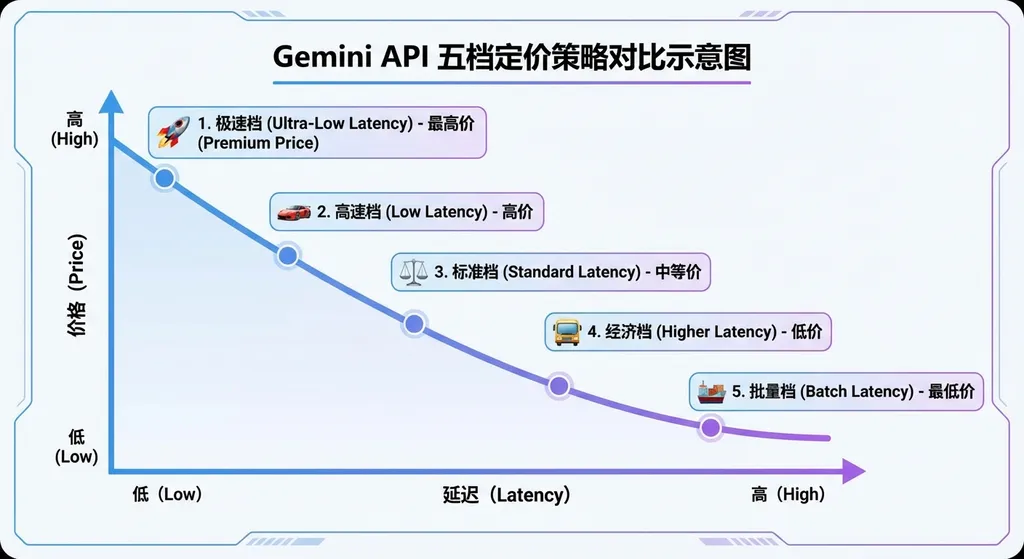
How the five tiers are divided
To get straight to the point: for most developers, Flex and Batch have the biggest impact — both cut the price to half of the Standard rate.
Let’s break them down:
Standard — Baseline
The baseline tier — nothing special here. Latency and reliability are at default levels, and the price is as listed on the official site. Its main purpose is to serve as a reference point for the others.
Flex — Half price, but you wait
Flex is the most interesting addition in this update.
Its principle is simple: Google sells you idle GPU capacity during off-peak hours at 50% of the Standard price. The trade-off? Latency is unpredictable — a target range of 1 to 15 minutes, explicitly marked with “no latency guarantee.”
Anyone familiar with cloud computing will recognize this as the “Spot Instance” equivalent for AI inference. AWS turned this model into a major business over a decade ago, and now Google is replicating the same logic on the inference layer.
When to use Flex? Google suggests cases like bulk CRM data updates, large-scale research simulations, or complex reasoning steps in background Agent workflows. In short: if your task doesn’t require the user to sit and wait, Flex is worth considering.
A concrete example: you run a content moderation system, accumulate tens of thousands of items during the day, and then process them overnight using Flex — your cost is instantly halved. Or your Agent has a “deep thinking” step — the user submits a task, grabs a coffee, and checks back later — this kind of asynchronous flow suits Flex perfectly.
One implementation detail: Flex uses a synchronous API, not the asynchronous Batch API. Meaning the connection stays open after you send your request, but you might wait minutes for a response. You’ll need to handle timeouts and retries properly in your architecture.
Priority — Expensive, but stable
The exact opposite of Flex. Priority costs about 75%–100% more than Standard, but you get millisecond-to-second latency and priority handling during high load.
Here’s a design detail: if your Priority traffic exceeds quota, excess requests aren’t rejected with a 429 — they’re automatically downgraded to Standard. This “graceful degradation” is much friendlier than hard throttling — your online service won’t crash just because of a traffic spike.
The API’s response indicates the actual service tier used, so you can monitor and alert accordingly — if you see frequent downgrades, it’s time to increase quota.
Google recommends Priority for use cases like real-time customer chatbots, online fraud detection, and mission-critical assistants. In short: if users are watching the screen and every extra second of delay costs experience or money, Priority is for you.
Is it expensive? Sure — but if your real-time risk control system is 2 seconds late, a fraudulent transaction might already have gone through. Easy math.
Batch — Also half price, but even slower
Batch gives the same 50% discount as Flex but follows a traditional asynchronous batch processing model, with latency up to 24 hours.
If Flex says “I can wait a few minutes,” Batch says “Get me results tomorrow.”
Typical use cases: nightly labeling tasks, weekend bulk feedback processing, periodic classification or summarization of historical data. Common traits: large volume, low urgency, high cost sensitivity.
Batch mode isn’t new — OpenAI’s API already has it. Google’s addition mainly fills a product gap.
Caching — Priced by storage
Caching works differently. It’s not priced per request but by the number of tokens cached and storage duration.
Ideal for scenarios like:
- A chatbot with a long system prompt reused on every request
- Analyzing multiple segments of the same long video
- Repeated queries over a large document set
Essentially, Caching tackles the “repeated input” cost problem. If many of your requests share the same prefix context, caching processes that prefix once and reuses it later — dramatically reducing input costs.
Anthropic’s Claude API offers a similar Prompt Caching feature — Google’s now aligned with that.
Summary table of the five tiers
| Tier | Price (vs. Standard) | Latency | Use case | |------|----------------------|----------|-----------| | Standard | 1x | Default | General use | | Flex | 0.5x | 1–15 min (unpredictable) | Background tasks, asynchronous Agent reasoning | | Priority | 1.75x–2x | ms–seconds | Real-time chat, risk control, critical tasks | | Batch | 0.5x | Up to 24 hrs | Large offline processing | | Caching | By cached tokens and time | – | Long prompts, repeated analysis |
What it means for developers
The biggest value in this update isn’t how much cheaper a specific tier is, but the clear cost optimization framework it introduces.
Previously, all Gemini API requests had the same price and priority — your live chat and background data processing shared the same pipeline and cost. That made little sense — why should a 200 ms response chatbot cost the same as an overnight data labeling task?
Now with tiering, developers can manage costs more granularly. A typical optimization plan:
- Real-time user flows → Standard or Priority
- Internal Agent “thinking” → Flex
- Daily/weekly batch jobs → Batch
- Shared long context → Caching
With just smarter routing, inference costs may drop 30%–50%. For apps with millions of daily calls, that’s serious money.
How to use it — just one parameter
Integration is simple: add a service_tier parameter in your request — works for both GenerateContent and Interactions.
No need to change endpoints, SDK versions, or API keys. You can switch tiers dynamically within the same app.
If you’re using an OpenAI-compatible aggregator like OpenAI Hub, switching is equally easy. Example usage:
import openai

client = openai.OpenAI(
    api_key="your-openai-hub-key",
    base_url="https://api.openai-hub.net/v1"
)

# Real-time use: Priority for low latency
realtime_response = client.chat.completions.create(
    model="gemini-2.5-pro",
    messages=[
        {"role": "system", "content": "You are a real-time customer support assistant."},
        {"role": "user", "content": "When will my order ship?"}
    ],
    extra_body={
        "service_tier": "priority"
    }
)
print(realtime_response.choices[0].message.content)

# Background task: Flex for half-cost inference
background_response = client.chat.completions.create(
    model="gemini-2.5-pro",
    messages=[
        {"role": "system", "content": "Please classify and summarize the following text."},
        {"role": "user", "content": "[a long text to process...]"}
    ],
    extra_body={
        "service_tier": "flex"
    }
)
print(background_response.choices[0].message.content)
// Node.js example
import OpenAI from 'openai';

const client = new OpenAI({
  apiKey: 'your-openai-hub-key',
  baseURL: 'https://api.openai-hub.net/v1',
});

// Batch: large offline processing
const batchResponse = await client.chat.completions.create({
  model: 'gemini-2.5-pro',
  messages: [
    { role: 'system', content: 'Analyze sentiment for the following user reviews.' },
    { role: 'user', content: '[batch review data...]' },
  ],
  service_tier: 'batch',
});

console.log(batchResponse.choices[0].message.content);
The key parameter: service_tier.
Set it to flex for half-price slow inference, priority for fast premium inference, or omit it for Standard. Simple and effective.
Industry perspective
In the broader LLM API market, Google’s new pricing looks more like a “catch-up” move.
OpenAI already has Batch API (half price, 24 h delay). Anthropic offers Prompt Caching and priority levels. Google was behind on this — now it’s filling all five tiers at once, with Flex being uniquely positioned: synchronous, half-price inference using idle compute — more flexible than Batch and cheaper than Standard.
More importantly, it reflects a shift: model inference is becoming infrastructure, and infrastructure pricing has never been one-size-fits-all.
Think AWS EC2 — on-demand, reserved, spot instances, Savings Plans... dozens of billing options, all trading different “commitments” for different “discounts.” Model APIs are going the same route: commit to higher latency tolerance, get lower cost; commit to higher spending, possibly get reserved discounts later.
For developers using multiple APIs, tiered pricing adds complexity — vendors differ in design, discount, and latency. This drives more teams to use aggregation platforms for unified multi-model management, routing, and cost optimization — far easier than integrating each API separately.
Key details to watch
- Flex’s “no latency guarantee” must be taken seriously. The 1–15 min range is a target, not an SLA; actual delays can be longer under heavy load. If your business has a strict deadline, Flex may not fit.
- Priority’s auto-downgrade is a double-edged sword. It avoids service interruption but can silently run requests at Standard latency. Always monitor the returned
service_tierfield to detect downgrades. - Caching’s cost-benefit depends on volume. You pay for stored tokens and time — if your request volume or prefix length is small, caching might not save money. Test with small traffic to find the breakeven point.
- The five tiers currently apply to
GenerateContentandInteractions. If you use other Gemini capabilities (like Embedding or Code Execution), check for support.
Summary
By splitting Gemini API’s flat pricing into five tiers, Google’s message is clear: not all inference requests deserve the same price.
Existing Gemini users should audit their workloads and move suitable tasks to Flex or Batch — half price is half price, the ROI is obvious.
For teams still evaluating options, this brings Gemini up to par with OpenAI and Anthropic in pricing flexibility — even offering advantages with Flex’s synchronous half-price model. Worth reconsidering.
The LLM API price war continues, but competition is moving from “who’s cheaper” to “who gives developers better cost control.” That’s good news for developers.
References:
- Google updates Gemini API pricing: tiered billing by inference usage – Baidu Baijiahao
- Google upgrades Gemini API: new Flex and Priority inference tiers – Tencent News
- Google announces new Gemini API pricing, pay-per-inference – Baidu Baijiahao
- Google updates Gemini API pricing, tiered by inference usage – Tonghuashun Finance
- Google Gemini API pricing update – Sina
- Google updates Gemini API pricing – NetEase
- Google updates Gemini API pricing tiers – TMTPost


