
Claude breaks into the Office suite—Copilot has its first direct rival.

Anthropic officially releases the Word, Excel, and PowerPoint versions of Claude, with the Outlook version entering public beta. Claude is no longer just a sidebar Q&A bot—it’s now an office Agent capable of handling multi-step tasks across documents and applications.
Claude Breaks Into the Office Suite — Copilot Gets Its First Direct Rival
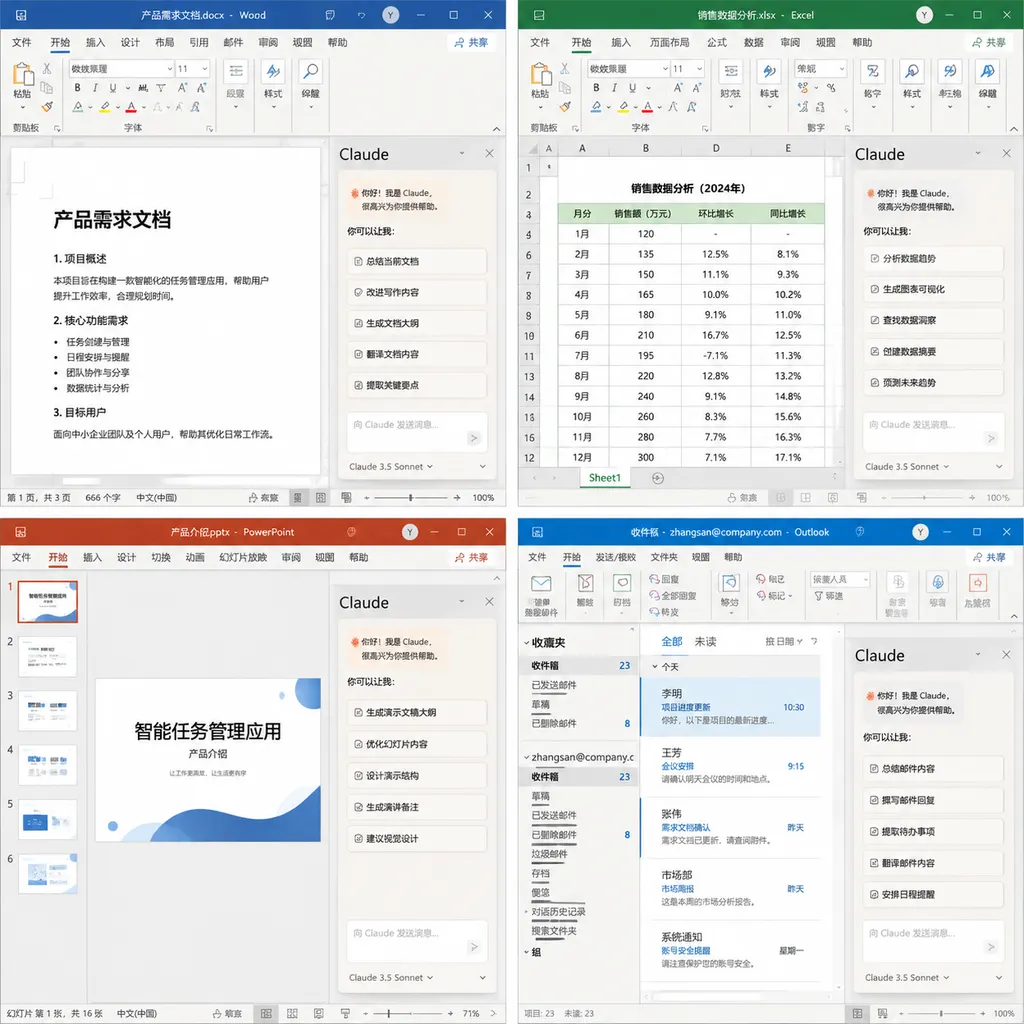
On May 7, Anthropic announced the full launch of Claude for Microsoft 365: the Word, Excel, and PowerPoint editions were officially released, and the Outlook edition entered open Beta for all paid plan users. Both Mac and Windows versions went live simultaneously, and enterprise admins can deploy the suite in bulk directly via Microsoft AppSource through the Microsoft Admin Center.
The subtlety of this move lies in the fact that Office is Microsoft’s home turf, Copilot is Microsoft’s own creation, and yet Anthropic has essentially set up shop right in Microsoft’s living room. What’s even more interesting is that Microsoft hasn’t blocked it—the whole chain runs through official channels: AppSource is Microsoft’s official app store, Entra ID is its official identity system, and everything is compliant. For the first time, the AI office battle sees a serious contender not tied to the Copilot ecosystem.
Not Just Another Sidebar, But a Cross-Document Workflow
Over the past year, nearly every company building AI office add-ins has done this one thing—stuck a chat box on the right side of Word or Excel, letting you select text, click a button, and generate content. The ceiling for that product form is low—it’s essentially just bringing the ChatGPT web experience into Office, with context limited to the current document and cross-file collaboration relying mostly on manual copy-paste.
Claude for Microsoft 365 takes a very different approach. Anthropic’s release notes highlight one core capability: Claude moves with you across different apps, and conversations persist across files.
A typical workflow provided by Anthropic looks like this:
- Sort through morning emails in Outlook and find a project message with an attachment that needs attention;
- Ask Claude to open the attachment in Word and draft a memo following the team’s standard template;
- Switch to Excel to build an analytical sheet and calculate the figures mentioned in the memo;
- Move on to PowerPoint to turn the results into slides.
The key point: you don’t have to re-explain context to Claude every time you switch apps. It knows what was discussed in your email, which number in the third paragraph of your Word memo corresponds to which column in Excel, and that the PowerPoint needs conclusions, not process details.
You can open spreadsheets, presentation decks, and memos side by side—change data in one file, and related updates flow seamlessly to others. This is what “AI office work” should look like—not an isolated helper for each document, but one that oversees your entire workspace.
Outlook Edition: Turning the Inbox Into a Task Queue
Of the four add-ins, the Outlook version stands out the most.
Claude for Outlook does something that many have tried but few have done well: it treats your inbox as a task queue. It scans your inbox and categorizes messages into three groups:
- Those requiring your personal reply;
- Those Claude can draft for you, pending your review before sending;
- Junk or ignorable messages.
For the second category, Claude automatically generates a draft right in Outlook’s compose pane—with recipients, subject, and body all filled in, waiting for your send click. Anthropic explicitly notes: nothing is sent until you hit Send. It’s a restrained and necessary design choice.
Email AI tools often stumble on “over-automation”—automatic archiving, replying, or forwarding may sound convenient but can cause major problems. Anthropic deliberately stops at the “drafting” stage, leaving the final step to humans—drawing a clear boundary of responsibility. This approach aligns perfectly with Claude’s trademark safety-first philosophy.
How Does It Stack Up Against Copilot?
Now we must face the obvious question: why wouldn’t users just use Microsoft 365 Copilot?
Several differentiating points stand out:
The model itself. Copilot is built on GPT models, while Claude for Microsoft 365 runs on Claude (using either Anthropic API or Bedrock, depending on enterprise deployment). In handling long documents, code, and complex instructions, Claude has earned strong reviews—especially for tasks like revising lengthy Word documents or writing sophisticated Excel formulas, where Claude holds its own against GPT.
Cross-application state retention. Copilot also supports cross-app functionality, but its logic is more like “each app’s Copilot shares one underlying service.” Claude’s implementation feels more like “a single Agent active across multiple apps.” They sound similar, but the experience differs dramatically: the former extends a conversation, the latter extends a workflow.
Deployment flexibility. This matters for enterprises. According to Anthropic’s docs, if a company already uses an LLM Gateway to run Claude Code, the Office add-ins can simply point to that same endpoint—no new infrastructure required. Bedrock customers can also use Microsoft Entra ID for unified authentication. In other words, Claude for Microsoft 365 integrates directly into an enterprise’s existing AI governance system, whereas Copilot plays by stricter rules.
For large enterprises already running workloads on AWS and deploying Claude via Bedrock, this add-in is nearly frictionless to adopt. It’s a clever move by Anthropic—it’s not trying to steal consumer users from Copilot; it’s targeting enterprise IT teams already committed to Claude.
An Overlooked Trend: Office Is Becoming the Runtime for Agents
Taking a step back, the truly interesting part of this launch isn’t just “Claude entering Office.” It’s that Office itself is being redefined as the runtime environment for AI Agents.
In the past, “Office” meant a collection of productivity apps. Going forward, it might mean a workspace that includes documents, spreadsheets, emails, and presentations—all hosting different Agents. Claude is one, Copilot is another, and eventually Gemini and even open-source wrappers could join in.
Microsoft benefits from this—all transactions go through AppSource, identity stays locked under Entra ID, and Microsoft 365 subscriptions keep growing. What it wants to protect is the platform, not the model. The fiercer the competition at the model layer, the stronger the platform’s value. Microsoft is playing a very calculated game.
The takeaway for developers is clear: building AI features in Office through the Add-in technical route will become far more important than expected. It goes deeper than browser extensions, lighter than standalone apps, and has direct access to Office’s document object model. The form Anthropic has launched may well become the template for future entrants.
Getting Started and Pricing
Here are a few practical details:
- Available versions: Official Word, Excel, and PowerPoint editions; Outlook in Beta
- Platforms: Mac and Windows
- Eligibility: Available to all Claude paid plan users
- Deployment: Admins can roll out via Microsoft Admin Center through AppSource
- Enterprise integration: Supports LLM Gateway reuse, direct Bedrock connection, and Entra ID SSO
If you’re an individual user, you can install it from AppSource after subscribing to Claude Pro. If you’re enterprise IT, this upgrade is worth serious consideration—especially for teams that have already integrated Claude into their internal toolchains, since migration cost is nearly zero.
As a side note, OpenAI Hub now supports API calls to all Claude models. A single key lets you switch seamlessly among GPT, Claude, Gemini, and DeepSeek—direct access in China, compatible with the OpenAI format. If you’re looking to recreate similar multi-model capabilities within your own toolchain, you won’t need to redo compliance for each provider separately.
Final Thoughts
Claude for Microsoft 365 isn’t a flashy showpiece—it’s even a bit “boring.” Sidebars, email drafting, cross-file data linking—none of these sound revolutionary on their own. But together, paired with Claude’s model capabilities and flexible enterprise deployment, they create Copilot’s first truly formidable opponent.
The war for AI-powered office productivity has only just begun. The vast soil of Office—the world’s biggest productivity platform—no longer belongs solely to Microsoft.
References
- ITHome: Anthropic releases Claude for Microsoft 365, enabling cross-document work and synchronization — Official source for launch dates, available versions, and key features
- Reddit: Microsoft just launched an AI that does your office work — Early user feedback and discussion from the overseas developer community


