
Tencent QClaw launches File Space, integrating Tencent Docs into the AI chat box.

QClaw launches the “File Space” feature today, enabling a one-step authorization to connect local files, Tencent Docs, and the ima knowledge base. AI-generated results are directly output as collaborative online documents, extending the closed loop from “finding information” to “producing deliverables.”
Tencent Cloud pushed a seemingly minor but actually quite crucial update to QClaw today (May 11) — the “File Space” feature is officially live. With a single authorization, QClaw can now connect three data sources: local files, Tencent Docs, and the ima knowledge base. The AI can read these files and even write generated results directly back into Tencent Docs, forming a shareable, collaborative live document.
This may look ordinary, but anyone who has worked on AI Agent integrations will understand its importance. Previously, most domestic AI assistants connected with office documents in a “plug-in” manner — through either plugins or sync hubs — which always fell short in permission control and user experience. This time, QClaw took the route of official deep integration. Since Tencent Docs is a native Tencent product, permissions, synchronization, and collaboration states all work through the platform’s native channels — no need to reinvent the wheel.
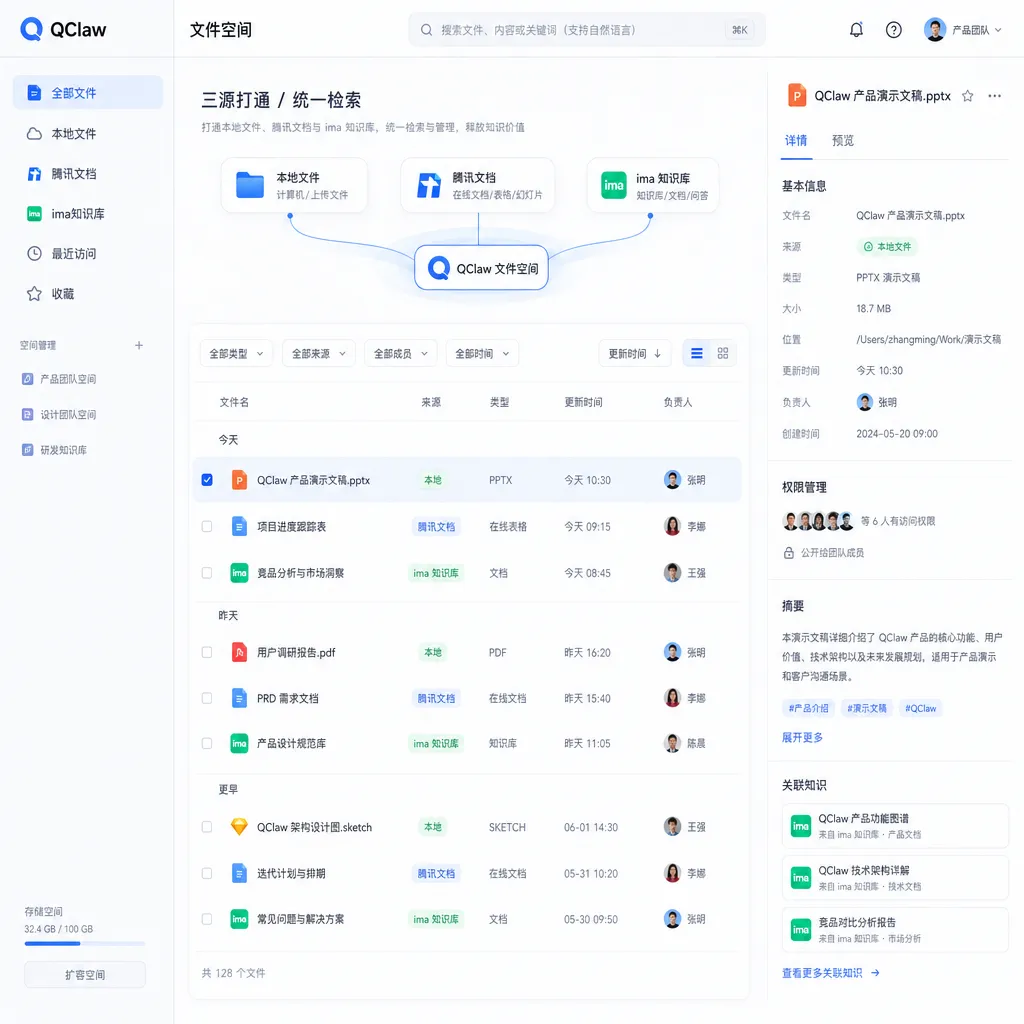
One Authorization, Three Data Sources
Let’s break down the core capabilities of this update.
Tencent Docs side: Once authorized, users can directly open their online documents, spreadsheets, and mind maps in QClaw, select a few files, and pass them to the AI. The key is in how the AI outputs results: not just text replies in the chat window, but one-click generation of a new Tencent Doc with a collaboration link. You can drop it into a work group, and colleagues can open it in their browsers to keep editing — or use their own QClaw to iterate with AI. This step upgrades AI output from “content generation” to “generation of collaborative assets.”
ima knowledge base side: QClaw can directly access a user’s private knowledge base or connect with ima’s “Knowledge Base Plaza,” bringing industry materials into the chat for analysis. Conversely, solutions generated within QClaw can be saved back to ima with one click, feeding the next round of creation. This forms a cycle of “materials → processing → accumulation → reuse.”
Local file side needs little explanation — QClaw already excels at local deployment and file operations. This update simply places local and online data sources on the same workbench.
Selecting and mixing the three data sources in one conversation — though it sounds simple — actually solves AI’s biggest pain point: the “data island problem.” No matter how capable a model is, if it can’t access your real work data, it’s just a chat bot.
“Activated Tencent Docs” Is the Key
The most intriguing phrase in this update is the official statement: “AI-generated content is not just text confined to a chat box, but an activated Tencent Doc.”
To grasp the value of this design, compare it with current mainstream AI assistant output paradigms:
- ChatGPT / Claude: Output stays in the chat; users must copy-paste into external documents. Canvas and Artifacts solve part of this, but remain proprietary AI containers lacking enterprise-level collaboration.
- Notion AI / Feishu Smart Partner: Output directly enters documents, but locked within their own ecosystems — more for assisted editing than for generating sharable collaborative documents from scratch.
- QClaw + Tencent Docs: AI generation equals distribution. Share a link in the group chat — recipients don’t need QClaw installed and can collaborate through their browsers; if they do have QClaw, they can continue AI iterations on that same document.
This “AI outputs with innate collaboration capabilities” workflow is a unique advantage for Tencent in China’s office scenarios. The chain of WeChat + Tencent Docs + QClaw means near-zero distribution cost.
What QClaw Is and Why This Update Matters
It’s worth revisiting QClaw’s role, because it’s a rather special piece in the entire OpenClaw ecosystem.
QClaw is Tencent PC Manager’s one-click installation version built on the open-source OpenClaw framework. It emphasizes zero setup, local deployment, and seamless WeChat integration. It’s neither a cloud SaaS nor a browser plugin — it runs directly on the user’s computer as an AI Agent. It can manage local files, execute automated tasks, and expose command input through WeChat — you send an instruction on your phone, and your home PC starts working remotely.
The biggest limitation of this approach used to be data isolation. QClaw could access local files but was disconnected from user’s online collaboration assets like Tencent Docs and knowledge bases. With “File Space” now live, QClaw upgrades from a “local file manager + remote control terminal” to a “personal Agent workstation spanning both local and cloud environments.”
From a developer’s perspective, this signals Tencent’s clearer strategy for Agent products: not competing on raw model performance, but leveraging its ecosystem — “WeChat + Docs + Knowledge base + Local client” — to win the first mile of agent deployment.
Key Points in Technical Implementation
Tencent hasn’t revealed much detail, but based on feature descriptions and QClaw’s known architecture, several assumptions can be made:
1. Permission model uses Tencent Docs’ native OAuth, not credentials held by QClaw. The description emphasizes “permission management and sync stability identical to native experience,” implying official channel authorization. For enterprise users, this is critical — IT admins don’t need separate audits on which documents AI accessed; document-side logs already cover it.
2. ima knowledge base access is likely via structured interface calls, not file-level reads. As an AI knowledge base product, ima includes vectorization and semantic search. QClaw likely retrieves search results, not raw files — which explains how industry materials from the “Knowledge Base Plaza” can be pulled directly into chats for analysis, essentially reusing ima’s search capabilities.
3. Collaboration link generation uses Tencent Docs’ public sharing mechanism. This means recipients don’t need QClaw installed or a paid Tencent Docs account — they can edit right away. This near-zero distribution cost is the real killer feature of this update.
4. Hybrid handling of local and online files requires QClaw to unify context before calling the large model. For developers, this suggests an internal abstraction layer converting data from different sources into standardized model-readable formats — a capability vertical Agent developers would find very appealing if opened later.
Comparison with Competitors
Across China’s AI office software landscape, strategies are already diverging clearly:
- ByteDance Doubao + Feishu: Closed-loop ecosystem, but highly fenced off and unsuitable for cross-organization collaboration.
- DingTalk AI Assistant: Strong in enterprise scenarios, limited for individual users.
- WPS AI: Mature document integration, but lacks local Agent-like operation.
- QClaw + Tencent Docs + ima: With collaborative features now filled in, the puzzle is nearly complete — local Agent, WeChat entry, online documents, and knowledge base all in one.
QClaw doesn’t aim to become a massive all-in-one office suite. It’s more about linking Tencent’s existing “components” through AI. The benefit is a near-zero-cost cold start — users are already on WeChat and Tencent Docs.
Of course, there’s a clear limitation: unfriendly to non-Tencent ecosystems. If your team uses Notion, Feishu Docs, or Google Docs, QClaw’s “File Space” offers little value. It’s a classic ecosystem-bound product.
Observations for Developers
If you’re building similar AI Agent products, this update offers several lessons worth adopting:
- Don’t trap AI output inside chat boxes. Giving results native collaboration and distribution capabilities impacts retention more than model-level improvements.
- Integrate data sources through official channels. Crawlers, OCR, or screenshot-based “plug-in” integrations work for demo purposes, but not long-term products — they cause permission and stability headaches.
- Ensure a closed loop of knowledge accumulation. AI generation → saving → reuse — once this cycle runs smoothly, user data assets will naturally anchor them to your platform.
QClaw didn’t release a new model, didn’t host an event, didn’t chase ranking charts. It quietly launched “File Space.” But these infrastructure-layer updates often better reflect a company’s true understanding of practical Agent deployment. In the next stage of AI product evolution, the competition won’t hinge on larger model parameters, but on who embeds the model most seamlessly into users’ existing workflows.
From that perspective, Tencent has made a well-aimed move.
References
- Tencent QClaw launches “File Space” to bridge local files, Tencent Docs, and ima knowledge base - IT Home: Original announcement with feature details and official description.
- QClaw guide for operating Tencent Docs - Juejin: Tutorial on QClaw integration with Tencent Docs, including advanced use cases like converting webpage content into documents.


