
Claude Code has learned how to "dream"

Anthropic has rolled out the Auto Dream feature for Claude Code in grayscale testing, enabling the Agent to automatically organize and merge memories during idle periods, addressing the issue of context degradation in long-term collaboration with AI programming assistants.
At the end of March, Anthropic quietly added a new feature to Claude Code called Auto Dream.
The name sounds poetic, but what it does is quite practical—it allows the agent to automatically organize the accumulated memory notes when you’re not using it. It merges redundant entries, removes contradictions, and turns vague inferences into definite knowledge.
In short, Claude Code has learned how to dream.
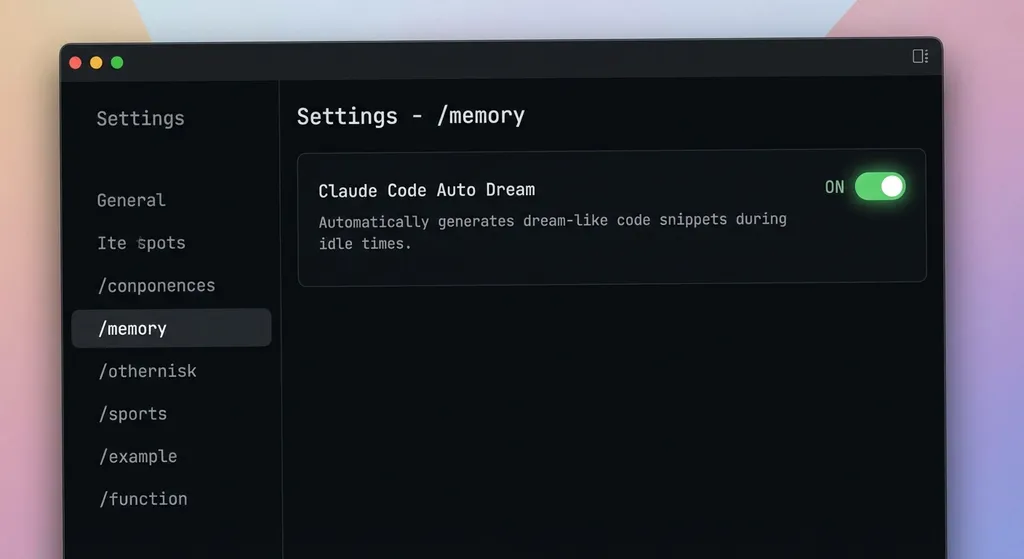
This feature is still in beta and not yet fully rolled out. But some users already have access. You can type /memory in Claude Code to check if there’s an auto-dream option. If there is, just turn it on.
Before We Begin: What Is Auto Memory
To understand what problem Auto Dream solves, we first need to talk about its predecessor—Auto Memory.
In February, Claude Code introduced a fully automated memory system that’s turned on by default. As you work with Claude Code, it automatically records what it deems important: which frameworks you use, your preferred coding style, your project structure, and what mistakes you’ve corrected.
These notes are isolated per project and stored locally:
~/.claude/projects/<your_project_name>/memory/
Inside the directory, there’s a MEMORY.md index file with several types of documents:
- user: your personal preferences and habits
- feedback: your corrections or affirmations to Claude
- project: project progress, technical decisions, architectural background
- reference: guidance to external resources
The advantages of this system are obvious. You don’t have to tell it every time, “I’m using Next.js 14 with the App Router, Tailwind for styling, and Vitest for testing.” Claude Code already remembers.
But the problems are equally obvious.
The More It Remembers, the Easier It Is to Go Wrong
Developers who’ve used Claude Code for a while have likely noticed: as a project reaches its mid-to-late stage, Claude’s performance starts drifting. It repeats mistakes you’ve already corrected or becomes uncertain about previously confirmed decisions.
The reason isn’t complicated. Auto Memory “just records, never manages.” Every conversation adds fragments of memory, and over time, the memory files become cluttered with duplicates, contradictions, and outdated decisions.
It’s like keeping a notebook for three months without organizing it. On page 5 you wrote “using PostgreSQL,” on page 38 you wrote “migrating to MySQL,” and on page 72 it says “actually PostgreSQL is better.” Even you’d be confused—let alone an AI that depends on context to understand the world.
Worse yet, these memory files are injected into every conversation’s context. The bulkier the memory, the lower the density of useful information, leaving less context space for the current task.
The common approach in the industry has been compaction—compressing the context. Command-line AI tools like OpenClaw use this method. But compaction is inherently lossy. You shorten length but inevitably lose some information. Compress too much and you lose key details; too little and the problem remains.
Auto Dream is meant to solve exactly this.
How Auto Dream Works: Background Sub-Agent + Dual Trigger Conditions
The design of Auto Dream is clearly inspired by how the human brain organizes memories during sleep.
When we sleep, our brains don’t completely shut down. They do something vital: memory consolidation. The brain reviews the day’s flood of information, reinforcing important items, discarding redundancies, and connecting fragmented clues into coherent knowledge. Sleep-deprived people have poorer memory not because they didn’t learn, but because their brains didn’t have time to organize.
Auto Dream does the same thing—only its objects are Markdown files instead of neurons.
It triggers only when two conditions are met:
- It’s been 24 hours since the last organization
- At least 5 conversation sessions have occurred since then
Both must be true. If you only talked to Claude Code twice in a day, it won’t trigger—nothing much to organize. If you had 20 exchanges in a row but within a single day, it also won’t trigger—it’s not “bedtime” yet.
As for when it runs: it doesn’t currently execute sneakily after you close Claude Code. Instead, when you open a new session, the system checks in the background. If conditions are met, it spawns a sub-agent to handle the organization.
This sub-agent runs entirely in the background without interrupting your current chat. You can keep coding or debugging while it “dreams” silently. When it’s done, your memory files are tidier—and your next context will be cleaner.
As one developer put it: “It cleaned up 31 minutes ago, and I didn’t even notice.”
What Exactly Does It Clean Up?
Based on leaked Claude Code source and user feedback, Auto Dream’s logic roughly includes:
Merging redundancies. If you repeatedly confirm the same decision—say, “using file-based routing” in three conversations—it merges them into one definitive record.
Eliminating contradictions. If an early note said “use REST API” but later changed to “use GraphQL,” it keeps the latest decision and removes the outdated one.
Promoting certainty. Some memories are uncertain inferences like “the user may prefer functional style.” If later interactions consistently confirm that, Auto Dream upgrades it to definitive knowledge.
Structural reorganization. Related info scattered across files is grouped together, and the index file MEMORY.md is updated accordingly.
The before-and-after difference is striking. Users report that where their memory directories once looked “like horror shows,” after cleanup they became concise and well-structured, with no fluff.
This directly improves coding experience. With cleaner memory, less noise enters context, Claude Code understands your project and preferences more accurately, and simple mistakes decrease.
Current Issues
Now, for the caveats.
Auto Dream is still in limited rollout and not very stable. The most common issue is manual triggering often fails. When users try the recommended /dream command, they often see:
Unknown skill: dream
The system can’t find the “dream” skill. Automatic triggers mostly work fine, but manual ones are still rough.
The trigger thresholds also raise debate. “24 hours + 5 dialogues” might be conservative for heavy users. Developers coding 12 hours a day with dozens of conversations might want more frequent cleanup. It’s likely just a cautious beta strategy that will later allow customization.
A more fundamental issue: quality depends on the model’s judgment. Deciding what to keep, discard, or reconcile requires discernment. If the model wrongly deletes important info as redundancy, it could backfire. There’s no rollback feature yet—but since memory files are local, you can use Git for versioning.
Why This Matters
Frankly, Auto Dream isn’t a revolutionary feature. It doesn’t make Claude Code dramatically smarter or unlock new powers. But it hits a real, long-ignored pain point.
Competition among AI coding assistants is shifting from “how smart each reply is” to “how reliable long-term collaboration can be.” Cursor, Windsurf, GitHub Copilot—the differences in model intelligence are shrinking. What really separates them is: can the AI still understand your project as precisely in the 100th session as it did in the 1st?
That’s the value of memory management.
Traditional approaches—from hardcoded system prompts to .cursorrules config files—are essentially “manual memory.” You still have to tell the AI what to remember. Auto Memory automated that, but didn’t solve the “too much, too messy” problem. Auto Dream fills that gap.
Technically, this mimics the human cognitive trio of working memory + long-term memory + sleep consolidation. Working memory is the chat context, long-term memory is Auto Memory’s files, and sleep consolidation is Auto Dream.
All three together form a complete memory system.
And judging from Claude Code’s leaked “Kairos” and “Daemon” modes, Anthropic’s ambitions go further. Today’s Auto Dream runs “while you’re active,” but future versions may “keep dreaming after you log off”—truly asynchronous background agents. By then, memory consolidation will be only one of many background tasks.
Practical Advice for Developers
If you already have beta access, just enable it. In Claude Code, type:
/memory
Find the auto-dream option and turn it on.
If you don’t yet have access—no worries. You can start by checking your memory directory:
ls ~/.claude/projects/
Pick a project you’ve used for a while, open memory/MEMORY.md, and see what shape it’s in. If it’s chaotic, clean it manually—or wait for Auto Dream’s full release to handle it.
Also, since memory files are stored locally, it’s highly recommended to put the ~/.claude/ directory under version control. You don’t have to push it to the cloud; local Git is enough. That way, if Auto Dream messes something up, you can roll back.
cd ~/.claude
git init
git add .
git commit -m "memory snapshot before auto-dream"
For teams that rely heavily on the Claude API for automated workflows, memory management is worth exploring too. If your own agents call the Claude model, you can implement similar cleanup with scheduled tasks that periodically prompt the model to reorganize stored memory.
Example using Claude via the OpenAI Hub interface:
from openai import OpenAI

client = OpenAI(
    base_url="https://api.openai-hub.net/v1",
    api_key="your OpenAI Hub key"
)

# Read current memory content
with open("memory/MEMORY.md", "r") as f:
    raw_memory = f.read()

response = client.chat.completions.create(
    model="claude-sonnet-4-20250514",
    messages=[
        {
            "role": "system",
            "content": "You are a memory cleanup assistant. Please merge redundant info, remove contradictions, keep the latest decisions, and output a structured memory document."
        },
        {
            "role": "user",
            "content": f"Please clean up the following memory file:\n\n{raw_memory}"
        }
    ]
)

print(response.choices[0].message.content)
This code is fully OpenAI-compatible—switching models lets you test GPT, Gemini, or DeepSeek for comparison on this task.
Final Thoughts
The AI agent memory problem has been discussed for ages, but most solutions still focus on RAG retrieval or vector databases—in essence, “how to find memory,” not “how to manage memory.”
Auto Dream takes a different route. Instead of optimizing retrieval, it improves the quality of the memory itself. Record first, then organize, and precision naturally follows.
Is the approach correct? I think so. The human brain already proves this over millions of years of evolution.
Whether Anthropic can pull it off remains to be seen. Rough edges in beta are normal; the key will be stability and quality at full release. At least, they’re asking the right question.
In the AI coding assistant race, whoever masters memory management first will gain an edge in long-term collaboration. Auto Dream is Anthropic’s step in that direction—small, but meaningful.
References:
- Claude Code Quietly Learned to Dream - Sina Finance: Detailed walkthrough and trigger mechanism of the Auto Dream feature
- After Reviewing 500,000 Lines of Leaked Claude Code, I Finally Found Its Secret Sauce - Tencent News: Source-level analysis of the autoDream consolidation logic
- When Claude Code Quietly Learned to Dream - NetEase: Comparison between Auto Memory and Auto Dream and their memory directory structures
- Claude Code Quietly Learned to Dream - CSDN: Known beta issues and manual trigger methods


