
VS Code Copilot can finally connect to third-party models.

Developers have bypassed GitHub Copilot’s model restrictions through reverse engineering, successfully connecting to models from third-party API sites. Several plugins have been verified as functional by the community, but the official stance and long-term stability remain uncertain.
VS Code Copilot Can Finally Connect to Third-Party Models
GitHub Copilot’s model selection has long been a pain point — officially, you only get GPT-4o and Claude 3.5 Sonnet. Want to use DeepSeek, Qwen, or your own API relay? No way. But recently the community has released several plugins that bypass this restriction, and developers have already gotten them working via public API services.
This isn’t the first time someone has tried breaking Copilot’s model limitation, but this time it’s different: multiple independent developers have succeeded using different technical approaches, and working plugins have already been published to the VS Code Marketplace.
Technical Approaches: Three Paths to the Same Goal
The community has verified three main schemes, all based on the same idea — intercepting Copilot’s API requests and redirecting them to custom endpoints.
Approach 1: Modify Copilot Chat Source Code
Directly modify Copilot Chat’s JavaScript code and hardcode new provider options into the model selector. This is the most straightforward method, but you have to redo it every time Copilot updates, and it technically violates the extension’s usage terms. Developers have shared detailed steps on CSDN, but the maintenance cost is too high for long-term use.
Approach 2: API Compatibility Layer
Disguise an OpenAI-compatible API as a local Ollama service. Copilot natively supports Ollama, so as long as your relay service returns Ollama-formatted responses, Copilot believes it’s a local model.
This solution doesn’t require touching Copilot itself. However, there are subtle protocol differences between Ollama and OpenAI, such as streaming formats and error handling. Tests have shown that some models’ thinking tokens (chain-of-thought outputs) are lost under this wrapping, reducing reasoning performance.
Approach 3: Independent Extension Intercepting Requests
The approach attracting attention on the Linux.do forum. Developers built an independent VS Code extension that intercepts Copilot’s network requests via the VS Code Extension API, then forwards them to custom API endpoints.
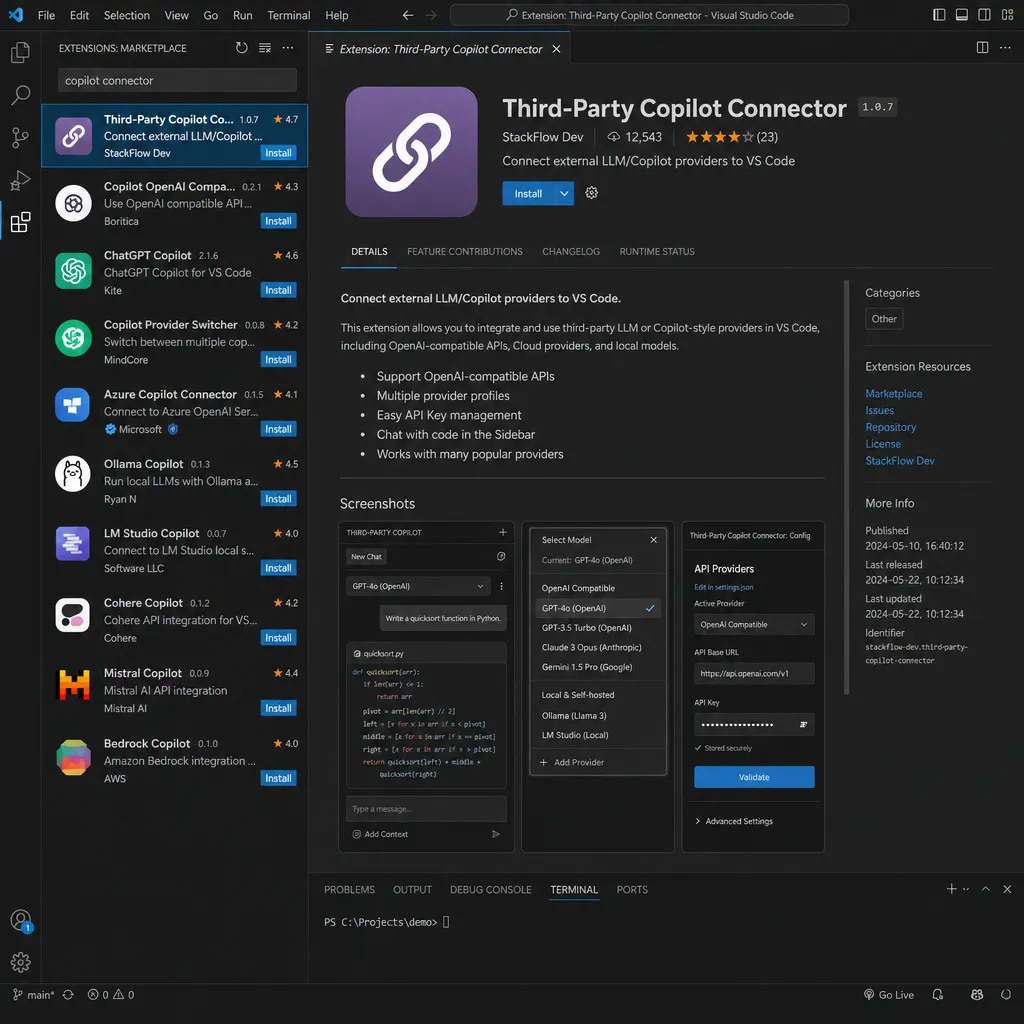
The technical challenge here is that Copilot’s requests aren’t standard OpenAI format but a GitHub-custom protocol. For example, authentication uses GitHub OAuth tokens, a special X-GitHub-Api-Version header, and slightly modified response formats.
More troublesome, some public API services (like any route or agent router mentioned in the thread) check whether the request originates from the Claude Code CLI — Anthropic’s official command-line tool — and allow only that client to call the Opus model. Developers analyzed the verification logic via packet capture and spoofed the corresponding headers and User-Agent in the extension, successfully bypassing detection.
In Practice: Works, But Mixed Experience
The main plugin currently on the VS Code Marketplace is OAI Compatible Provider for Copilot. Configuration is simple:
- Enter API endpoint and key in the extension settings
- Configure model list (supports custom
displayName,max_tokens,temperature, etc.) - Restart VS Code, and you’ll see your new model in Copilot Chat’s model selector
Testing revealed several issues:
Latency and Stability
Public endpoints are inherently unstable. Adding another relay layer, first-token latency often exceeds 3 seconds. If you use an overseas relay, network instability can cause timeouts — Copilot throws an error instead of gracefully degrading.
Context Management
Some models (especially open-source ones) handle long contexts worse than GPT-4o. In multi-turn conversations, Copilot dumps previous code snippets and errors into the prompt, often exceeding the model’s context window. Even though the plugin supports configuring max_tokens, Copilot’s prompt construction is a black box — you can’t precisely control actual token counts.
Missing Features
Vision capabilities don’t work on some models. Even if you set vision to true in configuration, Copilot may not send image data — it depends on whether the model ID is whitelisted. Developers tried renaming their custom model to gpt-4-vision-preview, but Copilot rejected the request as “model unavailable.”
Thinking Chain Support
For reasoning models (e.g., DeepSeek-R1, o1 series), the plugin includes a thinking_budget parameter to control reasoning token length. However, Copilot’s UI doesn’t display the thought process — only the final result. This makes debugging reasoning tasks difficult: you can’t see how the model derived its conclusions or whether issues lie in reasoning or the prompt.
Why Doesn’t GitHub Officially Support This?
Technically feasible — so why doesn’t GitHub allow custom models?
The Business Reason Is Obvious
Copilot costs $10/month or $100/year — covering GitHub’s API expenses to OpenAI and Anthropic. If users could plug in their own APIs, especially free ones or cheap domestic models, GitHub would lose that revenue.
More importantly, Copilot isn’t just a chat UI. It includes code completion, inline chat, and workspace indexing. These rely on prompts fine-tuned by GitHub’s team. Allowing arbitrary models risks unpredictable user experience — some models may fail to parse Copilot’s prompts properly, leading to poor code and users blaming Copilot.
Security and Compliance Risks
Copilot processes users’ code, which may contain sensitive data, trade secrets, or undisclosed vulnerabilities. If users send that to third-party APIs, GitHub can’t guarantee data safety. Though users could accept that risk individually, enterprise clients can’t — many corporate policies forbid sending code to unaudited external services.
Model Quality Varied
GitHub’s official models are vetted for coding ability, safety, and performance. Opening up to all models risks poor output, buggy, insecure, or even malicious code. Even if it’s the user’s choice, Copilot’s reputation would suffer.
The Future of Community Plugins: How Long Can They Survive?
These plugins work today, but their long-term survival is uncertain.
Official Blocking Likely
The DeepSeek v4 for Copilot Chat plugin was recently removed from the Marketplace for unknown reasons — possibly by the developer or at GitHub/Microsoft’s request. If such plugins threaten Copilot’s business model, the company could easily block them — by changing the API protocol, tightening request validation, or rejecting such extensions during Marketplace review.
High Maintenance Cost
Copilot updates frequently — new features or protocol tweaks almost monthly. Developers must keep pace or the plugin breaks. Most of these plugins are side projects, without commercial backing, easily abandoned.
Unstable API Endpoints
Public API endpoints are volatile — they can shut down or change policies anytime. The mentioned sites even use anti-abuse mechanisms that may ban keys for abnormal traffic. Quotas are limited too; if too many users connect via plugins, they’ll quickly run out.
Real-World Value for Developers
Despite uncertainties, these plugins can be valuable for some scenarios.
Cost Control
If you have your own relay or use a pay-as-you-go cloud API (Alibaba Cloud, Tencent Cloud, etc.), connecting via a plugin can significantly reduce costs. Heavy Copilot users might exceed $10/month value, but their own APIs can scale with actual usage.
Model Freedom
Copilot’s official models are limited and updated slowly. For example, when DeepSeek-V3 launched, it took weeks for Copilot to adopt it. If you want immediate access to new or domain-specific models, plugins are your only choice.
Privacy and Data Sovereignty
Developers who don’t want to send code to GitHub/OpenAI/Anthropic servers can connect local models (via Ollama or vLLM). Though less capable, local models are ideal for sensitive or offline environments.
Experimentation and Tuning
For prompt engineering or fine-tuning research, plugins let you quickly test different models — comparing GPT-4o vs Claude 3.5 Sonnet on a given task, or checking whether your fine-tuned model outperforms the base.
Technical Details: Configuration Parameters Explained
If you want to try these plugins, understand these key parameters first.
baseUrl and Authentication
The API endpoint must follow OpenAI-compatible format. Most relay APIs do, but note:
- Typically, endpoint path is
/v1/chat/completions(don’t omit/v1). - Authentication uses Bearer token or API key — configure in
headers. - Some providers require extra headers like
X-API-Versionor custom auth fields.
Model Configuration
Each model can have separate settings:
model: Model ID matching the endpoint’s supported model namedisplayName: Friendly label shown in Copilot UImax_tokens: Maximum generation length (use 4096+ to avoid truncation)temperature: Controls randomness — 0–0.3 for code, 0.7–1.0 for creative workvision: Enables image input, but actual use depends on Copilot’s internal logic
Performance Tuning
max_completion_tokens: New OpenAI parameter, overridesmax_tokensfrequency_penalty: Reduces repetition — 0.1–0.3 suggested for coding tasksthinking_budget: For reasoning models, controls chain-of-thought length to save tokens
Risk Warnings
Using such plugins comes with risks:
Data Leakage
Your code is sent to third-party endpoints. If untrusted, it could log or leak your code. Public APIs rarely have strong privacy policies — don’t use them for sensitive or commercial projects.
Account Security
Some plugins require GitHub tokens or Copilot auth info. A malicious plugin could steal credentials. Install only from trusted sources, and inspect code if possible.
Service Stability
Relay APIs may fail anytime, breaking Copilot. Keep official models as backup — don’t rely solely on third-party APIs.
Violation of Terms of Service
These plugins likely break GitHub Copilot’s ToS. In theory, GitHub could suspend accounts. No known bans yet, but the risk remains.
Conclusion
The community has proven that third-party model integration for VS Code Copilot works — but it’s more of a “community hack” than an official feature. For individual developers or experiments, it’s valuable; for enterprises or production use, stick with official models to avoid risk.
Will GitHub ever officially support custom models? Unlikely soon. But if community demand grows or competitors (like Cursor or Codeium) offer more flexible model choices, GitHub might reconsider.
For now, how long these plugins will survive — or whether they’ll be blocked — remains uncertain. If you want to try them, do it soon — they might stop working any day.
References
- A Plugin to Connect Third-Party API Models in VS Code Copilot - Linux.do – developer experience and test results
- Integrating Third-Party Models into VS Code Copilot - Zhihu – detailed configuration and API examples
- GitHub Copilot Calling Third-Party Model APIs - CSDN – comparison of three technical approaches
- Connect Third-Party OpenAI-Compatible Models to GitHub Copilot - CSDN – implementation details of API compatibility layer


