
Codex plugin system is live, ushering AI programming into the era of governance.
OpenAI has launched a plugin system for Codex, supporting one-click integration with tools such as Slack, Figma, and Notion. Enterprises can fine-tune plugin distribution and permissions through JSON policy files, marking the transition of AI programming from a personal productivity tool to enterprise-level infrastructure.
Codex Plugin System Launches — AI Programming Enters the Era of Governance
OpenAI has just added a plugin system to Codex. Slack, Figma, Notion, Gmail, Google Drive, GitHub, Cloudflare—these essential tools for developers can now be directly embedded into Codex workflows as plugins.
This isn’t just another “integrated with XX tool” feature update. What truly deserves attention is the enterprise governance framework behind the plugins: IT administrators can manage what is and isn’t accessible to AI programming agents through JSON configuration files—just like managing npm packages.
Since Codex officially reached GA in October 2025, this has been OpenAI’s biggest step yet toward the enterprise market.
What Exactly Are Plugins? Not What You Think
Let’s clarify the concept. Codex plugins aren’t like browser extensions, nor are they the short-lived ChatGPT-era Plugins.
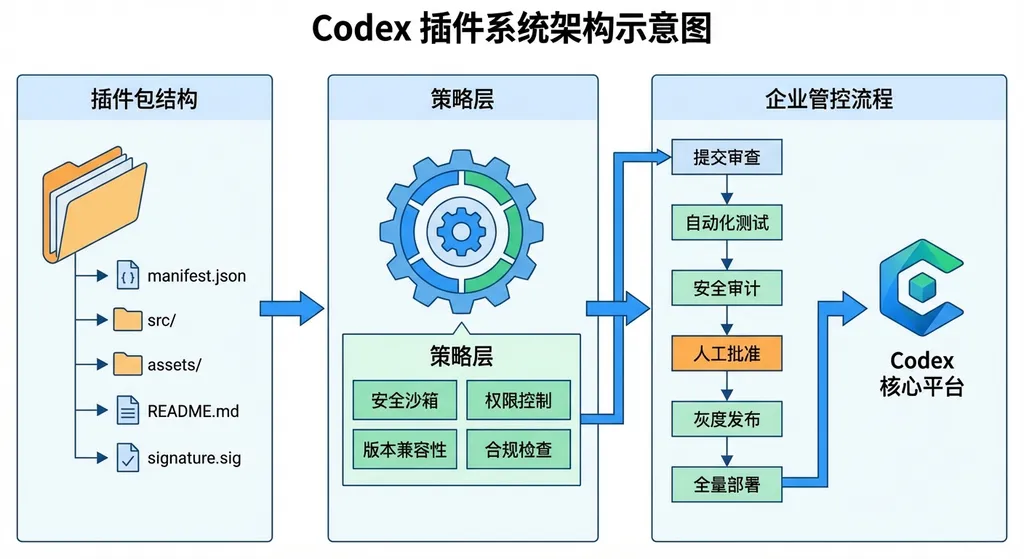
According to OpenAI’s developer portal, a Codex plugin is “an installable package representing a reusable Codex workflow.” In simpler terms: it’s a versioned configuration bundle that packages the abilities, tool connections, and rules you want an AI agent to follow, and can be distributed within your team.
Each plugin package can contain up to three types of components:
- Skills: Task instructions described in natural language that Codex agents can automatically discover and execute. For example, “Read the Slack #dev channel messages from the past 24 hours and generate a summary” is a skill.
- App Integration Configurations: Interface settings for connecting to external services, defining how the agent interacts with Slack API, Figma API, etc.
- MCP Server Configuration: Connection details for Model Context Protocol (MCP) servers, allowing agents to access remote tools or shared contexts.
The design principle is clear—extract the agent’s “capabilities” from code into a declarative, versioned, shareable configuration. Developers familiar with Infrastructure as Code will find this familiar—this is essentially “AI Workflow as Code.”
The Real Highlight: The Governance Layer
The plugins themselves aren’t revolutionary—Cursor, Windsurf, and GitHub Copilot already do tool integration. But Codex sets itself apart with the layer above: its policy control system.
Plugin Marketplace: An “App Store” Defined by JSON
Organizations can define their own plugin directories in a JSON file—OpenAI calls this the Marketplace. But don’t be misled—it’s not a UI-based store; it’s a declarative manifest.
Two scope levels are supported:
- Repository-level: Configure available plugins for a specific project.
- Developer environment-level: Configure for an individual’s development setup.
This means you can install a Figma plugin for the frontend team’s repo, a Cloudflare deployment plugin for the backend team’s, while interns might have no external integrations at all.
Three Installation Policies
Each plugin entry includes an installation policy field with three possible values:
| Policy | Meaning | Typical Use Case |
|--------|----------|------------------|
| default_install | Mandatory installation; developers can’t uninstall | Company-wide code linting plugin |
| available | Optional installation; developer’s choice | Figma integration, Notion sync, etc. |
| unavailable | Completely disabled; hidden from developers | Third-party plugins rejected by the security team |
A typical marketplace configuration looks like this:
{
  "marketplace": {
    "scope": "organization",
    "plugins": [
      {
        "id": "slack-integration",
        "version": "1.2.0",
        "install_policy": "default_install",
        "auth": {
          "type": "oauth2",
          "provider": "slack",
          "scopes": ["channels:read", "chat:write"]
        }
      },
      {
        "id": "figma-design-sync",
        "version": "0.9.1",
        "install_policy": "available"
      },
      {
        "id": "unofficial-crypto-tracker",
        "version": "*",
        "install_policy": "unavailable"
      }
    ]
  }
}
Authentication is also managed at the policy layer. OAuth2, API Key, SSO—administrators lock the method within the plugin definition. Developers neither need nor are able to configure credentials themselves.
What does this mean for enterprises? In short: AI programming agents’ activities can finally be audited.
Available Plugins: Covering the Full Development Cycle
The first batch of plugins covers major areas of developer workflows:
Communication & Collaboration:
- Slack: Read channel messages, summarize, and draft replies. For instance, you ask Codex to fix a bug—it automatically retrieves discussions from #bug-reports, fixes the issue, and posts a summary back.
- Gmail: Read emails, organize unread messages, draft responses.
Design Collaboration:
- Figma: Read and edit design files directly. Frontend developers will love this—Codex can now reference Figma designs and write UI code without you manually feeding screenshots.
Knowledge Management:
- Notion: Create, edit, and manage documentation. Syncing between documentation and implementation is now automatable.
- Google Drive: Work across docs, sheets, and slides.
Development & Deployment:
- GitHub: Full integration for code lifecycle.
- Cloudflare: From development to deployment in one go.
Individually, none of these are groundbreaking—many AI tools offer similar integrations. But within Codex’s plugin framework, the combination effect is different.
For example: A product manager updates a Notion document. Codex detects the change via the Notion plugin, compares it with the Figma design, generates frontend code, submits it to GitHub, deploys via Cloudflare, and finally notifies the team in Slack—all triggered by a natural language prompt, no manual context switching.
Can this workflow run perfectly today? Probably not—there are many edge cases. But the direction is right, and the framework is in place.
Compared to Competitors: What Is Codex Betting On?
The AI programming field is crowded. GitHub Copilot has first-mover advantage and the VS Code ecosystem. Cursor attracts individual developers with an exceptional editor experience. Windsurf (formerly Codeium) competes on price.
Codex has chosen a different path: focusing on enterprise governance, not editor experience.
This logic is easy to understand. Individual developers prioritize usability; enterprises prioritize control. When an AI agent can read Slack, edit Figma designs, commit GitHub code, and deploy to Cloudflare—without governance, no cautious CTO will approve it.
Cursor and Windsurf remain individual-oriented tools with limited enterprise features. GitHub Copilot benefits from GitHub Enterprise’s access control base, but its integrations are tightly confined to GitHub’s ecosystem.
Codex is effectively saying: I’m not just an AI coder—I’m a corporate-manageable AI programming platform. Versioning, policy control, unified authentication—these are all must-haves for enterprise adoption.
Whether this bet pays off will depend on execution. Enterprise sales cycles are long and complex; strong architecture alone won’t cut it. OpenAI still needs customer success, compliance certifications, and SLAs—areas where it has limited experience.
What It Means for Developers
If you’re an individual developer, this update won’t change much for you directly. The plugin system’s main value lies in teamwork and enterprise governance; it won’t significantly alter the solo coding experience.
But if you’re part of a medium or large team—or a technical lead—it’s worth taking a closer look.
A few key takeaways:
1. Standardizing AI programming workflows may finally be possible.
Previously, everyone used different tools—Copilot, Cursor, etc.—and wrote prompts differently, resulting in inconsistent quality. Codex plugins could encapsulate your team’s best practices and enforce a unified setup.
2. The ecosystem value of the MCP protocol is emerging.
Plugin support for MCP servers is crucial. MCP (Model Context Protocol), originally proposed by Anthropic and now natively supported in Codex, enables cross-platform interoperability. This standardization is great for the entire AI tooling ecosystem.
3. AI agent permission management will become a new engineering discipline.
As AI agents gain access to more systems, permission complexity will skyrocket. Codex’s policy layer is just a starting point. Dedicated frameworks for AI agent access control will likely emerge—just as Kubernetes sparked a cloud-native security ecosystem.
Calling Codex via API
For developers integrating Codex via API, OpenAI still follows the standard Chat Completions format. If you’re using an aggregator like OpenAI Hub (openai-hub.com), switching to Codex-compatible models just means changing the model parameter:
import openai

client = openai.OpenAI(
    api_key="your-openai-hub-key",
    base_url="https://openai-hub.com/v1"
)

# Use a Codex model for code generation
response = client.chat.completions.create(
    model="o4-mini",  # Model suitable for programming tasks
    messages=[
        {
            "role": "system",
            "content": "You are a senior software engineer skilled at generating high-quality code from requirements."
        },
        {
            "role": "user",
            "content": "Write a Python script to read the last 24 hours of messages from a Slack channel via the Slack API and summarize them."
        }
    ],
    temperature=0.2
)

print(response.choices[0].message.content)
// Node.js example
import OpenAI from 'openai';

const client = new OpenAI({
  apiKey: 'your-openai-hub-key',
  baseURL: 'https://openai-hub.com/v1',
});

const response = await client.chat.completions.create({
  model: 'o4-mini',
  messages: [
    {
      role: 'system',
      content: 'You are a senior software engineer who generates React component code based on Figma design descriptions.',
    },
    {
      role: 'user',
      content: 'Generate a component described as: a top navigation bar with a search box, logo on the left, user avatar and notification bell icons on the right...',
    },
  ],
  temperature: 0.2,
});

console.log(response.choices[0].message.content);
Note that the plugin system itself operates at the Codex platform level, mainly accessible through Codex’s web interface and CLI tools. The API layer currently focuses on model-based code generation. However, once the platform API is fully open, API-triggered plugin-context workflows will likely follow.
A Few Cold Realities
Now for some grounded concerns.
Who ensures plugin quality? The initial batch is official or large-vendor plugins—quality-assured. But if third-party plugins open up, consistency becomes a problem. ChatGPT Plugins’ downfall—enthusiastically launched then shuttered due to quality issues—serves as a cautionary tale.
Policy configuration complexity. JSON files work for small teams, but at enterprise scale—hundreds of people, multiple business lines, multiple repos—manual JSON maintenance becomes a nightmare. OpenAI will likely need an admin console or Terraform Provider integration.
Where are the security boundaries? When an AI agent can read Slack, edit Figma, push code to GitHub, and deploy to Cloudflare, a single prompt-injection could have immense consequences. OpenAI’s security whitepapers must explain how plugin permissions are isolated and whether human approvals exist for sensitive operations.
Lock-in effects. Once a team deeply embeds its workflow in Codex’s plugin ecosystem, migration costs will be high. That’s great for OpenAI—but not necessarily for users. Evaluate portability before going all-in.
In Closing
The launch of the Codex plugin system marks a new stage in AI programming tool competition. Previously everyone competed on “better code completion” or “larger context windows.” Now, the contest is over “which platform enterprises can trust for large-scale deployment.”
The direction is right. For AI programming tools to evolve from personal gadgets to enterprise-grade productivity infrastructure, governance is essential. OpenAI’s plugin + policy framework offers an answer—perhaps not the final one, but at least it poses the right question.
For teams still observing, keep an eye on two things: first, real-world plugin performance, especially cross-tool reliability; second, OpenAI’s upcoming security architecture documentation for details on permission and audit logging.
The second half of the AI programming race isn’t just about writing code—it’s about managing the AI that writes it.
References
- OpenAI Adds Plugin System to Codex to Enable Enterprise Governance of AI Programming Agents - Sina AI — Original report with official OpenAI X account statement
- OpenAI Codex Adds Plugin System: Enterprises Can Govern AI Programming - Sohu — Deep dive into the architecture and governance system
- OpenAI Adds Plugin Marketplace to Codex Code Generation Tool - Sohu — Overview of the first batch of integrated tools
- OpenAI Codex Plugin System Launch: Unlock End-to-End Workflow Automation - SMZDM — Feature testing and plugin usage details
- OpenAI Adds Plugin System to Codex - Tencent News — Summary report citing developer portal documentation


