
Google Gemini Intelligence Debuts: The Native Android Agent System Has Arrived

At the 2026 Android Show, Google launched **Gemini Intelligence**, upgrading Gemini from a Q&A assistant to a native Android agent capable of automatically performing tasks across apps and websites. It supports features like form filling and widget generation and will begin rolling out to Pixel and Samsung devices this summer.
Google Gemini Intelligence Debuts: The Native Android Agent System Arrives
At the 2026 The Android Show | I/O Edition, Google officially launched Gemini Intelligence, the most radical AI assistant upgrade yet in the Android ecosystem. The core change turns Gemini from a “question-answering chatbot” into a “system-level agent that can do tasks for you.” It can now coordinate across apps and even directly control the Chrome browser to complete web-based tasks.
The ambition behind this upgrade is clear: to make Gemini the “second operating system” of Android — the user says one sentence, and Gemini links multiple apps and web pages to get things done. From a product positioning standpoint, Google no longer aims to just enhance the voice assistant but to establish a full Agent execution framework on mobile.
Task Automation: A Leap from Chatting to Execution
The core capability of Gemini Intelligence is task automation. Google’s logic is simple — if a user can manually complete a task on their phone, Gemini should be able to do it instead. This isn’t merely triggering preset voice command flows; it involves an Agent that truly understands task goals, plans execution steps, and coordinates resources across apps.
The most straightforward use case is form filling. Chrome’s previous autofill handled repetitive forms (name, address, credit card number) but failed on complex ones. Gemini Intelligence targets non-standard forms — insurance claims, visa submissions, medical questionnaires — where fields vary and logic branches are complex, which traditional autofill simply cannot handle.
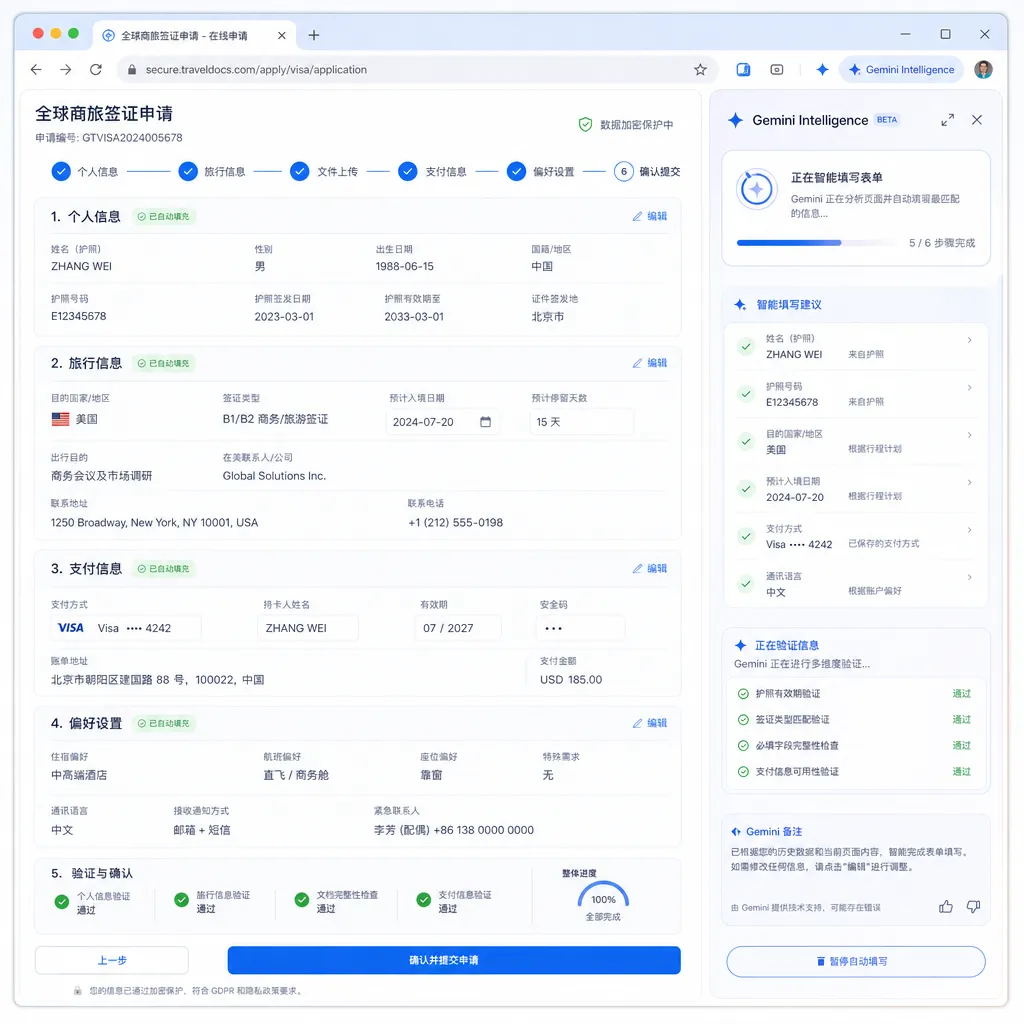
In the demo, a user says, “Help me finish this rental application.” Gemini reads the form structure, extracts relevant data from the user’s Google account and history (income proof, employer details, emergency contacts), and fills each field accordingly. When uploads are required, it calls Google Drive; when signatures are needed, it prompts the user for confirmation.
The technical foundation for this capability lies in Gemini’s multimodal understanding and tool invocation skills. It simultaneously handles page DOM structures, form-field semantics, user data permissions, and inter-app communication protocols. Implementation-wise, it’s even more complex than OpenAI’s Operator or Anthropic’s Computer Use, because mobile app sandboxing is stricter than desktop environments.
Chrome Auto-Browsing: The True Battleground of Agents
Even more ambitious is the Chrome Auto-Browsing feature. Google explicitly states that if a task can be done on a webpage, Gemini should be able to do it for the user. This means Gemini can not only fill forms but also click buttons, navigate pages, and handle multi-step processes.
Example: a user says, “Find me a Bluetooth headset under $50 with at least a 4-star rating on Amazon, add it to the cart but don’t check out.” Gemini must open Amazon, enter a search term, apply filters, browse listings, compare reviews, select a product, and add it to the cart. That’s a typical multi-step decision-making task far beyond standard voice assistants.
Google plans to roll out the Chrome Auto-Browsing feature starting in June, initially to Pixel and select Samsung Galaxy devices. The timing is telling — OpenAI launched Operator in January, and Anthropic’s Computer Use went live in October the previous year. Google may be later, but its advantage lies in system-level integration: Gemini Intelligence is an Android-native capability, requiring no extra installation and offering finer-grained permission control.
Technically, Chrome Auto-Browsing depends on Gemini’s visual understanding and reasoning. It converts rendered web pages into visual inputs, interprets layouts and interactive elements, then generates an operational sequence. This concept is similar to Anthropic’s Computer Use, but Google emphasizes boundaries — Gemini only works within user-authorized apps and tasks. This reflects a compromise between privacy and security — a constraint every mobile Agent must face.
Edge-Cloud Collaboration: A Pragmatic Computing Strategy
Gemini Intelligence adopts a hybrid device-cloud architecture. Simple requests are handled by the on-device Gemini Nano, while complex tasks are offloaded to the cloud-based Gemini. It’s a pragmatic strategy — on-device models offer low latency and better privacy but limited power; cloud models offer stronger capabilities but incur network and privacy overheads.
Gemini Nano is a lightweight model optimized for mobile devices with around 1 billion parameters, capable of real-time inference on flagship phone NPUs. It handles tasks like text rewriting, simple Q&A, and local data retrieval. For complex reasoning, multi-step planning, and external tool usage, the system automatically switches to cloud Gemini (possibly Gemini 1.5 Pro or newer).
This edge-cloud collaboration isn’t new — Apple’s Apple Intelligence follows a similar architecture. The key lies in its switching strategy: which tasks run locally, which go to the cloud, and how to balance latency, cost, and privacy. Google hasn’t revealed specifics, but demos suggest tasks like form filling and widget generation are processed in the cloud due to their semantic complexity and code generation requirements.
For developers, edge-cloud collaboration means Gemini Intelligence’s ceiling is determined by the cloud model. As Google upgrades Gemini in the cloud (e.g., to Gemini 2.0), device experiences automatically improve without OS updates. This is the advantage of cloud-native AI and a key differentiator from Apple — Apple’s model updates rely on iOS versions, while Google can upgrade cloud capabilities anytime.
Create My Widget: Natural-Language UI Generation
Gemini Intelligence introduces two new tools, and one of them — Create My Widget — is particularly interesting. Users describe a desired widget in natural language, and Gemini generates and renders the corresponding code. For example, saying “Make a widget that shows today’s step count and calories, with a gradient background,” leads Gemini to produce Android Widget code that the user can pin to the home screen.
Fundamentally, this is code generation disguised as “vibe-coded widgets.” Google’s marketing language avoids the phrase “AI-generated code,” instead highlighting how users can “express what they want to feel.” This framing lowers the technical barrier, making it feel more like designing than programming.
Technically, Create My Widget relies on Gemini’s code-generation capabilities and the standardized Android Widget API. Widget code structures are relatively fixed — layout, data binding, and update logic — making them suitable for template-based generation. The challenge lies in interpreting fuzzy user descriptions: What exact colors for “gradient”? Where to fetch “step count”? Gemini must perform semantic understanding, parameter inference, API calls, and finally generate executable code.
The potential lies in extensibility. If Google opens the Widget-generation API, third-party apps could plug in, allowing users to customize any app’s widgets via natural language. Expanding further, if applied to in-app UI editing, a user could say “Make this button round and move it to the top-right,” and Gemini would directly modify the layout — a glimpse of AI-native interaction.
Gboard Rambler: The Polishing Layer for Voice Input
The Rambler mode in Gboard targets voice dictation scenarios. When users speak, they often repeat themselves, revise phrases, or insert add-ons, resulting in messy text. Rambler refines this input in real time, producing fluent written output.
This seemingly simple function tackles a real pain point in speech-to-text. Traditional speech transcription mirrors what’s said literally — including stutters, duplicates, and filler words. Rambler adds semantic understanding and text reconstruction, turning casual speech into polished language.
Technically, Rambler handles live audio streams, parses semantics, and outputs refined text — demanding extremely low latency, as users can’t wait seconds for results. It likely runs on-device via Gemini Nano since cloud latency is too high, showcasing Nano’s strong text-generation ability for real-time use.
Rambler fits many contexts — composing emails, taking notes, sending messages, writing documents. For users who dislike typing or need rapid input, it’s invaluable. More importantly, it reduces the psychological barrier to using voice input — users can speak freely, knowing AI will tidy it up.
Rollout Strategy: Gradual Launch, Flagships First
Google plans to launch Gemini Intelligence gradually starting this summer, beginning with Pixel and select Samsung Galaxy flagships, with Chrome Auto-Browsing starting June. This cautious rollout suggests Google still lacks full confidence in Agent stability.
In terms of product maturity, Gemini Intelligence remains early-stage. Tasks like form filling and widget generation are relatively controlled, but auto-browsing involves complex multi-step operations prone to errors. Testing first on Pixel and Galaxy devices for feedback before scaling wider is a prudent approach.
Another factor is computational cost. Cloud executions of Gemini Intelligence generate heavy inference loads, so Google must throttle scale to manage expenses. Gradual rollout smooths traffic growth and allows time for infrastructure expansion.
Competitively, this upgrade directly responds to OpenAI and Anthropic. Operator has shown its capabilities on desktop, and Computer Use API is rapidly iterating. Google has strengths in mobile integration but faces slower rollout due to Android’s fragmentation — meaning most users will wait long before access.
Android Auto and In-Car Integration
Google also confirmed that vehicles supporting Android Auto will gain Gemini Intelligence capabilities. This is a compelling expansion — in cars, where users’ hands and eyes are occupied, voice interaction is essential. If Gemini can handle navigation planning, music playback, and message replies, in-car UX will improve dramatically.
But in-car scenarios pose extra challenges. First, safety — AI actions must never interfere with driving and must involve user confirmations. Second, network stability — vehicular connections are less reliable, risking failed cloud calls. Third, permission management — cars are often shared, so Gemini must distinguish users and their data rights.
While details remain undisclosed, logic suggests an in-car Gemini Intelligence will operate conservatively — focusing on low-risk tasks such as navigation, communication, and media control, not enabling risky features like Chrome Auto-Browsing.
Comparison with Competitors: Differentiating Mobile Agents
Comparing Gemini Intelligence with competing products highlights key differences:
vs OpenAI Operator: Operator is a desktop browser extension relying on Chrome APIs, limited to browser operations. Gemini Intelligence is system-level, able to coordinate across apps, but exclusive to mobile. Operator’s upside is cross-platform (Windows/Mac/Linux), Gemini’s is deep Android integration with system APIs.
vs Anthropic Computer Use: Computer Use employs screenshots and simulated mouse-keyboard input to control desktop apps universally. Gemini Intelligence instead leverages Android APIs and app integrations, making it more performant but dependent on app support. Computer Use’s edge is generality, Gemini’s is speed and permission control.
vs Apple Intelligence: Apple’s AI strategy is conservative — focused on on-device inference and privacy, with limited Agent capabilities. Gemini Intelligence is bolder, enabling cross-app and cross-web automation. Apple’s strength is privacy and ecosystem control; Google’s is AI capability and cloud scale.
In short, Gemini Intelligence is Google’s attempt to build an Agent moat on mobile. While desktop already has Operator and Computer Use, mobile remains open territory. If Google establishes an Android standard for Agents, it could lead the next era of interaction paradigms.
Developer Perspective: API and Ecosystem
Google hasn’t yet announced a developer API for Gemini Intelligence but logically will in the future. If third-party apps can integrate with Gemini, users could use natural language to operate any app — “Order takeout on Meituan,” “Book tomorrow’s flight to Shanghai on Ctrip.” That’s the ultimate Agent ecosystem.
However, open APIs bring permission and security challenges. Gemini must access app data and execute actions, invoking sensitive privileges. Google will need a robust auditing process to prevent misuse — similar to WeChat Mini Programs or iOS App Clips, but far more complex.
Commercially, Gemini Intelligence could spur new revenue. Developers may pay for API access, and Google could monetize Agent calls. More importantly, it would deepen Android user dependence, bolstering Google’s mobile dominance.
For domestic developers, access might come via aggregation platforms like OpenAI Hub, which support Gemini models under OpenAI-compatible formats without VPN. If Google opens Gemini Intelligence APIs, such platforms would offer convenient integration paths.
Privacy and Security: The Agent’s Achilles’ Heel
Google repeatedly stresses Gemini Intelligence’s boundaries — only operating within user-authorized apps and explicit tasks. This addresses privacy concerns and reflects a fundamental challenge for any Agent product.
The stronger the Agent, the greater the privacy risk. Gemini needs access to personal data (email, calendar, contacts, browsing history), third-party services (banking, commerce, social apps), and sensitive actions (payments, purchases, messages). Any misstep could be devastating.
Google’s mitigation strategy is fine-grained permission control — allowing users to specify what apps Gemini can access, what data it can read, and what actions it can perform. Each sensitive task triggers a confirmation. It extends Android’s permission system but with even finer detail.
Another risk is Agent abuse — hackers tricking Gemini into executing harmful actions (like unauthorized payments or data exposure). Google must enforce robust model alignment to ensure Gemini rejects clearly dangerous commands. It’s a classical AI safety problem — unsolved, but manageable through continuous refinement.
From a user’s standpoint, trust is fragile. People must believe Gemini won’t misoperate, leak data, or be exploited. Such trust forms slowly yet can be destroyed in a single incident. Google’s cautious rollout is thus partly about risk containment.
Conclusion: The Dawn of Mobile Agents
Gemini Intelligence marks Google’s first systemic step into mobile Agents. It surpasses traditional voice assistants, embodying true automation. Yet, it remains early-stage — many features need real-world validation.
Its importance lies not in individual features but in direction. Google has redefined Gemini’s role — from chatbot to task-performing Agent. This shift will ripple through all future design, permission, API, and business decisions.
Competitively, the mobile Agent arena is still blue ocean. OpenAI and Anthropic focus on desktops, Apple is conservative, leaving Google a first-mover edge on Android. But challenges persist — ecosystem fragmentation, privacy concerns, and user trust.
For developers, Gemini Intelligence signals a major opportunity. Once APIs open, app interaction could transform — from “users operating apps” to “users directing Agents to operate apps.” That could be the next evolution of mobile computing.
Ultimately, Gemini Intelligence validates a broader trend: the next frontier of AI isn’t stronger models — it’s smarter Agents. Model capability is already formidable; the key question now is how to translate capability into user value. With this launch, Google takes its first serious step toward answering that question.
References
- Google to roll out Gemini Intelligence this summer: reshaping Android phone AI interaction, enabling browser operations like form filling — IT Home — Detailed report from IT Home on Gemini Intelligence features


