
Xcode 26.5 Released: The AI Agent Finally Learns to “Ask Before Acting”
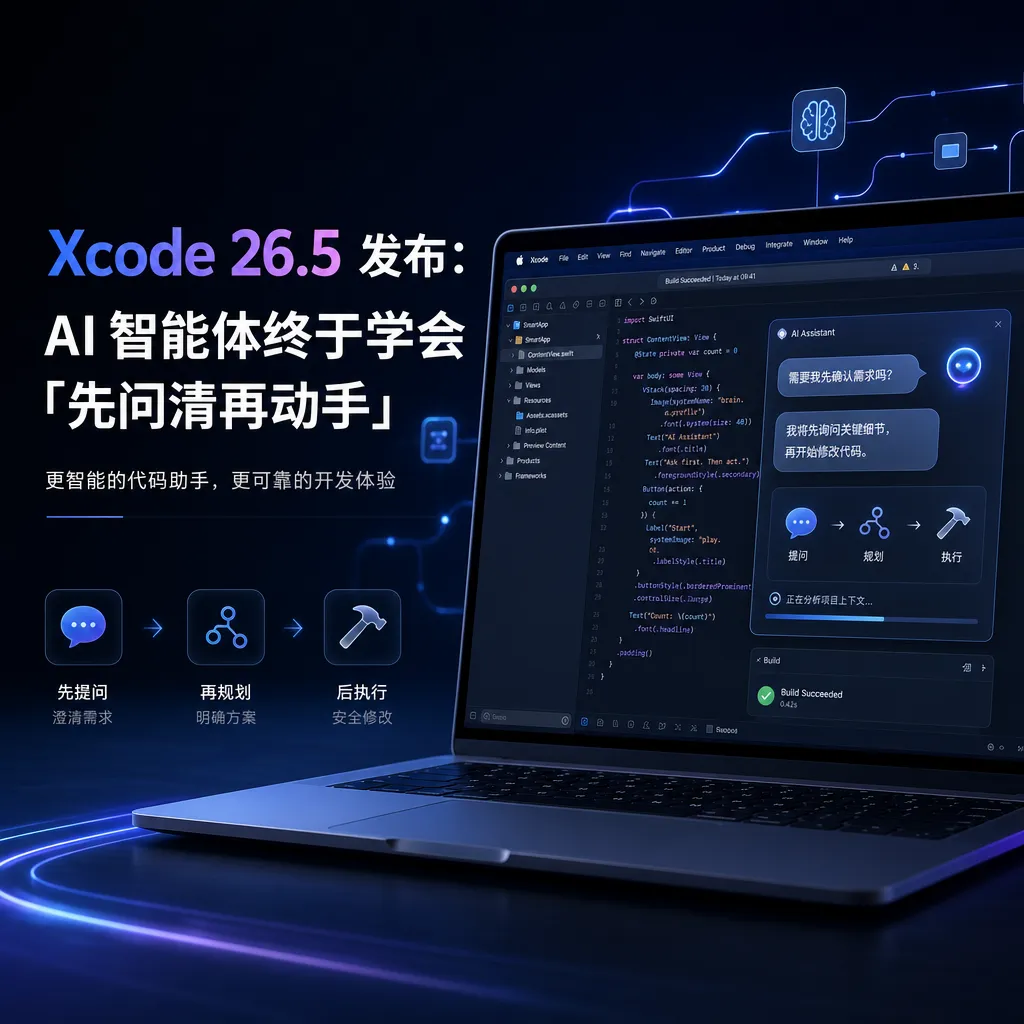
Apple introduced a message queue mechanism in Xcode 26.5, allowing AI agents to actively ask clarifying questions while generating code. It also enables developers to send multiple instructions consecutively without waiting for the previous response to complete, significantly improving collaboration efficiency in large projects.
Xcode 26.5 Released: The AI Agent Finally Learns to “Ask First, Act Later”
Apple pushed Xcode 26.5 yesterday (May 12). The core of this update is making the AI agent more “considerate”—it now clarifies your intentions before writing code instead of chaotically modifying things based on vague commands. The newly added message queue mechanism also lets developers queue up multiple requests—as if chatting on WeChat—without having to wait for the AI to finish generating one piece of code before continuing.
This marks another substantial step in Apple’s push toward agent-based programming, following Xcode 26.3’s integration with OpenAI Codex and Anthropic Claude Agent. Version 26.3 enabled AI to handle boilerplate and project-level changes, while 26.5 tackles a deeper issue: how to make human–AI collaboration no longer a turn-based “question–answer” game.
Message Queue: Finally, You Don’t Need to Wait for the AI to Finish Writing
Traditional AI coding assistants use a strictly turn-based model: you issue a command, wait for the AI to generate code, review the result, and then give the next instruction. This can still work for small tweaks but becomes an efficiency killer for large projects.
Here’s a real scenario: you ask the AI to refactor a data layer, but halfway through you realize you forgot to tell it to preserve a certain field, or you suddenly remember you need to add an index. Under the old logic, you’d have to wait for it to finish, then send a second message to add that requirement, and the AI would modify its already-generated code based on that. This kind of “serial waiting” repeats over and over in complex tasks, pausing work for tens of seconds each time.
The message queue mechanism in Xcode 26.5 breaks this limitation. Developers can keep sending new instructions, constraints, or file scopes even while the AI is generating code. These messages go into a queue; the AI processes them in order rather than discarding or interrupting the current task.
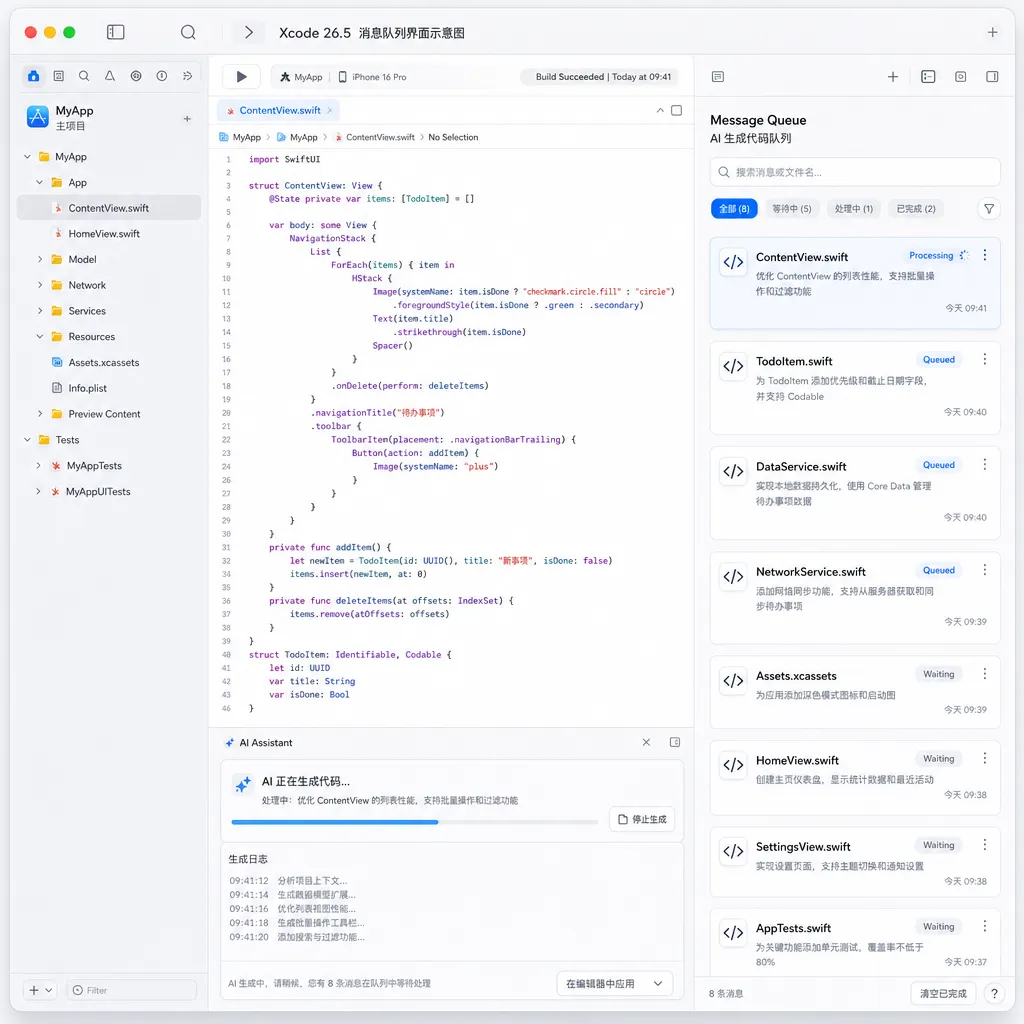
This change might look small, but its impact on workflow is transformative. It shifts collaboration from a “you say one thing, I do one thing” pattern to “you keep talking, I keep working,” much closer to real pair programming. In scenarios requiring iterative refinement—like adjusting API designs, optimizing database queries, or refactoring component structures—the message queue lets you express your thoughts fluidly without being blocked by the AI’s generation speed.
Technically, this requires the AI agent to have stronger context management. It must understand both the task it’s currently executing and upcoming queued messages, then determine whether those are independent tasks or amendments to the current one. If they’re amendments, the AI must dynamically adjust its strategy during generation; if independent, it must maintain proper task dependency handling.
Active Clarification: The AI Finally Learns to “Ask When Unsure”
Even more important than the message queue is another new feature: the AI agent now actively asks questions before executing tasks.
This solves one of the biggest pain points of AI coding assistants—misunderstanding the request. Developer instructions are often imprecise; for example, “optimize this function’s performance.” The AI might interpret that as reducing time complexity, lowering memory usage, or switching to a more efficient algorithm library. If it acts on its own assumptions, the result often veers off course, and the developer has to roll back and restate their needs.
The Xcode 26.5 agent will now pause and ask clarifying questions when encountering vague commands. For example, if you say, “Add caching to this API,” it might ask:
- Should the cache be in-memory or in Redis?
- How long should the cache last?
- Cache all requests or only certain parameter combinations?
- Use LRU or LFU for cache eviction?
These are common-sense clarifications in human communication but must be explicitly modeled for AI. Apple’s clarification mechanism in 26.5 essentially adds an “uncertainty detection” module. When task description entropy exceeds a threshold or key parameters are missing, the AI generates clarification questions instead of proceeding based on default assumptions.

The challenge lies in balance: ask too many questions and developers will find the AI “dumb” and demanding; ask too few and misunderstandings arise. Apple’s method is to trigger clarification only at “high-risk decision points”—for irreversible actions like deleting data, restructuring architecture, or changing dependencies. For low-risk tasks like formatting or renaming variables, it proceeds automatically.
Practically, this greatly reduces “AI messing up code.” In large projects, a wrong assumption might corrupt dozens of files—costly to revert. Letting the AI clarify first adds an extra round of dialogue but avoids bigger rework later.
Technical Details: How the Message Queue Works with the Agent
The message queue and active clarification features may seem separate, but they need deep integration to work effectively.
Traditional AI coding assistants are stateless: each request is independent, and the AI clears its context afterward. With message queues, the agent needs to maintain a persistent task state machine recording:
- The task in progress and its progress state
- The queued messages waiting for processing
- Each message’s dependencies (independent task or revision of a previous one)
- Intermediate generated code states (so later messages can build on the latest state)
When the AI encounters a clarification need during code generation, it must:
- Pause current code generation
- Insert clarification questions at the front of the queue (higher priority than user follow-ups)
- Wait for user responses
- Update task parameters based on responses
- Resume generation
This requires interruptible and resumable execution capability. Engineering-wise, it likely depends on:
- Checkpointing: saving intermediate states to resume after interruptions
- Incremental generation: producing code in chunks, allowing clarifications between them
- Context compression: as the message queue grows, compressing historical context to keep only relevant details
Apple likely upgraded its agent framework from version 26.3 for this. The 26.3 agent behaved more like a “task executor”—completing commands in one go; the 26.5 agent, in contrast, acts like a “collaboration partner,” maintaining an ongoing dialogue while executing.
Comparing GitHub Copilot and Cursor: Apple’s Differentiation
The AI coding assistant field is already crowded. GitHub Copilot dominates with Microsoft’s ecosystem and OpenAI tech; Cursor draws independent developers with more aggressive agent capabilities; JetBrains AI Assistant ties deeply into IntelliJ IDEs. Apple entered late but has a clear angle: focus on interaction design, not just model power.
GitHub Copilot’s core is “code completion”—predicting the next code snippet as you type—but still fundamentally turn-based: “write a bit, predict a bit.” Copilot Chat supports dialogue but remains turn-by-turn.
Cursor goes further. Its Composer mode lets AI modify multiple files directly and infer project-wide changes automatically. However, Cursor’s issue is being too aggressive—it often makes large-scale changes without proper confirmation, forcing frequent rollbacks. Moreover, its message mechanism remains serial—you must wait for one task to finish before sending the next.
Xcode 26.5 sits between them: it retains Cursor-level multi-file edit power (from 26.3) but adds the conservative “ask first, act later” safeguard to prevent erratic AI edits. Meanwhile, the message queue ensures non-blocking, fluid interactions—no rigid turns like Copilot, no loss of control like Cursor.
Apple clearly positions Xcode’s AI as a professional tool rather than a productivity toy. It doesn’t chase flashy “generate an entire project with one click” promises, but instead focuses on reducing time spent on repetitive tasks. Message queues and clarifications make the AI more controllable and predictable—especially valuable for enterprise development.
Other Updates: Swift 6.3.2 and StoreKit Testing
Xcode 26.5 also includes the Swift 6.3.2 update and SDKs for iOS 26.5, iPadOS 26.5, tvOS 26.5, watchOS 26.5, visionOS 26.5, and macOS 26.5.
Swift 6.3.2 mainly brings bug fixes and stability improvements, with no major language changes. Since Swift 6.0 introduced strict concurrency checks and the Sendable protocol last year, the 6.3.x series is focused on refining these implementations rather than adding features.
Another notable update is support for StoreKit Testing of “12-month commitment monthly subscriptions.” Apple introduced this model in March, letting developers offer discounted rates for users who commit to a year—similar to annual billing discounts in cloud services.
Previously, developers could only test such subscription logic in live environments. Now, they can simulate full subscription lifecycles in StoreKit Testing, including renewals, early cancellations, and post-commitment price changes. This is a practical improvement that cuts testing costs for subscription-based apps.
The Next Step in AI Programming: From Tool to Collaborator
Xcode 26.5’s direction is clear: evolve AI from an “automation tool” into a “collaborative partner.”
Traditional automation tools are deterministic—you give input, they output fixed results. AI agents are probabilistic—the same instruction can yield different results depending on context. This uncertainty is both their strength (handling ambiguity) and their weakness (susceptibility to errors).
Apple’s solution introduces more “human–machine negotiation.” Message queues let developers express thoughts continuously, and active clarification allows AI to confirm uncertainties. Both mechanisms effectively reduce AI’s “autonomy,” handing key decisions back to humans.
This design philosophy differs from the mainstream “fully autonomous agent” trend. Many AI agent frameworks—like AutoGPT or LangChain Agent—pursue complete automation: you give a goal, and the AI plans, executes, and handles errors by itself. But in practice, such setups are often unreliable, getting stuck or going off track.
Apple opts for a semi-automated approach: the AI executes, the human decides. Given today’s AI capability limits, this is likely more pragmatic. Once reasoning and reliability improve, autonomy can gradually increase.
In the long run, the ultimate form of agent-based programming may not be “AI replacing programmers,” but “AI and programmers dividing labor.” Developers handle system architecture, technology choices, and critical algorithms; AI handles implementation, testing, and documentation. Xcode 26.5’s message queue and clarification features are early explorations of how this new collaboration model might work.
Real-World Developer Impact
For developers already using Xcode 26.3’s agent features, the 26.5 upgrade is seamless. Both message queues and clarifications are on by default—no setup needed.
To fully leverage them, developers should adjust their habits:
- Don’t wait for the AI to finish before speaking again. If you think of new constraints mid-process, just message them—the AI will queue and handle them.
- Give room for the AI to ask questions. If your instruction is vague, let the AI clarify before acting; skipping this may cause rework later.
- Break complex tasks into multiple messages. Instead of sending one long description, split it into shorter follow-ups—easier for the AI to parse and adapt.
- Use the queue for “thought logging.” While brainstorming, send your ideas one by one—even mid-generation. They’ll queue up, effectively streaming your thought process to the AI.
For newcomers, 26.5 is an excellent entry point. Compared with 26.3, the interaction is smoother, and AI error rates are lower.
Note, however, that Xcode’s AI still relies on cloud APIs (OpenAI Codex and Anthropic Claude), requiring Internet connectivity. Teams in isolated environments or with strict code security needs may have to wait for an on-device solution.
In Closing
The Xcode 26.5 update isn’t radical, but it’s pragmatic. Rather than chasing hype like “auto-generate entire projects,” Apple focused on real collaboration pain points.
Message queues make human–AI teamwork smoother; active clarification makes the AI more controllable. Behind these simple features lies deep thinking about how AI should assist professional developers.
From 26.3 to 26.5, Apple’s direction in agent-based programming grows clearer: not replacing programmers, but giving them a smarter assistant—capable of handling routine work and inferring intent, but leaving the key decisions to humans.
Given the current state of AI, this is the most sensible stance. As reasoning and reliability evolve, Apple can gradually grant its agents more autonomy.
References
- Apple Releases Xcode 26.5: Agents That Ask Before Acting, Support for AI Message Queues – IT Home – Official release notes and feature descriptions


