
Meta open-sources VR framework with AI integration: Rebuilding tens of thousands of lines of code in 15 hours
Meta has integrated AI agent workflows into the open-source VR development framework Immersive Web SDK, enabling compatibility with tools like Claude and Cursor. In the official demo, AI rebuilt a VR project—previously requiring tens of thousands of lines of code—within 15 hours, showcasing the practical efficiency of AI-assisted WebXR development.
Meta Open-Source VR Framework Integrates AI: Rebuilding Tens of Thousands of Lines of Code in 15 Hours
Meta just gave its open-source VR development framework, Immersive Web SDK (IWSDK), a huge upgrade: direct integration of AI agent workflows. Developers can now call on AI coding assistants such as Claude Code, Cursor, and GitHub Copilot to build WebXR applications. This isn’t mere code completion—it’s a closed loop from creative concept to interactive VR experience.
To prove this isn’t just a slide-deck demo, Meta used its own 2022 VR gardening showcase project, Project Flowerbed—a complex app with tens of thousands of lines of custom code—as a test case. Using IWSDK’s AI workflow, and keeping all original art assets, Meta says it fully rebuilt the Web VR app in just 15 hours. Compared to traditional development cycles, that speed is almost unbelievable.
WebXR + AI Workflow: Targeting Which Problems
When IWSDK debuted at last year’s Meta Connect conference, its positioning was clear: encapsulate the repetitive, technically demanding low-level engineering work—physics systems, gesture tracking, character movement, object grabbing interactions, spatial UI—so that developers can focus on creative ideas. This new AI workflow extends that philosophy by automating the “writing code” part of the process.
The pain points of traditional VR development stem from a complex tech stack. You have to understand 3D graphics, physics engines, input systems, performance optimization, and hardware adaptation across different devices. Even with mature engines like Unity or Unreal, going from prototype to release takes a long time. WebXR has the advantage of being cross-platform—one codebase runs on desktop and all VR devices, accessible via a link without installations. But WebXR development is still challenging; libraries like Three.js, while powerful, have steep learning curves.
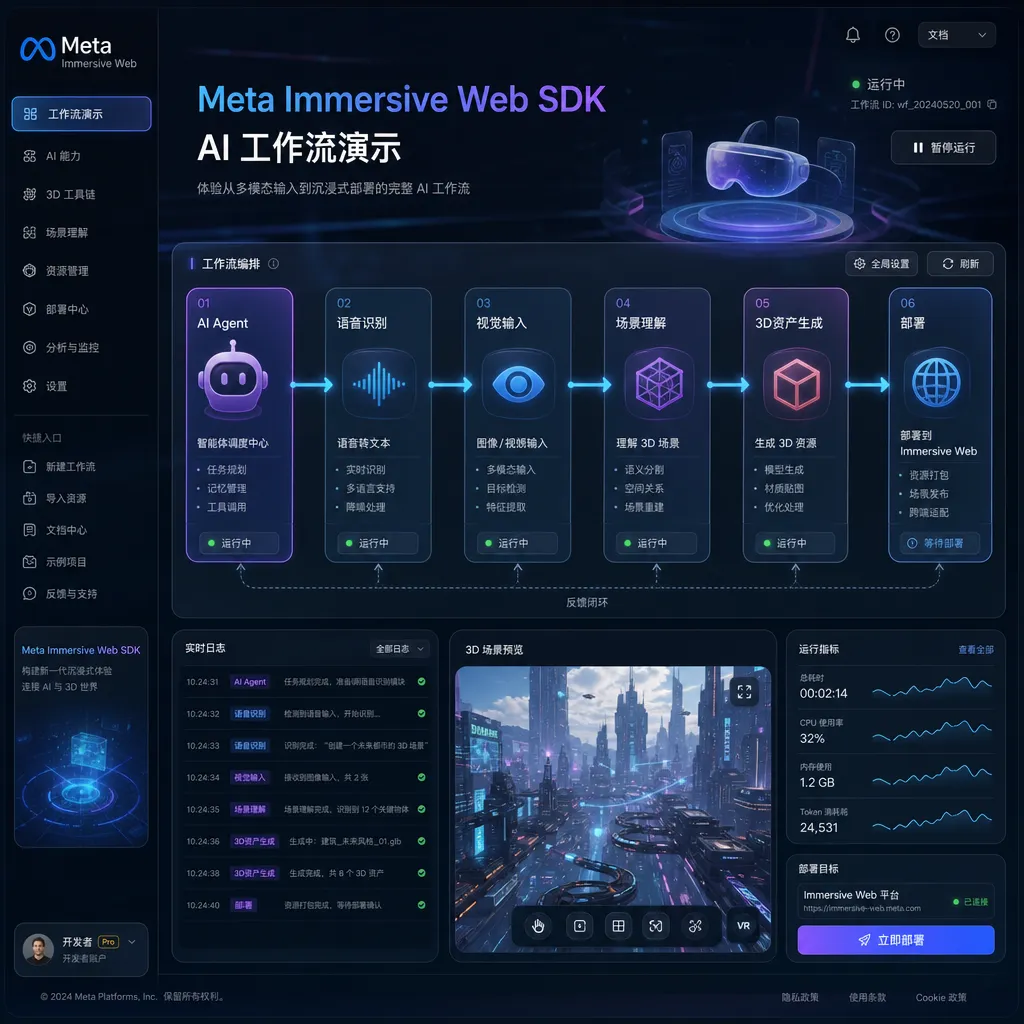
Meta’s thinking is: since AI coding assistants can already handle complex logic, why not let them generate VR apps directly? IWSDK provides standardized components and APIs; AI just needs to output code following those rules, while developers describe requirements, verify results, and iterate. This “agentic workflow” emphasizes a collaboration loop: AI generates code → developer tests → feedback → AI fixes → verify again.
What Rebuilding Project Flowerbed in 15 Hours Means
Project Flowerbed was released by Meta in 2022 as a VR gardening demo where users could plant, water, and trim plants in a virtual space, with realistic physical interaction and visual feedback. The original project used Meta’s internal VR toolchain and custom code for hand interactions, object grabbing, plant growth animation, etc.
In the rebuild using IWSDK + AI workflow, Meta kept the original 3D models, textures, and sounds—but completely rewrote the code. Official numbers say the entire process took 15 hours, which included:
- Describing functional requirements in natural language
- AI generating the initial code framework
- Testing interaction effects in a VR headset
- Providing natural-language feedback to AI for problems found
- AI fixing bugs or adjusting implementation
- Repeating test-feedback-fix cycles until satisfactory results
The key point here isn’t “how much code AI wrote,” but that “developers didn’t have to write code themselves to complete a complex VR project.” Normally, even with existing art assets, rewriting tens of thousands of lines of code would take weeks and require experienced VR engineers. Now, in theory, a product designer with no coding skills could use AI assistants to turn their ideas into runnable WebXR apps.
Of course, the “15 hours” figure deserves some skepticism. Meta didn’t disclose detailed workflow data, such as how many people were involved, what the code quality was like, or how much manual correction happened. Still, even halving that efficiency would represent an order-of-magnitude improvement over traditional methods.
The Technical Implementation of the AI Workflow: More Than Just API Calls
IWSDK’s AI workflow isn’t simply plugging in Claude or Cursor’s API. Meta did several things to help AI understand VR development:
1. Standardized Component Library and API
IWSDK comes with over 40 commonly used VR components covering hand interaction, physics simulation, spatial audio, UI systems, and more. These components have clear documentation and examples, so AI can directly reference them without reinventing low-level logic. For example, to implement “grab an object,” traditional methods require collision detection, gesture recognition, and physical constraints—using IWSDK, you just call the GrabInteraction component and configure parameters.
2. Seamless Integration with Three.js
Built on Three.js, IWSDK plugs directly into existing Three.js projects. That means AI-generated code can reuse vast Three.js ecosystem resources—model loaders, material systems, post-processing effects. Developers don’t need to handle conversions, and AI can use Three.js documentation and community code as references.
3. Quick-Start Templates
Meta provides the command npm create @iwsdk@latest to create a VR app template in under a minute, complete with base scenes, hand tracking, and teleportation movement. AI can develop incrementally from this scaffold instead of starting from scratch. It’s a smart design—give AI a “framework,” and it just fills in business logic, without worrying about project setup or dependency management.
4. VR-Specific Prompt Optimization
Meta provides extensive examples of prompts tailored for VR development in its documentation, showing developers how to describe VR interaction requirements in natural language. For example, the prompt “implement two-handed object grabbing with scaling/stretching” given in IWSDK context will make AI generate code calling the TwoHandedGrabInteraction component, handling tracking, physics constraints, and visual feedback automatically.
Supported AI Tools: Claude, Cursor, Copilot, All Compatible
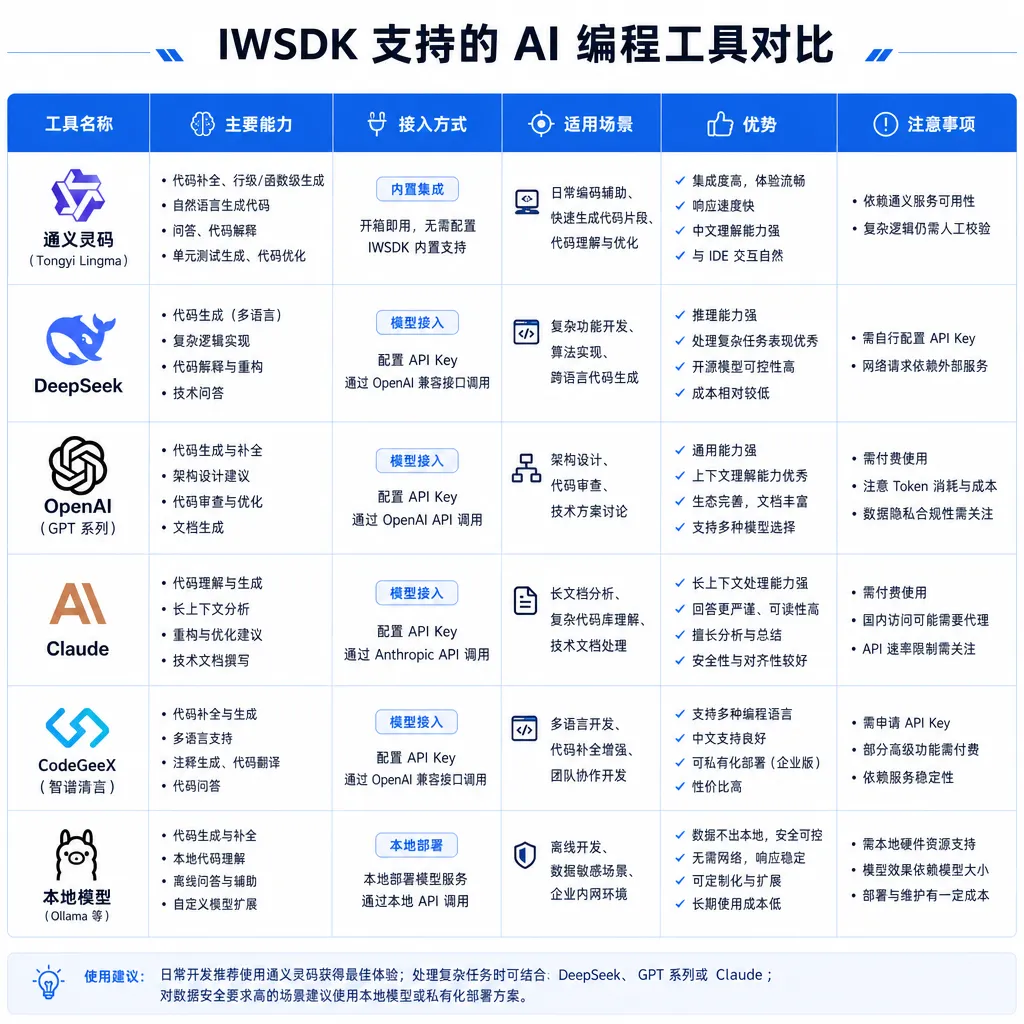
IWSDK’s AI workflow isn’t tied to any specific tool; theoretically, any AI coding assistant can work with it. Meta officially tested:
- Claude Code: Anthropic’s coding-focused model, good at understanding complex requirements and generating structured code
- Cursor: A VSCode-based AI editor supporting multi-turn conversational development
- GitHub Copilot: Microsoft’s AI assistant integrated into popular IDEs
- OpenAI Codex: GPT-based code generation model
They all share “context awareness”—reading project files, understanding code structure, and generating new functionality based on existing code. IWSDK’s documentation and component definitions are structured, so AI can quickly locate APIs and usage patterns.
From testing, behavior varies by tool: Claude excels at complex interaction logic understanding; Cursor offers smoother conversational iteration; Copilot has the edge in completion speed. Developers can mix and match—use Claude for initial setup, Cursor for iterative refinement, Copilot to fill repetitive code.
Amplifying WebXR’s Cross-Platform Advantages
WebXR is inherently cross-platform—a single codebase runs on Meta Quest, PSVR, PC VR, and even desktop browsers. But traditional WebXR development must handle input differences (controllers vs. hand tracking), performance gaps (mobile vs. PC VR), and browser compatibility issues. IWSDK wraps those adaptation logics so that AI-generated code automatically supports multiple devices.
That’s huge for indie developers and small teams. Previously, making a VR app meant choosing heavyweight engines like Unity/Unreal, or managing low-level details yourself with WebXR frameworks like A-Frame/Babylon.js. Now, IWSDK + AI workflow means one person can build a cross-platform VR experience in a short time, distributed via the web—no installs, just click and play.
Meta is clearly betting on WebXR as a key channel for VR content distribution. Compared to native apps, Web VR is instantly accessible, unreviewed, and fast to iterate. The tradeoff is performance and feature limits imposed by browsers. But with WebGPU and the WebXR Device API maturing, Web VR’s capability frontier is expanding. IWSDK’s mission is to lower the barrier to WebXR creation, enabling rapid prototyping and publishing.
Ideal Use Cases for This Workflow
IWSDK + AI workflow isn’t universal—it shines in specific scenarios:
Suitable for:
- Fast prototyping: designers or PMs can test ideas without waiting for developer cycles
- Educational/training content: creators can make VR teaching scenes without coding skills
- Small interactive art experiences: artists or indie developers experimenting with VR
- Converting existing Three.js projects into VR: quickly add VR support to existing Web 3D experiences
Not suitable for:
- Large-scale multiplayer games: require network sync, state management, server logic
- Performance-critical apps: WebXR’s ceiling is lower than native VR
- Deeply customized projects: if features go beyond IWSDK’s library, AI-generated code may be unreliable
Meta itself admits the AI workflow is better for “0-to-1” idea realization than “1-to-100” production optimization. Commercial-grade VR apps will still need professionals for performance tuning, bug fixing, and UX polish. But AI can help you quickly implement core gameplay and check viability—saving trial-and-error costs.
Where the Limits of AI-Assisted Development Lie
IWSDK’s case again proves AI excels in structured, well-defined domains. VR development is complex but has fixed interaction patterns—grabbing, teleporting, ray selection, gesture recognition, etc. IWSDK packages these into components; AI just has to combine them rather than invent new algorithms.
However, limitations remain:
1. Generating Innovative Interactions Is Hard
If you want a completely new kind of VR interaction, AI can’t help much—it can only mimic existing patterns based on documentation, not invent new paradigms. Human designers still need to prototype those.
2. Complex Logic Is Error-Prone
Project Flowerbed was relatively simple—mostly physical interaction and visual response. Apps with complex state machines, multiplayer sync, or data persistence could break down under AI-generated logic. Developers need technical skill to review and fix issues.
3. Performance Optimization Still Requires Humans
AI can write functional code, but not necessarily efficient code. VR demands high frame rates (at least 72fps, ideally 90fps), as lag causes motion sickness. Optimizing rendering pipelines, memory, and asynchronous loads still needs human expertise.
4. Debugging and Issue Localization Still Relies on Developers
AI can propose fixes based on error messages, but when bugs span module interactions or browser quirks, it often can’t pinpoint root causes. Experienced engineers remain essential.
Meta’s Real Intention: Lowering the Barrier to the Horizon OS Ecosystem
IWSDK is open-source, but Meta has strategic motives. Horizon OS, which runs on Quest headsets, needs more content to attract users. High development cost and time slow ecosystem growth. By combining IWSDK + AI workflow to reduce entry barriers, Meta aims to attract non-professional creators—designers, artists, content producers—to make Quest content.
WebXR’s cross-platform nature also serves Meta’s goals. Though Quest is proprietary hardware, Web VR experiences can run on any WebXR-enabled device, including competitors’. This might seem counterproductive, but it expands the total VR content pool—drawing more users who may later buy Quest.
Another factor: competition with Apple’s Vision Pro. Apple’s visionOS toolchain (SwiftUI + RealityKit) offers great UX but is Apple-only. By open-sourcing IWSDK and integrating AI workflow, Meta is fighting back via developer friendliness. If IWSDK becomes the de facto WebXR standard, Meta gains a stronger position in the VR ecosystem.
Practical Impact for Developers
If you’re a VR developer, IWSDK’s AI workflow is worth exploring—but don’t expect full replacement of traditional development. Realistic applications include:
- Rapid prototyping: Use AI for early versions to test gameplay feasibility
- Learning and reference: Study AI-generated code to understand IWSDK APIs
- Repetitive tasks: Let AI handle scene setup, UI layout, mechanical coding
- Iterative tweaks: Describe changes in natural language and let AI regenerate code
But architecture design, optimization, and UX polish still need human developers. AI is a tool, not a substitute.
If you’re not a developer but want to build VR content, IWSDK + AI workflow indeed lowers barriers. You can describe ideas naturally, have AI produce runnable code, and test in a headset. But you still need to learn foundational VR interaction design, spatial concepts, and performance awareness. AI can write your code—it can’t make your product decisions.
In Conclusion
Meta’s key innovation this round isn’t just “AI can write VR code,” but “AI + standardized frameworks empower non-developers to create VR apps.” The 15-hour Project Flowerbed rebuild is persuasive, but real projects are much more complex.
AI-assisted development is here to stay—but it’s reshaping workflows, not replacing the essence of creation. Good VR experiences still depend on deep understanding of interaction design, user psychology, and technical craft. IWSDK lowers the technical barrier, not the creative one.
For anyone entering VR development, now’s a great time. Toolchains are maturing fast, AI boosts efficiency, and WebXR standards keep evolving. Just don’t expect AI to do everything—it’s your assistant, not a magic wand.
References
- Meta updates its open-source immersive web development framework Immersive Web SDK, adding support for AI integration - IT Home — Chinese report on Meta’s official announcement
- Meta officially releases spatial web development tool Immersive Web SDK - Zhihu column — IWSDK technical and workflow details


