
Osaurus launches on Mac: run models locally or use them in the cloud
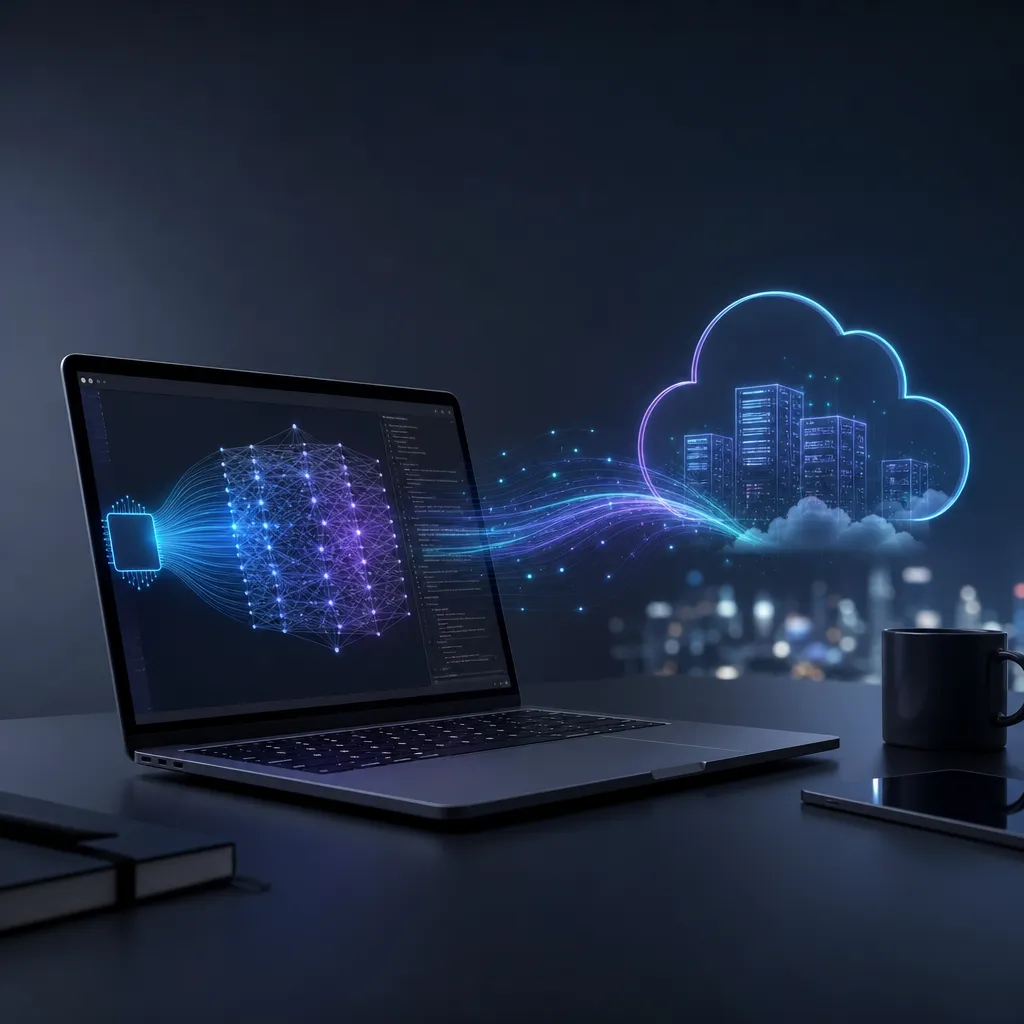
Osaurus, launched by Dinoki Labs, combines local MLX inference and cloud APIs into a native macOS application. Memory, files, and toolchains all stay on the user's hardware, offering privacy enthusiasts and tinkerers a new option.
Osaurus Is Here: A Desktop Framework That Brings Both Local and Cloud AI to the Mac
On May 15, the Dinoki Labs team released Osaurus, a native AI desktop framework for macOS and Apple Silicon. What it does is not complicated, but the concept is interesting: it packages both a local inference engine and a cloud model API inside the same shell, keeping conversation memory, files, and tool calls on the user’s own machine. The model itself can be a local Llama or a remote GPT or Claude.
In short, this is aimed at people who want GPT‑4‑level intelligence without handing all their chat logs to a cloud service. The space hasn’t been quiet over the past two years—Ollama, LM Studio, Jan, and GPT4All each have their fans—but they’re either purely local or purely cloud clients; few combine both sides naturally. Osaurus targets Mac users—specifically developers and power users who have invested in M‑series chips and 32 GB or even 64 GB of RAM.
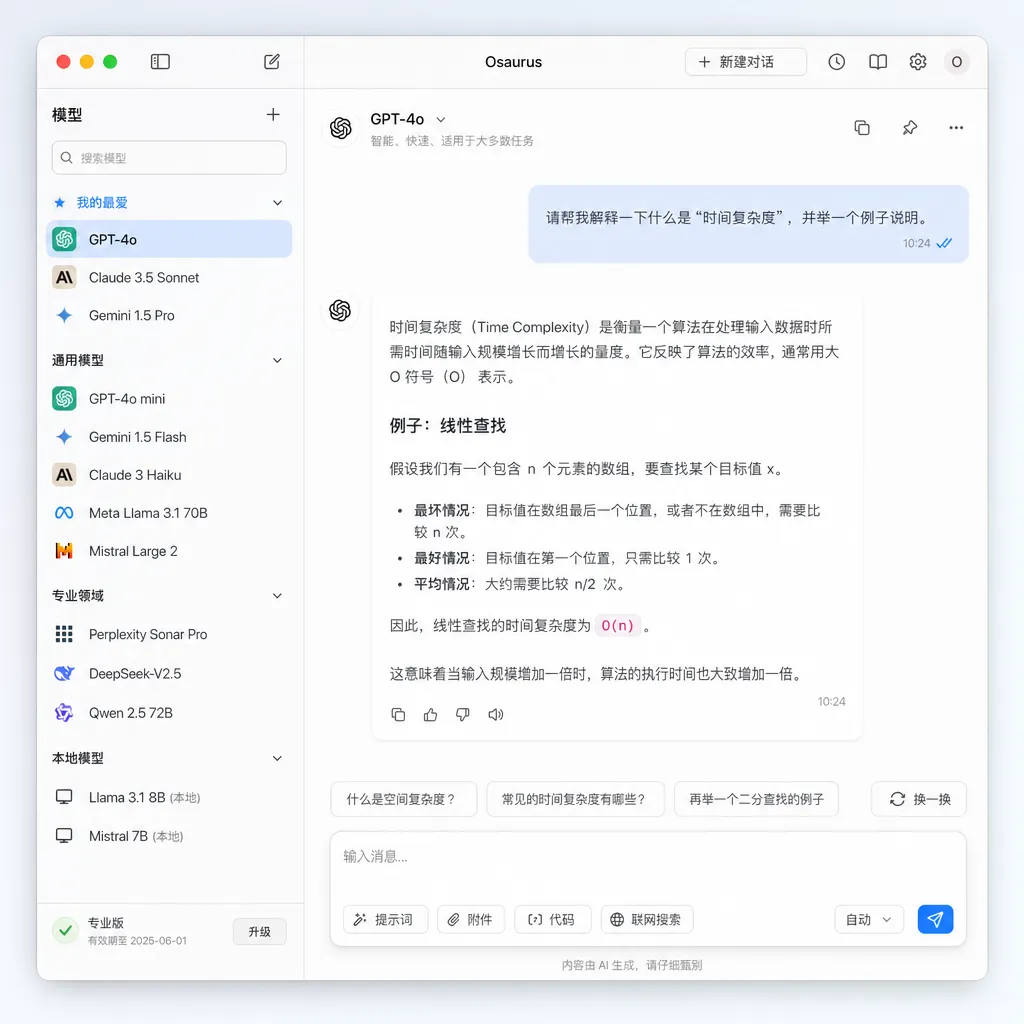
Tech Stack: Built on MLX, Unified by OpenAI‑Compatible Protocols
Osaurus’s local inference is built on MLX—Apple’s own machine‑learning framework released last year. This choice was almost inevitable. MLX is deeply optimized for Apple Silicon’s unified memory architecture; compared with llama.cpp’s Metal implementation, MLX delivers more stable throughput for long contexts and large‑model inference, especially for 70 B‑scale models on M3 Max/M4 Max, where token/s performance is no longer just a slide‑deck number.
Current local model support includes:
- Llama 3.x series
- Qwen 2.5 / Qwen3 series
- Gemma 2/3
- Mistral and its derivatives
- Distilled DeepSeek versions
For remote connections, Osaurus presents itself as a local server compatible with OpenAI’s API. In other words, it exposes an endpoint such as http://localhost:port/v1/chat/completions, which can route to local MLX or forward to OpenAI, Ollama, LM Studio, or any service supporting the same protocol. The benefit is clear: your existing LangChain, LlamaIndex, Continue.dev codebase requires no changes—just point the base_url to Osaurus.
This OpenAI‑compatible protocol has become the de facto standard—from vLLM to SGLang to aggregator platforms—and Osaurus saves both itself and its users by embracing it.
Why Go Hybrid? Isn’t Local Enough?
Local is great—but it has limits.
Hardware defines the ceiling for local models. A MacBook M4 Pro with 36 GB of RAM can comfortably run a Qwen 2.5‑32B 4‑bit model. It’s fine for conversation and just about workable for coding, but once you attempt complex agent workflows, long‑document analysis, or logic‑heavy tasks, there’s still a clear gap compared with Claude 3.5 Sonnet or GPT‑4o. And once local inference starts, fans spin, battery drains, and other tasks must yield.
So Osaurus’s real positioning is “use local for everyday work, call the cloud for heavy lifting.” Model selection is integrated like choosing an input method—within the same chat window, local 7B handles simple queries, while a single click switches complex jobs to GPT‑5 or Claude 4. Editors like Cursor and Zed already use similar hybrid strategies for programming; Osaurus extends the concept to general dialogue and tool invocation.
Most importantly, data ownership stays local. No matter which model you use, conversation history, vector indices, local knowledge bases, and MCP tool configurations—all this “contextual asset” resides on your machine. Switch models without losing memory, and you don’t need to worry about an API provider using your chat logs for training.
Tool Invocation and MCP Support
Osaurus has built‑in support for MCP (Model Context Protocol), which matters. MCP was introduced by Anthropic late last year and has since been adopted by OpenAI and Google—fast becoming the USB‑C of the agent era. Osaurus handles MCP server connections at the configuration‑file level: drop in a JSON file, and tools like file systems, databases, and search engines plug right in.
For example, to let a local Llama 3 read your Obsidian notes, a configuration might look like this:
{
  "mcpServers": {
    "obsidian": {
      "command": "npx",
      "args": ["-y", "@modelcontextprotocol/server-filesystem", "/Users/you/Obsidian"]
    }
  }
}
Once set up, both local and cloud models can call the same tools. That’s the real meaning of “tools stay local”—you don’t need to grant each cloud service separate access to your files.
Differences Compared with Ollama and LM Studio
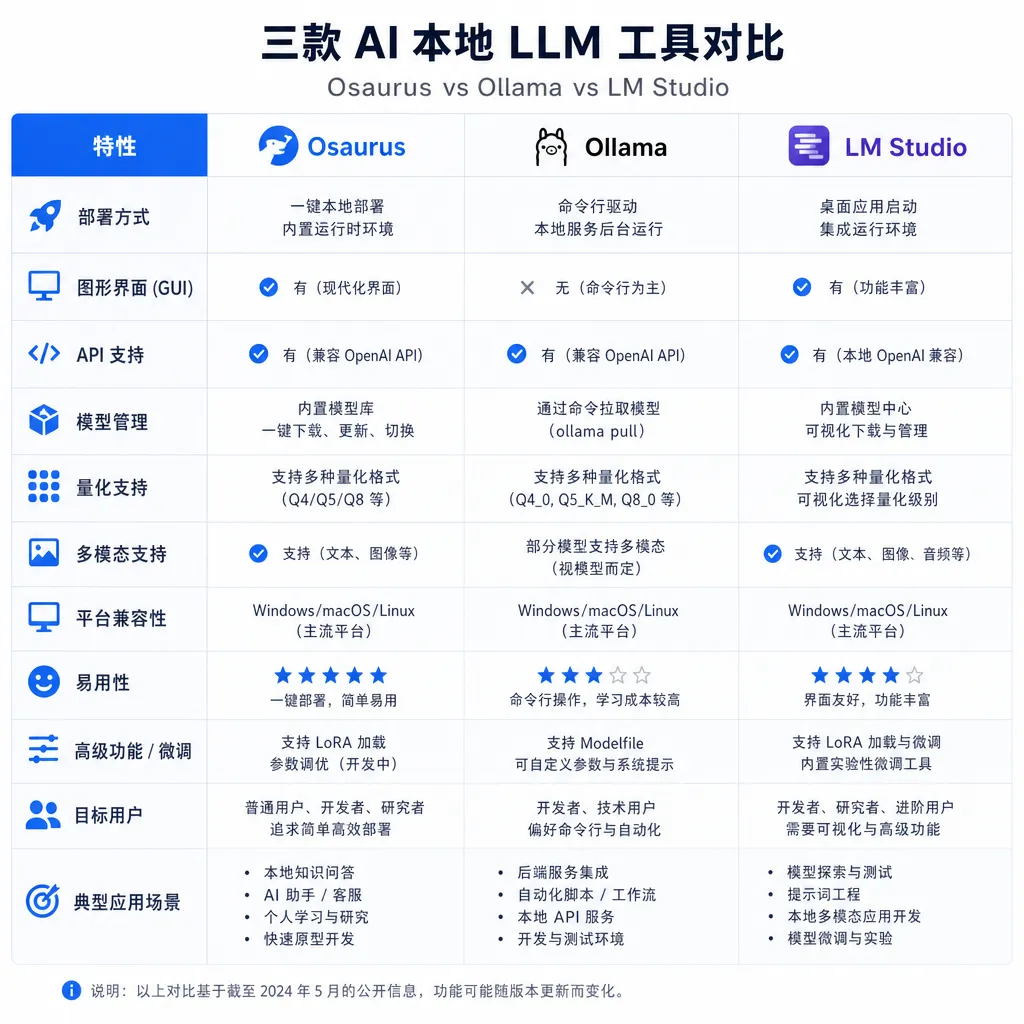
That’s the inevitable question. Ollama is the default for command‑line users; LM Studio dominates GUI users; Jan follows an open‑source full‑stack path. Osaurus stands apart in three ways:
-
Native Mac app. Not an Electron wrapper—it’s written in Swift, launches fast, uses little memory, and integrates deeply with the system. For macOS users who care about that “native” feel, this is a clear plus.
-
Cloud models as first‑class citizens. Ollama relies on third‑party proxies to connect to cloud APIs; LM Studio is only beginning to add support. Osaurus designed cloud integration as a core feature from day one, not as an afterthought.
-
MLX‑first. Ollama is built around llama.cpp; MLX support is community‑patched. Osaurus bets on MLX, which means higher performance limits on Apple Silicon—but at the cost of depending on MLX community conversion speed. It’s a double‑edged sword.
A Few Interesting Details
Model‑routing strategy. Osaurus offers rule‑based routing—you can set rules like “code‑related queries go to cloud GPT, casual chat goes to local Qwen.” Simple in concept, but if well done, it can save many API costs. Routing itself runs on a small model; poorly tuned, it might introduce latency.
OpenAI‑compatible server mode. Osaurus can run as a background service so other apps (Cursor, Zed, Raycast AI extensions, custom scripts) can access it via localhost. Osaurus decides which model to use behind the scenes, effectively becoming your local AI gateway.
Model management. Downloading, quantization, and version control are handled via GUI—much friendlier for those who avoid the command line compared with Ollama’s pull commands.
Privacy boundaries. To be clear—true offline use happens only with local models. When the cloud API is called, data is of course sent out. Osaurus’s promise is “context management stays local,” not “no data ever leaves your machine.” Users should understand this distinction.
Some Unresolved Issues
First, Apple Silicon only. Intel Macs are left out entirely, and Windows and Linux users need not apply. That’s fine as a positioning, but it means Osaurus cannot become a cross‑platform standard like Ollama; its ceiling is the size of the Mac user base.
Second, business model. Osaurus is currently free, but maintaining a native Mac app, tracking changing APIs, and adapting to new models takes real effort. Whether Dinoki Labs will go subscription, release a Pro version, or get acquired remains uncertain.
Third, cloud‑aggregation experience. If you configure APIs from OpenAI, Anthropic, and Google simultaneously, you’re managing three sets of keys, quotas, and rate limits. Using an AI API aggregator makes life easier—for instance, platforms like OpenAI Hub have already unified GPT, Claude, Gemini, and DeepSeek into a single OpenAI‑compatible endpoint. That works even from China, and integrating it into Osaurus is as simple as setting one base_url, without juggling multiple accounts.
Final Thoughts
Osaurus isn’t revolutionary—it simply does something that “someone should have done but hadn’t done well before”: make hybrid AI experiences on Mac smooth enough. MLX gives it performance confidence; the OpenAI‑compatible protocol gives it ecosystem access; MCP gives it tool ability; and local‑first design gives it a privacy story.
For developers already using Ollama, migration cost is low—it’s worth installing to see MLX’s real‑world performance. For Mac users who want local models but are intimidated by the command line, this is likely the most user‑friendly gateway yet. For AI‑app builders, Osaurus serves as a practical reference for local deployment.
The boundary between local and cloud AI is blurring, and Osaurus is betting that while models may float in the cloud, users’ digital lives should firmly reside on their own machines. Whether that bet is right—time will tell next year.
References
- Osaurus GitHub Repository – Project homepage by Dinoki Labs, including installation guide, supported‑model list, and MLX‑integration details
- GitHubDaily Project Index – A Chinese developer‑community roundup and comparison of Osaurus and other local‑AI tools


