
ChatGPT Business issued Codex a pass

OpenAI has launched Codex Access Tokens for ChatGPT Business and Enterprise workspaces, enabling CI pipelines, scheduled tasks, and local scripts to call Codex directly under the workspace identity without relying on browser login. This is a key step in extending ChatGPT’s enterprise governance capabilities to automated scenarios.
OpenAI quietly rolled out a feature very useful for automation engineers in this week’s Codex enterprise documentation update: ChatGPT Business and Enterprise Workspaces can now create Codex Access Tokens, allowing scripts, CI runners, and scheduled jobs to run Codex non-interactively as workspace members.
It may sound minor, but it solves a very specific pain point—previously, if you wanted to run codex exec in a pipeline, you either had to use an API key from the Platform (which uses a separate billing and permission system), or have an employee log in via a browser on the runner and hope the session wouldn’t expire. Neither approach was elegant. Access Tokens remove that friction.
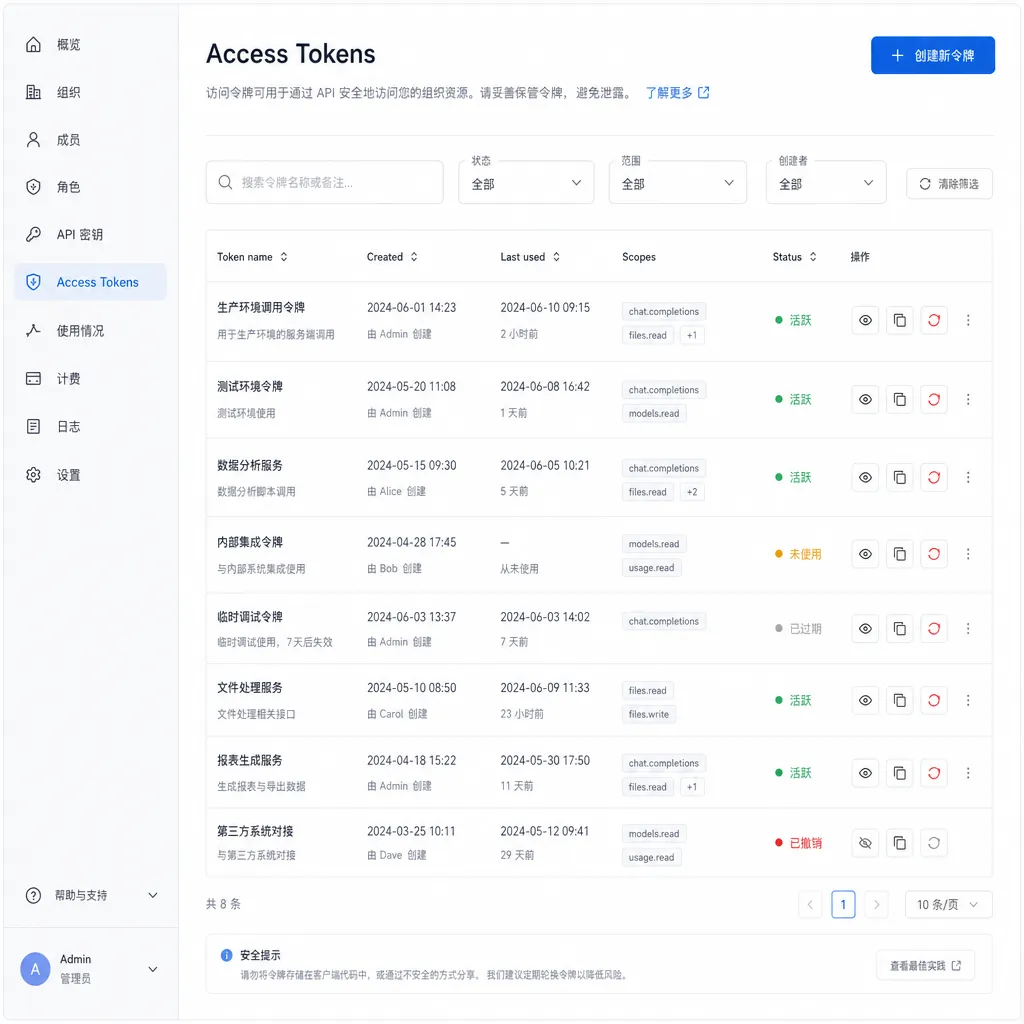
What it is
According to OpenAI’s official definition, a Codex Access Token is “a credential that allows trusted automation to run local Codex as a ChatGPT workspace identity.” Three keywords need unpacking:
- Trusted automation – Not for arbitrary public use; OpenAI explicitly warns against using it in public CI systems, forked PRs, or shared machines.
- ChatGPT workspace identity – This is the most essential difference from the Platform API Key. The token is bound to the ChatGPT user and workspace that created it. All calls follow the workspace’s governance, quota, and audit chain.
- Local Codex – Specifically for the local CLI form such as
codex exec, not for general OpenAI API calls.
The creation entry can be found on the Access Tokens page of the ChatGPT admin console. It is currently visible only for Business and Enterprise plans. The Team plan isn’t listed in the documentation (though community users have confirmed seeing the entry in Team workspace admin panels on linux.do, OpenAI’s official docs currently mention only Business and Enterprise).
Why not just use an API Key
This is the most common point of confusion for developers. In the documentation, OpenAI gives a straightforward judgment:
If a Platform API key works for your automation, continue using API key authentication.
In other words, Access Tokens aren’t an upgrade to API Keys—they are a complement. They exist specifically for scenarios that must run as a ChatGPT workspace identity. The differences can be summarized as:
| Dimension | Platform API Key | Codex Access Token | |------------|------------------|--------------------| | Ownership | API organization | ChatGPT workspace user | | Billing | Usage-based via Platform | Uses ChatGPT subscription benefits | | Audit | Platform console | ChatGPT workspace governance | | Applicable for | General API calls | Local Codex automation | | Permission model | Organization-level | User-level, inherits workspace policies |
A concrete example: your company has ChatGPT Enterprise, which includes Codex usage quotas. The boss wants engineers to run code generation or refactoring tasks in CI so that usage counts toward the ChatGPT subscription rather than creating a separate Platform bill. That’s exactly the purpose of the Access Token—it lets “Codex benefits within a ChatGPT subscription” be used programmatically for the first time.
A typical use case
Typical scenarios highlighted in the documentation are everyday tasks for engineering teams:
# Run a one-off code generation task in CI
export CODEX_ACCESS_TOKEN="your-token-here"
codex exec "refactor src/auth/ to use the new SessionStore API" \
  --working-dir ./repo \
  --output-format patch
Or include it in scheduled jobs—running nightly code reviews, generating changelogs, or completing test coverage. Codex validates the token at startup, associates the execution with a workspace identity, and then administrators can see in the workspace governance console “whose token, what was run, and how much was consumed.”
This centralized usage reporting from an organizational perspective is valuable to enterprises. Previously, API Key auditing was “organization vs organization,” whereas workspace identity auditing resolves down to individual users—issues can be traced to responsible individuals, and quota overruns can be traced to teams.
Security model: treat it like an SSH key
OpenAI spends considerable space covering risks in the documentation, essentially following “key management best practice” guidelines:
- Leaked = compromised – Anyone holding the token can start a Codex run as you. Store it in a secret manager (Vault, AWS Secrets Manager, 1Password Secrets Automation, etc.), don’t log it, don’t commit it to repositories.
- Don’t use it on untrusted runners – Public CI, forked PRs, and shared development machines are all explicitly warned against. The fork PR case is particularly relevant for GitHub Actions—while secrets are normally blocked for fork PRs, misconfiguration would be disastrous.
- One person, one token—don’t share – The documentation specifically advises “create a token for each responsible workflow owner” to maintain audit clarity.
- Set an expiration – Tokens with long validity may linger after workflow changes; OpenAI recommends “prefer limited lifetimes and revoke unused tokens.”
For seasoned DevOps pros, this is nothing new, but for enterprise users who’ve only used the ChatGPT web version and are new to automation, it’s a necessary reminder. The token’s sensitivity is comparable to GitHub Personal Access Tokens—you wouldn’t use a PAT in a forked PR, right?
A subtle detail: identity ownership
One key aspect worth expanding: an Access Token is bound to a specific user, not shared across the workspace. That means:
- If the employee who created the token leaves, the token should be revoked.
- Token usage consumes that user’s Codex quota in the workspace (if per-user limits exist).
- Governance logs record the run under that username.
This design differs from many enterprise SaaS tools with “service account” concepts—OpenAI does not introduce a separate service account; rather, “automation” borrows a real user’s identity. Benefits include simpler governance and clear accountability; the tradeoff is that organizations must decide explicitly who owns a given automation.
Community discussions have already started about the boundaries of this design. For example, if a CI pipeline is maintained collectively by a team, under whose name should it run? OpenAI’s suggestion is “create tokens for specific workflow owners”—explicitly assigning automation ownership to individuals. This aligns with the modern SRE principle of “on-call ownership”: every automated system needs a clear owner.
What it means
Viewed broadly, the launch of Codex Access Tokens is a necessary step in OpenAI’s transition of Codex from “a personal developer CLI toy” to “an enterprise production tool.” Previously, enterprise usage relied mostly on personal sessions and lacked stable machine-to-machine integration; this fills that gap, enabling CI-ready workflows such as:
- Automated code reviews (Codex runs on each PR)
- Large-scale repository refactoring (scripts batch-process multiple directories)
- Scheduled documentation/test generation
- Code-generation steps within internal toolchains
Compared with Anthropic’s Claude Code and GitHub’s Copilot CLI, Codex’s update focuses on enterprise governance, not on technical features—this is what makes IT departments comfortable approving adoption in production environments. It’s an unglamorous but essential kind of compliance work.
Notably, Codex Access Token availability is limited to ChatGPT Business and Enterprise. Individual developers and most small teams still need to use Platform API Keys for standard OpenAI API calls. For projects seeking low-friction integration across multiple models (GPT, Claude, Gemini, DeepSeek, etc.) without separate accounts and billing, platforms like OpenAI Hub provide a single key that’s OpenAI-compatible and accessible domestically. It solves a different problem but can be considered alongside Access Tokens when evaluating options.
Unclear issues remaining
The documentation leaves some details unstated, which developers might run into when implementing:
- What’s the maximum token lifetime? The docs recommend “prefer limited lifetimes” but do not specify the system’s upper bound.
- Is there an API for rotation? Token creation currently appears to be a console-only operation—degree of automation for rotation unclear.
- Quota calculation? How Codex quota is measured within ChatGPT Business—per-user, per-workspace, and behavior when exceeded—needs admin confirmation from workspace settings.
- Conflict with Platform API Key? Not explicitly stated, but by design they follow separate pathways, so coexistence should be fine.
These questions will likely be clarified in future documentation iterations. Community users have already begun testing token behavior across CI platforms (GitHub Actions, GitLab CI, Buildkite). If your team uses ChatGPT Business or Enterprise, this feature is worth evaluating for your next automation upgrade—moving Codex usage from “spread across individual browsers” to “centrally governed within a workspace” is, by itself, enough reason for enterprise IT to adopt it.
References
- ChatGPT Business/Team can now create Codex Access Tokens - linux.do — First-hand community discussion and Admin Console screenshots of the update
- awesome-ChatGPT-repositories - GitHub — Aggregated open-source ChatGPT ecosystem, useful for tracking community projects around Codex CLI


