
Tencent Ardot Public Beta: Let AI turn a sentence into deliverable design drafts and code

The AI design agent **Ardot**, independently developed by the Tencent Design Team, is now open for public beta. It focuses on text-to-UI generation, direct Figma file import, and one-click design-to-code conversion — aiming to fill the local gap left by Figma.
Tencent Ardot Public Beta Today: Draft in One Sentence, Convert to Code with One Click—Another Chunk of Designers’ Work Taken Away
On May 18, Tencent Cloud announced that its self-developed AI design agent Ardot is officially launching its public beta. The official positioning is an "AI-driven product-design-development collaboration platform"—note, not a "design tool," but a collaboration hub that brings together product managers, designers, and developers on the same canvas. This wording difference basically marks Ardot’s biggest distinction from local Figma alternatives such as Jishi Design and MasterGo.
Looking back, after Figma tightened access in China in 2024 due to compliance issues, domestic design tools saw a wave of new entrants. However, most of them stopped at "copying Figma and adding a few AI plugins." What Ardot is bringing this time clearly aims to rewrite the workflow.
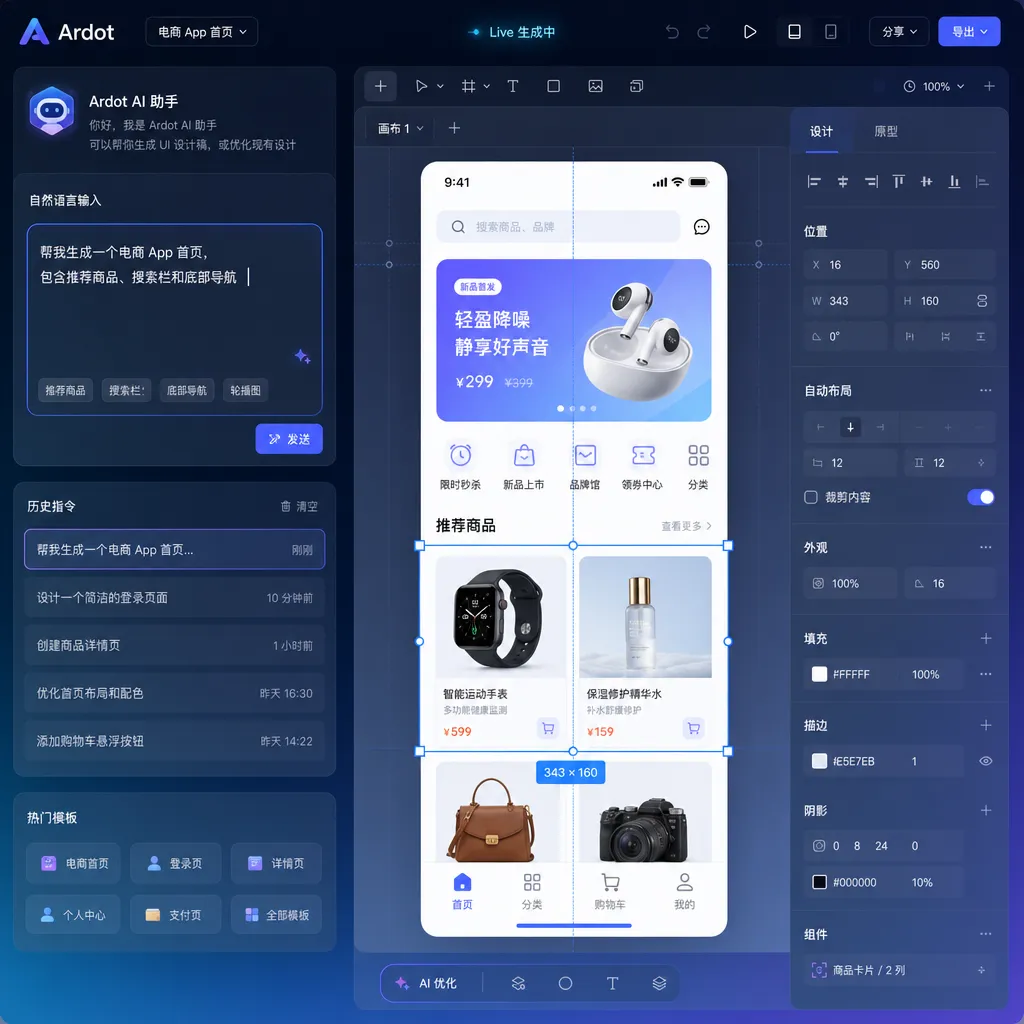
One Sentence to Generate "Editable" Design Drafts—the Keyword Is in the Latter Half
AI-generated UI isn’t new—Galileo, Uizard, Google Stitch, and v0 have all done it—but most outputs are either images or blobs of HTML, which still require manual redrawing when brought back into design tools. Ardot differs by emphasizing that its results are native design drafts with variables, components, and layout structures, ready for direct editing—the kind designers can actually use.
According to official sources, Ardot’s AI capabilities roughly include three layers:
- Text-to-UI: Generates app pages, websites, posters, illustrations, and PPTs from natural language descriptions, covering common UI and marketing scenarios;
- Image-to-Draft: Upload a sketch or reference image, it automatically layers, extracts elements, and converts them into standardized editable drafts;
- AI Assistant Support: Handles tedious design chores such as intelligent layer naming, linking assets to components, AI resource search, and AI image matching.
One particularly interesting detail: "Calling the team’s own business component library"—instead of creating components out of thin air, Ardot assembles elements from a company’s existing design system. For mid-to-large teams, this is essential—consistency often matters more than aesthetics. Figma’s Make/Code Connect tries something similar, but Ardot promises to produce standards-compliant drafts from a single sentence.
Direct Figma File Import: A Smart Migration Strategy
Ardot allows direct import of Figma files, preserving original layouts, styles, and component structures.
It may look simple, but this is crucial for reducing migration cost. Over the past few years, domestic teams have struggled to leave Figma despite frustrations with network reliability, mainly because of heavy legacy assets—hundreds of files and thousands of components. Rebuilding everything from scratch is unrealistic. The ability to losslessly import Figma files means Ardot doesn’t need to compete for users starting from a blank canvas—it can directly take over existing projects.
Jishi Design and MasterGo also offered this, but Ardot, backed by Tencent’s in-house design teams (which power QQ, WeChat, and Tencent Docs), is likely better equipped to handle the complexity of real Figma files used in production environments.
Design-to-Code: Connecting with CodeBuddy, Cursor, and Claude Code
This is the part I personally find most intriguing.
Traditional "design-to-code" solutions—such as Anima, Locofy, or various Figma-to-Code plugins—essentially translate visual data into HTML/CSS. The problem is that the real value in a design draft lies not in pixels but in structured data: variables, component hierarchies, constraints, and design tokens. Once that structure is lost, the generated code becomes throwaway, unfit for engineering reuse.
Ardot’s approach is to pass the full structured data, along with the design draft, directly downstream to coding tools:
- CodeBuddy: Tencent’s own deeply integrated AI coding assistant for one-click code generation;
- Workbuddy / Cursor / Claude Code: Integrated via the MCP (Model Context Protocol).
MCP, launched by Anthropic last year, has become the de facto standard in the agent ecosystem, supported by Cursor, Claude Code, and Cline. By choosing MCP rather than a proprietary protocol, Ardot positions itself as an upstream "design context provider"—downstream tools and models can be whatever users prefer. This open posture is smarter than it seems; since no one has "won" the AI coding race yet, Ardot simply aims to dominate the upstream.
What does this mean for developers? The workflow looks like this:
- The PM prompts Ardot to generate a homepage draft in one sentence;
- The designer fine-tunes details and aligns with the design system in Ardot;
- The developer pulls the draft into Cursor via MCP, complete with component trees, variables, spacing, and states in context;
- The AI generates front-end components following project standards.
The human communication overhead—honestly—could be cut by half or more.
Collaboration and Enterprise Features: Tencent’s Longstanding Strength
Collaboration capabilities aren’t surprising, but they check all the boxes:
- Real-time multi-user editing, commenting, and annotation;
- Version comparison and history tracking;
- Smart permission management (Owner / Manager / Editor / Viewer);
- Full audit logs with traceability;
- Automatic permission recovery for departing employees and one-click asset handover.
These functions exist in Figma Enterprise as well, but Tencent’s advantage lies in compliance and private deployment, where Tencent Cloud’s infrastructure gives it a natural edge—especially in enterprise sales.
A WeChat Mini Program version is also coming soon, which means reviewing and commenting can be done straight on mobile—aligning well with China’s product review workflows, where discussions often happen in WeChat groups anyway.
Some Takeaways
From Ardot’s public beta, several signals emerge:
First, Tencent has productized years of in-house design infrastructure. The team has supported nearly every Tencent consumer product’s visual system, and its tools were forged in real production, not built for demo purposes—giving it a much higher starting point than many startups.
Second, competition in AI design is shifting dimensions. Early on, it was about "can it generate"; now it’s about "can the output be used in engineering." Ardot’s awareness of data structures, design systems, and MCP integration shows sound technical direction.
Third, for designers, initial drafts, slicing, and spec annotation are now automatable. What remains for humans are upstream experience decisions, downstream detail refinement, and critical evaluation of AI outputs—the change is irreversible.
Of course, challenges remain: the actual quality of text-to-UI generation, fidelity in complex business scenarios, and stability of outputs after component library ingestion all depend on real-world testing. Integrating marketing materials like posters and PPTs into the same tool could be an advantage—or a distraction—depending on iteration speed.
The public beta is free but requires application, with both macOS client and web versions available. For existing Figma teams, consider migrating a non-core project first to test import fidelity; for newly formed domestic teams, Ardot could be a solid starting point—especially if your engineering workflow already uses Cursor or Claude Code, as the efficiency gains across this chain will be immediately visible.
References
- Tencent AI Design Agent Ardot Public Beta: Generate Editable Drafts in One Sentence, Convert to Code with One Click - IT Home: Official information summary of Ardot’s public beta
- Tencent Joins the AI Design Race! Ardot Goes Live - Zhihu Column: Early review of Ardot’s feature experience


