
ChromaDB Exposes Pre-Authentication Remote Code Execution Vulnerability

The open-source vector database ChromaDB has been reported to contain a severe pre-authentication code injection vulnerability (CVE-2026-45829), allowing attackers to execute arbitrary code on the server without authentication. All versions 1.0.0 and above are affected.
ChromaDB Exposes Pre-Authentication Code Execution Vulnerability: AI Vector Database Security on High Alert
The open-source vector database ChromaDB has been found to contain a severe pre-authentication code injection vulnerability (CVE-2026-45829). Attackers can execute arbitrary code on the server through specific API endpoints without any authentication. This vulnerability affects ChromaDB Python project version 1.0.0 and later, posing a direct threat to many AI applications that depend on the database.
Vulnerability Details: trust_remote_code Becomes the Breach Point
The core of this vulnerability lies in ChromaDB’s /api/v2/tenants/{tenant}/databases/{db}/collections endpoint. Attackers can send a malicious model repository path and set the trust_remote_code parameter to true, triggering arbitrary Python code execution on the server.
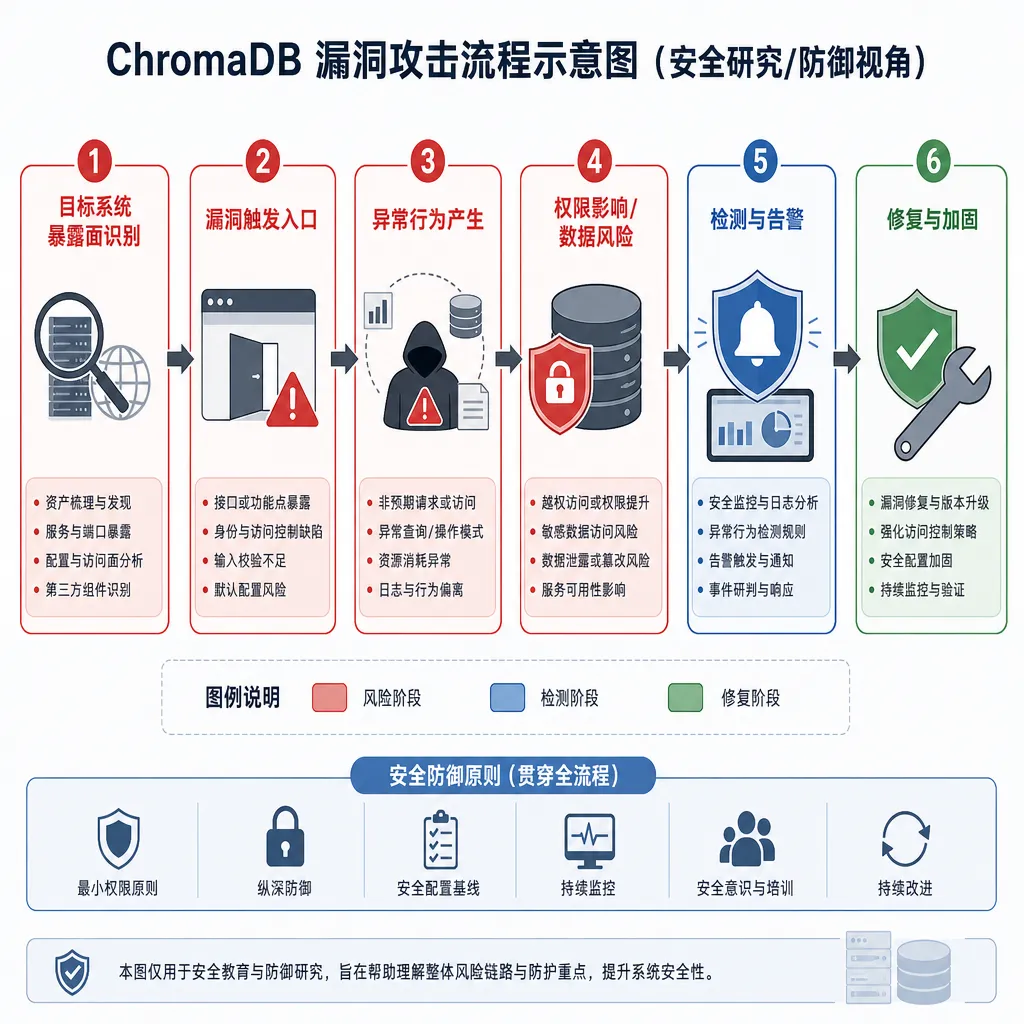
Here’s the attack process in detail:
- The attacker creates a “model repository” containing malicious code
- They send the malicious repository path to the ChromaDB server via an API request
- By setting
trust_remote_code=true, they trick the server into trusting and loading remote code - The malicious code executes on the server, granting the attacker full control
The most dangerous aspect of this vulnerability is the “pre-authentication” property — attackers don’t need any credentials to launch the attack. For services that expose ChromaDB directly to the public internet, this is tantamount to hanging the master key outside the front door.
Scope of Impact: More Than Just a Database Problem
ChromaDB is one of the most popular open-source vector databases, designed specifically for LLM applications. Typical use cases include:
- RAG (Retrieval Augmented Generation) systems: store document vectors to provide context for GPT, Claude, and similar models
- Semantic search engines: intelligent search based on vector similarity
- Recommendation systems: calculate content similarity through embedding vectors
- Memory layers for AI Agents: store conversation history and knowledge bases
This means that the vulnerability’s impact extends beyond the database itself. If ChromaDB is compromised, attackers can:
- Steal sensitive documents and knowledge bases stored in the vector database
- Tamper with vector data, corrupting AI model retrieval results
- Use the server as a springboard to attack other internal systems
- Plant backdoors and maintain long-term control over AI application data flows
According to FOFA’s global asset scan, a significant number of ChromaDB instances are publicly exposed. While exact figures remain undisclosed, given ChromaDB’s popularity in the AI development community, the number of affected systems is likely substantial.
Why trust_remote_code Is So Dangerous
The trust_remote_code parameter is not unfamiliar in the AI ecosystem. Tools such as Hugging Face’s Transformers library and LangChain employ similar mechanisms. It was designed to let developers load custom model code for greater flexibility.
But this convenience comes at a cost. By setting trust_remote_code=true, you’re essentially saying: “I trust all the code in this remote repository and allow it to run in my environment.” If that trust is abused, the result is arbitrary code execution.
ChromaDB’s issue stems from granting users control over trust_remote_code in a context where user input should never be trusted. It’s akin to having a public API with an “execute arbitrary code” toggle — and no password required.
Similar security issues are common across the AI toolchain:
- Pickle deserialization: PyTorch and TensorFlow model files can include arbitrary Python objects that execute upon loading
- YAML parsing: some YAML libraries allow Python code execution, turning configuration files into attack entry points
- Plugin systems: frameworks like LangChain and AutoGPT can execute arbitrary code if their plugin mechanisms lack sandbox isolation
AI development tools often trade off security for flexibility. The ChromaDB vulnerability underscores how costly that tradeoff can be.
Mitigation Recommendations: More Than Just Patching
The ChromaDB team has confirmed the vulnerability in GitHub issue #6717 and released a patch. If you use ChromaDB, take the following actions immediately:
Short-Term Emergency Measures
- Upgrade to the latest version: Check ChromaDB’s official release page and install the version containing the security fix
- Restrict network access: If ChromaDB does not require public access, configure firewall rules to allow internal access only
- Audit access logs: Check
/api/v2/tenants/endpoint logs for unusual requests - Disable
trust_remote_code: Explicitly turn off this feature in your configuration if your application does not require loading remote model code
Long-Term Hardening
This vulnerability exposes not just ChromaDB’s problem but a blind spot across AI infrastructure security. Consider the following systematic protections:
Network isolation — Vector databases should not be publicly accessible. Standard practice includes:
- Deploy ChromaDB within a private network
- Control access through an API Gateway or reverse proxy
- Use VPNs or dedicated lines to connect development environments
Principle of least privilege:
- ChromaDB processes should not run as root
- Isolate the database with containers or virtual machines
- Restrict file system permissions for the database process
Input validation:
- Strictly validate all API input
- Use whitelisting to allow only known model repository paths
- Prohibit user control of dangerous parameters like
trust_remote_code
Monitoring and auditing:
- Log all API calls, especially those involving model loading
- Set up anomaly detection rules to identify suspicious access patterns
- Periodically review database configurations and permission settings
Dependency management:
- Use vulnerability scanning tools (e.g., Snyk, Dependabot) to monitor known issues
- Keep all dependencies up to date, not just ChromaDB itself
- Validate updates in a test environment to avoid compatibility problems
The Security Dilemma of AI Infrastructure
The ChromaDB vulnerability exemplifies the broader security issues facing AI infrastructure. Over the past few years, AI development tools have evolved far faster than traditional software, yet security practices haven’t caught up.
Vector databases, model servers, Agent frameworks — these emerging AI infrastructure components are often built under a “rapid iteration, launch first” mindset. Security tends to be an afterthought, treated as an “optimization” rather than a “requirement.”
This has led to several systemic risks:
Expanding supply chain attack surface: AI applications rely on numerous open-source libraries and pretrained models. Each dependency becomes a potential attack vector. From PyTorch to Hugging Face, LangChain to ChromaDB — a compromise in any link can cascade downstream to thousands of applications.
Insecure default configurations: To lower adoption barriers, many AI tools prioritize openness over security — unauthenticated APIs, remote code execution enabled by default, and missing data encryption. Unless developers proactively harden deployments, production environments remain exposed.
Lack of security tooling: Traditional security scanners are ineffective against AI-specific threats such as model poisoning, prompt injection, and vector data pollution. AI-focused security tools are still in early stages, with limited coverage and maturity.
Knowledge gap: AI developers may not understand security, and security engineers may not understand AI. This knowledge gap means many risks go unnoticed. For example, trust_remote_code is an obvious red flag to experienced Python security practitioners but might appear merely as a “convenient feature” to AI researchers.
What the Industry Needs to Do
Addressing these challenges requires collective action across the industry:
For open-source projects:
- Establish security response mechanisms and handle reports promptly
- Conduct security audits, especially before major releases
- Provide secure deployment guidelines for users
- Default to secure configurations, making flexibility optional rather than standard
For cloud providers:
- Offer managed vector database services with built-in hardening
- Integrate security scanning and monitoring within AI platforms
- Provide developers with best practices and reference architectures
For enterprise users:
- Incorporate AI infrastructure into overall security management frameworks
- Perform security assessments and penetration testing on AI applications
- Train development teams to raise security awareness
- Establish incident response procedures to handle breaches swiftly
For the security community:
- Develop security tools and frameworks tailored for AI systems
- Build databases and knowledge bases for AI-specific vulnerabilities
- Promote industry standards and best practices for AI security
The ChromaDB vulnerability is a wake-up call. As AI applications become embedded in critical business processes, the security of underlying infrastructure — vector databases, model servers, and beyond — can no longer be considered a secondary concern. Code execution vulnerabilities are nothing new in traditional software, yet in the AI domain, we are still repeating the same mistakes.
If you’re building AI applications, now is the time to review your security architecture. Don’t wait until you’ve been attacked to start patching.
References
- ChromaDB Code Execution Vulnerability Discussion - Linux.do — Community technical analysis and discussion of CVE-2026-45829
- ChromaDB GitHub Issue #6717 — Official vulnerability confirmation and patch progress
- Building Semantic Search Applications with ChromaDB - Zhihu — Technical background and application scenarios of ChromaDB


