
Google AI Studio directly generates Android apps

At I/O 2026, Google added native Android app generation capabilities to AI Studio, allowing users to directly create, preview, and publish complete Android applications in the browser through text prompts, with support for offline operation and hardware access.
Google AI Studio Directly Generates Android Apps
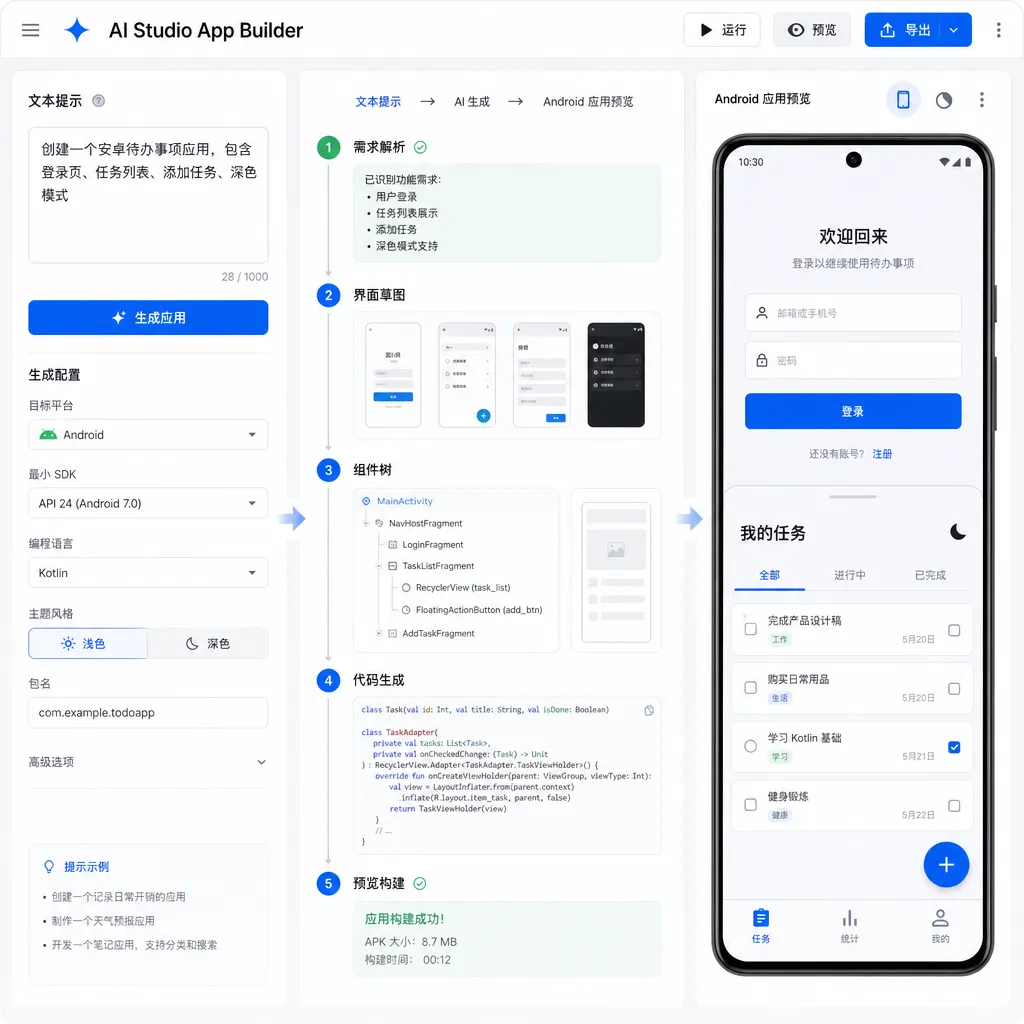
At today’s I/O 2026 developer conference, Google added a powerful new feature to Google AI Studio: it can now generate native Android apps directly from text prompts—and they’re fully installable, runnable, and shareable.
This isn’t just another low-code platform gimmick. AI Studio now outputs standard Kotlin + Jetpack Compose code, supporting offline operation, background services, GPS, Bluetooth, and NFC hardware features. More importantly, Google has packed development, preview, testing, and publishing entirely into the browser—no need to open Android Studio at all.
Who Needs This Feature
Google has clearly identified two target user groups:
Experienced developers: Those who need to quickly validate an idea. For example, if you want to test a new interaction pattern or show a feature prototype to a client, you used to spend hours setting up scaffolding and writing boilerplate. Now, just describe what you need—AI Studio generates the basic framework, and you fine-tune it.
Android newcomers: People building their first Android app. Traditionally, you had to learn Java/Kotlin syntax, read Android SDK documentation, and configure the dev environment. Now you can describe the app you want in natural language, see the generated code and the running result, and learn Android development in reverse.
This positioning is pragmatic. Google isn’t claiming to replace professional development workflows—it recognizes that much of early-stage app development is repetitive labor: building interfaces, setting permissions, writing data layers. AI can handle these tasks, leaving humans to think about product logic and user experience.
Technical Implementation: Not Toy Code
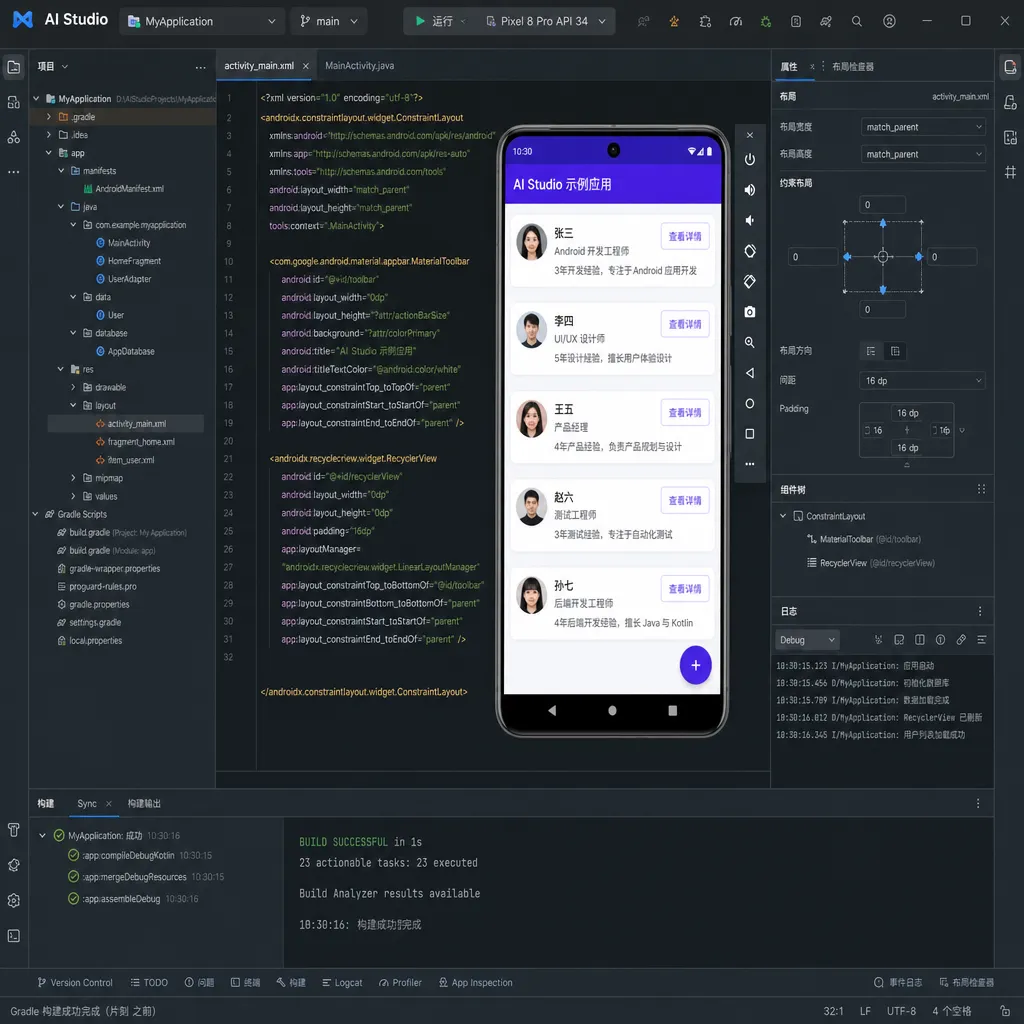
The generated apps are written in Kotlin, with Jetpack Compose for the UI—Google’s current flagship Android technology stack and the industry standard. In other words, AI Studio outputs the same kind of code you’d write manually in Android Studio, not a proprietary or simplified format.
That means several things:
- Readable code: Kotlin is concise, Jetpack Compose is declarative, so generated code is clear and maintainable—not spaghetti.
- Full functionality: Supports offline usage, background services, and hardware access (GPS, Bluetooth, NFC). These native features aren’t possible—or are awkward—in web or hybrid apps.
- Superior extensibility: Because it’s a standard stack, you’re not locked into AI Studio. You can export to Android Studio or push to GitHub for collaboration.
Google notably highlights its hardware access capability—a defining line between native and web apps. If your app needs continuous location updates or Bluetooth communication, web app APIs and permission models won’t cut it. AI Studio apps can directly call those low-level capabilities.
Development Workflow: Entirely In the Browser
Traditional Android development goes like this:
- Write code in Android Studio
- Compile (wait 30 seconds to several minutes)
- Run in emulator or on a device
- Find issues → return to step 1
And to test publishing, you had to manually package an APK/AAB, upload it to Play Console, and configure test channels.
AI Studio compresses all of that into one browser tab:
Generation Phase: Describe your app in text. For example: “An expense tracker with category-based analytics and CSV export.” AI Studio generates the code skeleton.
Preview Phase: A built-in Android emulator instantly runs the app. You can click, type, and test interactions in real time—no compiling or window switching.
Adjustment Phase: If something’s off, modify the text prompt or edit the generated code directly. The emulator updates live.
Testing Phase: If you have a Google Play developer account, you can publish directly to the internal testing channel. The platform automatically creates the app listing, packages the AAB, and uploads to Play Console. You simply share the test link.
The key value here is minimizing context switching. Developers lose focus jumping between tools, each switch reloading mental models. AI Studio strings all the stages together so you can stay focused on one question—“What should this app be?”
Testing and Publishing: Integrated with Play Console
Google went further than most code-gen tools by connecting the full publishing process.
With a Google Play developer account (a one-time $25 registration fee), AI Studio can publish apps directly to Play’s internal testing channel. Here’s how:
- Click “Publish Test” in AI Studio
- The platform auto-creates an app listing (if new)
- Packages the project as AAB (Android App Bundle—the format Play requires)
- Uploads it to Play Console’s internal testing track
- Generates a test link to share with up to 100 testers
A workflow that used to require 10+ manual steps is now done with a single click.
The internal testing track requires no review; uploads are live within minutes. Testers join via a link and download from the Play Store—cleaner and more production-like than sharing APKs.
If testing goes well, you can continue with the normal release process in Play Console. Or export the project for further development:
- Export ZIP: Download full project files (code, resources, configs)
- Push to GitHub: Create or update repositories directly
- Open in Android Studio: One-click import into local environment
These options suit different needs: backup/share code, collaborate with a team, or do deep development locally.
Use Cases and Limitations
Google states the initial version is best suited for three types of apps:
Utility apps: Calculators, converters, to-do lists, expense trackers, notes—simple logic, standardized UI. AI-generated code is largely usable.
Social apps: Simple chat, forums, feed posting. Emphasis on “simple”—not WeChat-level complexity. For anything involving real-time messaging, large recommendations, or massive concurrency, you’ll still need manual coding.
Gemini-powered tools: Apps using Gemini APIs for assistants, Q&A, or content generation—right in Google’s wheelhouse.
Unfit use cases are obvious:
- Games: engines, physics simulation, complex rendering are out of scope
- High-performance apps: video editing, image processing, big data analytics require manual optimization
- Complex business logic: e-commerce, finance, healthcare—heavy compliance and edge cases
- Custom UI apps: unique designs may exceed the generated components’ flexibility
Google teases two upcoming enhancements:
Firebase integration: Google’s backend cloud service for database, auth, storage, notifications. With integration, AI Studio apps can connect to the cloud automatically—no custom backend setup.
Simplified Play Store publishing: Currently limited to internal testing; upcoming support for direct public release. That would enable an idea-to-store workflow entirely inside AI Studio.
Comparison with Competitors
There are many AI code-generation tools, but most target web development. Mobile tools are rarer and typically output React Native or Flutter, not native Android.
GitHub Copilot / Cursor: Code completion tools—they help you write faster but don’t generate full apps. You still need to scaffold, configure, implement logic manually.
v0.dev / Bolt.new: Web app generators—they output React/Vue code for quick prototypes, no mobile native support.
FlutterFlow / Adalo: Low-code mobile platforms outputting Flutter/hybrid code, not native Android, with compromises in performance and feature access.
AI Studio’s differentiators:
- Native code: Outputs standard Kotlin + Jetpack Compose
- Complete workflow: From generation to test to publish in one platform
- Google ecosystem: Tight integration with Play Console, Firebase, and Gemini API
Currently, AI Studio supports Android only. For iOS, you’ll still need Xcode or cross-platform alternatives.
Impact on Developers
This won’t replace Android developers but will change how they work.
Junior developers: Tasks like boilerplate writing, docs lookup, and environment setup can be offloaded to AI, freeing time for understanding requirements and optimizing UX. The learning curve flattens—generate code first, then learn syntax and structure.
Senior developers: Faster idea validation—prototypes that took days now take hours. The saved time can go to experimentation or deeper feature optimization.
Product managers / designers: With some technical know-how, they can self-generate prototypes without waiting for dev cycles—great for early product validation.
Indie developers: A single developer can produce complete apps faster. Weeks of setup time can now go toward differentiated features.
But new challenges emerge:
Code quality: AI-generated code may not be optimal; developers must audit for redundancy, performance, and security.
Overreliance: Without understanding fundamentals, complex problems may become unsolvable.
Homogenization: If everyone uses AI, apps may look alike—originality depends on human creativity and judgment.
The Bigger Picture
This update fits squarely within Google’s broader AI strategy.
Gemini ecosystem: AI Studio itself is a Gemini API development platform. With app generation built in, developers can easily create Gemini-integrated apps—boosting Gemini adoption.
Lowering barriers: Google’s long-running effort to democratize Android development—from App Inventor (visual blocks) to Flutter (cross-platform framework) to now AI Studio (text-to-code)—the path keeps shortening.
Competition with Apple: Apple also showcased Siri-/Apple Intelligence-based app generation at WWDC 2025. Google’s quick response shows mobile AI dev tools are a new battleground.
Play Store’s future: Easier app generation could flood Play with low-quality apps. Google may need stricter review systems or better recommendation algorithms to surface valuable ones.
Long-term, AI-assisted development will become standard—but “assisted” is key. AI can handle repetitive tasks, but product definition, architecture, performance tuning, and UX still need human craftsmanship.
AI Studio’s strength lies in letting developers focus on creative, valuable work. If your idea is “create an expense tracker,” AI can deliver it quickly. But if your goal is “build the best expense tracker,” that’s still up to you.
How to Get Started
The Android app generation feature is now live—visit aistudio.google.com and log in with a Google account.
Basic steps:
- On AI Studio’s homepage, select “Create Android App”
- Describe your app in text—the more specific, the better
- AI generates the code framework and shows it in the built-in emulator
- Adjust via text or by editing code directly
- After testing, export or publish to Play Console
Publishing to Play testing requires registering a Google Play developer account ($25 one-time fee).
Google provides prompt templates such as:
- “Create a to-do list app that supports adding, deleting, marking complete, storing data locally.”
- “Build a step counter using the phone’s accelerometer, showing today’s steps and calories.”
- “Develop a weather app using the OpenWeatherMap API, displaying current and 3-day forecasts.”
The more detailed the prompt, the closer the output will be to your needs. But you can start simple—generate a base version and iterate.
Summary
AI Studio’s new Android app-generation capability is practical—not hype. It solves real pain points: fast idea validation, lower entry barriers, simplified publishing.
Technically, it outputs standard native code, supports full hardware features, and integrates testing and publishing—proof it’s serious product work.
But it’s not omnipotent. Complex, high-performance, deeply customized apps still need traditional development. AI Studio acts more as a accelerator—it gets you to the starting line faster, but the real journey is still yours.
For developers, it’s definitely worth a try. Even as a seasoned engineer, using it for rapid prototyping and idea validation saves time. For beginners, it’s an excellent learning entry point—see results first, understand principles later.
Google’s speedy rollout signals that AI-assisted development has moved from experimental to practical. What’s next to watch: Firebase integration and direct publishing—if those make it possible to go from idea to Play Store entirely in-browser, that would drastically lower barriers for indie devs and small teams.
References
- Google upgrades AI Studio: Text-to-native Android apps with integrated testing workflow – ITHome
Detailed coverage by ITHome of Google I/O 2026’s announcement, including technical details and use process.


