
Codex CLI 0.132.0 Critical Security Vulnerability: Environment Directory Confusion Leading to Cross-Project Misoperation
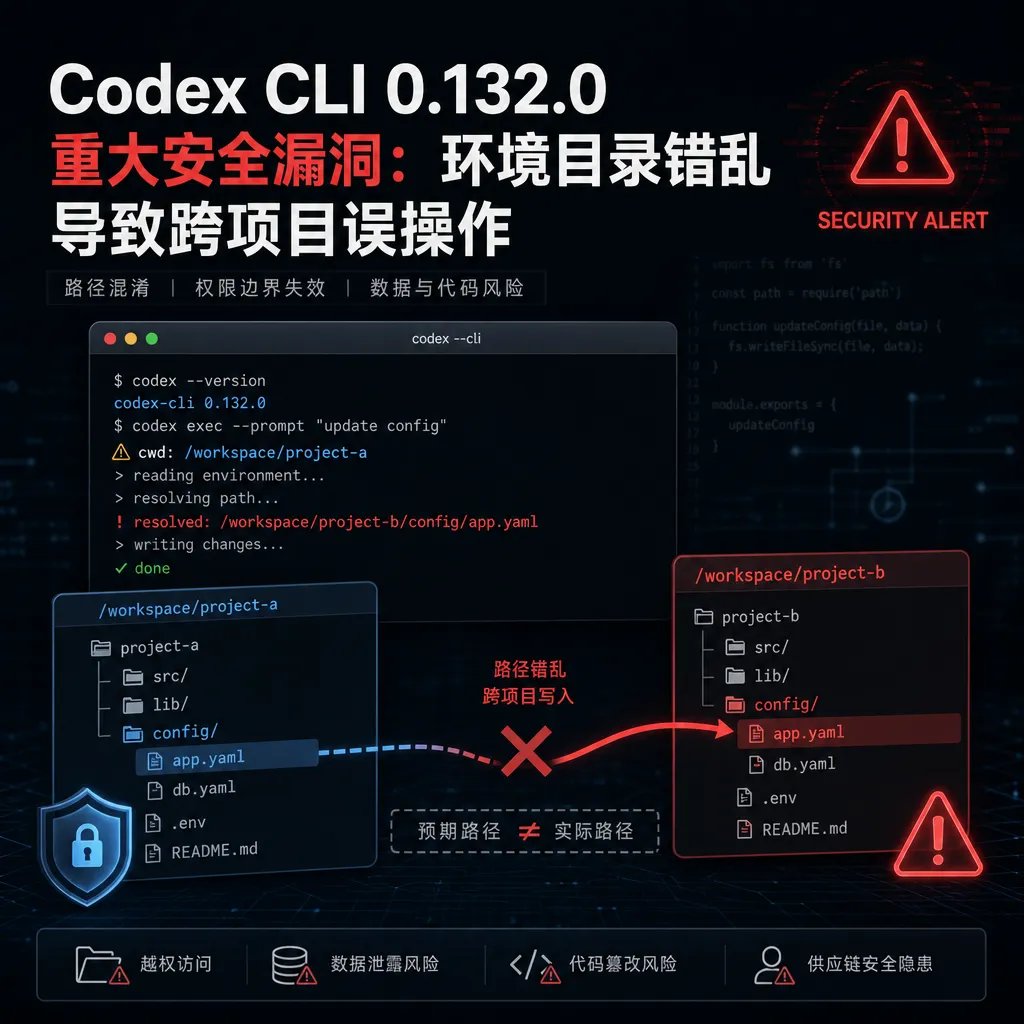
The latest version 0.132.0 of Codex CLI has been reported to contain serious security issues. After the upgrade, the conversation environment directory was changed from project-level to user-level, causing the AI to potentially modify files from other projects by mistake. Some developers have already been affected.
Codex CLI 0.132.0 Critical Security Vulnerability: Environment Directory Confusion Leading to Cross-Project Misoperations
The newly released Codex CLI version 0.132.0 has gone off the rails. Multiple developers reported on the Linux.do forum that after upgrading, the AI conversation’s working directory was forcibly changed from the project level to the user-level directory. The direct consequence: you tell the AI to modify code in Project A, but it might modify a same-named file in Project B instead.
This isn’t a configuration issue—it’s a version change that directly altered the environment isolation logic. For developers maintaining multiple projects simultaneously, this bug is as destructive as deleting a database—you simply have no idea what files the AI has modified in the background.
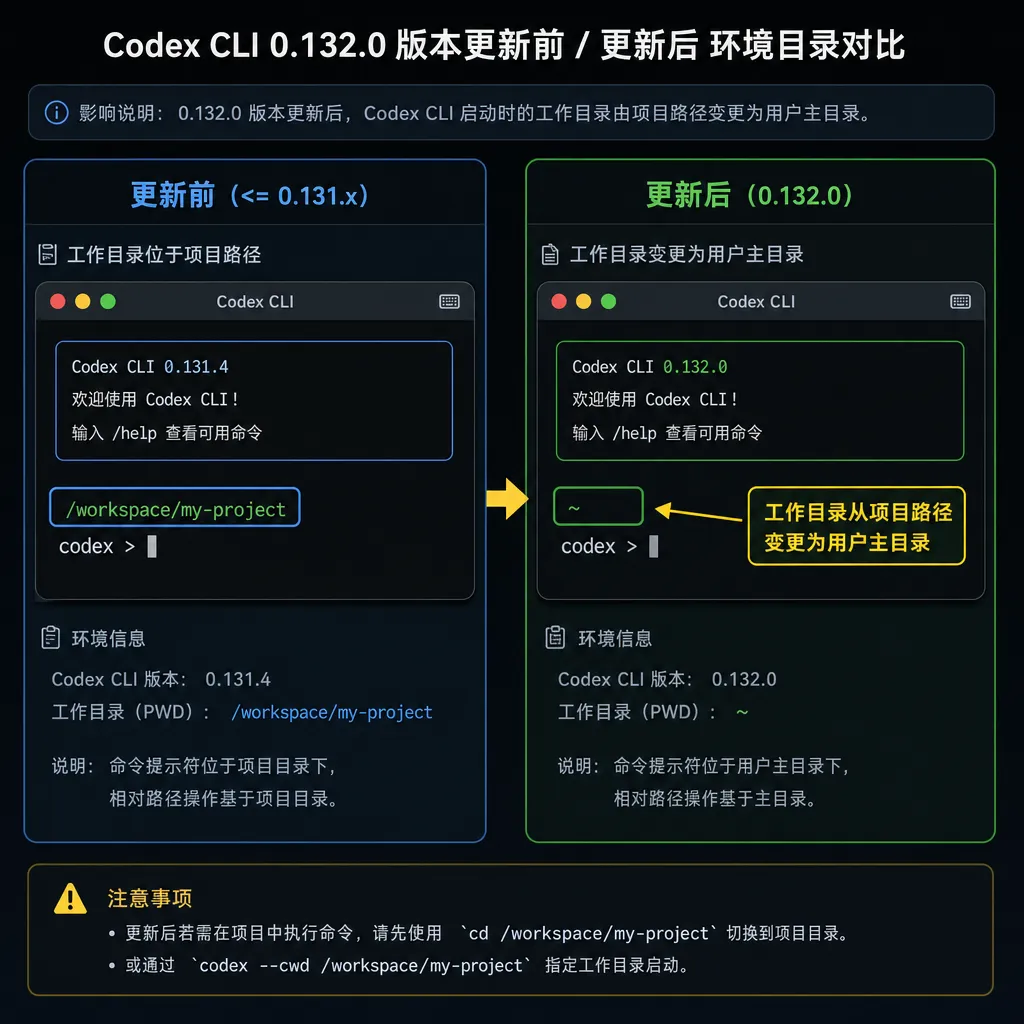
Core Issue: Environment Isolation Failure
The problem was first discovered by a developer using Debian 12. After upgrading from 0.130.0 to 0.132.0, he asked Codex to modify a utility function while conversing in Project A, only to find that the same file name in Project B had also been changed. Checking the logs revealed that the CLI’s working directory was no longer the current project’s root, but a global path such as ~/.codex/workspace.
What does this mean? Codex CLI was originally designed for each project to have a separate session—AI could only access the project’s own file tree. But version 0.132.0 broke that boundary—all project conversations now share a single workspace, and file paths are resolved relative to the user directory rather than the project directory.
Example scenario:
- You start a conversation in
~/projects/api-service, telling the AI to modifysrc/utils/logger.ts - The AI actually operates on the path
~/.codex/workspace/src/utils/logger.ts - If you also have the same structure in
~/projects/admin-panel, that project’slogger.tsmight be unintentionally altered - Worse yet, you won’t see records of those changes from Project A’s conversation history
This is not a permissions issue—it’s an architectural design error. Versions 0.130.0 and earlier maintained conversation context via a project-specific .codex directory, ensuring natural isolation for each session. In 0.132.0, in order to implement a “cross-project memory” feature (as speculated on Reddit), the storage of context was changed to a global model, but the sandbox file operation logic was not updated accordingly.
Impact Scope: Multi-Project Developers All Affected
The severity of this bug depends on your workflow:
High-risk scenarios:
- Maintaining multiple microservices with similar directory structures (each having
src/,lib/,utils/, etc.) - Using monorepos with packages sharing identical filenames
- Switching between different client projects with standardized naming conventions
- Using Codex for cross-file batch refactoring operations
Real cases:
One developer asked the AI to convert a method in auth.service.ts into async. The AI modified authentication services in three different projects—two of which should not have been changed. Even worse, Codex’s diff preview showed only the current project’s changes—others were silently modified.
Another case involved configuration file pollution. A developer asked the AI to modify .env.example in Project A, and the templates in Projects B and C were synchronized as well, since all three shared the same base infrastructure with identical filenames.
Relatively safe scenarios:
- Working on a single project
- Projects with very different directory structures
- Using Codex mainly for code explanations or Q&A rather than direct file writes
Even in “safe” scenarios, this bug is a time bomb. You can’t guarantee future projects won’t share similar structures, nor predict when the AI might suddenly touch unintended paths during a session.
Technical Analysis: Architectural Regression from Project-Level to User-Level
Codex CLI’s environment management has evolved several times:
Version 0.64.0 era (mid-2024):
- Each project root had its own
.codex/folder - Conversation history, context index, and temp files were stored within the project
- Working directory locked via
process.cwd(), strictly confined to project boundaries - Downside: no cross-project knowledge sharing; every new project required rebuilding context
Version 0.122.0 introduced Self-Contained Installation:
- Added
/sidecommand for parallel dialogs - Strengthened sandbox permissions; tightened execution policy on Windows
- Isolation logic unchanged, still project-directory based
Version 0.128.0 Persistent Workflow:
- Introduced
/goalcommand for cross-session task tracking - Began creating global state storage in the user directory
- This marked the beginning of the conflict between global state and project isolation
Version 0.132.0 Failed Attempt:
- Entire workspace moved to user-level to enable AI to “remember” cross-project operations
- File path parsing was not made compatible—relative paths now base on the global workspace
- Security checks failed; AI could access any project under the user’s home directory
Based on GitHub issue discussions, the problem likely lies in how the environment variable CODEX_WORKSPACE_ROOT was handled. In older versions, it pointed to the project root; in the new one, it was hardcoded to ~/.codex/workspace. All file operations now use a different base path, but prompt templates and path resolution logic still assume a project-level context.
The deeper issue is a conflict in architectural decisions:
- Product goals favor “intelligent memory,” letting the AI learn coding habits across projects
- Security goals require strict isolation to prevent unintended operations and data leaks
- These two cannot coexist under the current implementation
The correct approach would be:
- Store abstract global knowledge (coding style, patterns, tool preferences)
- Maintain strict per-project isolation for file operations and context
- Allow explicit “knowledge import” to control what gets shared across projects
Version 0.132.0 instead chose the bluntest approach—merging workspaces directly—leading to today’s disaster.
Temporary Workarounds & Risk Mitigation
Immediate rollback:
npm install -g codex-cli@0.130.0
# or
curl -fsSL https://codex.openai.com/install.sh | sh -s -- --version 0.130.0
After rollback, clean the global workspace to avoid residual file interference:
rm -rf ~/.codex/workspace
rm -rf ~/.codex/global-context
Check affected files: If you’ve already used 0.132.0, scan for possible unintended file changes using:
find ~/projects -name "*.ts" -o -name "*.js" -o -name "*.py" \
  -mtime -1 -exec ls -lh {} \; | \
  grep -v node_modules | grep -v .git
Then compare recent commits:
cd ~/projects/your-project
git diff HEAD~1 --stat
Precautions for multi-project workflows:
- Use isolated virtual environments or containers per project
- Explicitly exclude other project paths in
.codexignore - Enable git pre-commit hooks to detect out-of-project changes
- Use
codex --dry-runto preview operations before execution
Monitor file system activity:
On Linux, you can track Codex’s file access via inotifywait:
inotifywait -m -r ~/projects \
  --exclude '(node_modules|.git)' \
  -e modify,create,delete | \
  tee codex-file-activity.log
This at least allows you to later trace what files were touched by AI.
Community Reactions & Official Response
Discussion on the Linux.do forum quickly heated up, with multiple developers confirming identical issues. Some called this release “the most dangerous Codex update ever” because it broke the fundamental assumption—projects should be isolated.
There are also discussions under Reddit’s r/CodexAutomation, though with less traction. Possibly because Reddit users tend to work in English environments, while this bug manifests more easily for Chinese developers—Chinese project names and standardized structures lead to more name collisions.
GitHub currently lists two related issues:
- #16650 reporting version confusion due to multi-instance installs
- #19110 reporting inconsistent version display
Neither directly mention the environment directory problem yet, likely because it’s too new to enter the official issue tracker.
At the time of writing, OpenAI has not released any security advisory or rollback notice regarding 0.132.0. The release notes also make no mention of workspace architecture changes, suggesting the development team may not realize the full scope of the issue.
Historically, Codex CLI's maintenance has lagged behind. After telemetry was introduced in 0.64.0, privacy concerns took three weeks to get patched. This environment isolation issue is more severe, and since Codex CLI is not a core OpenAI product, the fix could take even longer.
Lessons for AI Coding Tools
The Codex CLI incident reveals a fundamental challenge in AI programming tools: balancing autonomy and safety.
Users want AI to be smart enough to understand structure, recall coding habits, and refactor across files—but these capabilities require broader access and complex context management. Without clear boundaries, “smart” quickly becomes “out of control.”
GitHub Copilot takes a conservative route—it only completes and generates code, never touching the file system. Editor-integrated tools like Cursor or Continue rely on the IDE’s sandbox for safety. Codex CLI, being standalone, must implement isolation itself, which is more difficult.
Another key takeaway is the risk of architectural evolution. This was not a simple code bug but a design decision mistake. To deliver the exciting “cross-project memory” feature, the team refactored the core environment module without fully assessing the impact on existing users.
Such shortcuts are common in fast-moving AI products: PMs push to match competitors’ features, engineers choose the quickest path to meet deadlines, tests miss edge cases (multi-project, same file names, complex structures), and production deployments break hard.
For developers, the takeaways are:
- Don’t upgrade AI tools blindly, especially those that manipulate the file system.
- Test new versions on non-critical projects first.
- Keep atomic git commits to make reverting AI misoperations easy.
- Regularly back up projects—don’t rely solely on version control.
Most importantly, understand AI tool limitations. They boost efficiency but can’t replace human judgment. When tools behave unexpectedly (e.g., modify unintended files), you must detect and fix quickly—not discover it only post-deployment.
Final Thoughts
The Codex CLI 0.132.0 environment directory issue is one of the most severe security incidents in AI development tools this year. It has not only disrupted developers’ workflows but also sounded a wake-up call for the industry: the more powerful AI tools become, the higher their potential damage.
If you’re using Codex CLI, check your version immediately. If it’s 0.132.0, rollback to 0.130.0. If you’ve already run sessions, take time to inspect your project files for unintended modifications.
For OpenAI, this incident exposes flaws in Codex CLI’s testing and release process. A change that impacts core safety boundaries should never be shipped to production without thorough testing and user notice. Hopefully, an official fix and stronger quality controls will follow soon.
The future of AI-assisted programming is bright—but on the road there, we’ll face many pitfalls like this. As developers, we must embrace innovation yet remain vigilant, ensuring our tools’ mistakes don’t become our disasters.
References
- Warning: After upgrading to Codex CLI 0.132.0, the conversation environment directory is replaced by a user-level directory - Linux.do – first community report
- Codex CLI update bug · Issue #16650 - GitHub – Multi-instance version issues
- Codex CLI version bug · Issue #19110 - GitHub – Version discrepancy discussion
- Codex CLI update 0.122.0 - Reddit – Background on self-contained installs and security policy
- Codex CLI update 0.128.0 - Reddit – Background on persistent workflow introduction


