
Sivtr Open Source: Enabling Humans and AI Agents to Share Working Memory

The Rust-based lightweight TUI/CLI framework **Sivtr** is now open source, addressing the challenge of context management across multiple terminals and multiple agents, enabling humans and AI to collaborate in the same workspace.
Sivtr Open Source: Enabling Humans and AI Agents to Share Working Memory
What’s the biggest headache for a developer switching between multiple terminal windows and multiple AI Agents? It’s not that the code can’t be written, but that they can’t find where that last command’s output was, or in which session the context from the previous conversation got lost.
Sivtr was created to address this pain point. This Rust-based open-source project puts terminal output and Agent conversations into the same workspace: humans browse through a TUI panel, Agents retrieve via CLI and Skills. The core idea is very straightforward: humans and Agents share the same layer of working memory.
Solving a Real Problem
In scenarios where multiple terminals and multiple Agents collaborate, context management has always been a tough issue. You run a command in the terminal, producing a flood of logs, which you want to copy to Claude; switch to Cursor to write code, and then paste the previous error message to Copilot; open VS Code’s Codex plugin and find the earlier conversation record is missing.
What’s the traditional approach? Rapid mouse clicks, crazy window-switching, Ctrl+C/Ctrl+V until your fingers ache. Worse yet, these operations are fragmented—terminal is terminal, Agent is Agent, and neither knows what the other is doing.
Sivtr’s idea: since humans and Agents are both dealing with the same project context, why not let them share the same memory space?
For Humans: Cross-Session Copy-Paste in One Step
From the human perspective, Sivtr’s most direct value is cross-session, cross-terminal, cross-Agent copy-paste.
Example: you run a docker ps command in the terminal, producing container info. Traditionally, you’d select with the mouse, copy, switch windows, paste. With Sivtr, simply type sivtr cc 1 in the command line to copy the output of the most recent command to the clipboard. Want to copy outputs from the latest 3 to 5 commands? sivtr co 3..5.
Better yet, Sivtr supports regex search. For example, find all recent outputs containing "error" by running sivtr co -r "error". No need to flip through windows or scroll logs—jump straight to it.
This logic applies not only to terminal commands but also Agent conversations. You ask Claude a question, get a long answer, and want to extract a specific section. Traditionally, you open conversation history, scroll to that message, select with the mouse. With Sivtr, all conversations are in the same workspace; sivtr co -a claude 1 copies Claude’s latest reply.
Crucially, these operations are cross-session. A command run yesterday, an Agent conversation from last week—if they’re still in Sivtr’s memory layer, you can retrieve, copy, and reference them anytime.
For Agents: Unified Context Retrieval Interface
Sivtr is not just a human tool—it’s a shared memory layer for Agents.
Traditionally, Agent memory management either shoves conversation history into prompts or uses a vector database for RAG. The former is limited by context window size, the latter needs extra infrastructure. And these memories are private to each Agent—Claude doesn’t know what you did in Cursor, Copilot doesn’t know what commands you ran in the terminal.
Sivtr offers a unified memory retrieval interface. Agents can call it via CLI or Skills to query terminal output, other Agents’ conversations, even human operation records.
For example, you run a test script in the terminal producing a bunch of error messages. Then you ask Claude: “Why did that test fail just now?” Traditionally, you’d manually copy-paste the error messages to Claude. With Sivtr, Claude can directly call sivtr query -t terminal -r "test failed" to retrieve recent terminal output and find the error messages itself.
Furthermore, multiple Agents can collaborate via Sivtr. Suppose you have Cursor write code, then have Claude do a code review. Traditionally, you’d copy the code from Cursor to Claude. With Sivtr, Claude can directly query the recent code snippet generated by Cursor—no human relay needed.
The core value here is: Agents are no longer isolated entities—they share the same working memory space.
Technical Implementation: Rust + TUI + CLI
Sivtr’s tech stack is pragmatic: core logic in Rust, TUI for human interface, CLI for Agent calls.
Why Rust? Because Sivtr handles high-frequency, low-latency operations—terminal output capture, command history recording, real-time retrieval. Rust’s performance and memory safety ensure these operations don’t slow down development. Rust’s cross-platform support is solid; Sivtr already runs on Windows, Linux, and macOS.
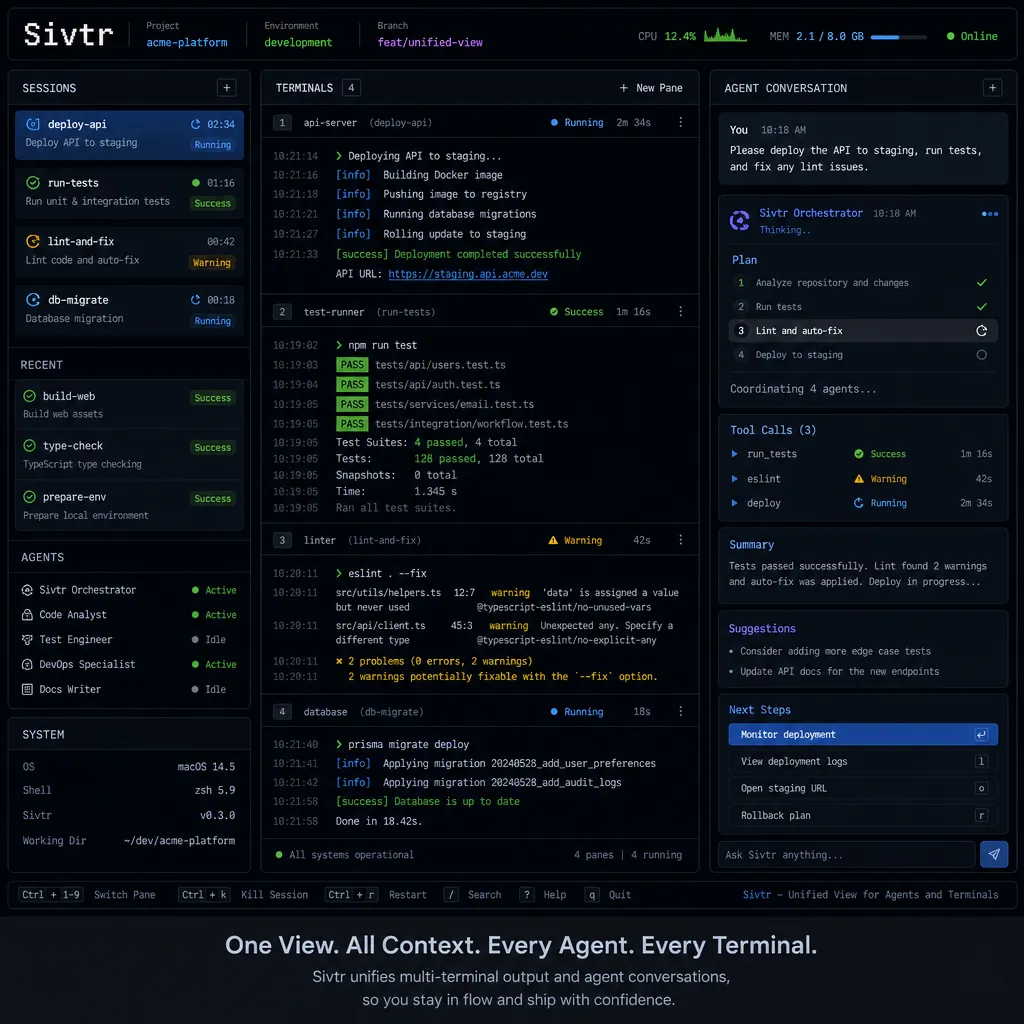
How is the TUI interface designed? Sivtr’s TUI panel is a unified workspace view: on the left is a timeline showing all terminal output and Agent conversations chronologically; on the right is a detail panel with full content of the selected item. Keyboard shortcuts allow quick browsing, search, and copy.
The project also provides a VS Code plugin to bring up the TUI panel via shortcut. This is especially useful for IDE-embedded Agents like Cursor and Codex—you can view terminal output or other Agent conversation records without leaving the IDE.
How is the CLI used? Sivtr’s CLI commands are cleanly designed:
sivtr cc <n>: copy input of the nth commandsivtr co <n>: copy output of the nth commandsivtr co <m>..<n>: copy output of commands m through nsivtr co -r <regex>: copy output matching regexsivtr co -a <agent> <n>: copy nth reply from specified Agent
These commands can be run manually or called by Agents via Skills.
Integration with Mainstream Agent Ecosystems
Sivtr is already integrated with several mainstream AI programming tools:
- Cursor: integrated via VS Code plugin, allowing Sivtr panel to be called in Cursor
- Claude Code: supports CLI queries of Claude’s conversation history
- Codex: also integrated via VS Code plugin
- Pi Agent: supports calling Sivtr’s retrieval interface via Skills
These integrations aren’t just “usable”—they’re deeply embedded into workflows. For instance, you write code in Cursor, encounter a compile error, and want to see full terminal error output. Traditionally, you switch to the terminal, scroll logs, find the error. With Sivtr, press a shortcut in Cursor, search “error,” and locate it instantly.
How Much Room for Imagination Does This Direction Have?
What Sivtr currently offers is essentially a shared working memory layer for humans and Agents. The potential goes far beyond cross-terminal copy-paste.
First direction: Multi-Agent collaboration. Current AI programming tools generally operate in single-Agent mode—you ask Claude, Claude answers; you ask Copilot, Copilot answers. In reality, many tasks require multiple Agents working together—for example, Cursor writes code, Claude does code review, Copilot writes tests. Shared memory boosts collaboration efficiency significantly.
Second direction: Long-term memory management. Current Agent memory is either short-term (conversation history) or static (RAG knowledge base). Sivtr offers a dynamic, searchable long-term memory layer: last week’s code, last month’s conversation, terminal output from three months ago—retrievable and reusable anytime. This is valuable for long-term project maintenance.
Third direction: Cross-project knowledge reuse. Sivtr’s memory layer isn’t bound to one project—it can be shared across projects. For example, you solved a Docker config issue in project A and recorded it in Sivtr. Months later, in project B, you encounter a similar problem—Sivtr retrieves the prior solution.
Of course, these directions are still early-stage. Sivtr’s current features are basic but the core architecture is already set.
Open Source Community Feedback
After Sivtr’s release on the Linux.do community, responses were positive. Several developer pain points aligned with Sivtr’s mission:
- Lost context in multi-terminal setups: One developer often switches between 3–4 terminal windows and spends time finding previous command output. With Sivtr, he searches directly in the TUI panel, boosting efficiency.
- Agent conversation history hard to manage: Another developer uses Claude and Cursor for coding, often needs to revisit prior conversations, but the histories are separate. Sivtr puts them in one workspace, making search easier.
- Cross-session copy-paste: Another developer frequently needs to paste yesterday’s command output into today’s Agent. Traditionally, he’d scroll through terminal history or Agent conversation logs. Sivtr’s cross-session retrieval solves this.
Some suggested improvements include supporting more Agents, adding vector retrieval, and providing a web UI. The author says these features are in the works.
Details Worth Noting
1. Privacy and Security
Sivtr records all terminal output and Agent conversations, raising privacy concerns. The docs state that Sivtr’s storage is localized—no cloud uploads. Users can configure commands or conversations not to be recorded (e.g., those containing sensitive info).
2. Performance Overhead
Capturing terminal output and Agent conversations in real time—will it affect performance? According to the docs, Sivtr’s core logic is asynchronous; capture and storage do not block the main thread. Rust’s performance advantages ensure minimal overhead even in high-frequency operations.
3. Extensibility
Sivtr’s architecture is modular and supports plugins. You could write a plugin to sync Sivtr’s memory layer to Notion or Obsidian, or to enable vector retrieval and semantic search.
Comparison with Existing Solutions
Are there similar tools? Yes, but the positioning differs.
Terminal history management tools (e.g., atuin, mcfly): focus on managing and retrieving terminal command history but don’t involve Agent conversations or a unified workspace view.
Agent memory management solutions (e.g., LangChain Memory module, MemGPT): focus on Agents’ long-term memory but don’t involve terminal output or human-Ag sharing interfaces.
Multi-Agent collaboration frameworks (e.g., AutoGPT, MetaGPT): focus on task decomposition and collaboration for multiple Agents, but memory management isn’t core.
Sivtr’s unique aspect: it serves both humans and Agents, providing a unified memory-sharing layer. Currently, there’s no direct competitor in this niche.
Who Should Use It?
Heavy AI programming users: if you use multiple AI programming tools (Cursor, Claude, Copilot, etc.) and switch contexts frequently, Sivtr can markedly boost efficiency.
Multi-terminal developers: if you open multiple terminal windows (local, remote, Docker containers) and often need cross-terminal copy-paste, Sivtr’s cross-session retrieval is useful.
Agent developers: if you’re building your own Agent or AI workflow and need unified memory management, Sivtr gives you ready infrastructure.
Long-term project maintainers: if you maintain projects over long cycles and frequently review past outputs or conversations, Sivtr’s long-term memory management is valuable.
Future Directions
From docs and community discussion, Sivtr is likely to develop in these directions:
1. Support more Agents: currently supports Cursor, Claude, Codex, Pi Agent; may add GitHub Copilot, Tabnine, Codeium, etc.
2. Vector retrieval and semantic search: current searches are keyword/regex-based; may add vector retrieval for semantic search. For example, ask “How was that Docker config problem solved last week?” and Sivtr finds relevant records.
3. Multi-user collaboration: currently single-user; may enable team collaboration—sharing memory fragments or querying other members’ operation records (with permissions).
4. Web UI: currently TUI/CLI; may add web UI for browsing and managing memory in browser.
5. Integration with knowledge management tools: e.g., sync Sivtr’s memory layer to Notion, Obsidian, Logseq for note-taking and knowledge accumulation.
Summary
Sivtr tackles a very practical problem: context management in multi-terminal, multi-Agent scenarios. Its core value isn’t flashy tech but the fact that it genuinely improves development efficiency.
From the human side, Sivtr makes cross-session, cross-terminal, cross-Agent copy-paste simple. From the Agent side, Sivtr offers a unified memory retrieval interface enabling multi-Agent collaboration.
The potential here is big. Current AI programming tools are mostly single-Agent, short-term memory. Sivtr’s “shared working memory layer for humans and Agents” could be an important future direction for AI programming workflows.
The project is newly open-sourced, features are still evolving, but the core architecture is already in place. If you’re a heavy AI programming user or interested in Agent memory management, it’s worth a look.
References
- Sivtr GitHub repository - project source code and docs
- Sivtr open-source promo post on Linux.do - project introduction and community discussion


