
WeCom launches voiceprint recognition for meeting minutes, with AI automatically distinguishing speakers

In version 5.0.8 of WeCom, the new "Record Face-to-Face Conversation" feature has been launched. By using voiceprint recognition technology, it can distinguish between multiple speakers in real time and generate text records. The AI automatically summarizes key points and to-do items, aiming to address efficiency pain points in offline meeting scenarios.
WeChat Work Launches Voiceprint Recognition for Meeting Notes, AI Automatically Differentiates Speakers
In version 5.0.8, WeChat Work officially rolled out the “Record Face-to-Face Conversation” feature — another attempt by Tencent to apply AI capabilities in the collaborative office domain. The feature targets offline meeting scenarios — those where people sit in a conference room discussing face-to-face, but later realize no one took notes and key decisions are unclear.
The core capability is voiceprint recognition. The system can distinguish different speakers in real time, match identity information in the corporate address book, and automatically organize “who said what” into text records. This is not just simple speech-to-text, but structured content with speaker tags.
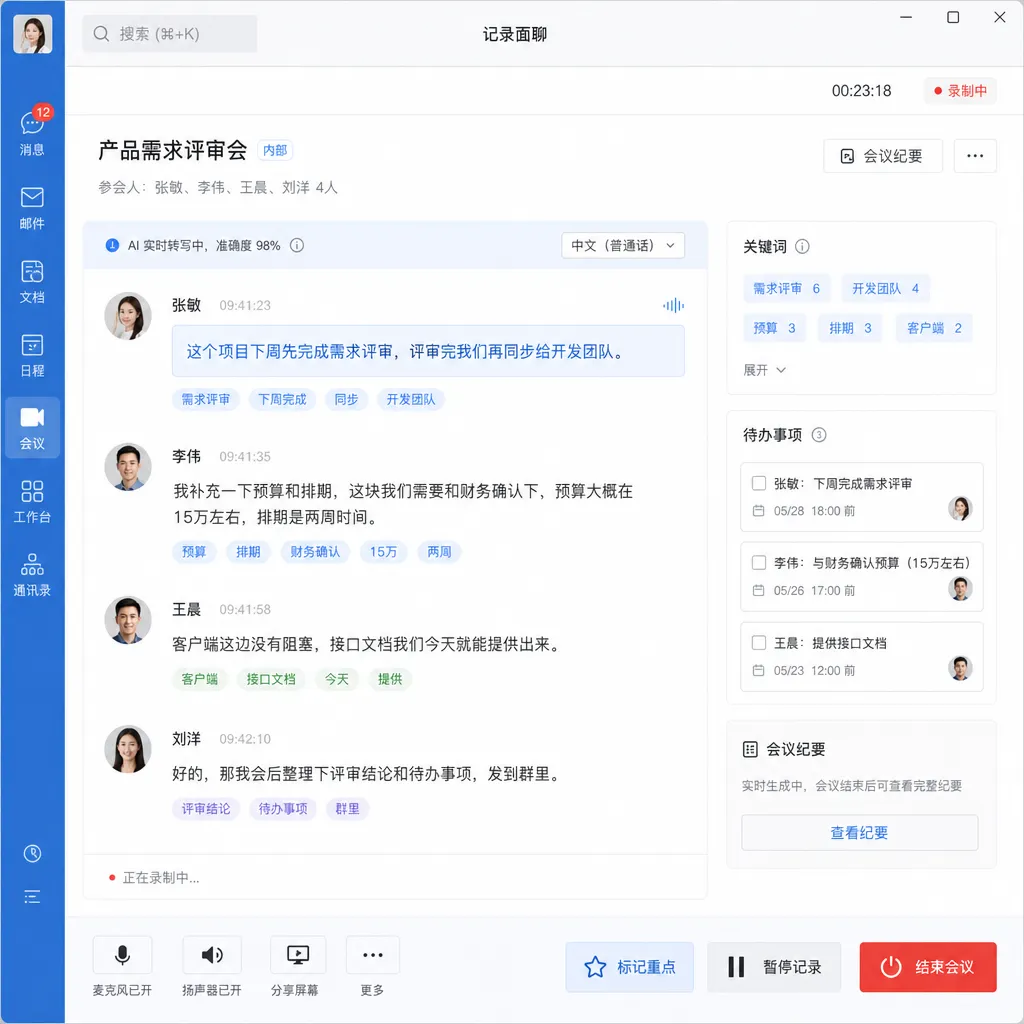
Feature Design: A Complete Loop from Recording to To‑Do List
The usage process is straightforward. In the WeChat Work interface, click the "+" in the upper right corner, select “Record Face-to-Face Conversation,” and the phone will begin recording and transcribing in real time. During the meeting, the system automatically adds speaker labels to each statement via voiceprint recognition technology. This recognition is real-time, with no need for post-meeting processing.
After transcription is complete, AI steps in to do two things:
- Extract key points: Pull core information from lengthy dialogue and generate meeting minutes
- Break down task lists: Identify to-do items mentioned in the discussion and automatically generate an assignable task list
These two capabilities are direct counterparts to Feishu’s “Fancy Notes” and DingTalk’s “Quick Minutes.” WeChat Work’s advantage lies in its user base — many traditional enterprises already use it for internal communication, so there’s no need to push a new tool.
The Technical Challenge of Voiceprint Recognition
Voiceprint recognition is not easy to perfect in meeting scenarios. It must address several challenges:
- Multi-speaker audio separation: Multiple people speaking simultaneously, interruptions, low volume — the microphone receives audio mixed together
- Voiceprint modeling: Must build a voiceprint feature library for each person, but WeChat Work cannot require all employees to pre-record a “voiceprint sample”
- Real-time requirements: Transcription and recognition must keep pace with speech; high latency renders it unusable
WeChat Work’s solution is to combine the corporate address book for cold start. The system quickly learns the voiceprint features of attendees at the beginning of the meeting, then continuously optimizes recognition accuracy during the conversation. This design assumes all attendees are in the WeChat Work address book; performance drops with external visitors or temporary participants.
From a technical standpoint, this system likely uses an edge–cloud collaborative architecture. Voiceprint feature extraction may be done locally (to protect privacy) while speech-to-text and AI summarization most likely happen in the cloud. This means network quality is important — poor signal in a meeting room could cause lag.
Benchmarking Competitors: Feishu and DingTalk Have Been Running for a Year
The feature is not new. Feishu’s “Fancy Notes” launched similar capabilities in 2024, and DingTalk’s “Quick Minutes” also rolled out last year. WeChat Work is catching up rather than creating a new category.
Comparison:
Feishu Fancy Notes excels in deep integration with Feishu Docs and Feishu Projects. Meeting notes can be converted directly into documents, and tasks synced to project boards with one click. Its AI summarization is more aggressive, attempting to distill conclusions and decisions rather than simply list points.
DingTalk Quick Minutes takes a lightweight approach. It does not require all attendees to be in DingTalk and allows for standalone recording uploads. This is better suited for cross-company meetings but sacrifices real-time collaboration.
WeChat Work’s Record Face-to-Face Conversation sits between the two. It relies on WeChat Work’s organizational structure and is more suitable for internal meetings, but its design is simpler than Feishu’s — fewer follow-up collaboration processes. This might be intentional — WeChat Work’s user base is heavily traditional enterprises that want “usable and easy” rather than “feature-packed.”
Real-World Applicability
The feature is best suited for small discussion meetings with fewer than 10 people. Too many attendees lower voiceprint recognition accuracy; overly long meetings turn the transcript into an unwieldy long document.
Typical usage scenarios include:
- Project kick-off meetings: Need clear task division and timelines; AI-generated task lists are immediately usable
- Client requirement discussions: Sales or pre-sales teams can compile a client’s core needs after face-to-face talks
- Department weekly meetings: Routine progress syncs where minutes must be quickly generated and shared
Less suitable scenarios:
- Brainstorming sessions: Discussions are divergent and jumps in logic, making it difficult for AI to extract valuable conclusions
- Executive strategy meetings: Sensitive information; companies may be unwilling to upload content to the cloud
- Cross-language meetings: If attendees speak different languages or dialects, accuracy drops sharply
Privacy and Compliance Considerations
Meeting recording and transcription involve sensitive information. WeChat Work has designed a few limits:
- Initiator-visibility principle: Only the person who starts “Record Face-to-Face Conversation” can see the complete record; others must be granted access
- Enterprise admin permissions: Enterprises can set in the backend which departments or personnel can use the feature
- Data storage location: Tencent has not disclosed where audio and transcription text are stored or how long they are retained — something enterprise clients care about
For highly regulated industries like finance and healthcare, these disclosures may be insufficient. They need to know whether data will be used for model training, whether local deployment is supported, and if requirements like China’s Level 3 information protection standard can be met. To expand in these industries, WeChat Work must provide more detailed compliance documentation.
The Ceiling of AI Capabilities
The AI summarization of “Record Face-to-Face Conversation” essentially involves large language models doing text understanding and generation. Its effectiveness depends on:
- Transcription accuracy: High speech-to-text error rates mean downstream AI produces “garbage in, garbage out”
- Context understanding: Meetings often reference earlier emails, documents, and chat records — can AI link to these?
- Domain knowledge: Different industries have specialized terminology and logic; general models may not interpret them correctly
Currently, WeChat Work’s AI summarization is basic: keyword extraction and simple task identification — it struggles to “understand the true intent” of a meeting. In a product review meeting, for example, AI might list all mentioned features without distinguishing between “must-do,” “nice-to-have,” and “explicitly rejected.”
There are two directions to solve this:
- Vertical domain fine-tuning: Train specialized models for specific industries or scenarios to improve accuracy
- Human–AI collaboration: AI drafts, humans quickly edit and supplement, instead of expecting perfect one-shot output
WeChat Work is more likely to choose the second. Its large user base and varied scenarios make it impractical to optimize models for each niche.
Impact on the Collaborative Office Market
This feature’s launch marks AI’s shift in collaborative work from “nice-to-have” to “standard capability.” Feishu, DingTalk, and WeChat Work are all doing similar things, indicating the market has validated the demand.
But competition will intensify. When all products have AI meeting notes, differentiation lies not in the feature itself but in:
- Recognition accuracy: Whose voiceprint recognition is more precise, whose speech-to-text error rate is lower
- Integration depth within the ecosystem: Whether meeting notes can flow seamlessly into task management, document collaboration, project boards
- Enterprise-grade capabilities: Data security, permission management, audit logs — essentials for B2B
WeChat Work’s advantages are the WeChat ecosystem’s massive user base and Tencent Cloud’s infrastructure. Its disadvantages are equally clear — slow product iteration, conservative feature design, and limited appeal to developers. Feishu pushes harder on product experience; DingTalk penetrates more deeply into SMEs; WeChat Work needs to find its differentiation.
In the long term, AI meeting assistants’ endgame is not “recording and summarizing” but “participating and deciding.” Future AI may remind in real time during meetings: “This issue was discussed last week, conclusion was X,” “Based on project progress, this timeline is unrealistic,” “A similar request has already been implemented in another department, could be reused.” Then AI becomes not just a tool but a “virtual team member.”
But that’s still far off. Currently, “Record Face-to-Face Conversation” addresses the most basic problems: ensuring meeting content isn’t lost, and clarifying task assignments. This alone is a tangible efficiency boost.
References
- WeChat Work Officially Launches “Record Face-to-Face Conversation,” Achieves Voiceprint Recognition and Automatic Minutes - 36Kr — Official release information and core capability introduction


