
Microsoft Tweaks Copilot Notebooks: Integrates Teams Meetings into Context

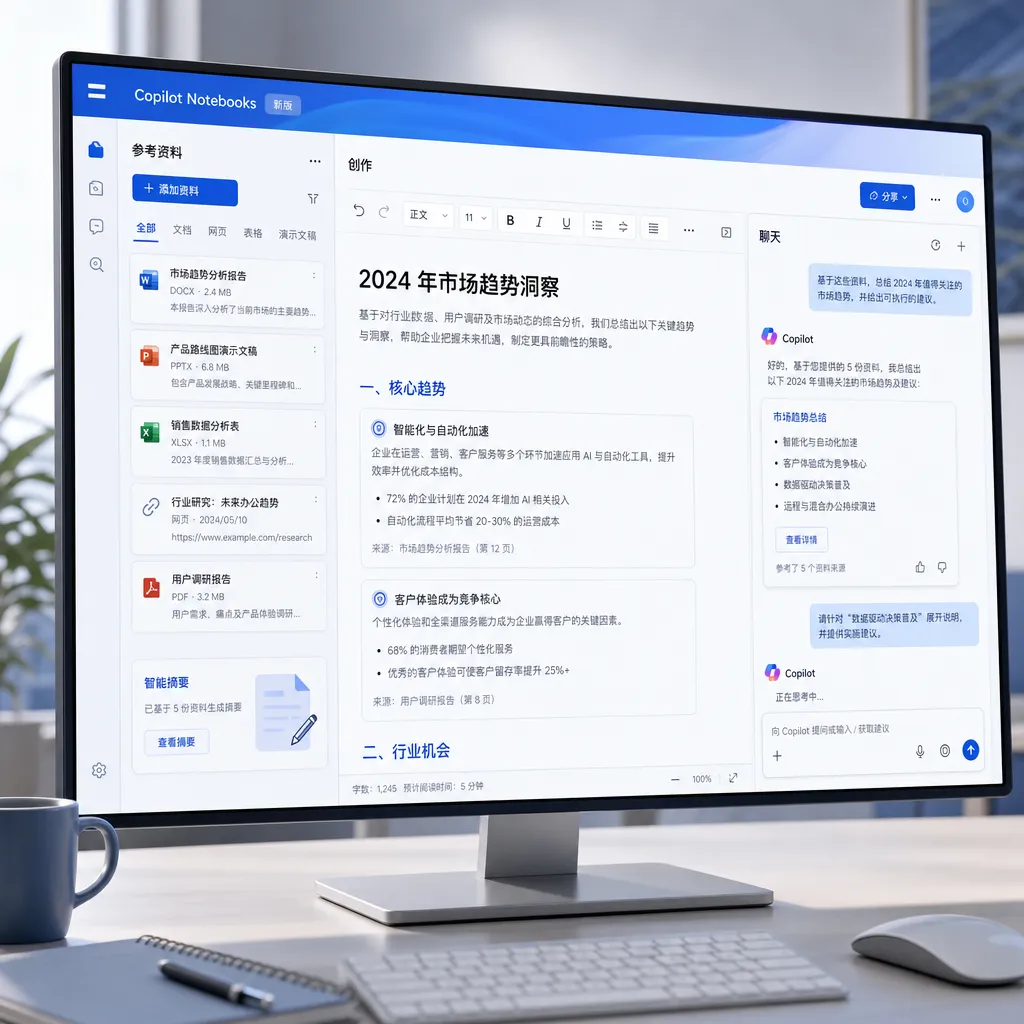
This month, Microsoft upgraded Microsoft 365 Copilot Notebooks, integrating chat, creation, and reference materials into a single interface, and including Teams meetings, Outlook emails, and webpage URLs as referenceable knowledge sources. Output capabilities now include Excel and infographics.
Microsoft pushed a significant upgrade to Microsoft 365 Copilot Notebooks today. The changes come in two parts: first, integrating formerly separate chat, creation, and reference materials into a single interface; second, greatly expanding the types of content the Notebook can “ingest” — Teams meetings, Outlook email threads, and web URLs have all been added to the reference list. The new interface and features will roll out to Frontier program users over the next few days.
This product has been somewhat awkward over the past year. Copilot Notebooks is positioned as a “project-level digital notebook” — you pile in documents, meetings, and links related to a project, and let Copilot answer questions, write, and generate materials within that restricted corpus. Logically, it’s comparable to Google’s NotebookLM, with a similar concept: using “user-selected corpus + large model” to create a high-accuracy, low-hallucination workspace. The problem was that Microsoft originally made it too “modular” — chat in one area, references in another, generated content in yet another, forcing users to bounce back and forth between three zones. This merged view fixes that long-standing issue.
Turning Teams Meetings into “Searchable Knowledge”
More noteworthy is the expansion of reference material scope. Frontier users can now add an entire Teams meeting into a Notebook, with references including:
- Meeting transcript
- Meeting notes
- Chat logs from the meeting
- Files shared during the meeting
The significance of this is greater than it appears. Previously, Copilot would process a meeting by giving you a “post-meeting summary” — a one-time, point-in-time output. Once a project runs across weeks or months, it’s hard to reuse the context from dozens of meetings. Now the Notebook turns a meeting into a “knowledge object” that can be repeatedly referenced. You can ask, “In last month’s requirements review, how did the PM set the tolerance for payment flow delay?” and Copilot will go back to that meeting transcript to find the answer, instead of relying on the model’s own guesses.
This use case is essentially a concrete implementation of RAG (Retrieval-Augmented Generation) — except Microsoft hides the “chunking, vectorizing, retrieval” pipeline from the user, and the only thing the user needs to do is check which meetings to put into the Notebook. For teams building internal corporate knowledge bases, this is a product form worth referencing: letting the user define the “boundary” of retrieval, instead of having the model hunt for a needle in a petabyte-scale haystack.
Support for web URLs is also included. No surprise here — this matches NotebookLM’s existing web import capability.
Outlook Emails: Coming to Frontier in the Next Few Days
Microsoft also announced that support for importing Outlook email threads will arrive in Frontier within the next few days. This feature’s usage scenario is very specific —
For example, you’re negotiating a project with a client, and over 30 email exchanges, scattered among them are quotes, contract terms, requirement changes, and opinions from various parties. Pull that thread into the Notebook, and have Copilot answer “What payment milestones did the customer ultimately accept?” — much faster than manually flipping through emails. This “specified corpus + precise questioning” paradigm is actually a different product direction from ChatGPT’s open-ended conversation. The former is more like an intern who can read your materials, the latter is more like an omniscient but occasionally inaccurate consultant. Microsoft’s bet with Notebooks is clearly on the former.
New Outputs: Excel and Infographics
The Notebook already had quite a few output capabilities: Office documents, presentations, Audio Overview (matching NotebookLM’s podcast generation feature that became wildly popular), mind maps, study guides. This update adds two more:
- Excel spreadsheets: Can now be generated directly. This is very practical for structured data scenarios — for example, asking Copilot to extract all mentioned to-do items from a batch of meeting notes, organize them by person responsible and deadline, and output an editable xlsx.
- Infographic: To be available to Frontier in the next few days. Microsoft hasn’t revealed the exact form, but product logic suggests it’s probably akin to a single-slide visual summary in PowerPoint, combining key information from the Notebook into one visual chart.
With Excel added, Notebooks’ output now essentially covers all forms of deliverables you can imagine for daily office work: documents, spreadsheets, PPTs, audio, charts, mind maps. Microsoft’s thinking is clear — you’re already paying for Microsoft 365, so there’s no need to use third-party tools.
Frontier Program: Microsoft’s “Gray Release Channel”
The repeatedly mentioned “Frontier Program” deserves its own explanation. This is an early-access mechanism Microsoft began using last year, positioned between internal testing and official release. Microsoft 365 Copilot users with Frontier enabled get new features weeks or months ahead of others, at the cost of stability and feature completeness still being refined.
Judging by the pace, Microsoft’s iterations for Copilot are basically “Frontier first, stable later,” similar to Google’s Workspace Labs or Apple’s beta channels. For enterprise IT, this is a good thing — allowing them to choose between aggressive early adoption and waiting for stable release.
Comparing with NotebookLM: Where It’s Weaker, Where It’s Stronger
The unavoidable comparison is with Google NotebookLM. The core concept of both is highly similar, but the differences are obvious.
NotebookLM’s advantage is its extremely low barrier to entry — open a browser and use it, free, friendly to individual users and students. Its Audio Overview feature became a phenomenon last year, with two AI hosts discussing your uploaded paper, good enough that many listened to it as a podcast.
Copilot Notebooks’ advantage is deep integration with the Microsoft 365 ecosystem. Teams meetings, Outlook emails, SharePoint documents, OneDrive files — these are the real places where information is generated in enterprises, and the Notebook can directly tap into them. For NotebookLM to achieve this, either the user manually exports and uploads, or Google deeply integrates Workspace to that extent (which hasn’t been seen yet).
In other words, for personal and student use cases, NotebookLM is more convenient; for enterprise project collaboration, Copilot Notebooks is much stronger after this update. This is Microsoft’s usual approach — not competing head-on over single-product UX, but leveraging ecosystem lock-in to win.
What It Means for Developers
If you’re working on enterprise AI applications, there are a few product decisions in this update worth referencing:
- Let users define retrieval boundaries themselves. The essence of the Notebook is the user actively defining a corpus scope, rather than having AI search all data. This “human + AI” division of labor often produces more stable results with fewer hallucinations than purely vector-based retrieval.
- Unify multi-source data into the single abstraction of “reference material”. Files, meetings, emails, web pages — in the Notebook they’re all the same kind of thing. This abstraction simplifies the user’s mental model and makes it easier to integrate more sources later.
- Match output forms to the scenario. The same corpus can output a study guide in research scenarios, a PPT in reporting scenarios, or an Excel sheet in analysis scenarios. Microsoft is closely aligning “what AI can generate” with “the user’s scenario.”
For domestic developers building similar products or directly calling large model APIs, Copilot’s deep integration is a Microsoft ecosystem advantage that’s hard to replicate. But the underlying product logic — “specified corpus + multi-model collaboration + multi-format output” — can be borrowed. If you need to orchestrate multiple models for different tasks (e.g., using Claude for long-text comprehension, GPT for code generation, embedding models for vector retrieval), you can use aggregation platforms like OpenAI Hub to connect with one key, saving repetitive integration and account management.
A Quick Assessment
This update doesn’t bring earth-shaking innovations, but the product direction is now clearer. Microsoft isn’t trying to make a “smarter ChatGPT” — it’s building a work context container deeply bound to Microsoft 365 data. The core competitiveness of the Notebook isn’t the AI itself, but how deeply it can hook into your workflow.
Meetings transcripts are in, emails are coming soon, and the next likely steps are Planner tasks, Loop components, and Whiteboard boards. Once the Notebook can truly ingest all work outputs over a project cycle, its value will no longer be “an AI tool,” but “the memory of the project itself.” That’s what Microsoft truly wants to build.
References
- Microsoft updates Copilot Notebooks: Merge chat and reference display, expand to import Teams meeting content - IT Home — First Chinese-language report on this update, with full feature list and rollout timeline.


