
Liberation for ComfyUI Users: LLM Takes Over the Entire Composition Workflow

The open-source project **comfyui-good-anima** encapsulates ComfyUI’s image generation process into an LLM-callable *Skill*, creating a seamless workflow from composition planning, Danbooru tag retrieval, and prompt assembly to workflow execution. This allows AI assistants like Claude Code and Codex to directly help you draw images.
An Open Source Solution That Lets LLM Take Over ComfyUI Has Appeared
On May 25, a project called comfyui-good-anima went viral on linux.do. Its author, ShiroEirin, expressed his frustration bluntly: “You guys have been playing with the Anima base model all day, still manually dragging and connecting nodes in ComfyUI—like cavemen.” So he decided to open-source his entire set of skills that use an LLM to automate the whole workflow.
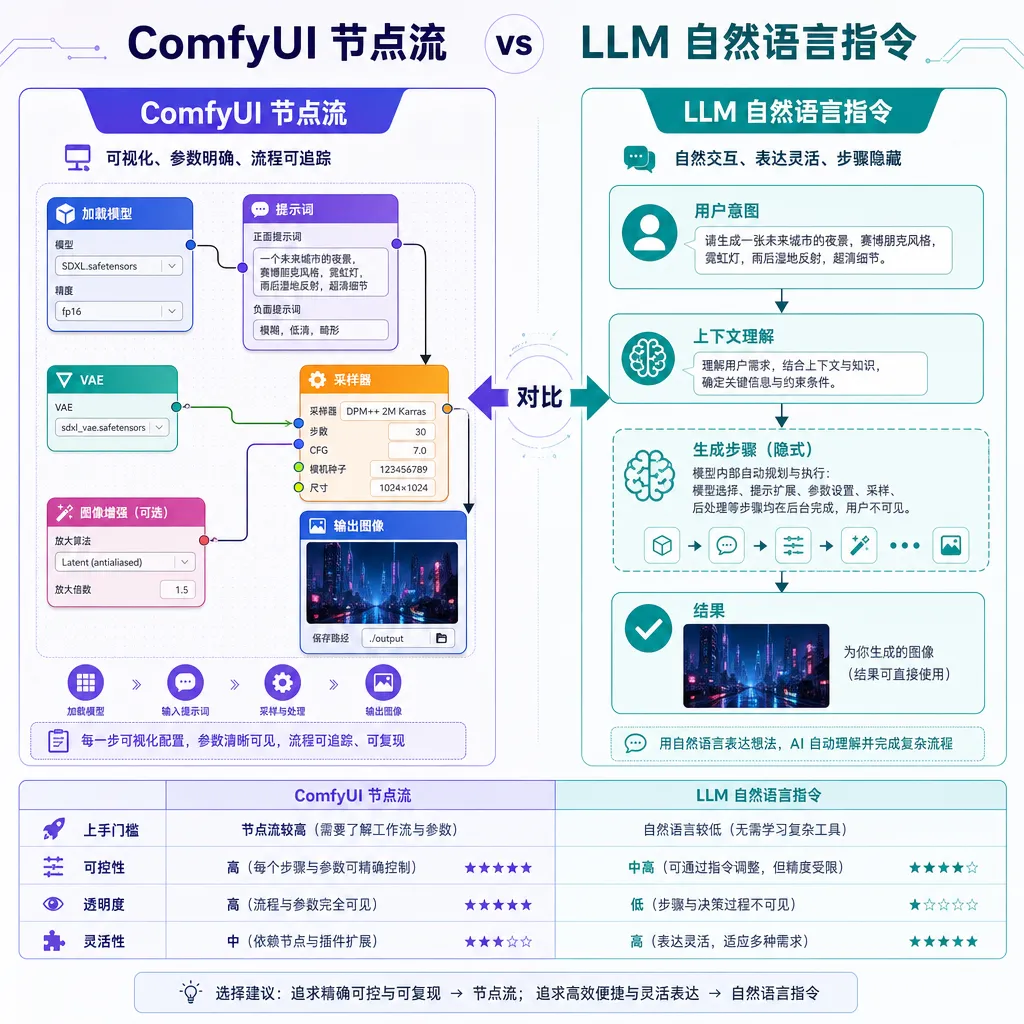
This actually hits a long-standing pain point in the AI art community—ComfyUI’s node workflow is made for engineers, not creators. To go from concept to finished image, users have to tune parameters across a dozen nodes, and writing prompts means remembering the exact spelling of countless Danbooru tags—one wrong character and a feature disappears. Yet LLMs can already understand natural language like “a cyberpunk-style girl standing on a neon-lit street.” So why make people act as the translation layer in between?
comfyui-good-anima offers a simple answer: stop making humans the translator—let the LLM directly control ComfyUI.
What It Actually Does
The project’s positioning is clear—this is not another ComfyUI plugin, but a set of Skill definitions for AI assistants (like Snow, Claude Code, Codex, etc.). Once the LLM reads these Skill descriptions, it understands the entire workflow from composition to generation—no need for users to manually craft prompts or touch ComfyUI’s interface.
The full process is divided into four parts:
1. Composition Planning
When the LLM receives the user’s request, its first step isn’t to write tags—it’s to do what a director should do:
- Aspect ratio selection: portrait or landscape, 9:16 or 3:2, depending on content
- Shot distance: full body, cowboy shot, upper body, portrait—each conveys a different density of information
- Composition method: rule of thirds, symmetry, leading lines, negative space
- Lighting direction: front light, backlight, sidelight, rim light
This is the most commonly overlooked step. Most people jump straight into prompts, piling on adjectives and character tags, ending up with stiff front-facing poses. Delegating composition decisions to the LLM means it first considers “what the image should express” before thinking “what tags will achieve that.”
2. Tag Retrieval
This is the most practical part of the whole solution. Danbooru’s tag system is notoriously unfriendly—character names must use Japanese romanization, artist tags require perfect underscores and parentheses, and a single typo kills the entire feature.
comfyui-good-anima builds an index so the LLM doesn’t guess tags from memory—it queries verified tags. Say you ask for “a character in Hatsune Miku’s style,” it retrieves the correct form hatsune_miku, instead of guessing hatsune miku or miku_hatsune. Same for artist styles—the parentheses format (artist_name) is guaranteed by the index.
This eliminates the steepest learning curve for Anima users.
3. Prompt Assembly
Anima, based on the Illustrious architecture, has specific prompt conventions—where to place quality tags, how to write negative prompts, and how to balance weights. The LLM assembles positive and negative prompts according to the official recommended template, avoiding common beginner mistakes like misplaced quality tags or missing negative keywords.
4. Workflow Execution
Finally, the LLM triggers ComfyUI. The project integrates a full pipeline for image generation, upscaling, and caching. Through ComfyUI’s API, the LLM submits tasks and retrieves results. In other words, the user only needs to give a single Chinese instruction—the LLM handles everything else.
Why Choose Anima
A bit about the Anima model: it’s one of the fastest-growing anime base models in the Illustrious ecosystem. It responds precisely to Danbooru tags, reproduces characters accurately, and differentiates artist styles well. Experienced users know its potential—but also that it’s extremely sensitive to prompt quality—a single wrong tag can yield a drastically different result.
This explains why the author built this tool: the stronger the model, the higher the prompt standard. If prompt engineering isn’t delegated to the LLM, the model’s performance ceiling is limited by the user’s tag skills.
Practical Experience and Engineering Approach
From its code organization, the project adopts Anthropic’s Skill-based design—packaging domain knowledge, tool calling, and workflow orchestration into modules an LLM can interpret and invoke. Programming Agents like Claude Code and Codex naturally support this method; install the Skill, and the Agent instantly gains expertise in that domain.
Compare this with existing community approaches, like comfyui_LLM_party, which embed LLM nodes inside ComfyUI workflows—still requiring node setup in ComfyUI, just with the LLM as a step in the chain. comfyui-good-anima flips the model—the LLM becomes the main orchestrator, and ComfyUI acts as the execution engine.
These two ideas serve distinctly different use cases:
- The former suits users with established workflows who need an LLM for text processing at certain nodes
- The latter suits “I have an idea—give me an image” style creation from scratch
The latter obviously aligns with most users’ natural workflow.
Deployment and Usage
The project is hosted on GitHub (ShiroEirin/comfyui-good-anima). Installation outline:
# 1. Clone the repo into your AI assistant’s skills directory
git clone https://github.com/ShiroEirin/comfyui-good-anima

# 2. Ensure ComfyUI is running locally with Anima model installed
#    ComfyUI default API port is 8188

# 3. Load the skill into Claude Code / Codex / Snow
#    Specific steps depend on which Agent you use
After that, you can simply tell your Agent “draw xxx,” and it will autonomously perform composition planning, tag lookup, prompt assembly, API calls, wait for completion, and return the image.
Key prerequisites:
- Local ComfyUI must be running: this project doesn’t solve compute—image generation still happens on your local GPU or server
- Anima model must be installed: the Skills are optimized for Anima’s prompt style; other anime models may have reduced performance
- Agent must support long context and tool use: composition and tag queries consume tokens, so use Claude Sonnet/Opus or GPT‑4 level models—smaller ones may fail to handle full workflows
How Far This Idea Could Go
This project isn’t just about “making AI drawing easier”—it demonstrates a bigger trend: LLMs as workflow orchestrators.
In the past two years, tools like ComfyUI and SD WebUI have exploded in complexity—more nodes, more parameters, more scattered plugins. It’s the classic “expert tool spiral”: powerful, but high barrier. LLMs open another path—instead of simplifying the tool itself, add a semantic abstraction layer on top.
comfyui-good-anima proves this approach works for AI graphics. The same idea could apply to video generation (Wan, Hunyuan—similarly complex workflows), 3D generation, music creation—any domain dominated by node-based tools. It’s likely we’ll soon see a wave of similar Skill projects.
For indie developers, it’s also a smart open-source strategy—don’t reinvent the wheel; build an LLM-friendly interface layer for existing powerful tools. The ROI is far higher than writing a new UI from scratch.
Some Remaining Issues
Of course, the solution isn’t perfect:
- Controllability is a double-edged sword: delegating composition to the LLM sacrifices fine-grained control—professional illustrators may find it limiting
- Tag index maintenance cost: Danbooru updates daily, new tags and artists appear constantly—the index must be maintained for accuracy
- Iterative workflow experience: image generation is inherently iterative—this Skill still has room for improvement in “refine based on previous image” scenarios
- Agent dependencies: implementation ties heavily to each Agent’s capabilities—switching Agents may require adaptation
But these are engineering challenges, not conceptual flaws. The author also mentioned in the post—issues welcome.
For ComfyUI users, this is a plug-and-play open-source project that boosts productivity instantly. For Agent developers, it’s a Skill design worth dissecting.
References
- linux.do Original Post: 【Open Source - comfyui-good-anima】A complete solution to let LLM handle layout, prompts, and ComfyUI calls — The author ShiroEirin’s initial release with project details and discussion
- GitHub - ShiroEirin/comfyui-good-anima — Source repository containing Skill definitions and documentation
- GitHub - heshengtao/comfyui_LLM_party — Reference project taking the opposite approach, integrating LLM as a node inside ComfyUI


