
Hermes Agent Deployment Tool Search: MCP Context Overhead Halved

Nous Research added a Tool Search feature to the Hermes Agent. By loading tool definitions on demand, it reduced the MCP tool’s context usage from 50% to on-demand invocation, lowering the per-session cost by 0.07–0.10 USD, while also addressing the issue of decreased decision accuracy caused by tool overload.
Hermes Agent Tool Search Launch: Cutting MCP Context Overhead in Half
Yesterday (May 29), Nous Research rolled out the Tool Search update for the open-source intelligent agent framework Hermes Agent. This feature directly addresses a long-standing pain point in MCP (Model Context Protocol) deployments: tool definitions consuming half of the context window.
According to Anthropic’s benchmark from last November, a Hermes deployment connected to 5 MCP servers with 34 tools had an average prompt size of 45,000 tokens per conversation turn, of which 22,000 tokens—fully 50%—were tool schema overhead. Even more striking data appeared in their April paper: in typical multi-server setups, tool definitions could consume 134,000 tokens, with each conversation turn costing 15,000–60,000 tokens.
This “MCP tool tax” brings two practical problems.
First, cost: when the cache misses at session start, each occurrence may burn through $0.07–$0.10.
Second, accuracy: when the model sees hundreds of irrelevant tool options at once, it experiences decision paralysis—too many choices make it unclear which tool to use.
On-Demand Loading: From “Combo Meal” to “À La Carte”
The core concept of Tool Search is progressive disclosure. The model no longer preloads all tool schemas but loads content incrementally, round by round, as needed.
Once Tool Search is enabled, all MCP tools and plugin tools in the model’s visible tool array are replaced by three bridging tools:
tool_search(query, limit?)— searches the deferred tool catalogtool_describe(name)— loads the full schema of a specific tooltool_call(name, arguments)— invokes the deferred tool
A typical interaction looks like this:
Model: tool_search("create a github issue")
  → { matches: ["github_create_issue", "github_create_pr"] }

Model: tool_describe("github_create_issue")
  → { schema: { title: string, body: string, labels?: string[] } }

Model: tool_call("github_create_issue", { title: "...", body: "..." })
  → [actual tool execution]
The model first searches for the tool, then inspects its parameters, and finally calls the target tool. Throughout the entire interaction, only the definitions of actually used tools enter the context window.
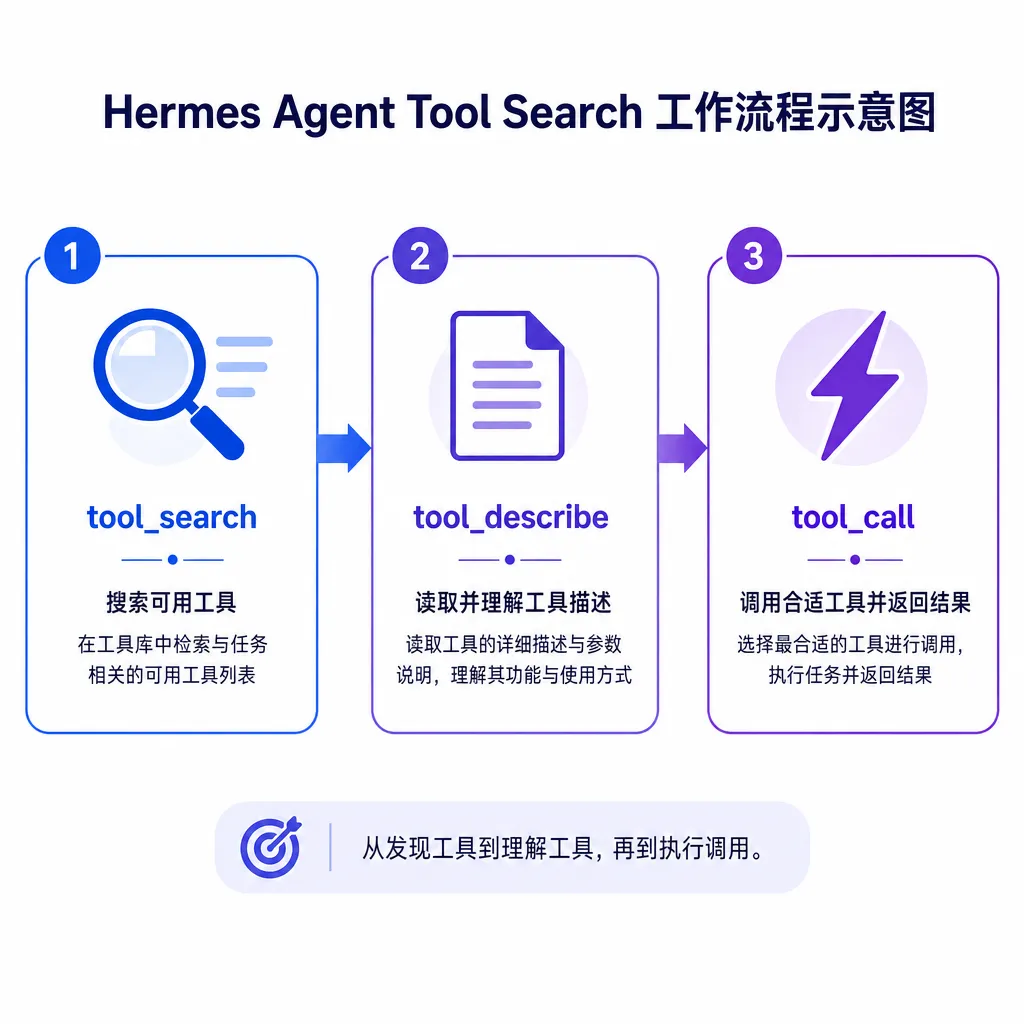
Real-World Results: Context Overhead Drops from 50% to On-Demand
Tool Search is optional and disabled by default. Once enabled, the tool definition overhead that previously occupied half the context window is reduced to three bridging tool definitions (a few hundred tokens) plus the definitions of actually invoked tools (a few thousand tokens).
For tool-heavy deployments (e.g., connecting 10+ MCP servers and 100+ tools), the optimization directly impacts two metrics:
- Cost: Prompt cost during cache misses drops from $0.07–$0.10 to just a few cents. For frequently used agents, this difference shows up clearly on monthly bills.
- Accuracy: The model is no longer overwhelmed by hundreds of irrelevant tools, leading to clearer decision paths. Anthropic’s paper introduced “Tool Attention” as the key metric measuring the MCP tool tax—the more tools available, the easier it is for the model to get distracted.
The design philosophy of Tool Search aligns with Hermes Agent’s overall architecture: don’t dump everything into the model, let the model proactively retrieve what it needs. This mindset is consistent with its four-layer memory system (L1 Core Memory, L2 Skill Library, L3 External Memory Providers, L4 Conversation History).
Hermes Agent’s “Learning Loop” Architecture
Hermes Agent stands apart from other open-source agent frameworks (like Claude Code, OpenClaw, and DeerFlow) thanks to its closed-loop learning system.
Its memory system has four layers:
- L1 Core Memory:
MEMORY.md(max 2200 characters) andUSER.md(max 1375 characters) store environment setup, project rules, and user profile. These files are always in context but are very small. - L2 Skill Library: The
SKILL.mdfile stores workflows distilled from completed tasks so the agent can reuse them in similar future scenarios—this is the agent’s “muscle memory.” - L3 External Memory: Supports 8 plugins (Honcho, Mem0, Zep, etc.) with unlimited capacity but requires manual search and LLM summarization.
- L4 Conversation History: Complete dialogue logs stored in SQLite for offline analysis and self-improvement training.
Tool Search essentially extends this “on-demand loading” concept to the tool layer. The model doesn’t need to remember every tool—only how to find and use them.
Autonomous Operations with the Autonomous Curator
The v2026.4.30 release (code-named The Curator Release) introduced the Autonomous Curator, a background persistent agent responsible for automatically maintaining the skill library.
The Curator’s tasks include:
- Scoring skills
- Merging similar skills
- Cleaning up deprecated skills
- Prioritizing recently used skills
It runs once every seven days, generating a log file (logs/curator/run.json) and a Markdown-format review report. You can check its runtime status and see skills ranked by usage frequency via hermes curator status.
The Curator inherits the runtime configuration of the main program (provider, model, credentials) but its permissions are restricted to the memory and skill toolsets so it cannot execute unauthorized operations. This design is intentionally restrained—it’s not an “all-purpose butler” but a focused background process dedicated to skill library maintenance.
When used together with Tool Search, the benefits compound. The Curator adjusts skill priorities based on usage frequency, while Tool Search prioritizes high-frequency skills in search results. Together they form a positive feedback loop: frequently used skills become easier to find while rarely used ones gradually fade or get purged.
The MCP Ecosystem’s Practical Challenge
MCP, launched by Anthropic in November last year, aims to standardize how agents integrate various tools and data sources. The concept is appealing in theory, but the first problem encountered in real deployments is context explosion.
The root issue lies in MCP’s design assumption: all tool definitions are loaded into the context at the start of a session. This is fine for a small number of tools (under 10), but when connecting to multiple MCP servers with hundreds of tools, the context window quickly floods.
Anthropic itself acknowledged this in its paper and introduced the “Tool Attention” metric to quantify tool overhead but didn’t offer a direct fix—Tool Search is Nous Research’s solution within Hermes Agent.
It’s not perfect—it introduces an extra reasoning step (search → describe → call), theoretically adding latency. However, in practice, the delay is negligible. Compared to the context and cost savings, one or two extra tool calls are well worth it.
Most importantly, Tool Search is optional. If your deployment only uses a dozen tools, you can leave it off. But for tool-heavy agents (e.g., integrating Spotify, Google Meet, ComfyUI, TouchDesigner, etc., across multiple MCP servers), Tool Search becomes essential.
Comparison with Other Agent Frameworks
Hermes Agent’s positioning differs from frameworks like Claude Code and OpenClaw.
- Claude Code is Anthropic’s official CLI tool, focused on code editing and command execution. It’s stateless—no memory is preserved after each session.
- OpenClaw is a message gateway agent emphasizing cross-platform routing (Telegram, Discord, Slack, etc.). It has passive memory (it remembers only when told to) and no active learning capability.
Hermes Agent’s core is the learning loop. It can remember what you tell it (L1 Core Memory, L3 External Memory), distill its experiences into reusable skills (L2 Skill Library), and auto-maintain those skills via the Curator. Tool Search extends this loop to the tool layer—allowing on-demand “learning” of tools as well.
If you need a long-running, continuously learning, autonomously evolving agent, Hermes Agent is currently the only open-source option. If you just need a temporary code assistant or chatbot, Claude Code or OpenClaw might suit you better.
Deployment Recommendations
Tool Search is still experimental, and official documentation does not yet provide detailed configuration guidance. Based on community feedback, you can enable it by adding the following to config.yaml:
tools:
  search:
    enabled: true
    limit: 5  # Maximum number of search results per query
Once enabled, all MCP and plugin tools will load on demand. If you want certain core tools to remain immediately accessible, add a deferred: false flag in their definitions.
Note that Tool Search increases the number of tool invocation rounds. If your tasks are latency-sensitive (e.g., real-time dialogues), you may want to weigh the trade-offs. But for most asynchronous tasks (code generation, data analysis, content creation, etc.), this delay is negligible.
Another recommendation is to pair it with the Curator. The Curator prioritizes frequently used skills, and Tool Search favors these in query results. Together, they gradually improve the agent’s tool usage efficiency.
In Closing
Tool Search isn’t a revolutionary feature—but it solves a very real problem. For the MCP ecosystem to become truly practical, it must address context explosion. Anthropic identified the problem; Nous Research delivered a workable solution.
The value of this solution lies not in technical complexity—it’s actually simple—but in its consistency with Hermes Agent’s overarching architecture: rather than feeding the model everything, let it autonomously fetch what it needs. This philosophy runs through Hermes Agent’s memory system, Skill Library, Curator, and Tool Search—they all serve the same purpose: making the agent more like a learning apprentice rather than a passive tool.
From “tool” to “apprentice,” this represents a paradigm shift in agent frameworks. Hermes Agent has gone farther down this path than any other open-source project so far. Tool Search may be a small step—but it’s a step in the right direction.
References
- Hermes Agent adds Tool Search, saving tokens for "AI horse trainers" - IT Home — IT Home’s coverage of the Tool Search feature, including Anthropic’s test data
- Hermes Agent Deep Dive: The Paradigm Shift from “Tool” to “Apprentice” - Zhihu — Detailed analysis of Hermes Agent’s four-layer memory system
- Inside Hermes Agent: The Only Closed-Loop Learning System in Open-Source Agents - Tencent Cloud — Technical breakdown of Hermes Agent’s learning loop architecture
- Hermes Agent GitHub Repository — Official open-source code and documentation


