
Chrome 149 lets you delete AI models

Chrome 149 introduces AI model management functionality on the client side, allowing users to proactively refuse downloads or delete existing models. This marks an important shift in Google’s client-side AI strategy, returning the power of choice to users but also exposing the complexity of local model management.
Chrome 149 Lets You Delete AI Models
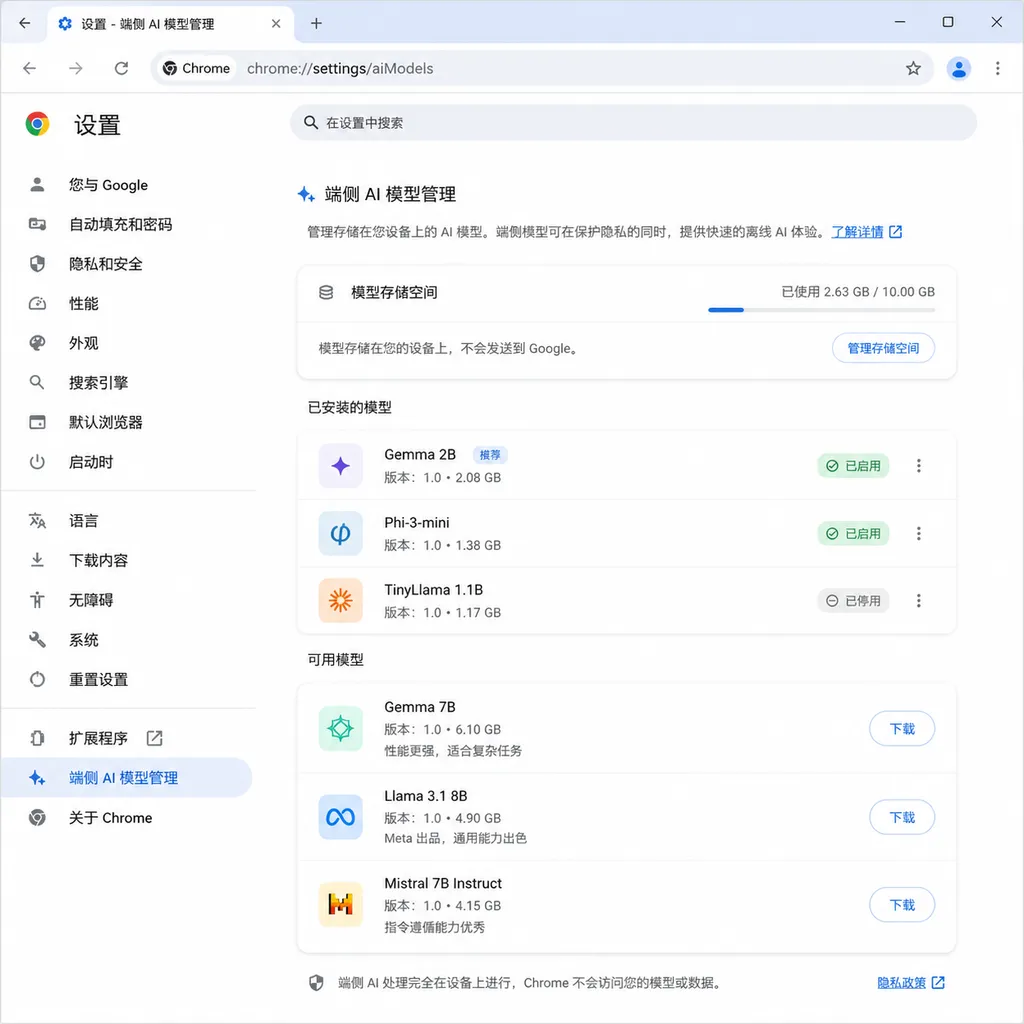
Google Chrome 149 stable version was pushed this week, with the biggest change being the addition of an on-device AI model management option. Users can now actively refuse the browser from downloading AI models, and can directly delete all previously downloaded models.
This marks a clear shift in Google's on-device AI strategy. Over the past few months, Chrome silently downloaded up to 4GB of Gemini Nano models, leading to dissatisfaction among many users — especially those with devices that already have tight disk space. Now Google has finally handed the choice back to users, but behind this change, it also exposes the complexities of implementing on-device AI in the browser.
The Awkwardness of On-Device AI: You Don’t Use It, But It Still Takes Up Space
Starting from version 147, Chrome has built-in Gemini Nano models for scam detection, content summarization, text proofreading, and other functions. According to Google’s design, the model will be automatically downloaded the first time the relevant API is invoked. The browser will first run a GPU performance test to decide whether to download the 4B (4 billion parameter) model or a smaller variant.
The problem is that this “automatic” download mechanism is a black box for most users. You might simply open a page with enhanced protection enabled, and then the browser begins downloading several gigabytes of model files in the background without any explicit prompt. By the time you notice a chunk of space mysteriously gone from your C drive, the model has already been installed.
More awkwardly, even if you never use Chrome’s AI features, the models will keep taking up space. Until Chrome 149, the only way to delete models was to manually locate the %LocalAppData%\Google\Chrome\User Data\On-Device Model directory and remove it, or change registry settings to disable the download policy. This was too high a barrier for ordinary users.
What the New Management Option Does
Chrome 149 adds an "AI and model management" entry in the system settings, providing two core functions:
- Refuse model downloads: When turned off, the browser will not automatically trigger model downloads, even if the related API is called.
- Delete downloaded models: One-click clearing of all local AI models, including base models and LoRA weights.
It’s worth noting that deleting models won’t affect the browser’s regular functions, but will cause features dependent on Gemini Nano to stop working — such as AI mode, content summarization, and text proofreading. Also, after deletion, the models will not automatically re-download; you must manually invoke the API again to trigger a fresh download process.
This design is somewhat subtle. Google clearly wants to balance two things: giving users control, and yet not completely abandoning the push for on-device AI. So it chose to let users “actively refuse” rather than “actively enable.” By default, model downloading remains turned on — it’s just that now you can see where the switch is.
The Complexity of Model Management
Managing on-device AI models is more complex than one might think. Chrome’s documentation states that Gemini Nano’s lifecycle includes multiple phases — download, update, hot swap, and removal — each triggered under different conditions:
Download Timing
- Triggered the first time
Summarizer.create()and similar APIs are called - When enhanced protection is enabled and the user has just created a new profile, calling
availability()may also trigger a download - Before downloading, the browser checks GPU performance and disk space (requires at least 22GB free)
Update Mechanism
- Checks base model updates upon browser startup
- Checks LoRA weight updates daily
- Updates are hot-swapped, without interrupting existing AI sessions
Automatic Removal
- Automatically deletes when disk space drops below a threshold
- Clears when the relevant feature has not been used for 30 days
- Immediately clears when disabled by enterprise policy
The original intent of this mechanism was to make it transparent to users, but in practice it has left many confused. You might suddenly find several gigabytes missing from your disk space, or discover that the AI feature you used to rely on has stopped working because the model was automatically removed.
What Developers Need to Watch Out For
Chrome’s on-device AI API design assumes the model may be unavailable at any time. This means:
- Don’t assume the model always exists: Even if the user previously successfully called the API, the next time it’s called the model might have been removed.
- Handle all return values from
availability(): Includingreadily,after-download,no. - Prepare fallback plans: When on-device models are unavailable, consider reverting to a cloud API or disabling the related feature.
This design philosophy is quite different from traditional frontend development. You need to treat the model as an unstable external dependency, rather than an intrinsic capability of the browser.
// Recommended way to check model availability
const availability = await ai.summarizer.availability();

if (availability === 'readily') {
  // Model is downloaded, use it directly
  const summarizer = await ai.summarizer.create();
  const result = await summarizer.summarize(text);
} else if (availability === 'after-download') {
  // Model needs to be downloaded; choose to wait or downgrade
  // Note: download may take minutes and could fail due to insufficient disk space
  showDownloadingUI();
  const summarizer = await ai.summarizer.create();
  // ...
} else {
  // Model unavailable; use fallback
  fallbackToCloudAPI();
}
Chrome’s AI Ambition Continues
While giving users the option to delete models, Google clearly has no intention of slowing its on-device AI rollout. Windows Report discovered that Chrome is testing skipping the search homepage entirely and guiding users into “AI Mode.” Google responded that this is only exploratory with no official rollout plan, but the direction is clear: making AI the default interaction mode in the browser.
Developer tools updates are also ongoing. Chrome 149’s DevTools adds MCP server implementation and a command-line interface for AI agents, and the CSS panel now includes Gemini-powered style autocompletion. These changes suggest Google aims to deeply integrate AI into developers’ daily workflows, not just user-facing features.

The Balancing Act of On-Device AI
The ideal state of on-device AI is: models are always available, respond quickly, don’t use cloud resources, and are transparent to users. Reality, however, makes it hard to satisfy all four goals at once.
- To keep models always available means occupying disk space, which may annoy users
- To respond quickly means using large models, which take up even more space
- To avoid using cloud resources means accepting limited functionality offline
- To be transparent to users means automatic download and updates — bringing us back to the controversy of silent installation
Chrome 149’s change is a compromise: giving users choice while keeping the default on. This both alleviates criticisms about space usage and ensures on-device AI features don’t become useless.
From a developer’s perspective, this is also a signal: on-device AI is far from “plug and play.” You need to consider situations where models are unavailable, handle download failures, and prepare fallback plans. This mindset is entirely different from calling a cloud API.
Other Updates Worth Noting
Chrome 149 has several other changes:
-
Official ARM64 Linux Support: Google finally provides official deb and rpm packages for ARM architecture Linux, whereas before only x86_64 had official builds. For developers using ARM devices, this means no longer relying on third-party Chromium packages maintained by distributions — with improvements in updates and compatibility.
-
429 Security Fixes: The number sounds large, but most are routine memory safety and permission isolation fixes, with no particularly severe vulnerabilities.
-
WebMCP API Debugging Feature: Experimental feature for debugging pages using the WebMCP API. MCP (Model Context Protocol) was proposed by Anthropic, and now Chrome is supporting it as well.
-
Intl.Locale Support for Language Variants: A small but practical improvement, allowing developers to handle multilingual scenarios more precisely.
Chrome 150 is expected to be released on June 30. If you’re concerned about frequent updates, you can switch to the Extended Stable branch, which updates every eight weeks.
Final Thoughts
On-device AI is a promising direction, but the implementation details still need refining. Chrome 149’s changes at least solve the most basic problem: users can now see where the model is and can delete it. But deeper questions remain: How should on-device models be distributed? Should they be installed by default? Should they be automatically removed when unused?
There’s no standard answer. Needs vary across different users and scenarios. Google has chosen a relatively conservative strategy: default on, but allow users to turn it off. This may not be optimal, but it’s certainly better than the previous “we’ll install it whether you want it or not” attitude.
For developers, now is the time to re-examine your assumptions about the browser’s AI capabilities. On-device models are not a stable runtime environment — they are more like an optional enhancement. Your code needs to be prepared for this.
References
- Google Chrome 149 Stable Release Allows Users to Delete Downloaded On-Device AI Models - IT Home - Main updates in Chrome 149
- How to Prevent Google Chrome 147 from Silently Downloading 4GB On-Device AI Models - IT Home - Method for disabling model downloads via registry settings


