
OpenAI Launches Dreaming V3: Complete Overhaul of ChatGPT Memory System

OpenAI released Dreaming V3 yesterday. The ChatGPT memory system has shifted from manual saving to an asynchronous synthesis architecture, automatically updating user preferences. Computing costs have been reduced to one-fifth, and it has been made available to paying users in the United States.
OpenAI Launches Dreaming V3: Complete Overhaul of ChatGPT Memory System
On June 4, OpenAI released the largest architectural upgrade yet to the ChatGPT memory system. The new version, Dreaming V3, abandons the “saved memories” list it had relied on for the past two years, replacing it with an asynchronous background synthesis mechanism. It treats users’ conversation history, uploaded files, and connected third-party apps (Gmail, calendar, etc.) as raw data sources, continuously generating a structured “memory state.”
This upgrade is not a patch—it’s a complete redesign of the memory layer’s logic. From the April 2024 version where users had to explicitly say “remember this” with Saved Memories, to today’s Dreaming V3 that can decide on its own what to remember, and what outdated information to delete, ChatGPT’s memory capability has finally evolved from a “note-taking tool” into a “continuously updated user profile engine.”
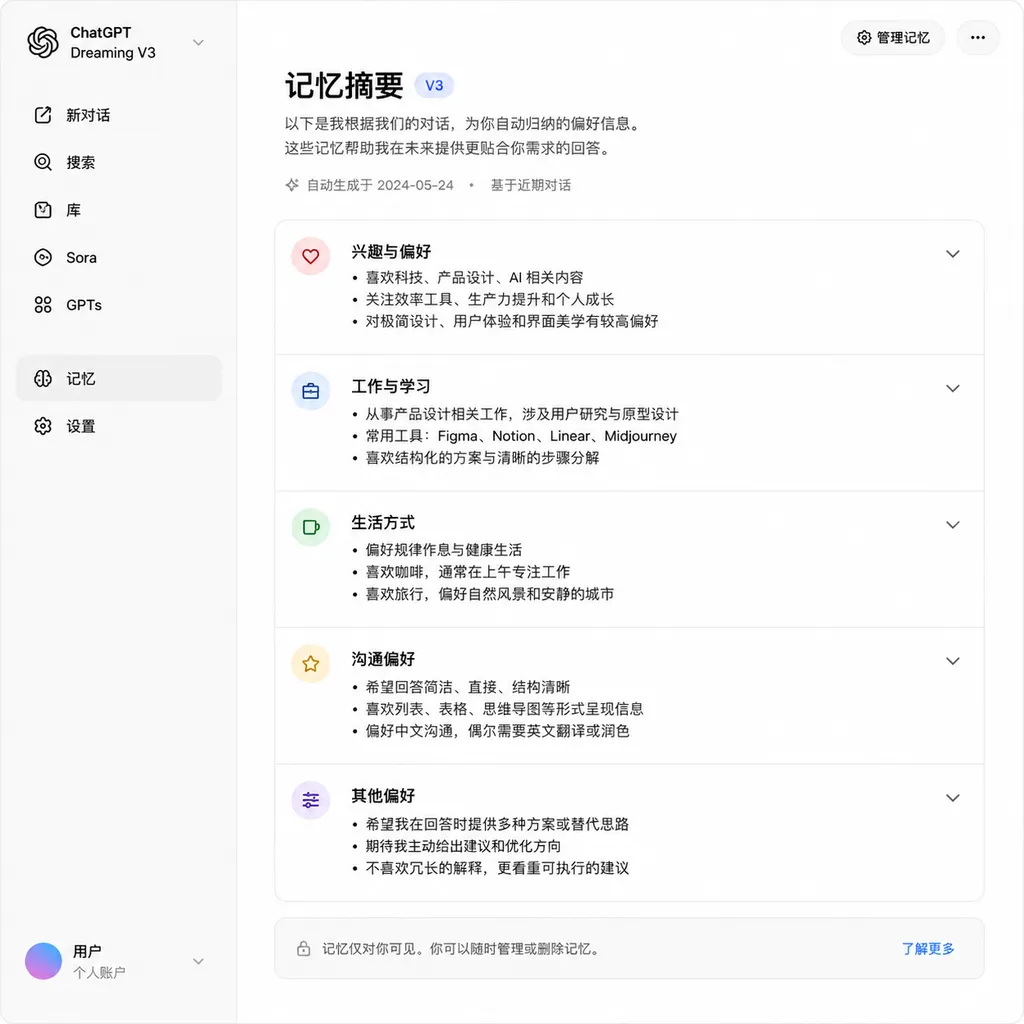
From Manual Saving to Asynchronous Synthesis: A Fundamental Shift in Architecture
The key change in Dreaming V3 is transforming memory from “a list of facts the user explicitly saved” into “a derived state continuously synthesized by the system.” Under the old Saved Memories mechanism, you had to tell ChatGPT “remember I like drinking black coffee” for it to record that in its memory list. This design had two fatal flaws: first, the user had to remember to maintain this list; second, the saved information never updated itself—you might have said three months ago you liked black coffee, but even after switching to lattes, ChatGPT would still recommend based on outdated memories.
Dreaming V3 works completely differently. It runs an asynchronous background process that constantly scans all your conversations, files, and emails, extracting key information to synthesize a “snapshot of who you are right now.” This snapshot isn’t static—periodically, the system reruns the synthesis, incorporating new conversation information, marking outdated details as historical, and reconciling conflicting facts.
For example, if you told ChatGPT at the end of May “I’m going on a business trip to Singapore next week,” Dreaming V3 would record this as a temporary state and wouldn’t mark you as “living in Singapore.” By mid-June, when you return, the system would automatically archive the “in Singapore” state and stop recommending Singapore restaurants. This ability to distinguish between temporary states and long-term facts is something Saved Memories simply couldn’t do.
Technically, Dreaming V3 structures memory in three layers: raw data sources (conversations, files, app data), synthesis engine (asynchronous background processes), and query layer (fast retrieval of relevant fragments during conversation). The memory itself isn’t raw data—it’s a continuous reinterpretation of it. This explains why OpenAI emphasizes that “deleting memory requires deleting summaries, conversation logs, archives, and disconnecting app links”—because as long as the raw data remains, the memory will be regenerated during the next synthesis.
Three Criteria for Defining “Good Memory”: Continuation, Adherence, Updating
In its official announcement, OpenAI defined three dimensions for evaluating memory quality:
1. Continuing useful context
This is the most basic ability: details mentioned in past conversations should be naturally brought into future ones. For example, if you previously said “I’m a front-end developer mainly using React,” the next time you ask a technical question, ChatGPT should default to a React solution rather than starting from Vue or Angular.
Dreaming V3’s improvement is its ability to extract structured information from fragmented conversations. You don’t have to say “I’m a React developer” explicitly—if you’ve mentioned React projects, discussed hooks, and asked about state management several times, the system can deduce it.
2. Adhering to preferences and constraints
This covers the user’s subjective tendencies and hard constraints—dietary restrictions (vegetarian, allergens), communication style (emoji use or not, reply length), workflows (code comments, unit test requirements).
In this aspect, Dreaming V3 introduces “conditional memory.” You can set preferences on the memory summary page like “when discussing travel, remind me I enjoy wildlife photography” or “when writing code, always add detailed comments.” The system activates corresponding memory fragments in appropriate scenarios rather than dumping all memories into every context.
3. Automatic updating over time
This is Dreaming V3’s biggest breakthrough. Saved Memories used to be “write once, valid forever”; the new system constantly evaluates the timeliness of each memory.
The official example is straightforward: if you ask “what breakfast places are nearby” at 5 AM in Singapore, Saved Memories would permanently remember you’re in Singapore—even a week after you’ve returned. Dreaming V3 tracks timelines, knowing “in Singapore” is a temporary state and reverting to your home location automatically.
The ability rests on modeling “fact lifecycle.” The system distinguishes “I live in Beijing” (long-term fact) from “I’m on a business trip this week” (temporary state), and handles “I used to live in Beijing, now I’ve moved to Shanghai” (fact change). Dreaming V3 solves this via continual resynthesis of memory snapshots—each synthesis session reevaluates the current validity of each piece of information.
Performance Optimization: Compute Reduced to One-Fifth, Soon Available to Free Users
Another key area of improvement in Dreaming V3 is cost control. OpenAI noted that compared to the previous architecture, compute costs for free users dropped by around five times.
This optimization matters because memory system costs come primarily from two steps: processing large amounts of historical conversations during background synthesis, and running relevance searches during conversations. Dreaming V3 is inherently suited to incremental updates—it doesn’t need to rescan all conversations every time, only merging new content into the existing snapshot. On the query side, it controls costs through a “first check for personalization need, then run precise search” two-stage process.
Specifically, when starting a new conversation, the system runs a lightweight “personalization check”: is this a generic knowledge query (e.g., “How to sort a list in Python”) or does it require user context (e.g., “Optimize that API design from last time”)? If it’s the former, it goes through standard answering without triggering memory search. Only the latter prompts retrieval of relevant memory fragments and historical conversations.
This design explains why OpenAI is confident in using Dreaming V3 as a standalone memory base—they believe the architecture can support hundreds of millions of long-term users while maintaining quality. The feature is currently available to Plus and Pro users in the U.S., and will roll out to the free version, Go plan, and more countries in the coming weeks.
Comparing Competitors: Claude and Gemini’s Memory Strategies
ChatGPT isn’t the only conversational AI working on memory systems. Anthropic’s Claude and Google’s Gemini have similar capabilities, but their approaches differ.
Claude’s memory leans toward “project-level context.” Its Projects feature lets users create individual knowledge bases for each project, upload documents, set instructions, and automatically use relevant content during conversations. This suits deep work in specific domains (e.g., a software project’s code base + design docs + past discussions) but is weaker in cross-project long-term user profiling.
Gemini’s strategy sits between the two. It has cross-conversation global memory and supports Google Workspace integration to use emails, calendars, and documents. However, Gemini’s memory updating mechanism is still more passive—mostly relying on users to proactively add information. Its automatic extraction and timeliness updating abilities are less advanced than Dreaming V3.
Dreaming V3’s advantage lies in “fully asynchronous + continuous updating.” It doesn’t depend on manual maintenance or heavy real-time synthesis during every conversation. Memory grows in the background, with only quick queries when chatting. This architecture offers better scalability and cost efficiency, and aligns with the product philosophy that “AI assistants should proactively understand users—not wait for users to teach them.”
Privacy Boundaries: Memory Summary Page and Temporary Conversations
The convenience boost from Dreaming V3 also means ChatGPT will automatically record more information. OpenAI has built in several privacy controls:
Memory summary page: A visual interface showing all structured information extracted from your conversations. You can see who ChatGPT thinks you are, what you like, and what projects you’re working on. Each piece of memory can be edited or deleted, and new facts can be added manually (like “I’m allergic to seafood,” which the system might not learn from conversations).
Temporary conversation mode: If you want to discuss things not to be recorded (e.g., editing someone else’s resume, sensitive topics), you can enable temporary conversation. Content in this mode won’t enter memory synthesis and won’t affect your profile.
Turn off memory: You can disable the memory system entirely in settings. Note that disabling memory doesn’t automatically clear saved content—if you wish to delete something completely, you need to remove it from the memory summary page and possibly also delete related conversation logs and archives, and even disconnect linked apps (because as long as raw data exists, memory will regenerate during synthesis).
These designs balance convenience and privacy, but they also shift the responsibility of “actively managing what the AI remembers” onto the user. If you never check the memory summary page, you won’t know what ChatGPT thinks about you. This issue will be more pronounced in the Dreaming V3 era—since memories are generated automatically, it’s hard to predict which conversations will yield which pieces of information.
Real-World Experience: “Emergent Behavior” of the Memory System
After Dreaming V3’s launch, developers on Reddit’s r/MachineLearning have been analyzing its behavior patterns. Interesting findings include:
1. The system proactively performs “fact reconciliation”
If you provide conflicting information at different times (e.g., “I’m a back-end engineer” and “I mainly do front-end”), Dreaming V3 won’t simply keep the latest—it will try to understand the context. The possible result might be “User is a full-stack engineer currently working on front-end projects” or “User changed roles, formerly back-end now front-end.” This reconciliation happens automatically during synthesis, without user intervention.
2. Significantly improved extraction of “implicit information”
You don’t need to explicitly state “I like clean code style”—if in several code review talks you’ve said “this function’s too long” or “can we split it into smaller modules,” the system can deduce this preference. Extracting implicit preferences from behavioral patterns is something Saved Memories could not achieve.
3. Timeliness judgment still imperfect
Despite OpenAI emphasizing “update over time,” tests show the system’s judgment on “when to mark information as outdated” is still conservative. Some users report that two weeks after ending a project, ChatGPT occasionally references its details. This may be intentional—preferring to keep potentially useful context rather than prematurely delete information that could still be relevant.
What Dreaming V3 Means for Developers
If you use ChatGPT for coding or technical decision-making, Dreaming V3 brings direct benefits:
More coherent multi-turn collaboration: Before, you might have had to restate “this project uses TypeScript + React + tRPC” at the beginning of every new conversation; now this information persists automatically. When discussing architecture, coding, or fixing bugs, the system remembers your tech stack and style.
More precise context understanding: When you say “optimize that API from before,” the system can pinpoint which API, what stage the previous discussion was at, and what unresolved issues remain. Cross-conversation referencing previously required you to manually supply enough context; now it’s automatic.
Actively manage technical preferences: If you prefer a specific code organization style (e.g., “strict separation of API layer and business logic,” “test coverage must exceed 80%”), set it explicitly on the memory summary page to avoid repeating it each time.
However, note that Dreaming V3’s “proactive learning” means if you casually make incorrect statements (e.g., “I usually don’t write unit tests”), the system may take them as fact and default to that assumption in future conversations. Regularly checking the memory summary page to ensure the system’s understanding is accurate will be a useful habit.
From Tool to Assistant: Product Logic Shift in the Memory System
Dreaming V3’s launch marks an important shift in OpenAI’s product positioning: ChatGPT is no longer just a “question-and-answer” tool—it’s evolving toward a “long-term companion and continuous learner” personal assistant.
The core of this shift is “state persistence.” Previously, each conversation was independent—ChatGPT didn’t know who you were or what you were doing, starting over each time. Saved Memories was the first step, but merely a static notepad, never updating itself. Dreaming V3 gives ChatGPT genuine “continuous awareness” of users—it knows your current projects, your work methods, and recent technology interests, and keeps these aligned with your real situation.
This product form demands higher ability from AI. It must not only answer single questions, but also model “a person’s long-term state,” distinguishing facts from preferences, temporary from permanent, explicit from implicit. Technically, this is a leap from stateless to stateful, with much greater complexity.
Dreaming V3 is not the final destination. For now, it mainly covers text conversations, files, and emails—highly structured data sources. In the future, it may integrate more types of signals (calendar events, code repositories, browsing history). Memory granularity also has room to improve—it’s currently “user-level” global profiling, but may evolve into “project-level” and “role-level” segmented memories (e.g., different memory sets for work and personal contexts).
For developers, this trend means AI tool usage patterns will shift from “one-off tasks” to “long-term collaboration.” You’re no longer “renting” an AI each time you solve a problem, but “training” an assistant that understands your working style. The value of AI moves from “one-time efficiency boost” to “continuous productivity gain,” but it also requires more effort from users to manage the AI’s understanding of them.
OpenAI Hub now supports invoking the latest ChatGPT capabilities via standard interfaces. Although Dreaming V3’s memory synthesis mechanism is currently only a feature within ChatGPT and not exposed via API, as the architecture matures, it may eventually open to developers—allowing third-party apps to build similar “long-term memory” capabilities.
References
- Reddit r/MachineLearning - How OpenAI Dreaming V3 works - In-depth technical community analysis of Dreaming V3 architecture
- ITHome - OpenAI upgrades ChatGPT memory system - Official release report by Chinese tech media


