
DEEIX Chat v0.2.0: Turned the WebUI into a usable product

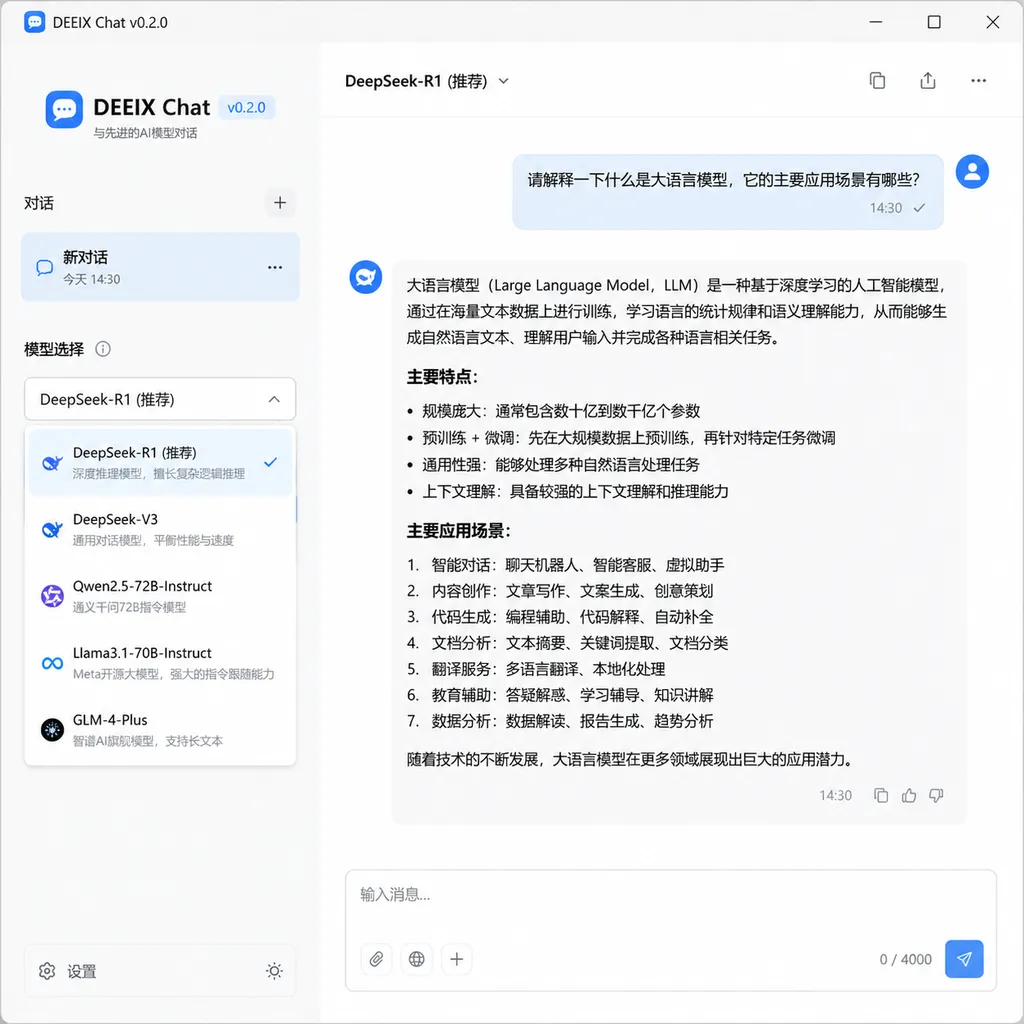
The WebUI project DEEIX Chat, in the aggregated API track, has released version v0.2.0, with key upgrades to model management, image generation, HTML rendering, and the redemption code system. This update takes it from a functional frontend to a big step toward being truly commercially viable.
In the past two years, many WebUI projects have emerged in the aggregated API track, but few have made a lasting impression. In early June, DEEIX Chat released version v0.2.0. The author opened a post on linux.do asking big names for token donations to test the demo site. Looking at the update, it’s not just patchwork—it’s solidly filling several gaps: model management, image generation, HTML rendering, and redemption code systems are all launched or rebuilt.
This is an iteration worth the attention of developers—not because it adds flashy new features, but because it solves several specific problems that have long been headaches for operators of aggregation sites.
First, the background: what kind of project is this
If you’re unfamiliar with this track, here’s the short version: Over the past two years, a large number of AI API aggregation sites have emerged in China—using a single key to call all major models (GPT, Claude, Gemini, DeepSeek, the full Qwen family). Behind these sites are gateway projects like one-api, new-api, veloera that handle forwarding and billing. However, the WebUI of these gateways mostly stay at “back-end management + basic chat testing,” which is far from the product experience suitable for end users.
So, some people began building dedicated “front-end shells.” Open-source projects like LobeChat and NextChat are the pioneers, but they are more aimed at individual users as ChatGPT replacements, not tightly integrated with back-end aggregation, billing, redemption codes, or revenue sharing—“commercial essentials.” DEEIX Chat’s aim is more specific: to provide small and medium API aggregation site owners with a ready-to-use, visually appealing front end that supports commercial logic.
This positioning determines that its update direction won’t be “another agent workflow” gimmick, but will focus on tackling operational pain points. v0.2.0 is a perfect example.
Model management: finally up to standard
Model management is the easiest place for aggregated site front-ends to fail. The back end may host hundreds of models—GPT alone has a dozen versions, Claude 4.5 splits into Opus, Sonnet, Haiku tiers, DeepSeek V4 comes in Pro and Flash versions, Gemini 2.5 keeps evolving… If the front end doesn’t consolidate, users might quit the moment they open the model selection menu.
The v0.2.0 improvements here include:
- Grouping and tagging system. Models are grouped by vendor, capability (reasoning/conversation/multimodal/image), and price tier, with customizable tags. Configure once in the back end, and the front end displays automatically.
- Capability icon visualization. Each model has icons—supports internet access, vision, function calling, and “thinking mode”—so users immediately see capabilities without consulting documentation.
- Model search and pinning. Frequently used models can be pinned, search supports fuzzy matching. Small feature in theory, but when an aggregation site connects 80+ models, this is essential.
- Batch operations for admins. Back end can enable/disable in bulk, batch change prices, and batch rename mappings. Operators managing 200 models will understand how valuable this is.
Comparing competitors reveals the significance. NextChat’s model list is hardcoded, requiring code changes; LobeChat’s model system is well designed but aimed at individuals, lacking commercial bulk control; new-api’s built-in front end manages the back end but can’t present for end users. DEEIX connects the entire chain.
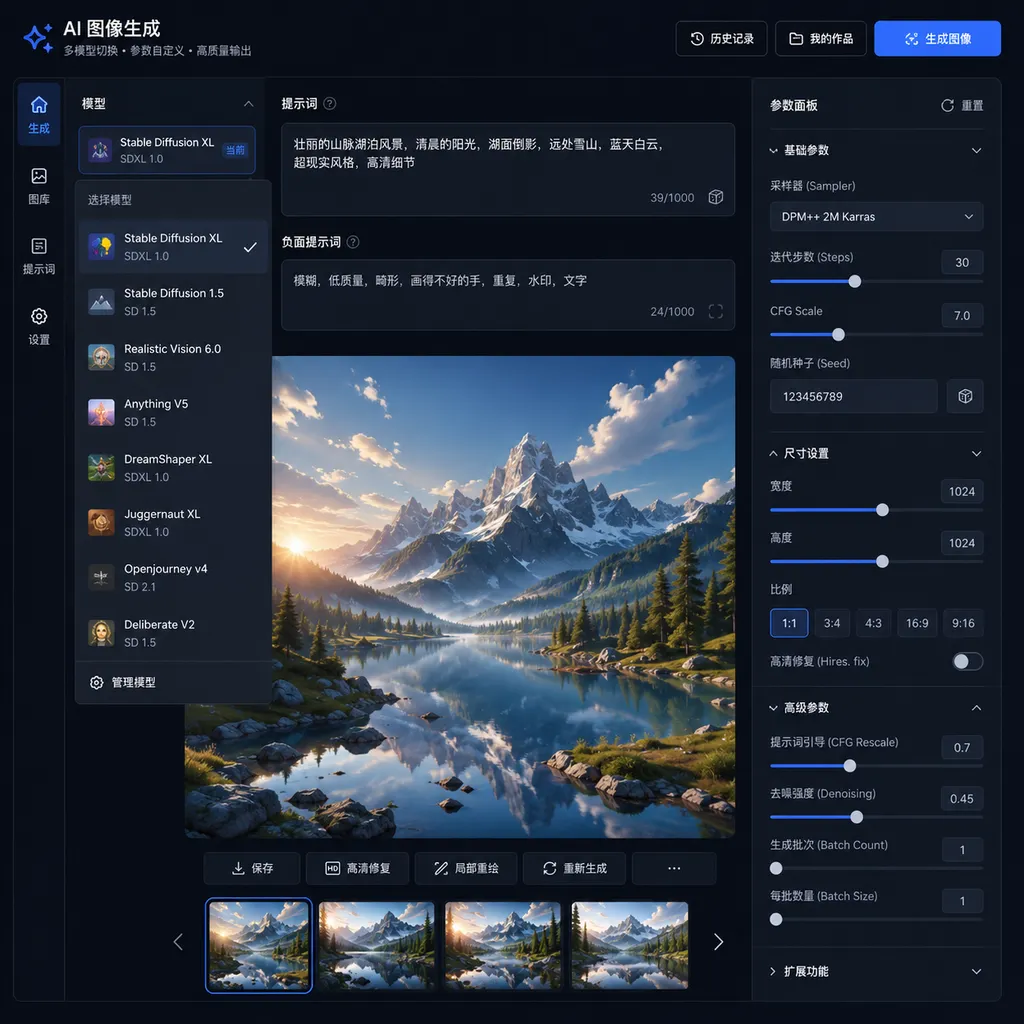
Image generation: from “usable” to “useful”
In v0.1, image generation was simply “connected”—send a prompt, get a picture. v0.2.0 rebuilds this with several developer-focused details:
- Unified interface for multiple models. GPT-Image-1, gpt-image-1-mini, Gemini 2.5 Flash Image, Seedream, Flux, Qwen-Image series are all accessible from the same panel, with parameters (size, quality, count, seed) automatically fitting model abilities.
- Separation of image-to-image and editing. Upload an original image, then choose “reference generation” or “precise editing,” each mapped to the correct API endpoint—avoiding confusion over whether to use edit or generation.
- History gallery. Generated images are archived for reuse of prompts, parameter copying, and secondary editing—making image generation a proper workflow.
- Failure retry and fee rollback. This is where aggregation sites often get complaints—failed image generation still charges money. v0.2.0 integrates status polling and failure prompts in the front end, with back-end rollback, making the process smoother.
Honestly, it still lags behind ChatGPT and Gemini’s official apps, but among third-party WebUI, it’s top tier. Considering it must handle differences across over a dozen image model APIs, this is a significant undertaking.
HTML rendering: judgment behind a small feature
When models output HTML code blocks, the conversation directly renders them as interactive page previews—Claude’s Artifacts and ChatGPT’s Canvas do this, but few open-source WebUI implementations do it well.
DEEIX v0.2.0 implements HTML rendering as an inline iframe sandbox: when a model outputs <html> or a complete HTML snippet, it auto-detects and offers “Preview,” “View Source,” and “Fullscreen” modes. Sandbox isolation is reasonably well done, with no obvious XSS exposure.
Value-wise, this lets developers enjoy the “Claude/GPT can write a small tool and run it immediately” experience—an SVG icon, a Tailwind landing page, a Three.js demo—drop it into the chat and preview it, without copying to CodeSandbox. For aggregation site owners, it’s a point of differentiation—using Claude Sonnet 4.5 on your site feels better than elsewhere, improving retention.
Redemption code system: the real key to commercialization
Redemption codes aren’t a technical problem—they’re an operational one—but many front ends skip them. With v0.2.0, common aggregation site tactics are natively supported in the front end:
- Distribute bulk codes to influencers with revenue sharing
- Issue limited-time recharge codes for holiday events
- Grant new user registration bonus credits
- Exchange tokens between site owners for co-operation
Back end supports generating bulk codes by denomination, expiry date, usage count, and binding user groups; front end lets users redeem in one click in their profile. Code-wise it’s just a table and a few APIs, but product-wise it’s the dividing line between “can it complete the commercial loop” or not.
Compared to competitors, DEEIX’s path
Here’s a quick comparison of current mainstream WebUI for aggregation sites:
| Project | Positioning | Commercial capability | Start-up cost | |------|------|------|------| | LobeChat | Primarily for personal users, strong plugin ecosystem | Weak, needs secondary development | Medium | | NextChat | Minimalist ChatGPT replacement | Weak | Low | | ChatGPT-Next-Web commercial edition | Dedicated to aggregation sites | Medium | Medium | | DEEIX Chat | Commercial front-end for aggregation sites | Strong (codes, grouping, pricing) | Low |
DEEIX’s advantage is being “born for aggregation site owners”—it doesn’t pretend to be a generic product, but fully addresses specific needs of this track. Its disadvantage is also clear: plugin ecosystem, agent orchestration, knowledge base—these general chatbot essentials are still lacking.
It’s a conscious trade-off. If you want to build a content tool like Notion AI, DEEIX isn’t suitable; if you want to launch an AI site that can charge, grow, and retain users, it’s already ready.
Some suggestions (from a developer’s perspective)
A few points for further refinement:
- Streaming render stability. On the demo site, testing long outputs (e.g. Claude 4.5 Opus writing a 5000-word analysis) occasionally causes Markdown rendering jitter—likely due to re-parsing issues when combining streamed chunks; incremental parsing optimization could help.
- Mobile experience. Model grouping looks great on desktop, but collapsing interaction on mobile isn’t smooth, especially with many models.
- MCP protocol integration. This year MCP is gaining developer attention; as a developer-facing WebUI, early support for MCP Server integration would be a plus.
- Multi-language support. The demo site author admits “some translations might be misaligned”—i18n coverage needs to be improved, especially for error prompts and admin console.
A side note
The real value of these front-end projects is lowering the barrier to “turning multi-model aggregation into a product.” With new-api/veloera as back end gateways and DEEIX Chat as a front end, you can launch a polished AI site in hours.
Following this logic, OpenAI Hub (openai-hub.com) is also a player in the aggregation services space—using one key to connect GPT, Claude, Gemini, DeepSeek and other major models, compatible with OpenAI format, with domestic direct access. If you don’t want to set up your own back end, you can point baseURL in DEEIX Chat directly to it, avoiding self-hosted gateways and ICP licensing hassles.
v0.2.0 is not a disruptive update, but it shifts the project from “runs” to “commercial-ready.” For developers, such gradual, solid, and real demand-driven iterations are the most worth tracking in open source.
References
- DEEIX Chat v0.2.0 release discussion thread - linux.do: Update notes and demo site test invitation from the project author, with direct feedback available


