
OpenCodex 2.0 Release: After an Architecture Rewrite, Remote AI Coding Finally Feels Smooth
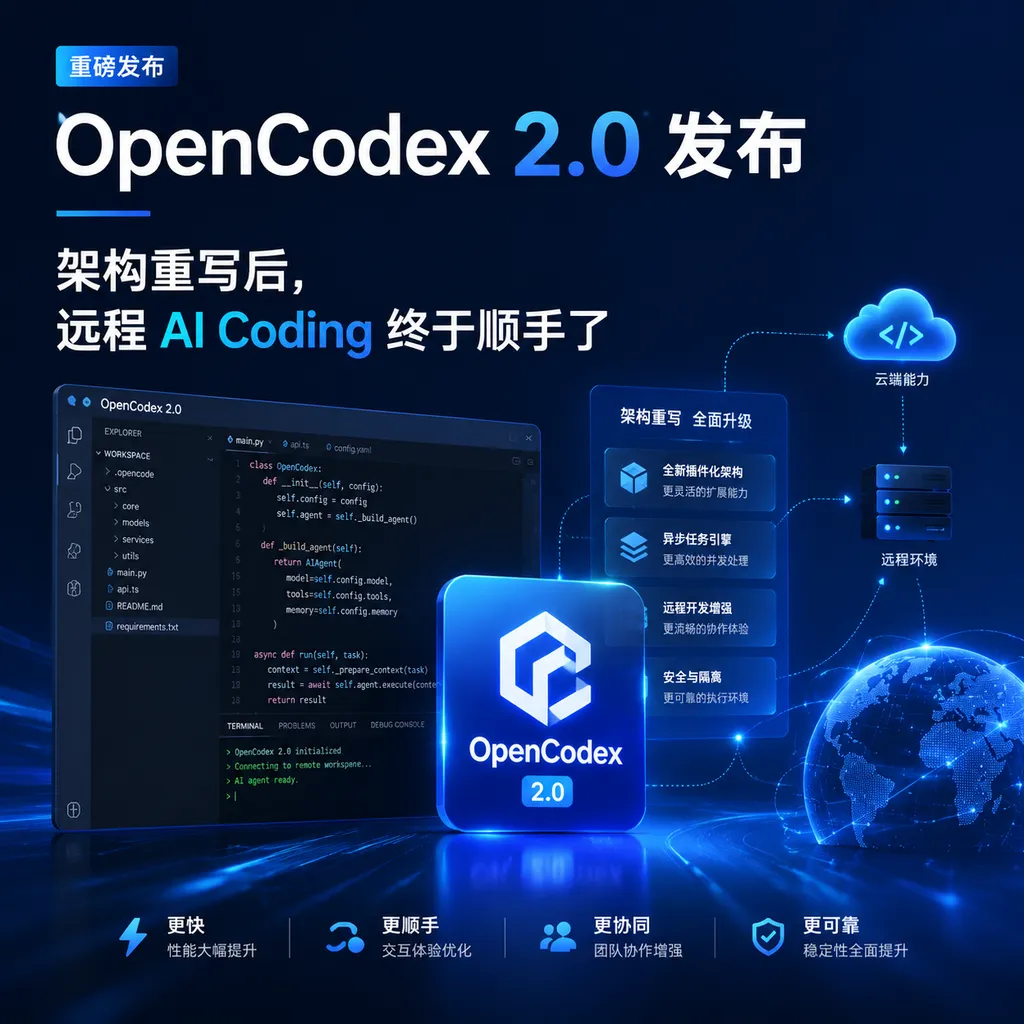
OpenCodex 2.0 abandons the cumbersome IPC implementation in favor of a brand-new intermediate layer architecture, greatly improving compatibility with the official Codex Desktop and data loading speed, while fully supporting macOS Arm64 and Windows.
An Intermediate Layer That Lets Codex Run in the Browser, Rewritten
Today, the open-source project OpenCodex released version 2.0. This is a near ground-up architectural overhaul — the author completely discarded the IPC implementation scheme that plagued the old version and replaced it with an intermediate-layer solution offering better compatibility with the official Codex Desktop. The result: Updating alongside the official OpenAI Codex Desktop will no longer randomly break entire chunks of functionality, data loads faster, macOS (Arm64) and Windows platforms get full support, while Linux still requires users to try running it manually via the command line.
If you've been using Codex recently but are stuck coding only in front of your main machine, this project is worth a look.
What Exactly Is It
For those unfamiliar, here’s some background. At the beginning of 2026, OpenAI carried out a major upgrade to Codex. The new version is based on GPT-5.3-Codex, and Codex Desktop became the officially promoted local client, deeply integrating with VS Code, Cursor, Windsurf, and linking with team tools such as Slack. The problem — Codex Desktop is a local desktop application. If you head out with an iPad, or at the office want to connect to your home machine running big-model projects, the official side hasn’t offered a convenient remote solution; the Codex mobile app requires an overseas account to install.
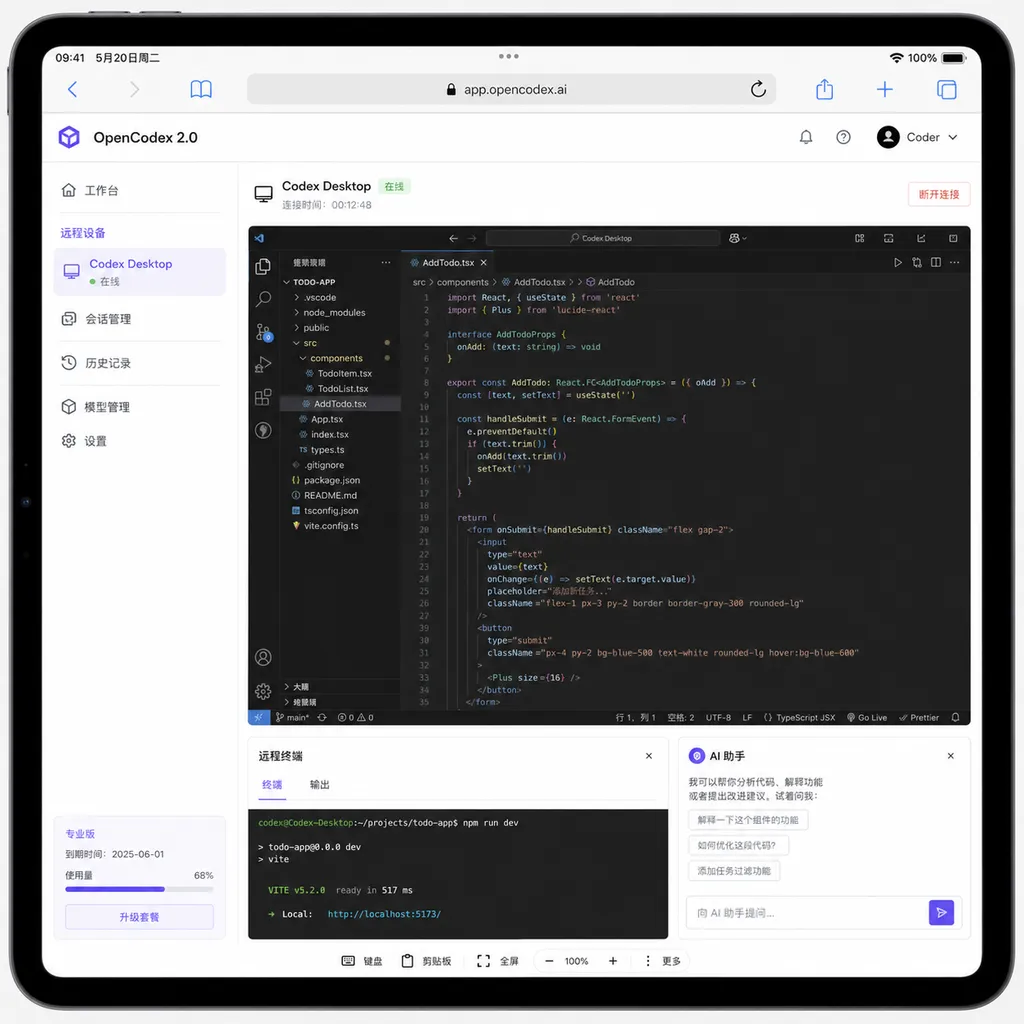
OpenCodex has a clever positioning: It isn’t building another remote frontend to mimic Codex, but rather acts as an intermediate layer for Codex Desktop, exposing the official client’s capabilities through the web. Phones, tablets, another laptop — as long as there’s a browser, you can operate that authentic Codex Desktop running on the target machine — file tree, terminal, code review, PR submission, all included.
The author’s own summary of the differentiated selling points is quite clear:
- No need for special network setups, no overseas Google Play / Apple ID, direct connection via browser
- Authentic official experience, since it’s fundamentally invoking the local Codex Desktop
- Detects and auto-adapts to the local Codex Desktop when service restarts, syncing immediately when the official version updates
- Remote IPC calls instead of screen streaming, offering much smoother speed and animations than remote desktop solutions
The last point is key. Many “remote AI coding” solutions in the market fundamentally use VNC with a custom skin, or outright build their own frontend wrapping model APIs. The former lags, the latter loses fidelity. OpenCodex takes a third route: the remote browser gets the real data stream from the Codex client, not its pixels.
Pain Points in the Old Version: IPC Was a Tough Road
To understand 2.0’s significance, you need to know how 1.x managed to hold together.
Codex Desktop itself is a relatively closed Electron application. OpenCodex 1.x intervened by hooking into inter-process communication (IPC), intercepting messages between the UI layer and backend services, then forwarding them via WebSocket to the remote browser. This approach worked fine when Codex Desktop versions were stable, but OpenAI pushed updates almost every two to three weeks — especially after the February shell-escalation architecture refactor and permission system upgrade, IPC protocol changes inside Codex became frequent.
The result: Whenever the official version updated, OpenCodex often broke on a large scale, forcing the author to chase patches. Continuing this cat-and-mouse game long term was obviously unsustainable.
What 2.0 Did
According to the author, 2.0 “no longer needs complex IPC implementation, maximally compatible with Codex.” The subtext: It abandoned deep reliance on Codex’s internal IPC protocol in favor of a connection path less sensitive to official updates. The announcement didn’t fully detail the technical specifics, but judging from the results, the new architecture likely has these features:
- Higher-level entry points — instead of hooking private IPC, it stands atop more stable external interface layers exposed by Codex Desktop to forward data.
- Runtime self-check mechanism — each service restart detects the locally installed Codex Desktop version and auto-adapts. This implies the compatibility layer performs version detection + capability negotiation instead of hardcoding protocols.
- Cross-platform binaries — Full support for macOS Arm64 and Windows suggests underlying dependencies switched from platform-specific hooking tools to more general solutions.
The improved data loading speed is likely a side effect of this refactor. In the old IPC interception scheme, messages had to pass through Codex main process, OpenCodex interception layer, and the web backend. If the new architecture shortens this chain, high-frequency small-data transfers like file tree rendering and terminal feedback will naturally feel more responsive.
Usage Scenarios: When You’d Want to Install It
I can think of at least three types of users with a strong need:
- Multi-device developers — main development machine at the office or home, but want to use an iPad to follow tasks during commute, travel, or café time.
- GPU / compute centralized deployment — Codex Desktop runs on a workstation packed with GPUs, but you want to remotely control it from a lightweight laptop.
- Team sharing a “code server” — slightly aggressive use case, but a small team setting up an internal Codex access portal is indeed convenient.
Unsuitable scenarios are also obvious: If you use one laptop for all tasks, there’s really no need for the extra layer.
Comparing to Similar Solutions
The remote AI coding space was quite lively in 2026. Anthropic’s Claude Code took a CLI + cloud sandbox approach, naturally cross-device; Codex’s upgrade also strengthened cloud capabilities, running each task in an independent sandbox. So what’s the point of OpenCodex’s intermediate-layer approach of “web-ifying the local client”?
My view: For developers with strong localization needs, it remains one of the best options.
- No matter how convenient the cloud, enterprise code and high-compliance projects often prefer running locally
- Local Codex Desktop sometimes gets new features and model permissions earlier than the web version
- For developers in China, cloud solutions can’t avoid network hurdles — local + internal network tunneling can be smoother
Compared to other remote AI coding projects, OpenCodex’s differentiation is clear: It doesn’t replace the official client, it wraps it with a web entry point. This means whatever new features the official client gets, you get too — without waiting for the community to catch up.
Some Points to Watch
Of course, 2.0 isn’t without questions.
Linux untested — The author says you can try running it from the command line — for Linux users, this means acting as QA at least in the short term. Considering many remote development scenarios target Linux workstations, this gap should ideally be filled soon.
Security model — A large part of Codex’s early-2026 upgrade focused on network security; GPT-5.2-Codex could even solve CTF challenges. OpenCodex exposes an entry point to the web, so authentication, permissions, and auditing must be solid. From the current repo implementation, the author has basic access controls, but for production deployment, adding a layer via Tailscale or reverse proxy with mTLS is advisable.
Long-term maintenance risk — Intermediate-layer projects fear upstream changes the most. Theoretically, the new architecture resists change better, but if OpenAI heavily refactors Codex Desktop (e.g., switching from Electron to Tauri), it’s still a variable.
By the Way
For developers interested in the Codex model itself, GPT-5.3-Codex is currently available for calls on OpenAI Hub. Combined with local toolchains like OpenCodex, you can build a fairly complete AI coding workflow — a single key can invoke GPT, Claude, Gemini, DeepSeek, the major models, with direct domestic connection, which is friendly for those who enjoy trying tasks across different models.
Summary
OpenCodex 2.0 isn’t the type of update that makes for flashy press releases, but for those actively using Codex Desktop with cross-device development needs, it solves a very specific pain point: Letting local Codex capabilities travel with you, instead of pinning you in your seat.
The compatibility improvements and loading speed gains from the new architecture are key to whether it can move from a “tinkerer’s tool” to an “everyday development dependency.” The author has made the code fully open-source and welcomes contributions — if you’re interested in this intermediate-layer concept, check out the implementation on GitHub.
References
- OpenCodex 2.0 Release! New Architecture! AI Coding Anywhere! - LINUX DO: Author’s official 2.0 release announcement and project introduction on the LINUX DO community
- GitHub - RyensX/OpenCodex: Main OpenCodex repository with complete source code, installation instructions, and documentation
- AI CLI Tool Community Daily Report - GitHub Issue: Community log of the February 2026 Codex shell-escalation architecture refactor and permission system upgrade


