
Apple iOS 27 teaches Calendar to "understand human commands" — natural language event creation is here
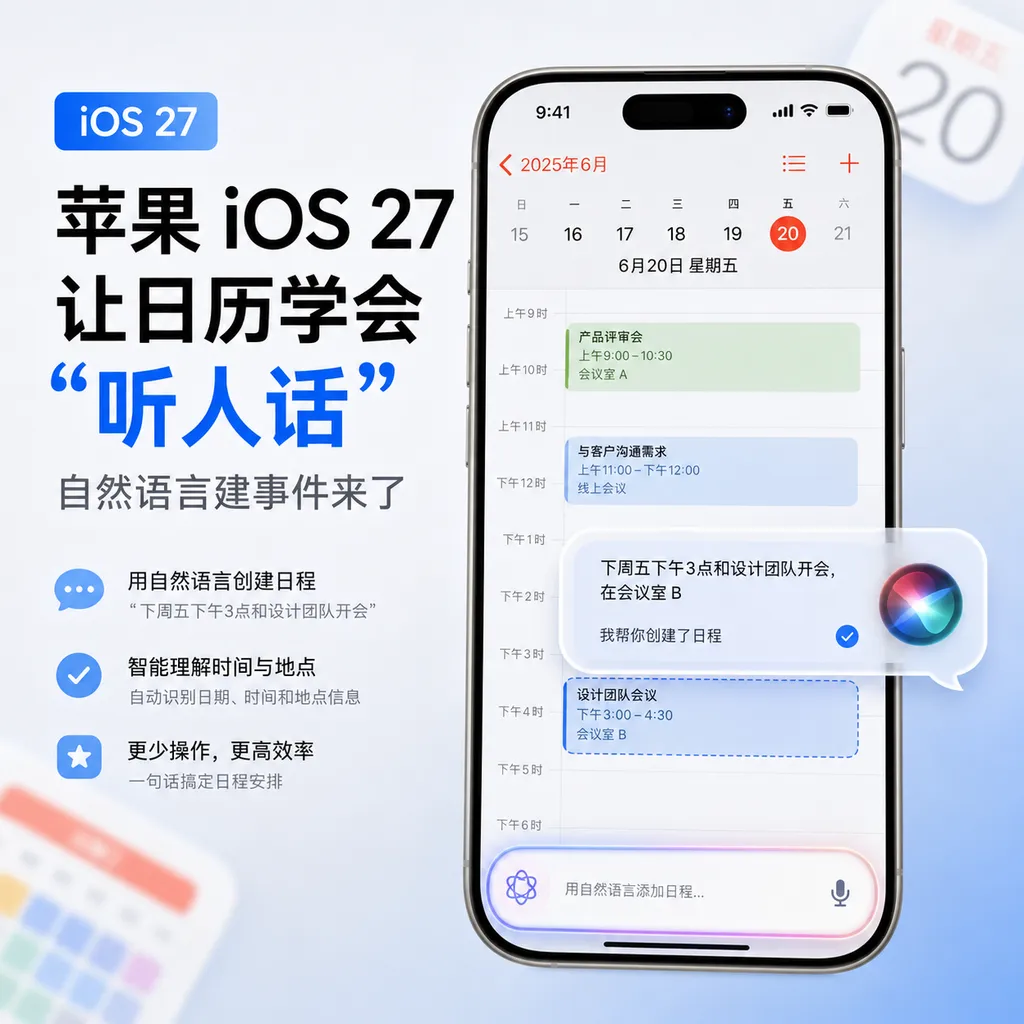
At WWDC 2026, Apple added a set of natural language parsing capabilities to the Calendar and Reminders in iOS 27, along with visual intelligence to recognize posters and screenshots and add them directly to the schedule. This is another advancement of Apple’s AI in system-level native apps.
Apple iOS 27 Teaches Calendar to "Follow Commands", Natural Language Event Creation Officially Launched
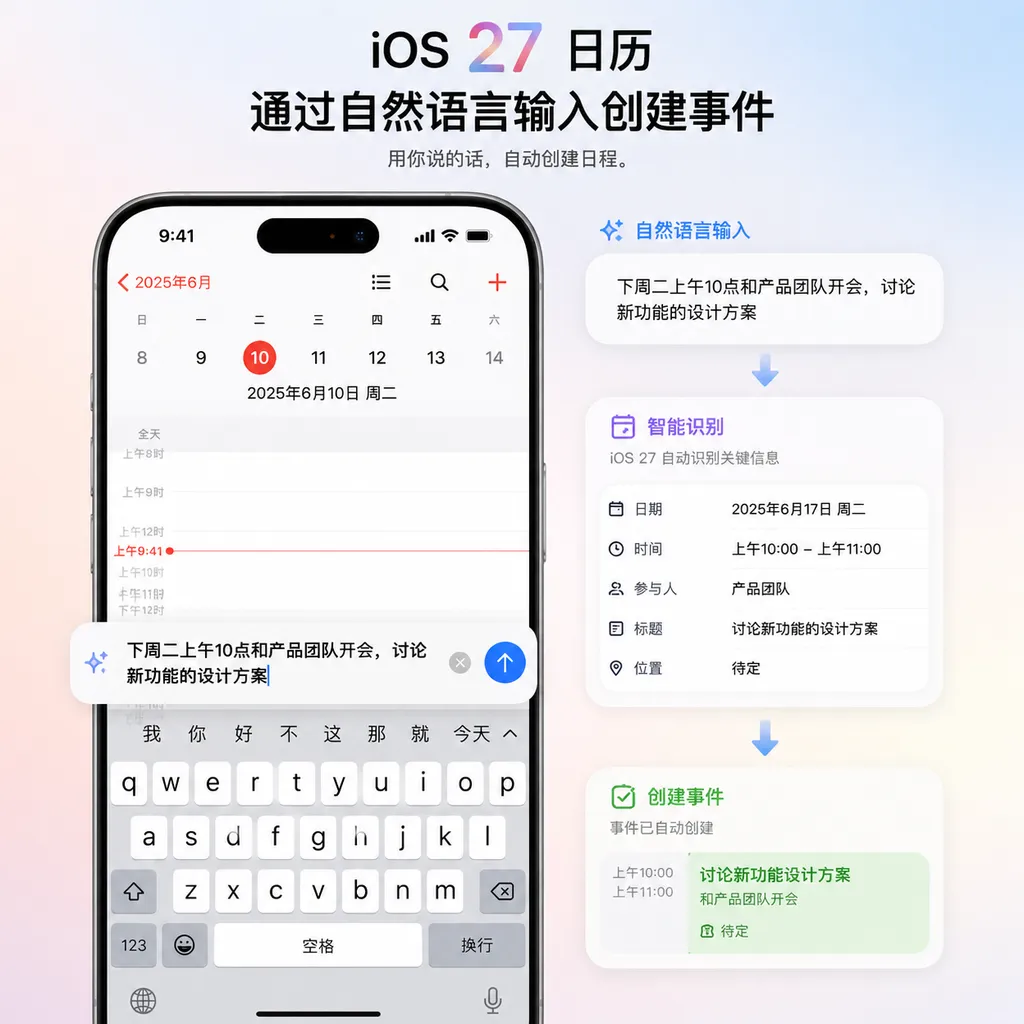
At the conclusion of WWDC 2026 in the early hours of June 9, Calendar and Reminders — the two native apps that Apple users have been “complaining about” for over a decade — finally received a meaningful upgrade. iOS 27 equips them with natural language understanding capabilities: you no longer need to painstakingly fill in the time, select the date, and type the title step-by-step. Simply type “Watch a movie with my girlfriend Sarah at 8 PM on Thursday,” and the system will automatically parse out the people, time, and event, generating a complete schedule entry.
This is a seemingly small change, but one with strong user impact. In the past, iPhone users wanting to quickly create an event either relied on Siri voice dictation (accuracy depended on luck) or opened a third-party app (tools like Fantastical use NLP parsing for this exact purpose). Now Apple has built this capability directly into the system’s native apps.
Not a New Concept — But Apple Finally Did It
Let’s be clear: natural language event creation is not an Apple invention. Fantastical perfected this interaction almost ten years ago, and Google Calendar’s Quick Add has existed for years. Apple’s delay is unsurprising — it has always held a strong belief in “dumbing down” native apps, preferring caution over mistakes.
But this time, iOS 27’s implementation is more thorough than expected. MacRumors’ hands-on experience highlights several key details:
- No need to jump to the target date first. Previously, you would scroll to Thursday and then hit “+” to create a new event. Now you can press “+” in any view, and while typing, the system will show suggestion bubbles for dates and times — tap one to auto-fill.
- Auto-recognition of frequency terms. If your text includes phrases like “every week,” “every two weeks,” “first Monday of every month,” the repeat rule is automatically created. This is essential for managing recurring meetings, workout classes, and weekly group sessions.
- Smart contact linking. Typing “with Sarah” will trigger a match with your contacts, automatically adding her as a participant — provided you have granted contact permissions.
- Location extraction. Sentences like “Meet at Starbucks Guomao” will prompt the system to call the Maps API, auto-fill the location field, and support navigation.
Reminders follows the same logic. Typing “Remind me to buy groceries at 2 PM on Thursday” will extract both the task content and reminder time in one go, eliminating the old two-step process of creating a blank to-do and then adding a date.
Editing Logic Is Smarter Now
Apple also took the opportunity to fix a longstanding pain point: editing recurring events.
Previously, on iOS, changing a weekly meeting — say from “Every Monday at 10 AM” to “Every two weeks” — would likely trigger a popup that raised users’ blood pressure: modify just this occurrence, all future events, or all events? Three options that forced a 5-second pause each time.
iOS 27 now detects your intention and automatically adjusts the recurrence for future events instead of overwriting all historical entries. This is actually a context-based differential editing logic — far more nuanced than the previous “one-size-fits-all” template replacement.
Visual Intelligence Is the Real Killer Feature
If natural language input is a catch-up move, then Visual Intelligence’s integration with Calendar/Reminders is the standout part of iOS 27.
The visual intelligence infrastructure Apple laid out in iOS 26 has now connected with productivity apps. Two typical use cases:
- Web screenshots auto-added to calendar. In Safari or apps like Xiaohongshu and Weibo, if you see an event poster or ticket info, taking a screenshot will prompt an “Add to Calendar” suggestion. The system reads the poster’s time, location, and event name, and creates the schedule in one tap.
- Recognize via camera. Receiving a physical concert flyer or a parent meeting notice from your child’s school: point your camera at it, press the Camera Control button, and visual intelligence will parse the image content into an event.
If this experience proves stable, it could eliminate a large number of “Screenshot → open Notes → manually create event” steps. Apple stressed during the demo that this is processed on-device — image recognition and text extraction run on Apple Intelligence’s local models, without uploading to servers. Apple has always been resolute about privacy.

Compared to Google and Samsung — Apple Is Slower but Has a Different Approach
Looking across competitors:
- Google Calendar has long integrated Gemini, which can extract flight, hotel, and event information from Gmail to create schedules. On Android 17, Gemini Intelligence’s cross-app task collaboration is built into the OS.
- Samsung Galaxy AI offers Note Assist and automatic schedule summarization in One UI 7, with a similar idea.
- Third-party apps like Fantastical, Notion Calendar, and Cron (now Notion Calendar) almost all support natural language scheduling.
Apple’s differentiator: it bakes this into the native apps, instead of requiring users to install extra tools. This is transformative for those who only use system apps, though developers and power users may be more concerned about whether Apple Intelligence’s APIs will be opened up — Apple did say at WWDC it will open parts of the Foundation Models framework to developers, enabling third-party apps to call the same natural language parsing capabilities. This could significantly impact the ecosystem.
The “Apple Intelligence 2.0” Behind the Upgrade
Looking at the bigger picture, Calendar and Reminders are just the surface. WWDC 2026 is about Apple rolling out its second generation of Apple Intelligence — essentially a system-wide AI overhaul powered by a stronger Siri. Other features launching alongside include:
- AI writing assistance upgrade: system-level grammar checks and style rewrites, with a “Write With Siri” switch directly on the keyboard.
- Natural language Shortcut creation: describe an automation process in one sentence and have the system generate the Shortcut. This is especially impactful for developers, lowering the barrier considerably.
- AI wallpaper generation: use Image Playground to make personalized lock and home screen backgrounds — clearly catching up with Google Pixel’s generative wallpaper feature.
- Image Playground enhancements: improved generation quality and style diversity.
Taken together, Apple’s AI strategy is increasingly clear: rather than producing a ChatGPT-like conversational beast, it’s “fragmentizing” LLM capabilities into key interaction points of each native app. You don’t perceive a concrete “AI,” but each operation you regularly perform now takes fewer steps.
The risk is also clear — if parsing errors occur (for example, interpreting “Thursday” as “today”), user tolerance will be very low because this happens in trusted, system-level native apps. Apple’s willingness to launch suggests that local models have reached an acceptable accuracy threshold in Chinese and other languages.
When You Can Use It
In Apple’s usual timeline:
- June 9: Developer Beta released — available to paid developer accounts.
- July: Public Beta open to all users.
- September: Official rollout alongside the new iPhone generation.
Regarding hardware support, since these features heavily rely on Apple Intelligence’s local large models, they will likely be fully available only on iPhone 15 Pro and above, all iPhone 16/17 series, and iPads with M1 chips or newer. iPhone 15 standard and older models will probably receive downgraded versions.
For Chinese support, Apple was vague, only stating “major languages will be supported at launch.” Based on Apple Intelligence’s past Chinese rollout progress, Simplified Chinese is expected to be included in the September release, though full functionality may not come until minor updates later in the year.
For developers, the key point to watch is how open Apple Intelligence’s Foundation Models framework will be. If Apple truly offers APIs for on-device natural language parsing and visual recognition, iOS productivity tool ecosystems will face a reshuffle — Fantastical’s moat could be quickly leveled, and apps relying on cloud-based LLMs will need to re-evaluate on-device vs. cloud cost structures.
This is a “small-looking, big-impact” update. Apple rarely overhauls Calendar and Reminders, and this time it’s finally more than changing an icon or tweaking an animation.
References
- Apple iOS 27 Calendar/Reminders adds AI features: supports natural language event creation - IT Home: First report and hands-on experience of iOS 27 Calendar and Reminders AI features at WWDC 2026.


