
NotebookLM switched to Gemini 3.5, increasing the win rate by 15 percentage points.
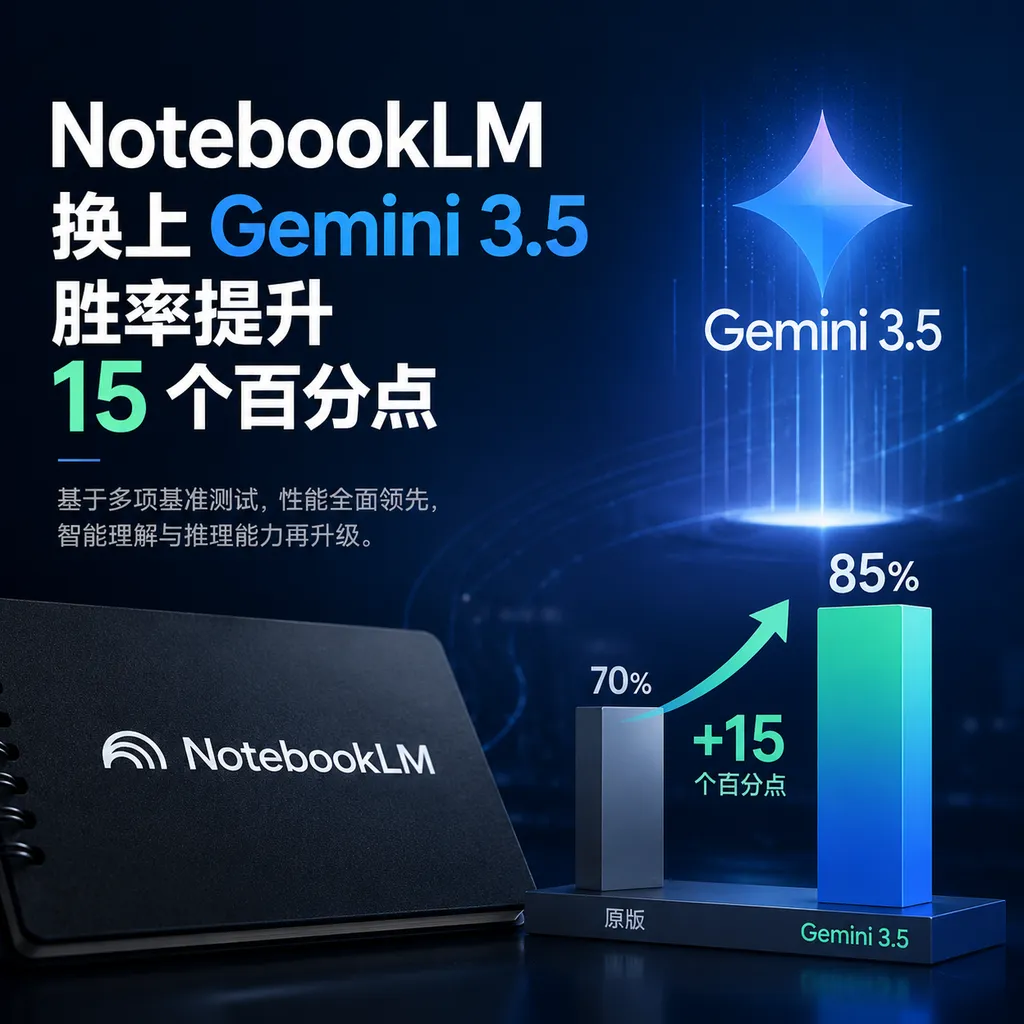
Google has replaced NotebookLM’s underlying model with Gemini 3.5, combined with Antigravity technology, added reasoning step visualization, and supports multi-format output such as XLSX and PPTX. Internal evaluation shows an average win rate of over 65%, and it is currently available to AI Ultra and Workspace paid users.
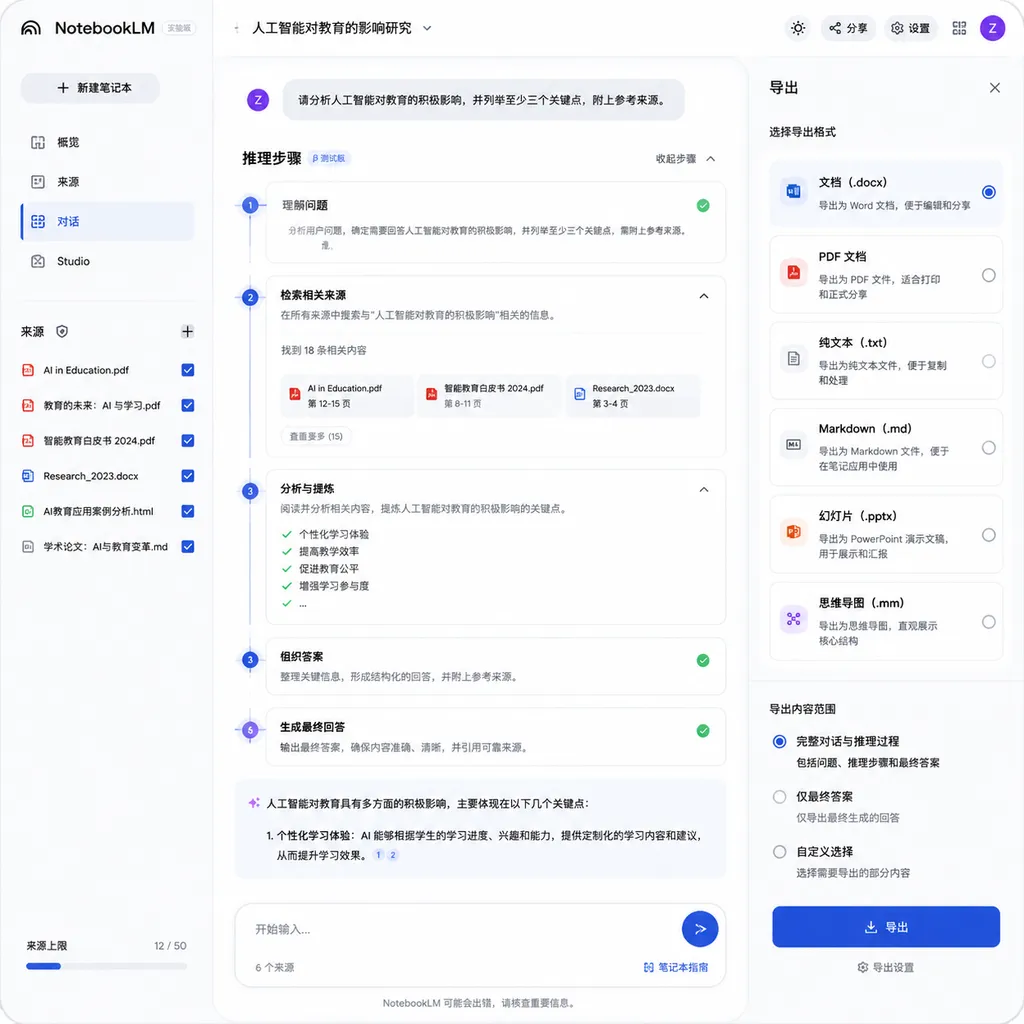
Today, Google rolled out a fairly aggressive version update for NotebookLM: the underlying model has been entirely switched to Gemini 3.5, with the addition of the Antigravity tech stack—a framework recently spotlighted by Google—while also bringing the long-criticized “black box reasoning” issue to the forefront. In the chat interface, users can now directly see how the model extracts information from sources step by step, and how it connects these pieces into conclusions.
This is not a minor patch. On its blog, Google shared internal comparison data: the new version, compared to the old one, has an average win rate of over 65% across five core dimensions, 15 percentage points higher than baseline. Large document analysis win rate is 69.9%, advanced web research and source discovery comes in at 78.2%—the latter described by Google as “outstanding performance.”
For a tool that was seen last year mainly as a “graduate thesis aid,” this upgrade shows a noticeably bigger ambition.
Jumping straight from Gemini 2.x to 3.5 — skipping more than just a version number
Developers familiar with NotebookLM’s trajectory over the past year can attest: from last year’s Audio Overviews, to Mind Maps, and then Video Overviews, new output formats have been added almost every few months. But the underlying model advances hadn’t been so aggressive; recently someone on Threads complained that using Gemini 3.5 Flash consumed 22% of quota for just two questions—showing the back-end scheduling was still in a tuning phase.
This time, Google moved the entire service onto Gemini 3.5, and plugged in Antigravity—introduced around November as an “autonomous agent execution framework,” in simpler terms letting the model plan multi-step tasks, call tools, and self-verify, especially suited for long-chain tasks. In the context of NotebookLM, the message is clear: research tasks are no longer “ask once, answer once,” but the model now works like a research assistant—breaking down problems, searching across documents, and cross-verifying results.
So that 78.2% win rate in advanced research is not simply the model getting smarter. It’s more likely Gemini 3.5’s deeper reasoning plus Antigravity’s task planning, fully running end-to-end for the first time in a product premised on “closed corpus.”
Reasoning step visualization: late, but more restrained than Deep Research
Transparency in reasoning is the aspect I personally care about most in this update.
Previously, using NotebookLM meant tossing in dozens of PDFs, getting a response plus a few citation markers. Citations are nice—but “how it arrived at this conclusion from these sources” was completely opaque. For general users, that’s fine; for academic research, legal search, or market analysis, it’s painful—you can’t just transplant a conclusion based on one sentence and a few links.
Now, the new version shows “reasoning steps” in the chat interface, clearly telling you: step one extracted which paragraphs, step two did which comparison, step three based on what judgment gave the conclusion. It’s stylistically different from the reasoning trace presentation of OpenAI or Anthropic—Google’s approach here is more like a “research methodology note,” not dumping chain-of-thought raw, but structuring it to tell you “here’s how I conducted the research.”
This restraint is key. Raw CoT exposure is noise for regular users, and free training data for competitors. Google abstracted it—providing transparency while keeping its content moat intact.
Output formats finally complete: XLSX, PPTX direct export
If the first two points are the “inner skills,” the expansion in output formats is the visible practicality.
The new version’s supported export formats are:
- Data visualization: PNG, SVG
- Documents: PDF, DOCX, Markdown, plain text
- Images: PNG, JPG, GIF
- Structured data: JSON, CSV
- Office documents: Direct output to Microsoft Excel (XLSX) and PowerPoint (PPTX)
The last category directly hits a pain point. Previously, you’d have NotebookLM create a research report, then manually paste it into Word, and then rearrange it into PPT. Now, XLSX and PPTX can be generated directly—meaning enterprise users get a closed loop: from the source library to final deliverables, without intermediate steps through ChatGPT or local scripts.
Moreover, these export files aren’t one-off snapshots: users can continue editing results and download corresponding files via the “Studio Panel.” This workflow is closer to real office usage than ChatGPT’s “regenerate a new version” logic.
SVG support is worth calling out—it means graphics generated by NotebookLM are vector-based, so dropping them into Keynote or Figma for further editing won’t blur. This attention to detail shows Google is now clearly building to B-standard.
Multi-language mixed workflows: a new way for cross-corpus research
Another underestimated feature is multi-language mixing.
The official wording is: “Users can not only issue instructions in one language and generate results in another.” Sounds like translation, but it’s not. Here’s the true use case:
You’re doing due diligence on an overseas company. Your library contains Chinese news, English financial statements, and Japanese industry reports. In the past, you had to translate everything, feed it to the model, and then ask for Chinese output. In the new version, you can directly ask in Chinese; the model extracts info from mixed-language sources and answers in Chinese—without any explicit translation step.
Taking it further, if you don’t have a complete set of sources yet, NotebookLM can proactively help discover them—e.g. you throw in just a keyword like “changes in Japanese used car export policy,” it will find Japanese primary sources, other studies by relevant authors, and perspectives from different languages. This is essentially Antigravity’s autonomous agent working behind the scenes.
For cross-border research, overseas market analysis, and academic literature reviews, this capability is even more impactful than simply swapping models.
Who can use it, and how
According to Google, this update is initially available to:
- Personal users subscribed to Google AI Ultra
- Eligible Google Workspace enterprise customers
Free-tier users remain on the old version for now. Given the compute cost of Gemini 3.5 + Antigravity, this tiered release isn’t surprising. Based on NotebookLM’s rollout pace over the past year, Plus and free tiers will likely get parts of the features in weeks to a couple of months.
Horizontal comparison: Differences from ChatGPT and Claude Projects
In the realm of “AI research assistants based on private corpus,” the main choices now are ChatGPT’s Projects, Claude’s Projects, Perplexity’s Spaces, and NotebookLM.
Each targets a different niche:
- ChatGPT Projects focus on personal workflow management, strong in long-term memory and custom instructions
- Claude Projects excel in long-document comprehension; their 200K context shines for deep single-document analysis
- Perplexity Spaces are about real-time search + collaboration
- NotebookLM, after this upgrade, clearly aims to be an “end-to-end platform for research tasks”
Direct XLSX/PPTX export, cross-language resource discovery, and visual reasoning steps—this trio is not fully present elsewhere. Google’s strategy didn’t chase context length or general dialogue capability, but instead closed the loop for research workflows—a smart differentiation choice.
A measured perspective
Of course, win rates of 65% and 78.2% are internal Google evaluations. Vendor rollout self-assessments aren’t reliable; independent benchmarks will tell the real story. Antigravity’s stability in long-chain tasks also needs time to verify—many frameworks look great in demos but fail in production.
One thing is certain: NotebookLM has moved from being an “enhanced PDF reader” to a true research workstation. For developers, this means if you’re building RAG, agent frameworks, or knowledge base products, NotebookLM’s current form is worth studying—it represents Google’s current best approach to the “AI research assistant” space.
Incidentally, developers in China wanting to directly test Gemini 3.5 can use OpenAI Hub to access it via an OpenAI-compatible API—avoiding proxy hassles. Using the same key, you can benchmark GPT, Claude, and Gemini fairly easily.
As for where NotebookLM will go next, here’s my bet: after proving Audio Overviews can run through, the next step will likely be further integration of Video Overviews with real-time collaboration. The ceiling for research tools is still far off.
References
- Google NotebookLM Major Update: New Multi-Format Outputs & Stronger Research Capabilities - linux.do: Community rundown and discussion of the complete NotebookLM update features


