
Sub2API in Action: Turn Your Scattered AI Subscriptions into a Single Pipeline
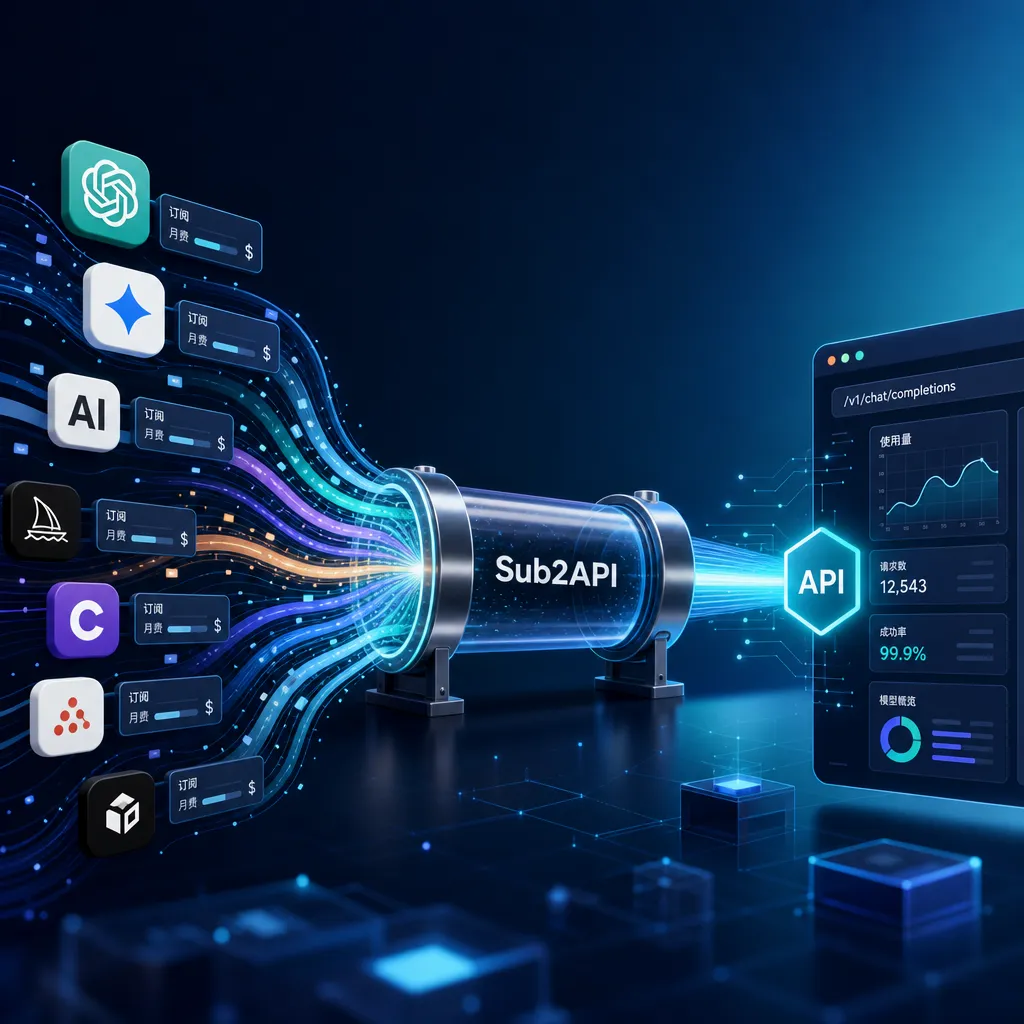
Sub2API is an open-source gateway that pools subscription accounts for Claude, GPT, and Gemini into a unified API. This article walks through the process from deployment to connecting the client, and also compares similar solutions such as new-api and UniAPI to discuss their trade-offs.
Sub2API in Practice: Twisting Your Scattered AI Subscriptions into a Single Pipe
It’s becoming increasingly common for developers to simultaneously hold Claude Pro, ChatGPT Plus, and Gemini Advanced subscriptions. Subscription fees burn through hundreds of dollars a month, but the quotas are likely left unused — Claude Code tends to be used for coding during the day, GPT gets switched to occasionally for tweaks at night, and the Gemini subscription might just be kept for Antigravity.
This kind of “subscription island” has spawned a wave of open-source relay gateway projects. Sub2API is the most discussed among them, with 3.4K stars on GitHub. Its author, Wei-Shaw, pushed an upgraded version in early June, rewriting the account scheduling and session persistence modules. Today we’ll make it our focus, walking through the complete chain from deployment to client connection, and also clarifying how it compares to other commonly mentioned solutions like new-api, UniAPI, and OpenAI Router.
1. What Problem Does Sub2API Actually Solve?
Let’s clarify the positioning first to avoid confusing it with tools like new-api, which is purely an API Key aggregation tool.
new-api / one-api works by “aggregating a bunch of official API Keys for load balancing,” with the prerequisite that you already have API Keys. Sub2API is different — it targets subscription accounts. That is, Claude Pro and ChatGPT Plus memberships logged in via the web client, which are normally only usable in official clients like Claude Code or Codex CLI, with no standard REST API.
What Sub2API does is pool together OAuth tokens, Session Keys, and standard API Keys, exposing a unified OpenAI-compatible endpoint. Downstream clients — whether Cursor, Cline, or your scripts — can simply change the base_url and start using it.
Some notable design features:
- Session stickiness: Tools like Claude Code are sensitive to continuous context, so if requests jump between upstream accounts, conversations break. Sub2API uses the
session_idin headers to lock requests to a fixed account so long-running tasks don’t break. - Automatic rate-limit avoidance: If an account hits the 5-hour rate-limit window, the scheduler removes it from the pool and adds it back after cooldown.
- Built-in billing: In carpooling scenarios, when multiple people share a pool, how do you split the costs? Sub2API integrates a payment gateway into the admin panel, saving the trouble of connecting Stripe or other systems.
This third feature is where it really diverges from new-api. new-api takes an “enterprise API gateway” approach, with heavy work on authentication, quotas, and auditing — but billing must be integrated by the user. Sub2API is aimed right at the “subscription carpool leader” use case.
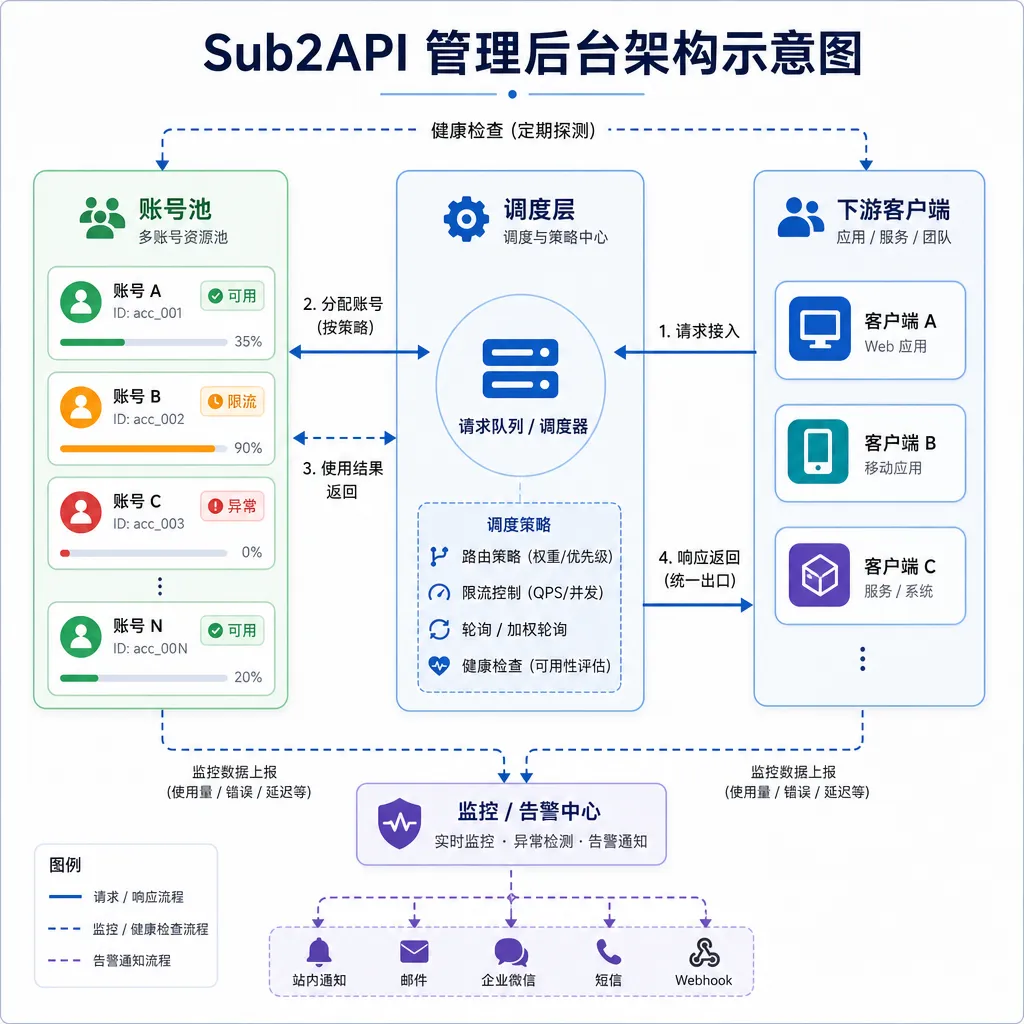
2. Getting It Running: Docker Compose Is Easiest
The official recommendation is Docker Compose — the reason is simple: it needs both PostgreSQL and Redis, and installing those manually is more work than letting Compose handle it.
Prepare a Linux machine (CX11 minimal spec is enough), with Docker Engine 20.10+, then run the one-click script:
curl -sSL https://raw.githubusercontent.com/Wei-Shaw/sub2api/main/deploy/install.sh | sudo bash
The script will pull images, generate a default .env, and start services. If you want to control environment variables yourself, take the manual path:
mkdir -p sub2api-deploy && cd sub2api-deploy
curl -sSL https://raw.githubusercontent.com/Wei-Shaw/sub2api/main/deploy/docker-deploy.sh | bash
docker compose -f docker-compose.local.yml up -d
By default, the service starts on port 8080. Open http://serverIP:8080 in your browser, with initial account admin@sub2api.com / admin123 — first thing is change the password. Don’t ask me how I know someone forgot and got their quota siphoned by strangers.
Critical environment variables to set:
POSTGRES_PASSWORD: Database password — lose it and you lose your data.JWT_SECRET: Login token signing key — if it changes after a restart, everyone has to log in again.TOTP_ENCRYPTION_KEY: Used for two-factor authentication — change it and all 2FA fails.ADMIN_PASSWORD: Initial admin password.
It’s best to generate these with openssl rand -hex 32 and write them into .env before starting — don’t use defaults.
Small Pitfall for Windows Users
If you plan to run this locally on Windows in WSL — there’s a popular detailed guide on linux.do — remember to go to Docker Desktop → Settings → Resources → WSL Integration and enable your WSL distro. Without this, running docker in WSL will result in command not found, which is a common beginner stumbling block.
3. Putting Subscriptions Into the Pool
Deployment only sets up an empty shell — the real work is connecting accounts.
For a Claude Pro subscription, Sub2API supports three ways:
- OAuth authorization: In the admin panel, click “Add account” and authorize on the Claude website; once redirected back it stores the token automatically. Easiest, but requires the server to be reachable by Claude — local deploys need ngrok or reverse proxy.
- Session Key mode: Copy
sessionKeyfrom browser developer tools and paste it. A hack, but works. - Standard API Key: If you purchased an official Anthropic API Key, just enter it — same as with new-api.
OpenAI and Gemini are similar. Notably, Sub2API recently added support for Antigravity — Google’s IDE Agent tied to the Gemini Advanced subscription. Integrating its token means your Gemini subscription can finally be used inside Cursor.
After accounts are added, go to “API Keys” to generate downstream keys, naming them by usage:
desktop-cursor
cli-claude-code
laptop-cline
The benefit is easier log tracing, disabling specific keys, and rate limiting later. Using one key for all clients is easier at first but painful for troubleshooting.
4. Connecting Clients
Most tools compatible with the OpenAI protocol only need two settings: base_url and api_key. Point these to Sub2API:
base_url: http://your-server:8080/v1
api_key: sk-xxxxxxxxxxxx (generated in the admin panel)
Cursor, Cline, Aider, OpenWebUI — same setup. Claude Code is a bit different as it natively uses the Anthropic protocol; Sub2API transparently forwards at /anthropic/v1/messages, so just set the ANTHROPIC_BASE_URL environment variable:
export ANTHROPIC_BASE_URL=http://your-server:8080/anthropic
export ANTHROPIC_API_KEY=sk-xxxxxxxx
One detail — if you have an Nginx reverse proxy in front, remember to enable underscores_in_headers on;. Anthropic’s SDK sends headers like x-api-key which include underscores; Nginx disables such headers by default, causing the backend to never receive auth info. Many have hit this issue.
5. Comparing Similar Projects
The relay gateway segment is highly competitive now. Some representative comparisons:
new-api (30.1K stars)
Largest ecosystem, backed by one-api’s old user base. Advantages: rich channels, flexible model mapping rules, full audit logs. Weakness: assumes you have API Keys, minimal subscription account support. If you’re a company with piles of Azure OpenAI, Volcano Engine, or Alibaba Bailian Keys, pick new-api. If you’re an individual with subscriptions wanting to carpool, it can’t help you.
UniAPI (1.7K stars)
Interesting positioning — it’s a “relay of relays”. Aggregates new-api, Sub2API, AnyRouter, etc., again, doing automatic model discovery and smart routing. Written in TypeScript + Fastify, cross-platform desktop client. For those already using multiple relays, UniAPI solves “not wanting to change base_url every time.”
Quotio (3.9K stars)
Not a gateway — it’s a quota visualization tool. Shows remaining quotas of your various AI accounts in one panel. Pairs nicely with Sub2API — one manages ingress, the other tracks budget.
Grok2API (3.9K stars)
OpenAI-compatible layer specifically for Grok. Grok’s official API is now open, so its relevance is fading, but if you just want to use a Grok subscription without paying for additional API usage, it still has utility.
OpenAI Router
More lightweight — zero config, SQLite persistence. Mainly for backend services to provide a unified entry to self-hosted inference backends like vLLM, SGLang, Ollama. Different segment from Sub2API — serves “I run lots of open-source models myself, how to expose them.”
Summary table:
| Need | Recommended | |------|-------------| | Team using API Keys for enterprise management | new-api | | Individuals/small teams pooling subscriptions & billing | Sub2API | | Aggregate multiple relay stations | UniAPI | | Unified entry for self-hosted inference | OpenAI Router | | Just want to see remaining quotas | Quotio |
6. Beyond Self-Hosting: Easier Options
Frankly, the fun of self-hosting is in tinkering. Maintenance, backup, tracking upstream API changes — each is a hidden cost.
For indie developers wanting “one Key to call all mainstream models” without account pool maintenance, using an aggregation platform like OpenAI Hub (openai-hub.com) is more practical. OpenAI Hub uses OpenAI-compatible format, supports GPT, Claude, Gemini, DeepSeek, etc., works directly from China without proxy fiddling, and adopts new models quickly — Anthropic’s recent update was live within two days.
The two approaches aren’t mutually exclusive: for carpooling and squeezing idle subscriptions, self-host Sub2API; for stable API calls without maintenance worries, use aggregation platforms. You can also hybridize — add OpenAI Hub as an upstream channel in Sub2API’s pool, acting as a fallback — primarily use subscriptions and overflow to paid APIs.
7. Common Pitfalls
Finally, the most frequently reported issues from the community:
- JWT_SECRET not fixed: Using default or regenerating each restart causes login sessions to be lost, and 2FA fails to unlock. Solution: set it before deployment.
- Database not backed up: Sub2API stores account tokens, keys, and billing records in PostgreSQL — if the container or host is lost, the data is gone. Add a
pg_dumpcron job — it’s five minutes of work. - OAuth callback address wrong: Local deployments often fail here — Claude’s OAuth requires HTTPS callbacks; plain IP + port won’t work. Use Cloudflare Tunnel or Session Key mode to bypass.
- Selling to the public: Legal and upstream terms-of-service risks — both Anthropic and OpenAI explicitly forbid reselling subscription accounts. Personal use is fine; don’t sell.
Closing Thoughts
The real value of tools like Sub2API isn’t “saving money” but in decoupling AI subscription usage from “bound to official clients” into “I’m in control.” Claude Pro quotas can be used in Cursor, ChatGPT Plus tokens can feed Aider, Gemini Advanced can be put into your custom Agent — this flexibility isn’t possible with API Key aggregators.
The cost is that you become the sysadmin. Account bans, upstream changes, PostgreSQL disks filling — all these problems land on you.
If you’re willing to pay maintenance costs for this freedom, Sub2API is currently the most complete open-source option. If not, stick to API Keys — these two paths are meant for different audiences.
References
- Sub2API GitHub repository — source code, deployment scripts, official docs
- linux.do: Detailed tutorial for local Sub2API relay setup — full Windows + WSL deployment steps, beginner-friendly
- Zhihu Column: GitHub Trending Daily — project introduction and feature overview from when Sub2API was trending


