
OpenAI equips ChatGPT Enterprise with a financial brain: Comprehensive upgrades to usage analysis and expense control

OpenAI has launched a brand-new usage analytics dashboard and refined spending control features for ChatGPT Enterprise, enabling companies to set budget caps by seat type, department, and user level—turning the AI budget from a black box into a manageable resource.
Today, OpenAI added a crucial missing piece to ChatGPT Enterprise — something large companies care about the most and find hardest to work around — Usage Analytics and Spend Controls. The newly released features allow Enterprise workspace admins to set monthly credit limits by seat type, department, or individual user. Combined with a real-time usage analytics dashboard, companies no longer have to rely on gut feel to budget for AI.
This is not a flashy release — no new model, no dazzling demo. But for CIOs and FinOps teams who are actually paying the bills, this might be the most pragmatic thing OpenAI has done in the past six months.
First, let’s clarify what happened
This update revolves around two core pieces: a new Usage Analytics system and a redesigned Spend Controls system. Bundled together, they form the “financial cockpit” for Enterprise workspace admins.
The background goes back to April this year. OpenAI introduced a dual-seat mode in ChatGPT Business/Enterprise: standard ChatGPT seats have a fixed monthly fee, while Codex seats are billed by usage (credits). This change made sense — Codex runs agent tasks, writes code, and debugs, with highly variable compute demands. A fixed monthly rate would either cause OpenAI to lose money or overcharge customers. But the cost was that corporate billing went overnight from “headcount × unit price” to “unpredictable cloud bill,” leaving IT managers complaining loudly.
Two months later, today’s update is here to clean up that mess.
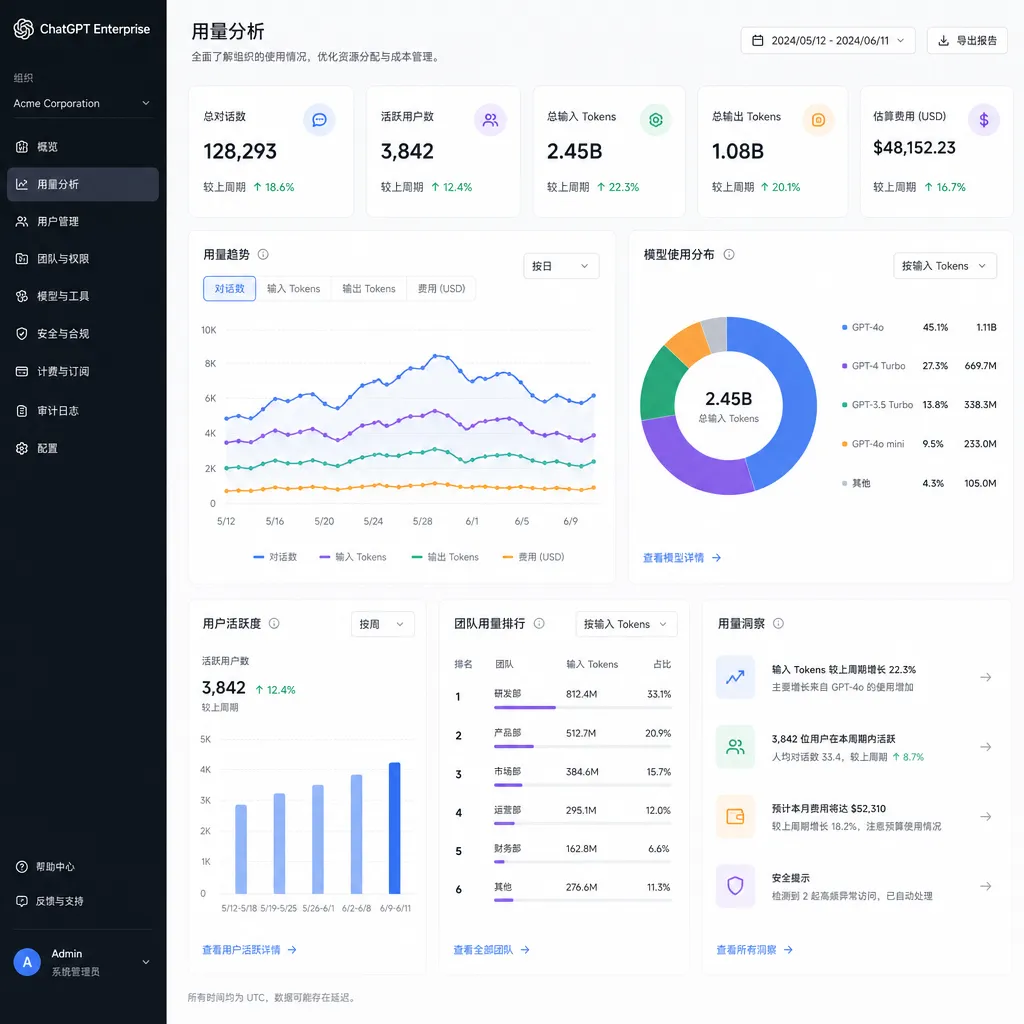
Usage Analytics: finally seeing where the money goes
The new usage analytics dashboard can:
- View credit consumption trends at the workspace level, with granularity down to the day and hour
- Break down by seat type: Codex seats vs. standard ChatGPT seat consumption share at a glance
- Sort by user: see which engineer or team is the major consumer
- Break down by feature: Deep Research, Codex agents, file analysis — each heavy feature’s credit consumption
The design logic is similar to AWS Cost Explorer or Datadog’s usage pages — clearly aimed at the “Enterprise FinOps workflow.” Previously, the ChatGPT Enterprise admin console was basically user management + SCIM + a few sad charts; today’s update fills in a fundamental gap.
More importantly, usage data can now be aggregated by department — provided the enterprise syncs organizational structure via SCIM. If you’ve never done SCIM before, it’s not too late; OpenAI has fully opened SCIM. This means that a CFO wanting to see “how much the marketing department spent on ChatGPT this month” no longer needs IT to manually pull data.
Spend Controls: from “pray we don’t go over” to “proactively defend”
Even more noteworthy is the redesigned spend controls. The new version supports a three-tier structure:
- Workspace-level limit: the maximum credits the whole organization can burn in a month — hit the wall, and it stops
- Seat-type-level limits: separate limits for Codex seats and standard ChatGPT seats
- Per-user override: individually raise or lower limits for certain users, overriding the first two tiers by default
This layered model isn’t new — anyone familiar with Snowflake or BigQuery quota management will recognize it. But OpenAI implemented it thoroughly — per-user overrides completely replace seat-type settings, avoiding ambiguity.
Accompanying this is auto-reload. You can set a minimum balance, target balance, and a monthly reload limit as a backstop. Once workspace credits drop below the minimum, OpenAI automatically tops up to the target balance using your stored payment method. Worried about runaway usage? Set the monthly reload limit at $10,000 — once it’s reached, it stops.
This mirrors Anthropic and Google’s budget control approaches for enterprise API customers, but is closer to the end user — after all, ChatGPT Enterprise’s “last mile” is ordinary employees clicking in a web/desktop app, not engineers making API calls.
Why this is worth a news flash
Honestly, as a tech editor, I’ve seen many OpenAI product updates. Most Enterprise-side releases are “compliance check” items — SOC 2, HIPAA, SAML, SCIM — each update just gives the sales team another bullet to land big deals.
But spend control is different. It directly addresses this year’s Q2 top two complaints from enterprise customers:
First: Codex seats billed by credits drove finance departments crazy. For a 200-person engineering team, ChatGPT Enterprise used to be $60 per month per person — easy to budget. Switching to Codex seats, heavy users could burn credits equivalent to hundreds of dollars a month, causing wild bill fluctuations. Without spend controls, finance couldn’t budget.
Second: Deep Research and agent mode made usage even less predictable. One Deep Research call can consume tens or hundreds of times more tokens than a regular conversation. A Codex agent running a lengthy task might call inference dozens of times. The more these heavy features are enjoyed, the nastier the bill.
So today’s update is less a “new feature” and more a patch for OpenAI’s April pricing overhaul. And it’s a timely patch — wait two more months, and some big customers might start swapping Codex seats for in-house toolchains due to uncontrolled bills.
How it compares with competitors
Looking horizontally: Anthropic’s Claude Enterprise still uses a “per seat + separate API billing” dual model, with little fine-grained budget control for agent workloads. Google’s Gemini Enterprise does have usage analytics, but its Workspace console granularity is coarser — no model-level breakdown.
OpenAI’s advantage this time is unifying ChatGPT and Codex credit consumption in one dashboard. For companies that want employees to use ChatGPT for documents and engineers to run Codex agent tasks, this is currently the most granular solution.
But don’t oversell it. This functionality is currently only available in the Enterprise plan. Business plans can only use the basic spend controls (credit limits per seat/per user), without advanced analytics. Small teams wanting Codex seats still need to manage with spreadsheets.
Also, export and API interfaces are missing. If your FinOps team wants to ETL ChatGPT usage data into your cost analysis platform (like Apptio or CloudHealth), you currently have to manually download CSV. OpenAI does have Compliance API (upgraded earlier this year to Compliance Logs Platform), but usage data isn’t yet integrated. This will likely be supplemented later, but short-term, FinOps automation still requires manual glue work.
Practical details for implementation
Tips for IT admins about to start:
- Credit validity remains 12 months — don’t stockpile too much; expired credits are void
- Auto-reload is off by default — workspace owners must enable it manually; new admins should check this setting
- Per-user overrides take effect immediately, but consumed credits aren’t rolled back — adjust carefully
- Adding the first Codex user triggers the credits process — prepare payment details in advance to avoid blocking a new hire on their first day
- Department-level aggregation requires SCIM to sync the department field — if this field is empty in your IdP, the analytics panel can only display by user level
How OpenAI Hub fits in
By the way, for teams that don’t want to be tied to the Enterprise plan but still want GPT‑5.5, Codex, Claude, Gemini, DeepSeek, OpenAI Hub (openai-hub.com) offers a single key to access all models — directly via API, pay-per-token, direct access from China, compatible with OpenAI format. Budget control isn’t as granular as Enterprise’s console, but it’s flexible, and engineering teams can wrap it with a gateway to handle usage tracking. Both options are non-conflicting — choose based on team size and use cases.
A bigger trend
Looking ahead, this update isn’t just “OpenAI adding a management feature.” It represents a larger shift: AI product pricing models are moving from subscription-only to hybrid models — base subscription + usage-based advanced features.
Claude Code is already on this path. Cursor’s Pro plan is essentially subscription + Fast Request quota. Codex seats’ credits system is OpenAI’s first large-scale attempt in ChatGPT. Once hybrid pricing becomes the industry standard, usage visibility and budget controls will no longer be “nice-to-haves” but must-haves in enterprise procurement contracts.
Whoever solidifies this infrastructure first will win more big deals in the enterprise market. OpenAI fixing this shortfall means the upcoming sales battles will be fiercer. Anthropic and Google will likely follow with similar features next quarter — easy to copy, but costly in engineering resources.
In closing
If you’re a ChatGPT Enterprise admin, it’s worth taking half an hour this week to explore the new features in the console. Focus on three things: enable auto-reload, set a monthly reload limit (as a backstop), and assign per-user overrides for heavy Codex users. Once you do these, your AI bills this year can basically become “predictable.”
If you’re still evaluating whether to adopt the Enterprise plan, today’s update lowers the onboarding barrier — at least it’s much easier to get past the CFO now.
References
- OpenAI launches ChatGPT Enterprise service - iThome: iThome’s early report on ChatGPT Enterprise, useful background for understanding the plan’s evolution.


