
Pi Agent Studio Released: Embedding a coding agent into the native VS Code terminal
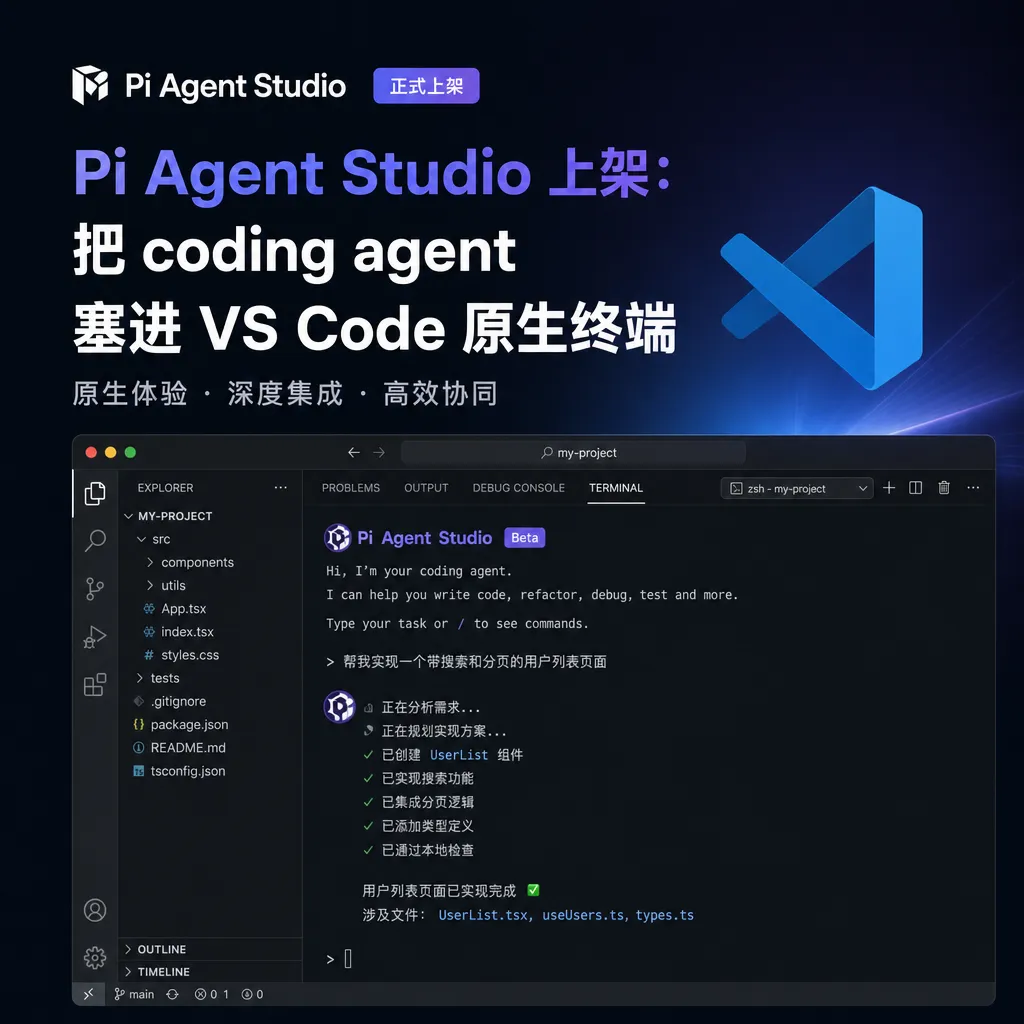
Pi Agent Studio officially launches on the VS Code extension marketplace. Instead of using a webview wrapper, it directly embeds the Pi coding agent into the built-in terminal using native PTY. Open-source, free, and cross-platform support.
Pi Agent Studio is here — and this time it's not just a wrapper
Today, People of Pi officially launched Pi Agent Studio on the VS Code Marketplace. Sounds like just another coding agent extension? Don’t scroll away too fast — this thing works quite differently from most IDE-embedded agents out there.
In one sentence: Pi didn’t wrap itself in a webview UI — it runs directly in VS Code’s built-in terminal, using native PTY with zero middle layer.
If you’ve written IDE plugins, you’ll instantly grasp the experiential difference. The vast majority of so-called “deeply integrated” AI coding tools essentially open an iframe inside VS Code, stuff in the web UI for chat, and communicate with the editor via message passing. The upside is slick UI and rapid iteration; the downside is awkwardness everywhere — rendering, shortcuts, clipboard, ANSI escapes, you name it. Pi takes a different path: you open the terminal, type pi, and the agent runs in a TUI, feeling just like your usual tmux + Neovim + CLI tool workflow.
Why put the agent back in the terminal
Over the past two years, AI coding tools have evolved along a fairly straight line: from inline completion à la Copilot, to full IDE rewrites like Cursor/Windsurf, and now this resurgence of CLI agents — Claude Code, Aider, Pi, and others.
The resurgence isn’t accidental. CLI-form agents have several advantages that GUI can’t match:
- No rendering overhead — no bloated hundreds-of-megabyte Electron.
- Naturally composable — can be piped, integrated into CI, or run over ssh on a server.
- Transparent state — output is just logs, no “I have no idea what it’s doing now” black-box feeling.
- Shell as environment — the agent gets everything from your shell: aliases, env variables, virtualenvs, current directory.
But CLI agents have an obvious shortcoming: they’re disconnected from the editor. You edit code in Neovim, while the agent runs in another terminal window. To feed it the currently selected code block or a file’s diagnostics, you either copy-paste manually or write a bunch of glue scripts.
Pi Agent Studio aims to solve this last mile: keep the CLI agent’s core intact, but make it aware of what’s happening in the editor.
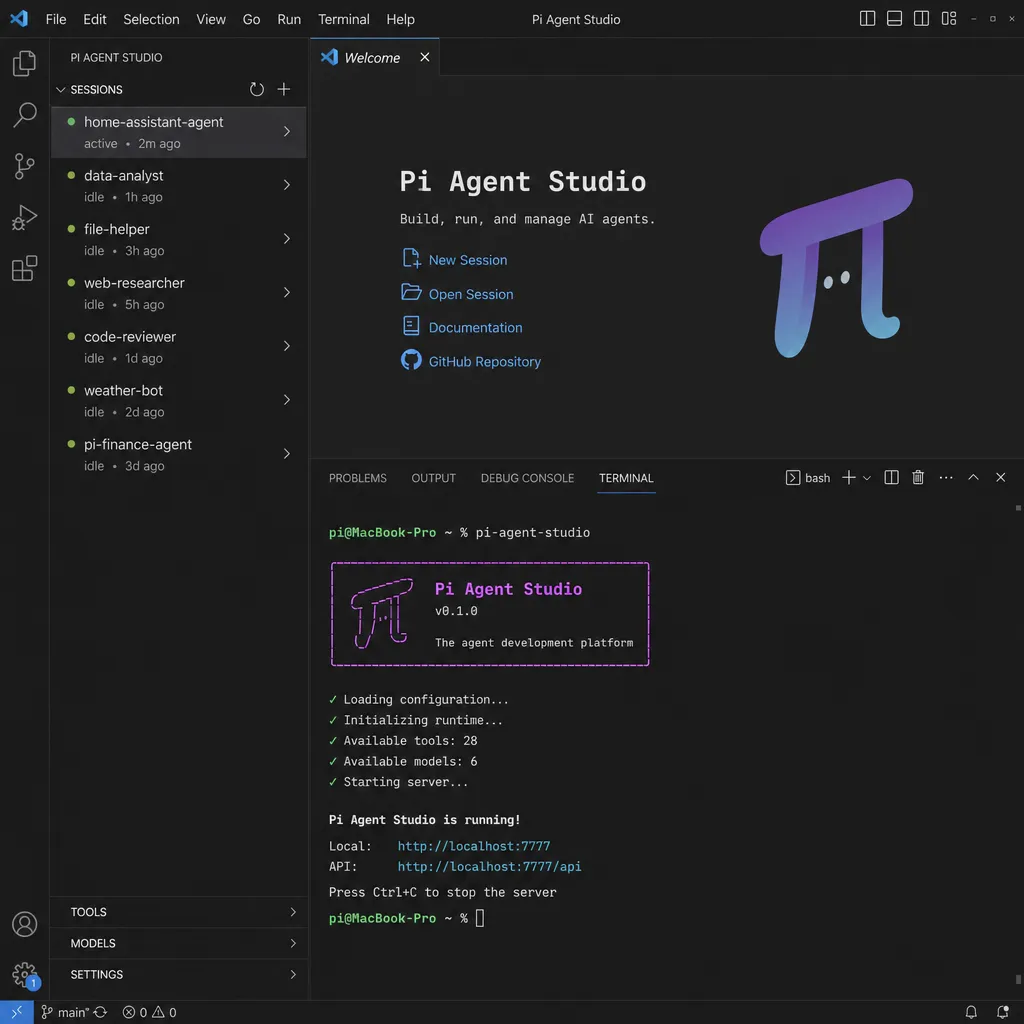
A few noteworthy design points
Truly Native Terminal
This is something Pi repeatedly emphasises: terminal is the product. Pi runs in VS Code’s built-in terminal using the node-pty stack — not an xterm.js shell emulator forwarding commands. The result: ANSI colors, cursor positioning, keyboard shortcuts, bracketed paste mode — all work as expected.
Anyone who’s used a webview agent with its own terminal emulator can relate — just handling Ctrl+C escapes can be an ordeal. Pi sidesteps that completely.
Editor Bridge
This is perhaps the most interesting part of the release. In Pi’s TUI, there’s a status bar showing:
- Which file you have open
- Cursor position (line and column)
- File language (TypeScript, Rust, Python, etc.)
- How many diagnostics (errors/warnings) are in the current file
This info is synced live from the VS Code Extension API. In other words, Pi’s CLI process can now “see” what you’re doing in the editor.
Combined with two built-in slash commands, you get:
/vscode-selection— precisely inject the code block you’ve selected in the editor into the conversation./vscode-diagnostics— package up all current file errors and warnings and send them to the agent.
The key to this interaction is the human always controls the wheel. Unlike some agents that automatically feed the entire workspace, Pi knows nothing by default — it sees the selection only when you /vscode-selection. You decide how the context window is used, how tokens are spent.
Session Persistence
Close VS Code and reopen — Pi automatically restores your previous conversation. This may sound minor, but once you’ve used it, you won’t go back — most IDE-embedded agents reset upon closure, losing memory. Pi serializes session state locally, letting you resume right from the sessions list.
Sidebar Management
Pi adds a panel in the Activity Bar with three sections:
- Sessions — list of past sessions; click to restore.
- Models — currently configured models; switch quickly.
- Settings — providers, OAuth, API keys — all configured in one place.
Models are important here: Pi is model-agnostic — it can run whatever model you connect — Claude, GPT, Gemini, DeepSeek, local Qwen — entirely up to your setup. If you’re already using an aggregation gateway like OpenAI Hub, just set base_url and key, and all mainstream models can be used within Pi immediately — no need to sign up separately for each.
Comparing with existing options
Current mainstream choices in the ecosystem:
| Tool | Form | Integration | Models | |------|------|-------------|--------| | GitHub Copilot Chat | IDE embedded | Native | Primarily Copilot’s own + limited third-party | | Cursor | Fork of entire IDE | Native | Own gateway | | Claude Code | CLI | Standalone terminal | Claude only | | Aider | CLI | Standalone terminal | Multi-model | | Pi Agent Studio | CLI + VS Code extension | Terminal + editor bridge | Multi-model |
Pi occupies a space no one else has claimed: CLI agent soul, IDE body. It doesn’t rebuild an IDE like Cursor, nor stay purely CLI like Claude Code — it embeds the CLI agent into VS Code’s terminal, then uses the Extension API to feed context back.
You might ask how it compares to GitHub Copilot’s agent mode? Copilot is closed-source, model-tied, UI-heavy; Pi is open-source, model-free, TUI-based. One is like an IDE vendor’s official answer; the other is like a hacker’s private playground. A community comment summed it up well: "If Claude Code is VS Code, then Pi is Neovim." More freedom, customizability, no product manager constraints — but you have to tinker yourself.
Potential pitfalls
Let’s talk about the not-so-sweet side.
Terminal TUI’s visual expressiveness is limited. Pi’s TUI route means no images, rich text previews, or complex charts. If you work in frontend/UI components and want the agent to render a live preview, Pi isn’t for you. It’s better suited for backend work, scripting, infrastructure changes, code migration.
Editor Bridge currently only covers basic signals. Current file, selection, diagnostics — all low-bandwidth metadata. If you want Pi to understand the entire workspace’s symbol index, call graph, cross-file references, you’ll still need to roll your own ripgrep + tree-sitter flow in the TUI. This fits Pi’s philosophy: clear, controlled context beats fuzzy, auto-injected context.
Ecosystem still early. Compared to officially developed tools like Claude Code, Pi’s plugin/config/command ecosystem is still evolving. Marketplace already features related projects like tintinweb/vscode-pi-model-chat-provider, which exposes Pi as a VS Code Language Model Provider so Copilot Chat can use Pi — the community is growing organically.
Getting started
Basic steps:
# 1. Install Pi CLI
npm install -g @pi-agent/cli

# 2. Search "Pi Agent Studio" in VS Code Marketplace and install extension

# 3. Configure provider (fill base_url and key in sidebar Settings)

# 4. Open VS Code built-in terminal
pi
First run will prompt you to select a model and provider. For aggregation gateways, just set base_url accordingly — Pi accepts OpenAI-compatible formats directly.
A few handy commands:
/vscode-selection— inject currently selected code/vscode-diagnostics— inject current file diagnostics/model— switch model for current session/sessions— list past sessions
Final thoughts
Pi Agent Studio’s launch feels like finding a standard answer for “CLI agent + IDE” combo. It doesn’t reinvent the wheel but fixes a few long-ignored industry details: native terminal instead of webview, explicit context injection instead of automatic absorption, session persistence instead of instant amnesia on window close.
If you’re used to Cursor’s all-in-one feel, Pi might seem plain and counter-trend. But if you’re the type who’d rather piece together Neovim + tmux + ripgrep than be boxed in by an IDE, this tool is basically made for you.
Both extension and CLI are open-source and free, available on the Marketplace, supporting macOS / Windows / Linux. Worth spending ten minutes to try.
References
- Experience sharing on deeply integrating Pi Agent in VS Code - linux.do — Community discussion on Pi Agent Studio integration.
- Zetaphor/pi-vscode-extension - GitHub — Another community implementation of Pi VS Code extension; useful for reference.


