
GitHub Internal Agent in Action: How Qubot Was Made

GitHub has officially released a retrospective on building its internal data analysis Agent, Qubot, covering everything from the semantic layer and evaluation system to trust building, detailing all the pitfalls encountered in deploying an enterprise-grade AI Agent. For teams currently developing internal Agents, this is a rare hands-on guide.
This week, the GitHub blog dropped a rather solid retrospective article with a plain title — “How we built an internal data analytics agent” — detailing how they built their internal data analytics agent named Qubot.
One-sentence summary of Qubot’s positioning: Any GitHub employee can ask it questions in plain language, such as “What was the DAU trend for Copilot among Enterprise customers last month?” or “Which repositories saw the biggest drop in PR merge rates over the past quarter?” Qubot will look up the data, run SQL, generate charts, and return the conclusion. Sounds like connecting ChatGPT’s Code Interpreter directly to the internal data warehouse — which is essentially true — but GitHub shared the trade-offs and failures along the way, making it far more valuable than a typical product PR release.
The reason this article is worth digesting carefully is simple: every company these days is building its own internal agent. Most are still stuck at the stage of “hook up an LLM, give it a SQL database tool, run a working demo, and roll it out”, only to get harshly criticized by the business side later. GitHub dissected several core contradictions in enterprise-level agent deployment — accuracy vs coverage, freedom vs controllability, trust vs speed — in quite a thorough way.
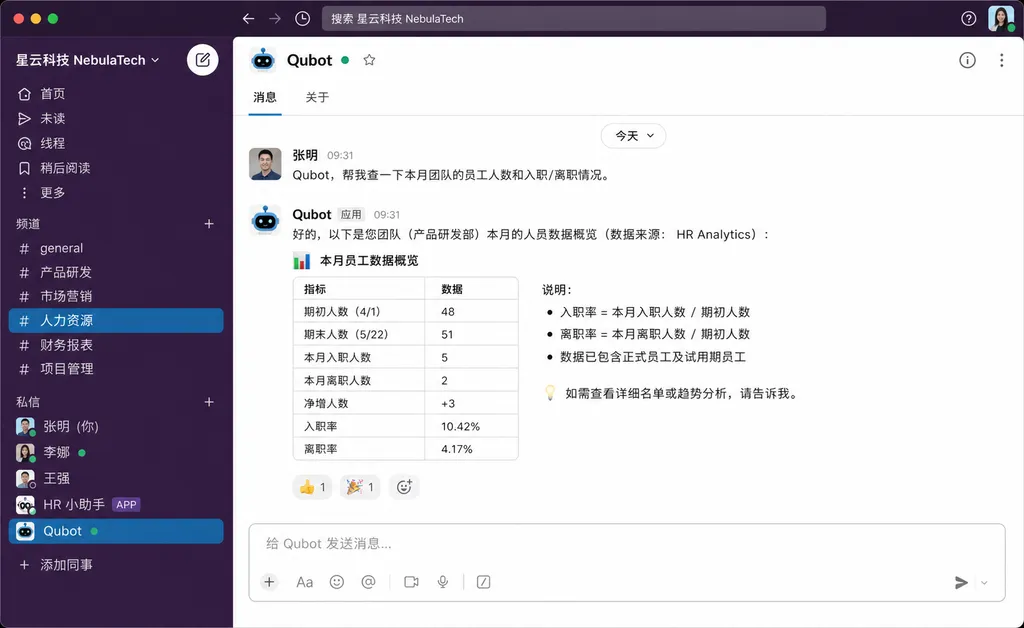
Why GitHub Built Qubot
The background is not complicated. At GitHub’s scale, the data team is constantly overwhelmed with all sorts of ad-hoc data requests. A product manager wants to see a specific metric — they have to queue up for a data analyst to write SQL. Sales wants to check a customer’s usage status — they need to file a ticket. BI tools like Looker or Tableau exist, but reports are static and questions are dynamic — new questions are either absent from the reports or hidden at intersections of five dashboards.
Internally, GitHub estimated that about 30–40% of the data team’s time is spent on this repetitive querying work, squeezing out time for truly creative deep analysis. This is a common problem for data teams in almost all large companies.
Qubot aims to solve exactly this: enabling employees to query data themselves, freeing the data team from repetitive labor. The concept of “self-service BI” has been around for at least ten years — from Tableau to Mode to Hex — but none has really solved the problem, because non-technical staff simply can’t write SQL or understand field semantics. The emergence of LLMs made text-to-SQL look promising — but only look promising.
The First Pitfall: Text-to-SQL Isn’t Enough in Production
The GitHub team initially went for the most intuitive approach — using Copilot to translate natural language into SQL. They hit a wall quickly.
The problem wasn’t that the model couldn’t generate SQL — the GPT series has long been capable of writing SQL. The real problem: the model doesn’t know what your company’s data actually means.
Example: Someone asks, “How many active users last week?” Sounds simple, right? But inside GitHub:
- Is “active user” defined as having logged in, performed any Git operation, or triggered a Copilot completion?
- Does “user” mean a GitHub account, an Enterprise seat, or a deduplicated real person?
- Does “last week” use UTC or PST? Is it a calendar week or a rolling 7-day period?
- Which table to use?
fact_user_activity,dim_users, or some dbt model?
These definitions are scattered in the data team’s heads, Confluence docs, and dbt .yml files. A new data analyst would take two weeks to figure this out — expecting an LLM to get it right immediately is pure fantasy.
The direct result: Early versions of Qubot often produced SQL that was syntactically correct but logically off — numbers looked plausible but were completely wrong in terms of definitions. This is more dangerous than errors that throw obvious exceptions, because nobody notices.
The Solution: The Semantic Layer Is the Agent’s Soul
GitHub’s core answer — and the most valuable part of the article — is that the semantic layer is the core of an enterprise agent, not the LLM itself.
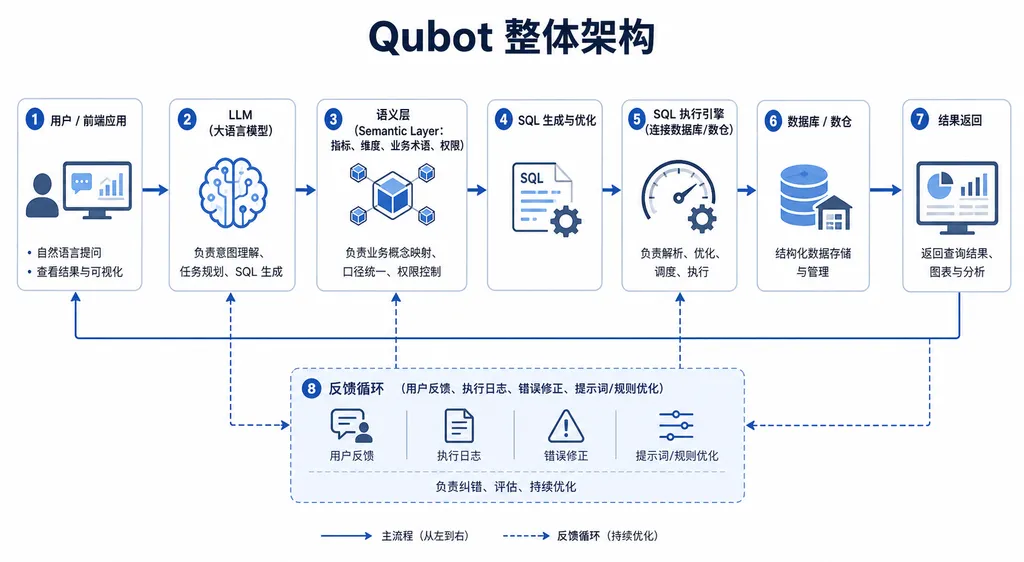
Their approach was to construct a structured metadata system, explicitly defining every business metric, dimension, and table so the LLM could “look up the definitions” before generating queries. This semantic layer includes:
- Metric definitions: Each metric has a unique name, e.g.,
copilot_weekly_active_users, linked to an approved SQL template. - Dimension dictionary: Defines which dimensions metrics can be split by (
plan_type,region,team_size, etc.) and allowed values for each. - Synonym mapping: “DAU”, “daily active”, and “日活” all point to the same metric.
- Relationship graph: Defines which tables can join and via which keys.
This is similar to Cube.js, LookML, or dbt Metrics — and essentially the same concept — but GitHub’s key insight is: the semantic layer is for the agent, not for BI tools. When the agent receives a natural language question, it should first map the question to specific metrics and dimensions in the semantic layer — if mapping fails, it asks the user for clarification rather than guessing.
This reversal of order is critical: “generate first, then validate” vs “constrain first, then generate.” The former has a high and hard-to-detect error rate; the latter has lower coverage but each answer is solid. GitHub fundamentally chose the latter.
Evaluation System: No Eval, No Iteration
Another heavily emphasized point is evaluation. While everyone talks about it in agent-building teams, few actually do it rigorously.
GitHub’s method has multiple layers:
- Golden question set: The data team manually labeled hundreds of typical questions and correct answers for regression testing.
- Categorized evaluation: Questions are categorized by difficulty and type; accuracy is tracked separately to avoid skew from easy questions.
- Offline + online: Runs benchmarks offline; online uses real user feedback as implicit signals (e.g., re-asking, downvoting).
- Failure archive: Every failure case goes into the backlog — either fix the prompt, update the semantic layer, or accept that the agent can’t handle it.
While simple, GitHub stresses: the agent’s iteration speed depends entirely on evaluation speed. If you tweak the prompt but don’t know whether you’ve improved things or not, you’re gambling.
Building Trust: Making the Agent’s Reasoning Visible
This is my favorite design aspect of GitHub’s implementation. Qubot doesn’t just drop a number in response — it shows:
- How it interpreted your question into metrics and dimensions
- Which SQL template it used
- The actual generated SQL
- Which table the data came from and last update time
Users can question or correct each step. If Qubot interprets “active users” as login users but you meant Copilot users, you can correct it with one click — and Qubot remembers this clarification.
The essence here: In an enterprise setting, explainability is 10 times more important than response speed. Employees use these numbers in meetings, decisions, and reports — if they don’t know where the number came from, they won’t trust it. Tools like Looker earn trust because users know the data team built the models; Qubot must match that transparency to be trusted.
In contrast, many text-to-SQL products on the market hide the process to look “smart,” leading to reluctance in putting them into decision workflows.
Tool Invocation & Agent Orchestration
Technically, Qubot is a fairly typical ReAct-style agent. The core toolset includes:
search_metrics(query): Search for matching metrics in the semantic layerget_metric_definition(name): Retrieve the full definition of a metricrun_query(metric, dimensions, filters): Parameterized query executionvisualize(data, chart_type): Generate chartsask_clarification(question): Ask the user for clarification
Note there’s no run_raw_sql catch-all tool. GitHub deliberately limits the agent’s freedom — it can only call metrics defined in the semantic layer. No freeform SQL writing. This is another “trade coverage for reliability” decision.
The cost: reduced coverage. If a question isn’t defined in the semantic layer, Qubot can’t answer — the data team must add it first. But GitHub believes this trade-off is worthwhile: better to answer fewer questions accurately than to occasionally get them right but often wildly wrong.
Key Points Worth Copying for Domestic Teams
Reading through the blog, several lessons apply equally well to teams building enterprise agents elsewhere:
- Don’t worship end-to-end LLMs: Treat LLMs as reasoning engines; keep business logic in a structured semantic layer.
- Evaluation before product: Without an eval pipeline, don’t launch — otherwise you’re A/B testing on your users.
- Prioritize explainability: Expose every agent step so users can feel confident using it.
- Limit freedom: Controlled toolsets are far more reliable than “do anything” environments.
- Bootstrapping depends on manual work: Semantic layer, golden question sets, and typical cases all require human annotation — no shortcuts.
Point 5 is especially important. Many teams fantasize about “deploying an agent to save manpower,” but in reality, it saves downstream manpower (querying) while requiring more initial manpower (building semantic layer, evaluations, case labeling). GitHub openly admitted that in Qubot’s early days, the data team’s workload actually increased — only once coverage reached a certain level did it start paying off.
What This Means for Developers
This GitHub article effectively provides a reference architecture for an enterprise-grade agent. Copilot itself is already pushing Agent Mode and third-party agent integration — Qubot is an internal application of the same methodology.
More broadly: As of 2026, the agent discussion has moved past “can it work” to “how to make it reliably work in production”. LLM capability is no longer the bottleneck — engineering, evaluation systems, and domain knowledge accumulation are.
For teams building similar products, this blog is more useful than ten Twitter threads introducing agent frameworks. Qubot isn’t a flashy new concept — it’s a real deployed system, used by thousands of GitHub employees, iterated over more than a year — the density of practical experience exceeds many academic papers.
References
- GitHub features - Copilot Agents: Official page for GitHub Copilot Agents, showing Copilot’s overall product layout in the agent direction
- github-agent-driven-development-translation.md: Chinese translation of GitHub’s Agent-driven development, helpful for understanding Copilot Agent workflows
- How GitHub Copilot and AI Agents Can Save Legacy Systems: A Zhihu post sharing practical Copilot Agent use cases in legacy system modernization


