
my-agent-browser Open Source: Give Your Agent a Browser That Doesn’t Malfunction

Developer briqt wrapped the chrome-devtools-mcp package into an MCP+Skill unified browser layer, focusing on shared instances, crash self-healing, and fingerprint spoofing. Claude Code, Codex, and Hermes can all reuse the same Chrome.
Another Solution to the "Agent Operating Browser" Pain Point — This Time Taking the Wrapping Approach
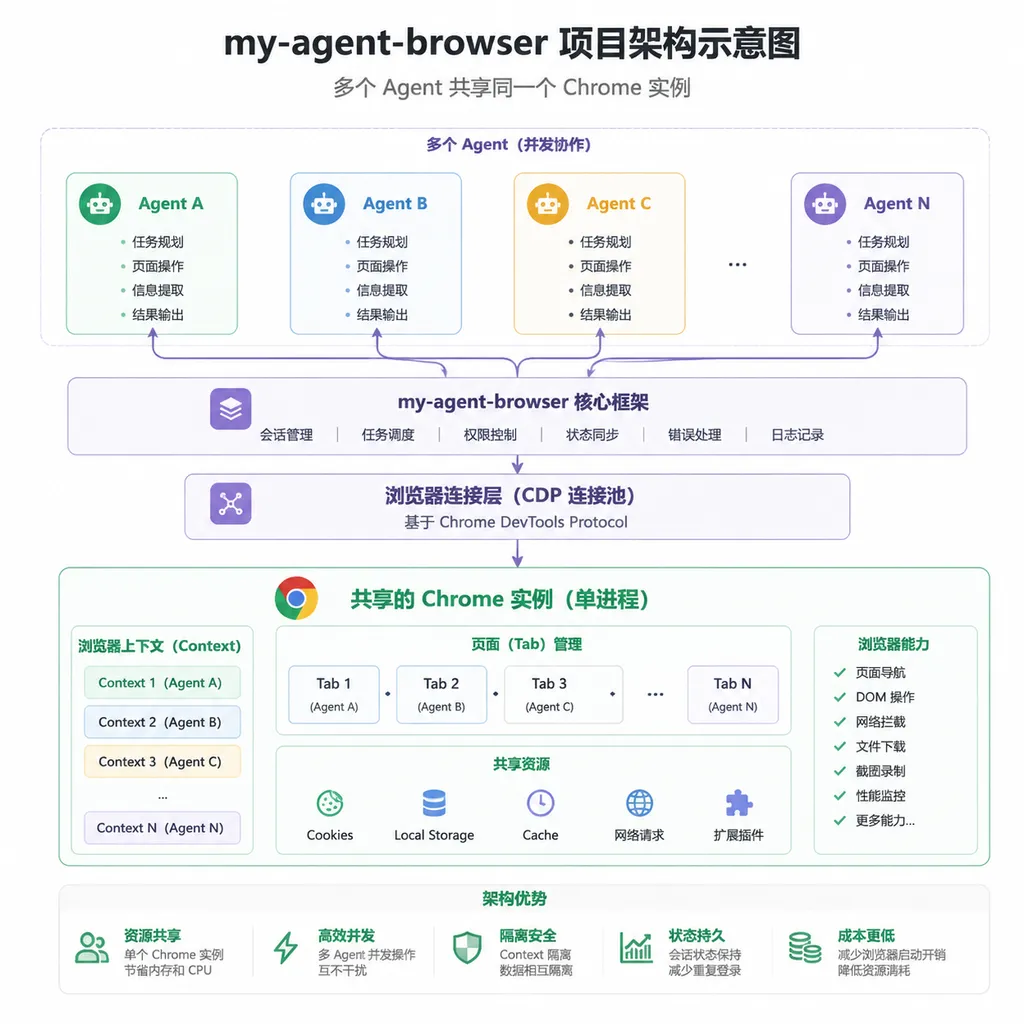
Around June 22, a project called my-agent-browser was released on the linux.do community by domestic developer briqt. The positioning is straightforward — instead of reinventing the wheel, it adds an enhanced wrapper layer on top of Google’s official chrome-devtools-mcp, forming an MCP + Skill combination specifically aimed at solving the confusion caused by multiple Agents coexisting and managing browser instances.
It’s a small thing, but it hits a very specific pain point: you’re using Claude Code, Codex, plus your own Hermes, and each Agent wants to open its own browser. The result? Port conflicts, cookies scattered across instances, login states repeatedly failing, and during debugging you have three or four Chrome windows floating around your screen, unable to tell which belongs to which process. Anyone who uses Agents intensively will encounter this scenario.
Why the Author Didn’t Use Existing Solutions Directly
In the post, the author reviewed the current landscape and concluded: “None perfectly meets the need.” Let’s follow the thought process:
- Agents with built-in browser capabilities: Each implementation is different — Claude Code, Codex, Cursor each have their own private protocols, making it impossible to reuse sessions and data directories across them.
- chrome-devtools-mcp: Officially from Google, fully capable, but fundamentally a raw MCP server — no process management, crashes are final, and it won’t automatically reuse an existing Chrome instance.
- Playwright CLI: Geared towards automated testing scenarios, always launches a fresh profile, with fingerprints vastly different from a normal user, easily caught by anti-bot mechanisms.
- Cloud browsers (Browserbase, Browserless, agent-browser, etc.): Vercel Labs’ agent-browser has 36k+ stars now, with a nice approach — Rust CLI + structured snapshots + headless operation — but it runs in the cloud or headless mode, so you can’t see the UI, nor use your daily browser’s login state, and for domestic developers there are network issues.
The author wanted a different combination: persistent data directory + visible UI + browser fingerprint almost identical to daily browser + all Agents sharing the same instance. There really isn’t a solution on the market that meets all four criteria.
What It Does
The core logic in one sentence: reuse your local real Chrome — all Agents connect to the same instance.
Compared to running chrome-devtools-mcp bare, my-agent-browser does the following:
1. Automatic Browser Instance Discovery
This is the key design. When an Agent calls the tool, it doesn’t bluntly spawn a new Chrome. Instead, it scans existing browser processes in the system to see if there’s an instance running with --remote-debugging-port. If found, it connects; if not, it launches one per configuration. That way, when three Agents start simultaneously, they see the same Chrome, same set of tabs, same login state.
This design revolutionizes the debugging experience. Previously, to see where your Agent was stuck, you’d need screenshots or a DOM dump; now you just switch to that Chrome window and look.
2. Process Lifecycle Management and Crash Recovery
A longstanding issue with chrome-devtools-mcp: when the DevTools protocol connection is lost, it’s game over — the Agent just gets a bunch of timeout errors and has no idea how to recover. my-agent-browser adds a state machine in the middle layer, detecting disconnects, Chrome process exits, and tab crashes, and automatically tries to reconnect or restart. It then feeds this back to the Agent in language it understands — e.g., “Target tab crashed, reopened in new tab, please retry operation” — instead of throwing an ECONNRESET.
For Agent fault tolerance, translating exceptions into actionable natural language hints is far more useful than giving it a stack trace.
3. Configuration-Driven Reduction of Anti-Bot Fingerprints
This is quite restrained — the author’s wording is “reduce,” not “bypass.” Essentially, since you’re connecting to your daily browser instance, UA, fonts, plugins, and WebGL fingerprints are all real, plus persistent cookies and localStorage, making detection much harder than in Playwright’s “fresh profile + automation flags” environment. There’s no black magic here, just the right approach.
4. Agent-Oriented Usage Guidance
This is where the Skill part adds value. After installing, the Agent doesn’t just grab a set of tools and start; it first reads SKILL.md, learning that “I’m dealing with a real browser that might already be logged in and have historical tabs, so before operating I should list tabs.” This effectively moves prompt engineering into the tool layer.
Installation and Integration
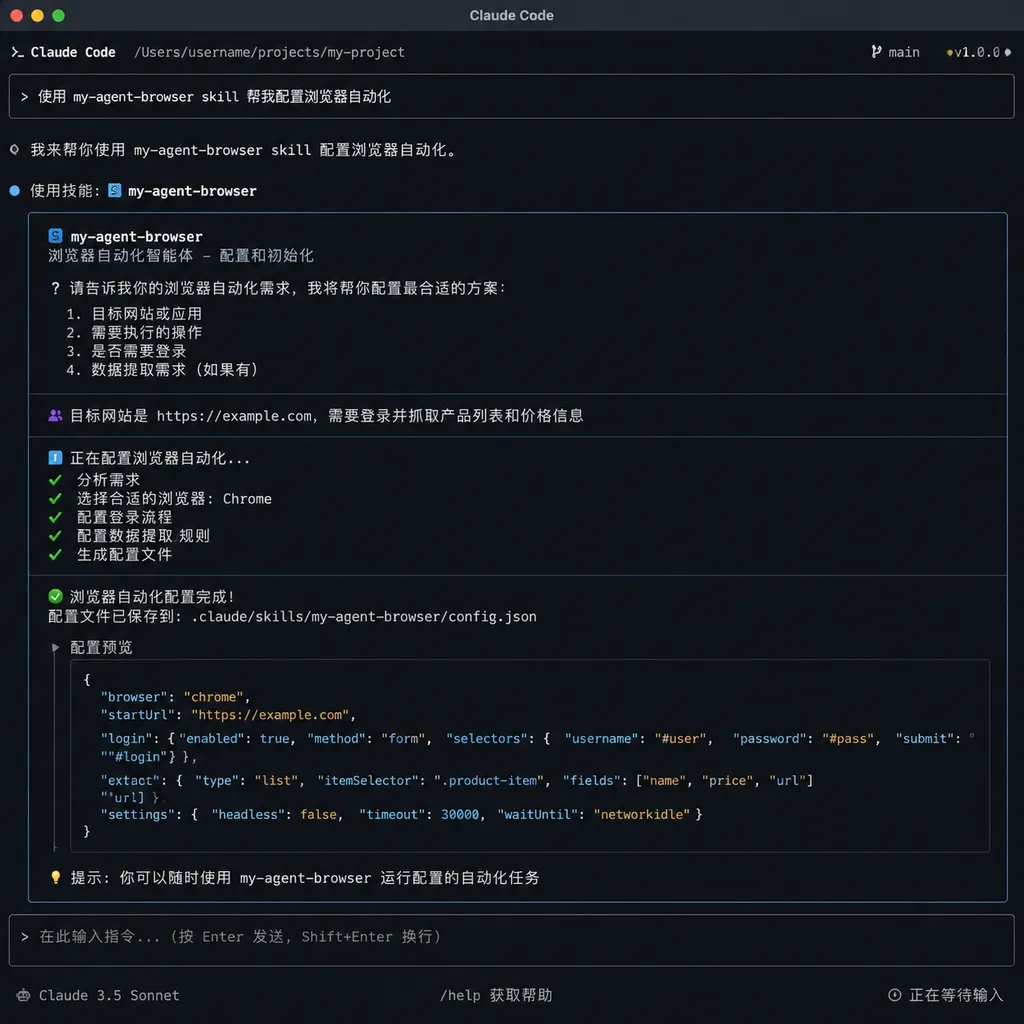
One command:
npx skills add briqt/my-agent-browser -g -y
After installation, have your Agent read the skill:
Read the my-agent-browser skill and guide me through configuration
The Agent will follow the instructions in SKILL.md to register and configure MCP automatically. This “have the Agent read the manual” integration approach has gradually become a paradigm over the past six months — much nicer than manually writing MCP config JSON.
Side-by-Side with Vercel’s agent-browser
Names are half similar, but the approaches are entirely different.
| Dimension | my-agent-browser | agent-browser (Vercel) | | --- | --- | --- | | Underlying tech | chrome-devtools-mcp wrapper | Custom Rust CLI + Chrome | | Runtime environment | Local real Chrome instance | Independent Chrome process, cloud-capable | | UI visibility | Has UI, visually debuggable | Mostly headless | | Multi-Agent sharing | Core selling point | Not design goal | | Output format | Uses chrome-devtools-mcp’s native capabilities | Structured snapshot + ref, token optimization | | User profile | Domestic heavy Agent users needing persistent login state | Team/platform scenarios, batch automation |
Vercel’s setup is more like infrastructure for SaaS-style Agent platforms, emphasizing token efficiency and determinism; briqt’s is a Swiss Army knife for solo operations, turning your daily browser into an extension of the Agent. Both approaches have merit — it depends on your use case.
Some Thoughts
This type of “wrapping existing MCP” project will become more common this year. Official servers like chrome-devtools-mcp, playwright-mcp, filesystem-mcp provide minimal viable functionality, but they’re not production-ready — lacking process management, state recovery, and contextual guidance — the “glue work.”
my-agent-browser’s value lies in doing that glue work solidly, and choosing a smart entry point: reuse the real browser. This has become rare in the current cloud-solution-dominated space. Cloud browsers make sense in enterprise scenarios, but for individual developers, your GitHub login, Notion session, and internal system authentications — nobody wants to re-login across the board in a cloud browser just for “Agent operation.”
It does have drawbacks: it depends heavily on chrome-devtools-mcp upstream, and changes to the CDP protocol will propagate down; testing so far is mainly on the author’s Hermes, Claude Code, and Codex — compatibility with more obscure Agents needs verification. But for the very common requirement of “I just want Claude Code to operate my own browser,” it’s mature enough for daily use.
A side note: On OpenAI Hub, with a single key you can run Claude, GPT, Gemini, and DeepSeek all together. Combined with local Agent tools like my-agent-browser, building a multi-model workflow with browser capabilities is now at least an order of magnitude easier than a year ago.
References
- my-agent-browser First Release Thread (linux.do) — Project introduction and open source statement by briqt on the linux.do community
- vercel-labs/agent-browser (GitHub) — Another route from Vercel Labs, for comparison
- Github Weekly Issue #9: AI Agent and Productivity Tool Picks (Zhihu) — Chinese analysis of the agent-browser design concept


