
NeMo AutoModel Release: Fine-tuning large models no longer requires converting checkpoints
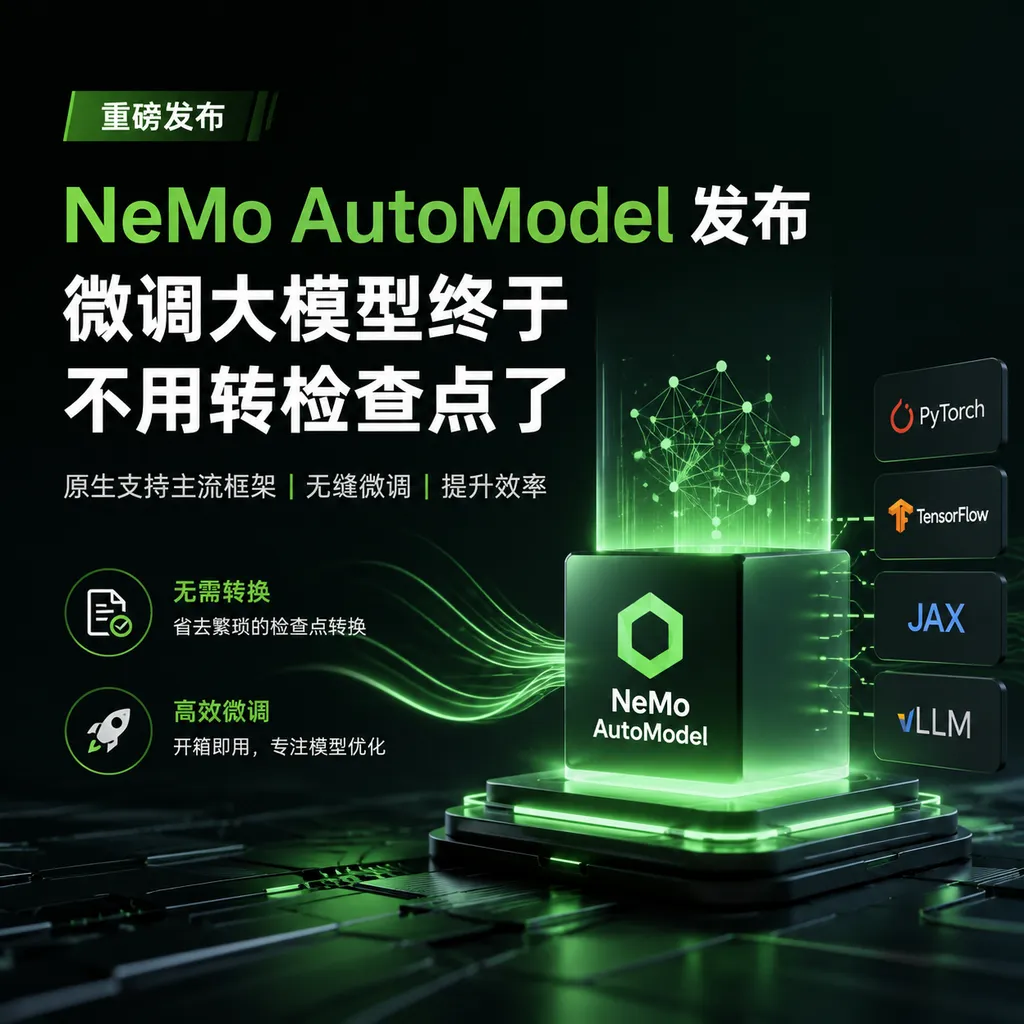
Hugging Face and NVIDIA have jointly launched NeMo AutoModel, enabling any Hugging Face model to be fine-tuned directly within the NeMo framework, eliminating the cumbersome checkpoint conversion process, and supporting distributed training from a single GPU to multi-node setups.
NeMo AutoModel Release: Fine-Tuning Large Models Without Checkpoint Conversion at Last
Anyone who’s done large model fine-tuning knows this pain point: you find a model you like on Hugging Face and want to train it using NVIDIA’s NeMo framework, but the checkpoint conversion alone can take half a day. Format mismatches, weight mapping errors, cumbersome validation processes—these issues make “rapid experimentation” an empty promise.
Now there’s an official solution. Hugging Face and NVIDIA have jointly released NeMo AutoModel, a high-level interface that allows Hugging Face models to run directly in the NeMo framework. No checkpoint conversion, no rewriting model definitions—just load and use.
What Problem Does It Solve?
First, let’s clarify how the NeMo framework originally worked.
NVIDIA NeMo is a framework designed for large-scale training, powered by Megatron-Core and Transformer-Engine at its core. Its advantage is clear: in multi-GPU, multi-node scenarios it achieves high throughput and MFU (Model Flops Utilization). The trade-off is that you can’t directly use Hugging Face models.
Here’s the original workflow:
- Download model weights from Hugging Face
- Use NeMo’s conversion scripts to turn the weights into Megatron-Core format
- Validate that the converted model works correctly in inference, fine-tuning, and evaluation
- If something goes wrong, troubleshoot whether it’s a bug in the conversion script or an incompatible architecture
This workflow is manageable for mainstream models like Llama or Mistral, since the NeMo team has already written conversion scripts. But if you want to use a newly released model—say a community fine-tuned version, or a niche architecture—you’d have to write your own conversion logic, and you might have to wait for official NeMo support.
This creates a time lag: a model is released on Hugging Face, but you might have to wait weeks or even months before you can efficiently train it in NeMo.
AutoModel’s approach is simple: since Hugging Face’s model definitions are already robust, why not just use them directly?
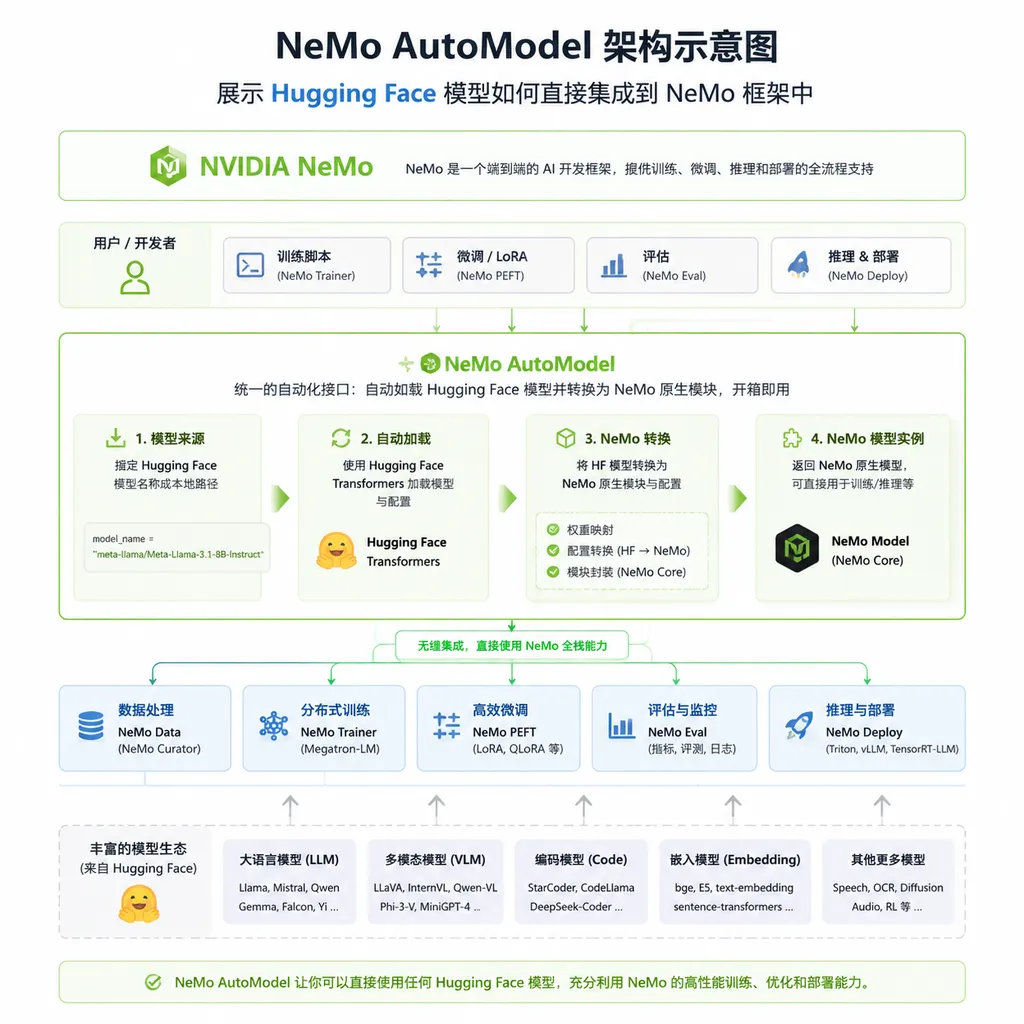
How to Use AutoModel
Code changes are minimal.
Previously using the Megatron-Core backend to load a Llama model looked like this:
import nemo.collections.llm as llm

# Megatron-Core approach: specify a concrete model class and config
model = llm.LlamaModel(llm.Llama32Config1B())
strategy = nl.MegatronStrategy(ddp="pytorch", ...)
Now with AutoModel, you just do:
import nemo.collections.llm as llm

# AutoModel: directly use Hugging Face's model_id
model = llm.HFAutoModelForCausalLM(model_id="meta-llama/Llama-3.2-1B")
Just that one line. The model is pulled directly from Hugging Face Hub, with no conversion steps needed.
A more complete fine-tuning example:
# Fine-tuning Qwen2.5-7B using NeMo AutoModel
python3 examples/llm_finetune/finetune.py \
    -c examples/llm_finetune/qwen/qwen2_5_7b_squad_peft.yaml \
    --model.pretrained_model_name_or_path Qwen/Qwen2.5-7B \
    --step_scheduler.max_steps 20
The config file specifies the dataset, learning rate, batch size, etc. For the model, just one pretrained_model_name_or_path is enough.
For larger models like Qwen2.5-32B, you can use QLoRA to reduce VRAM usage:
python3 examples/llm_finetune/finetune.py \
    -c examples/llm_finetune/qwen/qwen1_5_moe_a2_7b_qlora.yaml \
    --model.pretrained_model_name_or_path Qwen/Qwen2.5-32B \
    --loss_fn._target_ nemo_automodel.components.loss.te_parallel_ce.TEParallelCrossEntropy \
    --step_scheduler.local_batch_size 1 \
    --step_scheduler.max_steps 20
Note the use of TEParallelCrossEntropy here—this is a parallel cross-entropy implementation from Transformer-Engine, which is more efficient in multi-GPU scenarios.
Two Backends, Each With Its Strengths
The NeMo framework now actually offers two paths:
Megatron-Core backend:
- Deeply optimized, supports tensor parallelism, pipeline parallelism, expert parallelism
- Higher MFU, suited for large-scale production training
- Only supports models officially adapted by NeMo
AutoModel backend:
- Supports any Hugging Face model without conversion
- Also supports FSDP2, tensor parallelism, pipeline parallelism
- Can use FP8 precision optimization
- Ideal for rapid experiments and new model validation
They’re not mutually exclusive. The recommended workflow is:
- Use AutoModel to quickly verify that a model works for your task
- If it performs well, switch to the Megatron-Core backend for production training
- Switching requires only a few code changes
Think of it as having two gears: AutoModel is the short-iteration gear, Megatron-Core is the full-production gear.
Supported Models
In theory, AutoModel supports any model that the Hugging Face Transformers library can load. Officially tested examples include:
Large Language Models (LLMs):
- Meta Llama series (Llama 2, Llama 3, Llama 3.2)
- Google Gemma series
- Mistral, Mixtral (including MoE)
- Qwen series (Qwen 2, Qwen 2.5, Qwen 3)
- DeepSeek R1
- NVIDIA Nemotron and Llama Nemotron
- Codestral, Codestral Mamba
Vision-Language Models (VLMs):
- AutoModel also covers VLMs, allowing multimodal models to be loaded and fine-tuned with the same interface
Official documentation notes that video generation and other model categories will be added later.
From a practical standpoint, popular models generally run directly. If you’re using a community fine-tuned version (e.g., a Chinese Llama), as long as it loads normally on Hugging Face, AutoModel will work.
Distributed Training Support
Single-GPU fine-tuning is basic. AutoModel’s real value lies in inheriting NeMo’s distributed training capabilities.
Supported parallel strategies include:
- FSDP2 (Fully Sharded Data Parallel): PyTorch-native distributed strategy that shards parameters, gradients, and optimizer states across GPUs
- Tensor Parallelism: Splits computation of a single operator across GPUs, useful when a single model doesn't fit on one GPU
- Pipeline Parallelism: Places different model layers on different devices to form a pipeline
- Expert Parallelism: Designed for MoE (Mixture of Experts) architectures
- Context Parallelism: For handling ultra-long sequences
These strategies can be combined. For instance, training a 70B model on 8 A100s might require both tensor parallelism and FSDP2.
Additionally, AutoModel integrates TransformerEngine operators and DeepEP communication optimizations, supporting FP8 precision training. On Blackwell GPUs, FP8 can significantly boost throughput.
Comparison With Other Fine-Tuning Solutions
There are many tools for fine-tuning large models—where does AutoModel fit?
Compared to Hugging Face Trainer:
Trainer is easy to use, with abundant community resources, but its multi-GPU efficiency is lower than NeMo’s, especially when tensor or pipeline parallelism is needed. AutoModel combines Trainer’s ease of use with NeMo’s training efficiency.
Compared to DeepSpeed:
DeepSpeed is another mainstream choice for multi-GPU training, with ZeRO optimizations widely used. NeMo AutoModel’s advantage is deep optimization for NVIDIA hardware, particularly Transformer-Engine and FP8 support. If you use A100/H100/Blackwell GPUs, NeMo often achieves higher MFU.
Compared to LLaMA-Factory:
LLaMA-Factory specializes in LLM fine-tuning, providing a WebUI and rich presets with low entry barrier. AutoModel is more low-level, offering greater flexibility but requiring more config work. If you just want to fine-tune a chat model quickly, LLaMA-Factory might be better; if you need custom workflows or large-scale distributed training, AutoModel is preferable.
Compared to Axolotl:
Axolotl is popular for config-driven fine-tuning. AutoModel’s differentiator is being part of the NeMo ecosystem, allowing seamless switching to the Megatron-Core backend for production training, backed by sustained NVIDIA investment.
Overall, AutoModel targets teams seeking efficient fine-tuning on NVIDIA GPUs while staying compatible with the Hugging Face ecosystem.
Practical Experience
We ran the official example on a DGX Spark equipped with Blackwell GPUs.
Setup was simple—there’s an official Docker image:
# Pull official image
docker pull nvcr.io/nvidia/nemo-automodel:26.02

# Start container
docker run --gpus all -it nvcr.io/nvidia/nemo-automodel:26.02
The image includes all dependencies—PyTorch, Transformers, NeMo framework, Transformer-Engine.
Fine-tuning Qwen3-8B:
python3 examples/llm_finetune/finetune.py \
    -c examples/llm_finetune/qwen/qwen3_8b_squad_spark.yaml \
    --model.pretrained_model_name_or_path Qwen/Qwen3-8B \
    --step_scheduler.local_batch_size 1 \
    --step_scheduler.max_steps 20 \
    --packed_sequence.packed_sequence_size 1024
Here we used packed sequences to combine multiple short samples into a long sequence, reducing padding overhead.
The process is indeed much smoother. Before, fine-tuning a new model in NeMo could take half a day just to debug checkpoint conversion; now it’s basically just changing the model_id.
Some caveats:
-
VRAM usage: AutoModel’s VRAM usage is slightly higher than Megatron-Core’s due to fewer deep optimizations. If memory’s tight, use LoRA/QLoRA.
-
Speed differences: For mainstream models like Llama or Qwen, Megatron-Core’s training speed is still faster. AutoModel’s strength is universality, not extreme performance.
-
Model compatibility: While officially supporting “any Hugging Face model,” in practice some special architectures (e.g., nonstandard attention implementations) may cause issues. If so, raise an issue on NeMo’s GitHub.
After Fine-Tuning
You can push the trained checkpoint directly to Hugging Face Hub:
# Execute inside the container
huggingface-cli login
huggingface-cli upload your-username/your-model-name ./output_checkpoint
Since AutoModel uses Hugging Face’s format, checkpoints are fully compatible and can be loaded directly for inference with the Transformers library:
from transformers import AutoModelForCausalLM, AutoTokenizer

model = AutoModelForCausalLM.from_pretrained("your-username/your-model-name")
tokenizer = AutoTokenizer.from_pretrained("your-username/your-model-name")
You can also deploy to inference frameworks like vLLM or TGI with no extra conversion.
This is a big improvement over the Megatron-Core workflow. Before, NeMo-trained models had to be converted back to Hugging Face format to deploy; now you skip that step.
What It Means for Developers
AutoModel’s release reflects a trend: large model toolchains are becoming “plug-and-play.”
Two years ago, using NeMo for fine-tuning required understanding Megatron-Core’s architecture, mastering the pitfalls of checkpoint conversion, and handling multi-GPU communication. Now much of that complexity is encapsulated—you just decide “which model to train” and “which data to use.”
For small to mid-sized teams, this is great news. Before, to use NVIDIA’s efficient training framework you either had to invest a lot of learning time or hire a dedicated MLOps engineer. Now the barrier is lower—someone familiar with Hugging Face can pick it up.
For large companies, AutoModel offers a smooth path from experimentation to production. Research teams can quickly validate ideas with AutoModel, then hand off to engineering teams to optimize with Megatron-Core. The two backends share a code structure, making handover easy.
Of course, tools are just tools. Model performance ultimately depends on data quality and training recipes. AutoModel solves “how to efficiently get it running,” not “what to run for good results.”
Future Plans
According to the official blog, AutoModel will expand to more categories, including video generation models. This means that once models like Sora are released, they could be fine-tuned in NeMo shortly after.
Additionally, the NeMo team promises “Day 0 support” for popular models—that is, new models released on Hugging Face will be usable in NeMo AutoModel the same day. This is a significant commitment for researchers chasing cutting-edge models.
From NVIDIA’s perspective, AutoModel is also a way to promote its GPUs. Transformer-Engine and FP8 optimizations only shine on NVIDIA hardware. Lowering the usage barrier means more people will choose NVIDIA GPUs for training—a win-win for NVIDIA.
Summary: NeMo AutoModel does something simple—lets Hugging Face models run directly in NeMo. But this “simple” thing eliminates many real-world pain points. If you’re fine-tuning large models on NVIDIA GPUs and want to stay fully compatible with the Hugging Face ecosystem, AutoModel is worth a try.
References
- Instantly Run Hugging Face Models in the NVIDIA NeMo Framework on Launch Day - Zhihu: A Chinese translation of NVIDIA’s official tech blog, detailing AutoModel’s design and usage
- Accelerating Transformers Fine-Tuning with NVIDIA NeMo AutoModel - Hugging Face Blog: Hugging Face and NVIDIA’s joint blog post with performance benchmarks
- NeMo AutoModel Integration Docs - Hugging Face Docs: Hugging Face documentation on integrating NeMo AutoModel


