
Hugging Face Launches HF Jobs: Run a vLLM Server with a Single Command

Hugging Face has released HF Jobs with deep integration with vLLM, allowing developers to launch an OpenAI-compatible inference server in the cloud with just a single command, completely eliminating the cumbersome processes of environment configuration, dependency installation, and GPU scheduling.
Hugging Face Launches HF Jobs: Run a vLLM Server with One Command
Yesterday, Hugging Face announced on its official blog the deep integration of HF Jobs with vLLM. This means developers can now, with a single command, directly launch a production-grade vLLM inference server on Hugging Face’s cloud GPUs.
No environment setup, no dependency installation, no Docker tinkering. Type one line, wait a few minutes, and you’ll have a model service endpoint compatible with the OpenAI API format.
For developers who can’t run large models locally or don’t want to deal with infrastructure headaches, this is a very practical update.
What Problem Does This Actually Solve?
Let’s start with the pain points.
Running inference services for open-source large models isn’t difficult in theory. vLLM, as one of the most mainstream high-performance inference engines, supports PagedAttention, continuous batching, tensor parallelism — features that make it leave traditional solutions far behind in throughput.
But in practice, deployment has plenty of pitfalls:
- Environment configuration is the first hurdle. CUDA version, PyTorch version, and vLLM version must match; a small mismatch can cause a flurry of errors.
- GPU resources are the second hurdle. Not everyone has an A100 or H100 handy. Consumer-grade GPUs might handle a 7B model, but forget about 70B.
- Ops is the third hurdle. You need to consider service availability, auto-restarts, log monitoring — unavoidable in production environments.
This Hugging Face update essentially flattens all three hurdles.
You only need to care about one question: Which model do you want to run? The rest HF Jobs will handle for you.
How Simple Is One Command, Exactly?
Here’s the code:
hf jobs run vllm/vllm-openai \
  --gpu a100 \
  --env MODEL=meta-llama/Llama-3.1-8B-Instruct \
  --env HF_TOKEN=$HF_TOKEN \
  --port 8000:8000 \
  --detach
That’s it.
Breaking it down:
hf jobs runis the command-line entry point for HF Jobsvllm/vllm-openaiis the official prebuilt vLLM Docker image, with all dependencies configured--gpu a100specifies the GPU type--env MODEL=...specifies the model to deploy, directly using the model ID from Hugging Face Hub--port 8000:8000maps port 8000 out of the container--detachlets the service run in the background
Once you run this command and wait for the image download and model load (depends on model size, usually a few minutes), you’ll get a usable service endpoint.
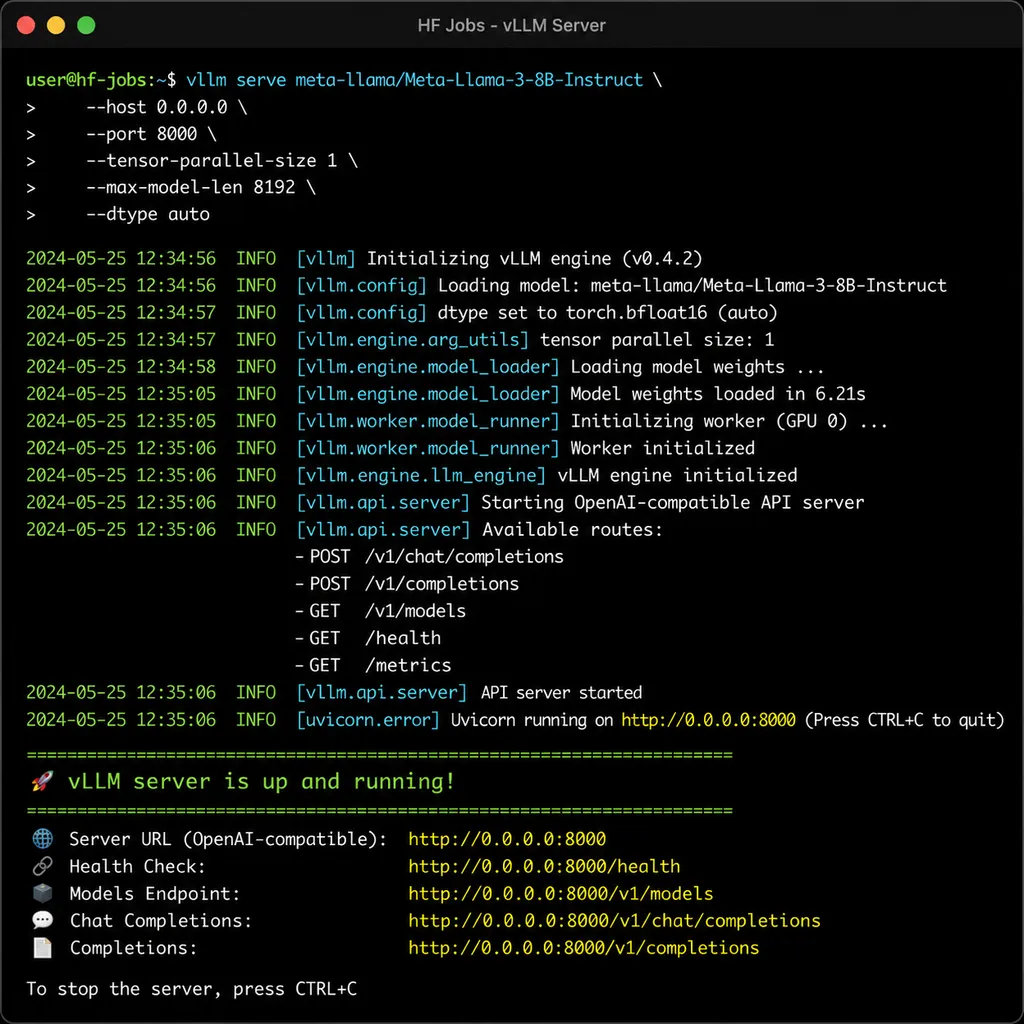
Then you can call it using the standard OpenAI SDK:
from openai import OpenAI

client = OpenAI(
    base_url="https://your-job-endpoint.hf.space/v1",
    api_key="hf_your_token"
)

response = client.chat.completions.create(
    model="meta-llama/Llama-3.1-8B-Instruct",
    messages=[{"role": "user", "content": "Explain what PagedAttention is"}],
    max_tokens=512
)

print(response.choices[0].message.content)
Note the base_url — it points to the HF Jobs instance you just started. The API format is fully compatible with OpenAI, so you hardly need to change your code; just swap the base_url and run.
Technical Details: What’s in the vLLM Image?
Hugging Face is using the official vllm/vllm-openai image here. This image isn’t a random package; it’s maintained by the vLLM team specifically for OpenAI-compatible mode.
It comes preloaded with:
- vLLM inference engine core: Including optimizations like PagedAttention memory management, continuous batching, speculative decoding
- OpenAI-compatible API server: Supports standard endpoints like
/v1/chat/completions,/v1/completions,/v1/embeddings - Automatic model download logic: On startup, downloads model weights from Hugging Face Hub based on the
MODELenvironment variable - Support for common model architectures: Llama, Mistral, Qwen, Gemma, Phi — most mainstream open-source models
The vLLM loading process roughly goes:
- Read the
MODELparameter, parse model ID - Check local cache; if absent, download
config.jsonfrom Hub - Based on
model_typeinconfig.json, determine which architecture to use - Download model weights (preferably safetensors format; fall back to PyTorch bin if needed)
- Load tokenizer
- Start API server to listen for requests
The process is transparent to the user. You just specify the model name — vLLM handles the rest.
How Is This Different from Inference Endpoints?
Some may ask: Doesn’t Hugging Face already have Inference Endpoints? What’s the positioning for HF Jobs?
The difference is quite clear.
Inference Endpoints are about managed inference services. You deploy your model and it manages availability, auto-scaling, load balancing. Great for production, but costs more and has a higher entry threshold.
HF Jobs is more like on-demand compute resources. You request a GPU machine, run your task, release it afterwards. The core advantage is flexibility — you can run inference, training, or any custom Docker container.
Running a vLLM server on HF Jobs is essentially quickly spinning up an inference service on on-demand resources. Suitable scenarios include:
- Development/testing: Quickly verify a model’s performance without local environment setup
- Short-term tasks: Run experiments or demos for a few hours
- Prototype development: Create demos for products, verify feasibility
- Teaching/research: Teams without long-term GPU access can use the cloud on demand
If you need long-term stable production service, Inference Endpoints may be better. If you want quick trial runs and flexible scheduling, HF Jobs is the way to go.
GPU Options and Cost Considerations
HF Jobs currently supports several GPU types; the official blog mentions:
| GPU Type | VRAM | Suitable Model Size | |----------|------|---------------------| | T4 | 16GB | Below 7B, quantized models | | A10G | 24GB | 7B–13B | | A100 | 40GB/80GB | 13B–70B | | H100 | 80GB | 70B+, high-throughput scenarios |
Choosing a GPU is straightforward: match it to your model’s size.
A rule of thumb is: at FP16 precision, model parameters (B) × 2 ≈ required VRAM (GB). For example, Llama 3.1 8B needs about 16GB, Llama 70B needs about 140GB (thus requiring multi-GPU or quantization).
Costs for HF Jobs are billed by usage time. Pricing depends on GPU type and duration — check Hugging Face’s website. For short-term tasks, on-demand billing is often cheaper than long-term server leasing.
Notes from Actual Use
From testing, here are key points:
1. Model Cold Start Time
First startup for a model is slower due to weight downloads. Llama 3.1 8B has ~16GB of weights — with slow network, this can take minutes.
Good news: Popular models may already be cached, making startup faster.
2. Token Authentication
For models requiring permission (e.g., Llama 3.1), include HF_TOKEN in the command. Ensure your Hugging Face account has agreed to model usage terms, or you'll get permission errors.
3. Service Lifecycle
Services started with --detach run in the background but are not permanent. HF Jobs has a maximum runtime limit, after which it stops automatically. For long-lived services, use Inference Endpoints or self-host.
4. Multi-GPU Support
If a model is too large for a single GPU, use tensor parallelism. vLLM supports this natively, but HF Jobs config is still being documented — start with models fitting single GPUs for now.
Integration with TRL: Training Use
Beyond inference, vLLM integrates deeply with Hugging Face’s TRL (Transformer Reinforcement Learning) library.
For RL methods like GRPO, Online DPO that need online generation, vLLM can act as a generation server, greatly speeding up sampling during training.
The official example:
# Start vLLM server
vllm serve meta-llama/Llama-3.1-8B-Instruct \
  --tensor-parallel-size 4 \
  --data-parallel-size 2

# Then run training on another machine or GPU set
python train.py --vllm_server http://vllm-server:8000
This separation of inference and training allows independent scaling. Inference uses vLLM to maximize GPU throughput; training uses DeepSpeed or FSDP for distribution.
With HF Jobs, you could start multiple vLLM instances for data-parallel generation and feed them into training — useful in large-scale RLHF scenarios.
What Does This Mean for Developers?
Stepping back, this update reflects Hugging Face’s ongoing infrastructure investment.
In recent years, Hugging Face’s core value has been its model repository and Transformers library. But having models isn’t enough — they must run easily. HF has built this up: first Spaces (hosting Gradio apps), then Inference Endpoints (hosting inference services), and now HF Jobs (on-demand compute resources).
The trajectory is clear: lower the barrier to using open-source models.
For individual developers and small teams, this is great: no need to buy GPUs, set up servers, or handle devops — just use cloud resources. Entry cost is almost zero; try any model anytime.
For enterprises, HF Jobs can be a quick validation tool. Before deciding on large-scale deployment, run it on HF Jobs for a few days and confirm performance.
Of course, convenience has a cost. Long term, self-hosting or using third-party cloud may be more economical. But for quick starts, HF Jobs + vLLM is one of the most hassle-free combos available.
Horizontal Comparison: Other Similar Solutions
There are other one-click vLLM deployment options. A quick comparison:
| Solution | Pros | Cons | |----------|------|------| | HF Jobs | One command, deep Hub integration | Higher price, max runtime limit | | RunPod | Cheap GPUs, billed per second | Need to configure Docker/template yourself | | Modal | Serverless, fast cold start | Steeper learning curve | | Replicate | Easy to use | Low customizability | | Self-host | Fully controllable | High initial investment, maintenance costs |
Choice depends on your needs. If you rely heavily on Hugging Face ecosystem (Hub for models, Transformers for dev), HF Jobs is natural. If cost is a concern, RunPod may suit better.
Possible Future Directions
From this update, HF Jobs will likely expand scenarios:
- More inference frameworks: Beyond vLLM, possibly SGLang, TensorRT-LLM
- Richer GPU options: New hardware like H200, B100
- Improved monitoring/logging: Currently basic
- Integration with Spaces: e.g., calling Jobs models directly from Spaces
These are reasonable guesses, though Hugging Face hasn’t confirmed — product logic suggests they’re natural extensions.
Final Thoughts
In summary: The HF Jobs and vLLM integration’s core value is reducing the barrier to deploying open-source large models almost to zero.
One command, a few minutes, and you have a production-grade inference service. No environment config, no GPU scheduling, no Docker packaging.
It may not be revolutionary tech, but it’s a pragmatic engineering improvement. For most developers, using ready, well-made tools is far more valuable than building everything yourself.
If you need to run an open-source LLM inference service and don’t want infrastructure hassle, give this new solution a try. The official blog has detailed tutorials and examples — it’s easy to get started.
References
- Run a vLLM Server on HF Jobs in One Command - Hugging Face Blog: Hugging Face official blog post detailing HF Jobs and vLLM integration usage and technical details
- Serve Models on Jobs - Hugging Face Hub Documentation: Official HF Jobs documentation, including CLI parameters and config
- vLLM Integration - TRL Documentation: Official guide on vLLM integration with TRL training library, for speeding up RL training generation


