
Kuma: Compile the PyTorch model into a browser-executable file

Developer Slater Victoroff has open-sourced the Kuma project, which can compile PyTorch models into self-contained WebGPU executable packages. These can run directly in the browser without Python or server-side inference, opening up new possibilities for scientific computing and edge deployment.
Kuma: Compiling PyTorch Models into Browser-Executable Files
An open-source project called Kuma recently sparked discussion in the Reddit machine learning community. Its idea is straightforward: compile an exported PyTorch model into a self-contained package that can run directly in a browser — no Python environment, no server-side inference, and no dependence on any heavyweight runtime.
It sounds simple, but it’s not so easy to actually pull off.
What Problem Is It Solving?
The traditional deployment path for models usually goes like this: you train a model in PyTorch, export it to ONNX or TorchScript, and then either deploy it to a server for inference APIs or run it on an edge device using runtimes like TensorRT or ONNX Runtime. Either way, you’re tied to a specific runtime environment.
In recent years there have been several attempts at in-browser inference — TensorFlow.js, ONNX.js, Transformers.js — but essentially they all embed a "runtime" into the browser, with the model file and the runtime loaded separately.
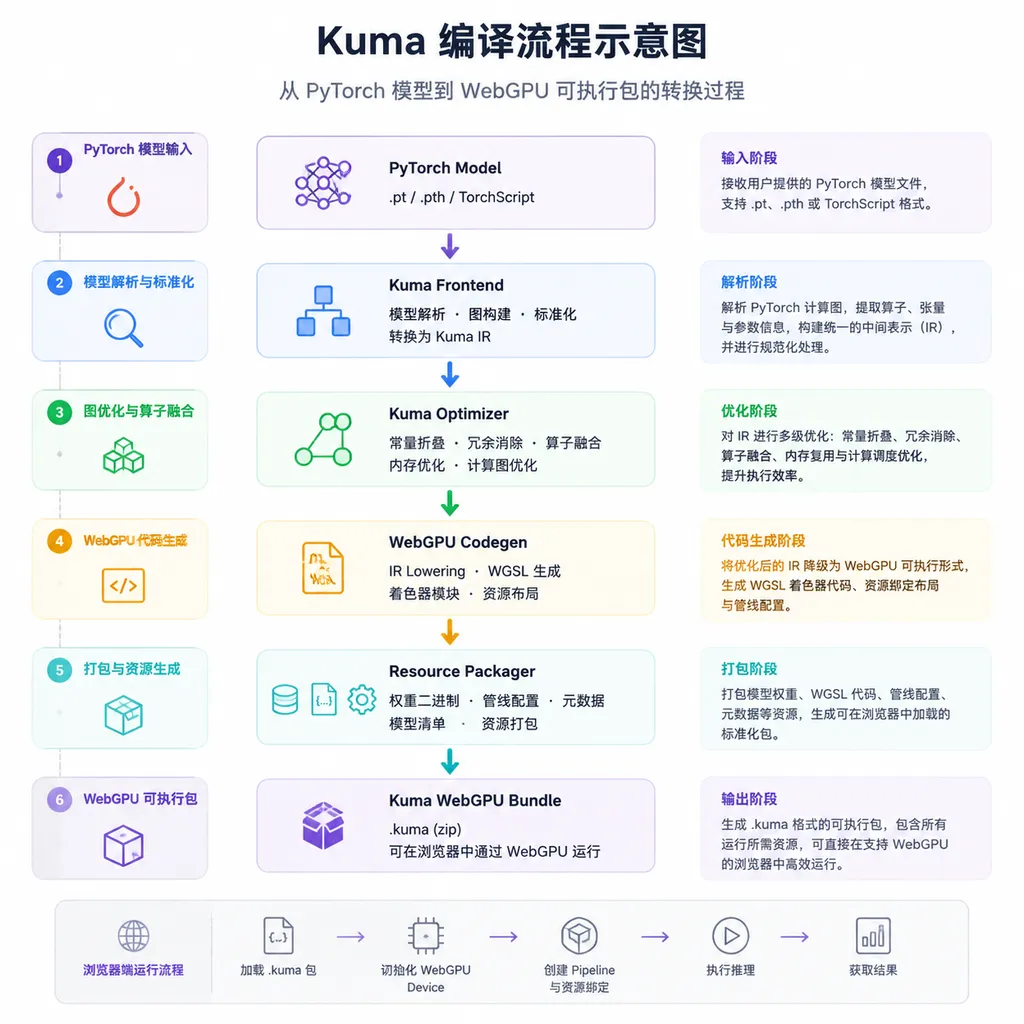
Kuma takes a different approach. It compiles the model into a completely self-contained artifact that includes:
- The computation graph
- Binary weights
- Backend kernels (currently in WGSL format)
- Runtime metadata
This package is executable by itself. With a lightweight WebGPU runtime, the browser can load and run it directly, with no intermediate format conversion, no dynamic graph interpretation, and no Python dependency.
In the words of author Slater Victoroff, it’s the concept of a “single portable artifact.”
Why WebGPU?
Good question. WebGL has been used for GPU acceleration in browsers for many years — why did Kuma choose WebGPU?
Simply put, WebGL was designed for graphics rendering; to use it for general-purpose computing (GPGPU), you need all kinds of hacks. Matrix multiplication? You have to disguise it as texture sampling. Batch normalization? More shader magic. Performance aside, the developer experience is terrible.
WebGPU is different. It supports compute shaders by design, with an API more like Vulkan and Metal, providing direct access to general-purpose GPU computation. More importantly, its shader language, WGSL, was designed specifically for this, removing the need to force computation logic into the graphics pipeline.
As of 2026, mainstream browsers have solid WebGPU support — Chrome, Edge, Firefox, Safari all run it. This means Kuma-compiled packages can theoretically run in any modern browser, effectively solving the cross-platform problem.
Technical Architecture Breakdown
Let’s look at exactly how Kuma’s compilation process works.
Step 1: Model Export
The starting point is PyTorch’s torch.export or TorchScript. This turns dynamic Python code into a static computation graph representation. PyTorch 2.x’s torch.compile ecosystem has become much more mature in this regard: TorchDynamo can safely capture most PyTorch programs, and AOTAutograd captures graphs for backprop.
Kuma builds on this, converting the computation graph into its own intermediate representation.
Step 2: Kernel Generation
This is the core step. For each operator in the computation graph (convolution, matrix multiplication, activation function, etc.), Kuma generates a corresponding WGSL compute shader.
WGSL code looks something like this:
@group(0) @binding(0) var<storage, read> input: array<f32>;
@group(0) @binding(1) var<storage, read> weight: array<f32>;
@group(0) @binding(2) var<storage, read_write> output: array<f32>;

@compute @workgroup_size(256)
fn matmul(@builtin(global_invocation_id) gid: vec3<u32>) {
    let row = gid.x;
    let col = gid.y;
    var sum: f32 = 0.0;
    for (var k: u32 = 0u; k < K; k = k + 1u) {
        sum = sum + input[row * K + k] * weight[k * N + col];
    }
    output[row * N + col] = sum;
}
Of course, the actual generated kernels incorporate more optimizations — memory coalescing, shared memory usage, vectorization, etc. These optimizations directly affect performance.
Step 3: Weight Packaging
Model weights are embedded in binary format into the final artifact. Here’s a design choice: store raw float32, or quantize to float16 or even int8?
In browser scenarios, download size is crucial. A 100 MB weight file can take over 10 seconds to load over mobile networks. Kuma currently supports weight quantization, but specific strategies are still evolving.
Step 4: Build the Self-Contained Package
Finally, the computation graph, kernels, weights, and runtime metadata are bundled into a single file. The browser runtime loads this file and schedules kernel execution in topological order.
The whole process is compile once, run anywhere — assuming the target environment supports WebGPU.
What Happens in Practice?
Right now, the demos in Kuma’s repository are mostly neural video representation. These models are relatively simple — input coordinates, output colors — making them suitable for validating the end-to-end process.
But the author’s real targets are operator networks and scientific machine learning. These applications generally:
- Have relatively small models (a few MBs to tens of MBs)
- Need to deploy quickly in various environments
- Are latency-sensitive but not extremely throughput-demanding
- Face users who may lack a Python environment
Imagine you’ve trained a neural network for physical field simulation and want colleagues or clients to interactively explore results in a browser. Traditionally, you either pre-render a video or host an inference server. Kuma’s approach? Send an HTML file; they open it and it runs.
Architectural Points of Debate
In the Reddit post, the author floated a few questions he’s wrestling with, prompting lively community discussion.
Is Embedding Kernels in the Artifact a Bad Idea?
Pro: Self-contained is a strength. No reliance on external kernel libraries means no version mismatch issues; deployment is simpler.
Con: Kernels can’t be hot-swapped. If a bug or better implementation is found for an operator, the whole artifact needs recompiling. Different GPU architectures may also require different optimization strategies; fixed kernels may be hard to adapt.
My take: For relatively stable scientific computing scenarios, embedding kernels has more pros than cons. But for fast-iterating production systems, separate kernels may be more flexible.
Advantages Over Existing Solutions?
Community members asked: why not just use ONNX.js or Transformers.js?
The key difference is compile vs. interpret. ONNX.js loads an ONNX model and interprets it; Kuma compiles it into native kernels ahead of time. In theory, compilation reduces runtime overhead, but systematic benchmarks are lacking.
Another distinction is dependencies. Transformers.js relies on ONNX Runtime Web, which is quite heavy. Kuma’s runtime is designed to be lightweight because the core compute logic is already compiled into the artifact.
Real Problem or Imagined Need?
It’s a sharp question, but a real one.
If your scenario is large-model inference, browser-based solutions aren’t optimal — VRAM limits and compute density are issues. But for small models, interactive apps, and offline use, browser-native inference meets genuine needs.
Examples:
- Privacy-sensitive apps: data stays in the browser; inference runs locally
- Offline tools: no network needed; just open and use
- Embedded scenarios: some IoT devices run Chromium-based browsers
- Educational demos: handing students an HTML file is far simpler than environment setup
Hands-On: Running Your First Demo
Let’s try it out. The steps are based on Kuma’s GitHub repo.
Environment Setup
# Clone repo
git clone https://github.com/Slater-Victoroff/Kuma.git
cd Kuma

# Install Python dependencies
pip install -r requirements.txt
Requires PyTorch 2.x. If you’re still on 1.x, it’s time to upgrade.
Compile a Simple Model
Suppose you have a trained model:
import torch
import torch.nn as nn

class SimpleNet(nn.Module):
    def __init__(self):
        super().__init__()
        self.fc1 = nn.Linear(784, 256)
        self.fc2 = nn.Linear(256, 10)
        self.relu = nn.ReLU()

    def forward(self, x):
        x = self.relu(self.fc1(x))
        x = self.fc2(x)
        return x

model = SimpleNet()
model.load_state_dict(torch.load('model.pth'))
Compile with Kuma:
from kuma import compile_model

# Export and compile
compiled = compile_model(
    model,
    example_input=torch.randn(1, 784),
    output_path='simple_net.kuma'
)
The generated simple_net.kuma is a self-contained executable package.
Run in Browser
<!DOCTYPE html>
<html>
<head>
    <title>Kuma Demo</title>
</head>
<body>
    <script type="module">
        import { KumaRuntime } from './kuma-runtime.js';

        async function run() {
            const runtime = new KumaRuntime();
            await runtime.load('simple_net.kuma');

            // Prepare input
            const input = new Float32Array(784).fill(0.5);

            // Inference
            const output = await runtime.infer(input);
            console.log('Output:', output);
        }

        run();
    </script>
</body>
</html>
You’ll need to run this under a local server (WebGPU doesn’t work with the file:// protocol):
python -m http.server 8000
Open http://localhost:8000 and check the console output.
Debugging Tips
If it doesn’t run, first check WebGPU support:
if (!navigator.gpu) {
    console.error('WebGPU not supported');
}
Then check if the adapter and device were obtained:
const adapter = await navigator.gpu.requestAdapter();
if (!adapter) {
    console.error('No GPU adapter found');
}
const device = await adapter.requestDevice();
Common issues:
- Chrome may need
chrome://flags/#enable-unsafe-webgpuenabled (certain versions) - Safari requires WebGPU enabled in the Develop menu
- Firefox support varies by version
Performance Considerations
Kuma is still in early stages, so not much performance data exists yet. But we can analyze key points from the architecture.
First Load
First load requires:
- Downloading the artifact (size determined by weight file)
- Parsing the computation graph and metadata
- Compiling WGSL shaders (done by the browser)
- Allocating GPU buffers
Shader compilation can be a bottleneck. Complex models with dozens or hundreds of kernels may take seconds. But this is a one-time cost, and browsers cache compiled results.
Inference Latency
At inference, the main factor is GPU compute time. WebGPU’s scheduling overhead is higher than native CUDA, but for small to mid-sized models, the difference is minimal.
Native vs. WebGPU
Roughly, the same model on WebGPU may achieve 50–80% of CUDA performance, depending on the model type and specific operators. CNNs may see smaller gaps, Transformer models larger gaps (due to attention’s sensitivity to memory bandwidth).
But from another perspective: WebGPU requires nothing to be installed; just open the browser and run. For some cases, this convenience outweighs raw performance.
Limitations and Future Directions
To be honest, Kuma still has notable limitations.
Operator Coverage
Currently, supported operators are limited. Common conv, linear, activation, and pooling ops are there, but some specialized ones may be missing. If your model uses a custom op, you’ll likely need to write your own WGSL kernel.
Dynamic Shapes
Static-shape compilation is easier; dynamic shapes are harder. For example, variable-length sequence processing in RNNs/Transformers complicates compilation strategies. PyTorch 2.x’s TorchDynamo has made strides here; how much Kuma can leverage remains to be seen.
Memory Management
WebGPU’s memory model differs from native GPU programming. Buffer allocation and data transfer APIs can impact performance ceilings. Efficient memory handling in Kuma’s runtime is a long-term optimization goal.
Ecosystem Integration
Can it integrate with Hugging Face, PyTorch Hub, and other model repositories? Can it support popular pretrained models? This will determine ease of actual adoption.
Similar Projects
It’s worth noting jmaczan’s torch-webgpu project, which has a similar goal: bridging PyTorch to WebGPU. torch-webgpu focuses on cross-GPU-vendor compatibility, claiming support for four GPU vendors, three backends, and three browsers.
The two projects can learn from each other: Kuma emphasizes the self-contained packaging idea; torch-webgpu emphasizes runtime universality.
Final Thoughts
Compiling PyTorch models into browser executables isn’t a brand-new idea. But Kuma leans heavily into the “self-contained” aspect — one file with all dependencies, runnable in any WebGPU-capable browser.
For scientific computing, educational demos, and privacy-sensitive applications, this deployment approach is indeed appealing. But to become mainstream, it will need to tackle operator coverage, performance tuning, and developer tooling.
The project is still young, and the author is soliciting architectural feedback. If you have model deployment experience, check out the repo — you might have ideas to contribute.
References
- Kuma GitHub Repo – Project source code and docs
- Reddit Discussion Thread – Original post by the author and community discussion
- torch-webgpu Project – PyTorch WebGPU project with a similar approach
- PyTorch 2.0 Major Release – Background on PyTorch 2.x compiler technology


