
NVIDIA Open-Sources MoE Acceleration Tool: Fine-tuning 3.7× Faster with One Line of Code
NVIDIA open-sources NeMo AutoModel, leveraging three key techniques—expert parallelism, DeepEP, and Transformer Engine—to achieve a 3.7× increase in fine-tuning throughput and a 32% reduction in memory usage for MoE models on Transformers v5, with an entry barrier as low as a single line of import.
NVIDIA Open-Sources MoE Acceleration Tool: One Line of Code, Fine-Tuning 3.7× Faster
NVIDIA has just open-sourced NeMo AutoModel, a training acceleration library designed specifically for MoE (Mixture of Experts) models.
The results are straightforward: based on Transformers v5, fine-tuning a 30B-level MoE model sees throughput improved by 3.4 to 3.7×, with peak memory consumption reduced by 29% to 32%. And all developers need to do is add one import line to their code.
This is not a PPT announcement — it’s something that already runs.
Pain Points in MoE Fine-Tuning: Too Many Experts, Not Enough GPUs
First, let’s clarify why this tool is needed.
The MoE architecture has risen in popularity over the past two years. Its core logic is “sparse activation” — the model has many experts, but each token is routed to only a small subset. This keeps the total parameter count huge, but keeps inference compute controlled. Models like DeepSeek-V3, Mixtral, and Qwen-MoE follow this approach.
However, fine-tuning MoE models is another matter.
During training, the weights of all experts must be loaded into GPU memory, and gradients computed. A 30B-parameter MoE model may have memory consumption several times higher than a dense model with the same activated parameter count. Making matters worse, expert load is unbalanced — some experts are frequently activated, others sit idle — but all occupy memory.
In multi-GPU training, the problem gets more complex. Traditional data parallelism is unfriendly to MoE because each GPU must store all experts. Tensor parallelism can split the work, but the communication cost between experts can eat into acceleration gains.
The result: many teams want to train MoEs, but either don’t have enough GPUs, have too low efficiency, or need heavily customized distributed code.
This is exactly what NeMo AutoModel aims to solve.
The Three Pillars of NeMo AutoModel
NVIDIA’s solution integrates three technical components:
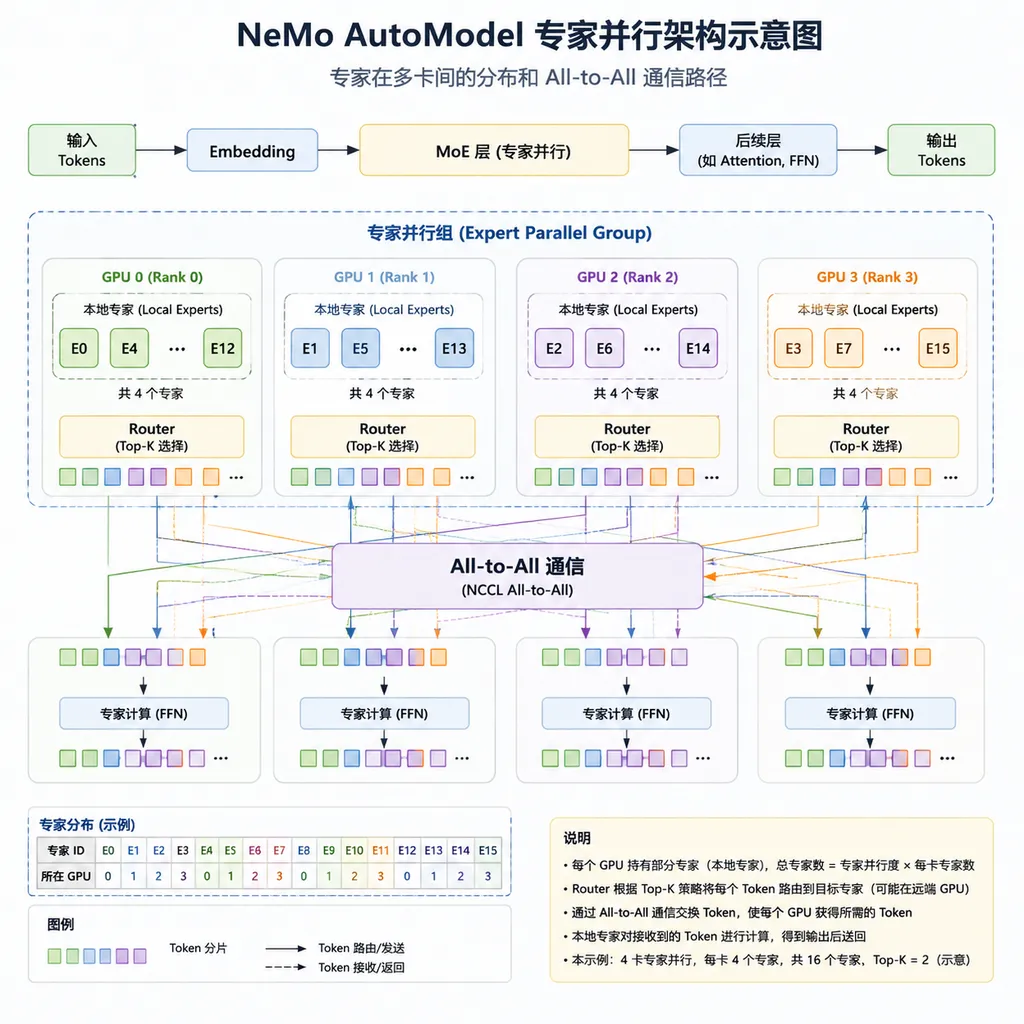
1. Expert Parallelism
Expert parallelism is not a new concept, but has been difficult to implement.
The basic idea: assign different experts to different GPUs, so each GPU handles only part of the experts’ computation. When a token needs to be routed to a specific expert, data is sent using All-to-All communication, processed, and then sent back.
Sounds simple — but the real implementation is full of pitfalls. Communication patterns must be optimized, load balanced, and combinable with other parallel strategies (data, tensor, pipeline parallelism).
NeMo AutoModel packages all of this up. Developers don’t have to handcraft communication logic — simply specify the expert parallelism degree in the config, and the framework automatically handles allocation and messaging.
2. DeepEP: Low-Overhead Expert Communication
The bottleneck in expert parallelism is communication. All-to-All operations are costly in large clusters, especially across nodes.
NVIDIA’s Megatron-Core team developed DeepEP, a communication optimization library specifically for this.
Key optimizations include:
- Communication–compute overlap: While waiting for expert results, compute other layers to avoid idle GPU time.
- Hierarchical communication: Within a node use NVLink, across nodes use NVSwitch/InfiniBand — choose optimal paths based on topology.
- Dynamic load balancing: Adjust communication strategies dynamically based on actual expert activation patterns.
Measurements show DeepEP reduces communication overhead significantly. On 8×A100/H100 nodes, communication time can be kept under 15%.
3. Transformer Engine: FP8 Training Acceleration
The third component is NVIDIA’s Transformer Engine (TE) — existing for some time, but its combination with MoE is a highlight here.
TE’s core capability is FP8 mixed precision training. On H100 and other Hopper-architecture GPUs, FP8 compute throughput is twice that of FP16. FP8 has lower precision, which can degrade quality; TE solves this via dynamic scaling and selective precision (using higher precision for critical layers).
For MoE models, the FFN (Feed-Forward Network) in expert layers is the main compute load — the perfect target for FP8 acceleration. TE also provides a GroupedGEMM kernel, batching multiple experts’ matrix multiplications in one go, improving GPU utilization.
The combination of these three yields the reported gains: 3.7× throughput, 32% memory reduction.
Benchmark Data: 30B-Level MoE Models
NVIDIA’s benchmark was done on a single node with 8×H100 GPUs, compared against native Transformers v5 + torch._grouped_mm (PyTorch’s official MoE optimization).
Test models include several 30B+ parameter open-source MoEs:
| Metric | Native Transformers v5 | NeMo AutoModel | Improvement | |--------|------------------------|----------------|-------------| | Training throughput (tokens/sec) | ~3,500 | ~13,000 | 3.7× | | Peak memory usage | Baseline | -32% | Significant reduction | | Per-GPU compute utilization (TFLOPs/sec) | ~70 | 190–280 | 2.7–4× |
Notable points:
Throughput gains are not uniform — the bigger the model and the more experts, the larger the gain. For models with 8 experts, gains are ~3.4×; with 16 experts, up to 3.7×.
Memory savings come from two sources: Expert parallelism (each GPU stores only part of the experts) and FP8 training (halving storage for weights and activations). Combined, a 32% reduction is reasonable.
Compute utilization improvement is even more dramatic — from 70 TFLOPs to 190–280 — indicating the native implementation leaves GPUs idle due to communication stalls or low kernel efficiency. NeMo AutoModel fills these gaps.
These numbers are in ideal conditions. Real projects involve data loading, preprocessing, checkpoint saving, etc., which affect end-to-end performance. But even with a 30% drop, a 2.5× real-world gain is still attractive.
Code: Is It Really Just One Import Line?
NVIDIA’s “one-line import” looks like this:
# Original code
from transformers import AutoModelForCausalLM, Trainer

model = AutoModelForCausalLM.from_pretrained("some-moe-model")
trainer = Trainer(model=model, ...)
trainer.train()
# Accelerated code
import nemo.collections.llm.automodel  # This line
from transformers import AutoModelForCausalLM, Trainer

model = AutoModelForCausalLM.from_pretrained("some-moe-model")
trainer = Trainer(model=model, ...)
trainer.train()
The principle: NeMo AutoModel uses Python’s import hook mechanism to automatically replace key components in Transformers — swapping native MoE layers for optimized versions, and adjusting the Trainer’s distributed logic to support expert parallelism.
The advantage: low invasiveness — almost no code changes. The downside: a black-box approach that’s hard to debug when problems arise.
In practice, it’s better to explicitly configure parallelism:
import nemo.collections.llm.automodel
from nemo.collections.llm import ParallelConfig

# Explicitly specify parallel strategies
config = ParallelConfig(
    expert_parallel=4,      # Expert parallel degree
    tensor_parallel=2,      # Tensor parallel degree
    use_fp8=True,           # Enable FP8
    use_grouped_gemm=True,  # Enable GroupedGEMM
)

# Use Transformers API normally thereafter
Prerequisites:
- GPU requirements: FP8 acceleration needs Hopper architecture (H100/H200), Ampere (A100) works but without FP8 benefits.
- Driver versions: CUDA 12.0+, cuDNN 8.9+
- Transformers version: v5.0+, older MoE implementations are incompatible.
- Model compatibility: Currently supports Mixtral, Qwen-MoE, DeepSeek-MoE; custom MoEs may require adaptation.
Comparison to Other Solutions
MoE training acceleration is not new — various options are available.
vs Unsloth
Unsloth also claims MoE fine-tuning acceleration, using a Split LoRA method — training only LoRA weights for part of the experts.
Their own data shows 2× faster than Transformers v5, 35% memory savings. NeMo AutoModel offers 3.7× and 32%.
Not a straight numeric comparison:
- Unsloth supports only LoRA/QLoRA, not full-parameter fine-tuning. NeMo AutoModel supports both.
- Unsloth optimizations target single-GPU scenarios, limited multi-GPU scaling. NeMo AutoModel is designed for distributed setups.
- Unsloth is lighter weight, easy to install, great for individual developers. NeMo AutoModel has heavier dependencies but fuller feature sets.
If you have only 1–2 GPUs and run LoRA fine-tuning, Unsloth may be better. For multi-GPU clusters with full-parameter fine-tuning or large-scale training, NeMo AutoModel is preferable.
vs DeepSpeed-MoE
Microsoft’s DeepSpeed also supports MoE — previously popular among many teams.
Comparison:
- DeepSpeed-MoE’s optimizations are more general, not tied to NVIDIA hardware. NeMo AutoModel is deeply bound to NVIDIA tech (TE, DeepEP), works best on NVIDIA, unusable on AMD/other.
- DeepSpeed’s ZeRO optimizations can combine with MoE, NeMo AutoModel currently lacks such memory optimizations.
- Integration differences: DeepSpeed requires Trainer code changes; NeMo AutoModel’s import hook is more seamless.
vs Megatron-LM
NVIDIA’s own Megatron-LM is a veteran big-model training framework, with MoE support.
The challenge: steep learning curve — its own data format, model definitions, training scripts, incompatible with Transformers ecosystem. Training a HuggingFace model requires conversion — cumbersome.
NeMo AutoModel essentially “democratizes” Megatron’s optimization — retaining performance, lowering the barrier.
What This Means for Developers
A few practical implications:
Lower Fine-Tuning Barrier for 30B-level MoEs
Previously, fine-tuning Mixtral-8x7B meant using QLoRA slowly on a single GPU, or renting many GPUs and building your own distributed code. Now with NeMo AutoModel, an 8×H100 setup runs smoothly and efficiently.
For teams with a few high-end GPUs (academic labs, startups), this is directly beneficial.
Wider Adoption of MoE Architectures
Lower training barriers mean more teams will try MoE. Previously, MoE was mainly played by big companies, with small teams struggling. Now at least fine-tuning is no longer the bottleneck.
Expect more domain-specific MoE models to emerge.
Deeper NVIDIA Ecosystem Lock-In
NeMo AutoModel’s performance advantage relies heavily on NVIDIA-exclusive tech like Transformer Engine and DeepEP. Once adopted, it’s hard to migrate to other hardware.
Not conspiracy — just fact. NVIDIA’s CUDA moat deepens.
Limitations & Notes
Current constraints:
- Limited pre-training support — NeMo AutoModel optimizes fine-tuning now; pre-training support is still developing. For training from scratch, you may still need Megatron-LM.
- Incomplete model coverage — Only verified models are on the official list; some new MoEs may require community adaptation.
- Debug difficulty — import hook is handy but hampers locating issues (OOMs, abnormal loss).
- Docs still maturing — Open-sourced just now, documentation/examples are sparse; you may need to read source or wait for community.
Getting Started
Install:
pip install nemo_toolkit[all]
# or only LLM-related
pip install nemo_toolkit[llm]
Ensure requirements are met, then run a minimal example:
import nemo.collections.llm.automodel
from transformers import AutoModelForCausalLM, AutoTokenizer, Trainer, TrainingArguments
from datasets import load_dataset

# Load model & data
model_name = "mistralai/Mixtral-8x7B-v0.1"
model = AutoModelForCausalLM.from_pretrained(model_name, torch_dtype="auto")
tokenizer = AutoTokenizer.from_pretrained(model_name)

# Prepare dataset (example)
dataset = load_dataset("your-dataset")

# Training parameters
training_args = TrainingArguments(
    output_dir="./output",
    per_device_train_batch_size=1,
    gradient_accumulation_steps=8,
    num_train_epochs=1,
    bf16=True,
    logging_steps=10,
)

# Train
trainer = Trainer(
    model=model,
    args=training_args,
    train_dataset=dataset,
)
trainer.train()
If all goes well, logs will show NeMo AutoModel initialization and noticeably higher throughput.
Final Thoughts
NVIDIA’s open-sourcing of NeMo AutoModel comes at a good time.
MoE architectures are becoming mainstream — from GPT-4 to DeepSeek-V3 to Grok — but tools for training and fine-tuning MoEs have been lacking, bottlenecking adoption.
Now NVIDIA is packaging and open-sourcing its internal optimization tech — both strengthening CUDA’s moat and lowering MoE’s adoption barrier.
While 3.7× acceleration and 32% memory savings are not revolutionary, they can make many previously “just barely impossible” projects feasible.
If you work with MoEs, it’s worth trying.
References
- Zhihu Column — Double Model Generation Speed! Single GPU Finishes Fine-tuning in Hours — Overview of large model fine-tuning acceleration methods
- GitHub — Firefly Large Model Training Toolkit — Open-source large model training framework supporting various model fine-tuning


