
Teams has finally cured the problem of not being able to find meeting materials.
Microsoft plans to introduce the Recap feature for Teams in July, bringing together scattered content such as meeting recordings, transcripts, and AI summaries into a centralized display, addressing the long-standing issue of meeting materials being spread across different locations. The basic features are free, while advanced AI capabilities require a Copilot license.
Microsoft is finally taking action to solve a problem that has troubled Teams users for years—after a meeting ends, the recording file is in OneDrive, the transcript is somewhere else, and the AI summary is tucked away in some corner, making it feel like a treasure hunt to find everything.
In July, the Recap feature will be launched on Windows, macOS, and the web version of Teams, consolidating all meeting-related content from the past 30 days into a single entry point.
What problem does it solve
Anyone who has used Teams for meetings will know: there’s plenty of output after a session, but it’s scattered everywhere. The recording is in OneDrive or SharePoint, the transcript is in a separate file, the chat messages are in the conversation thread, shared documents are in another location, and the AI-generated summary requires extra digging.
Want to review a meeting? You have to jump between at least three or four places. And if you’re looking for a specific sentence said by someone in a meeting two weeks ago—it’s a nightmare.
Recap’s purpose is simple: aggregate these fragmented contents and provide a unified search entry.
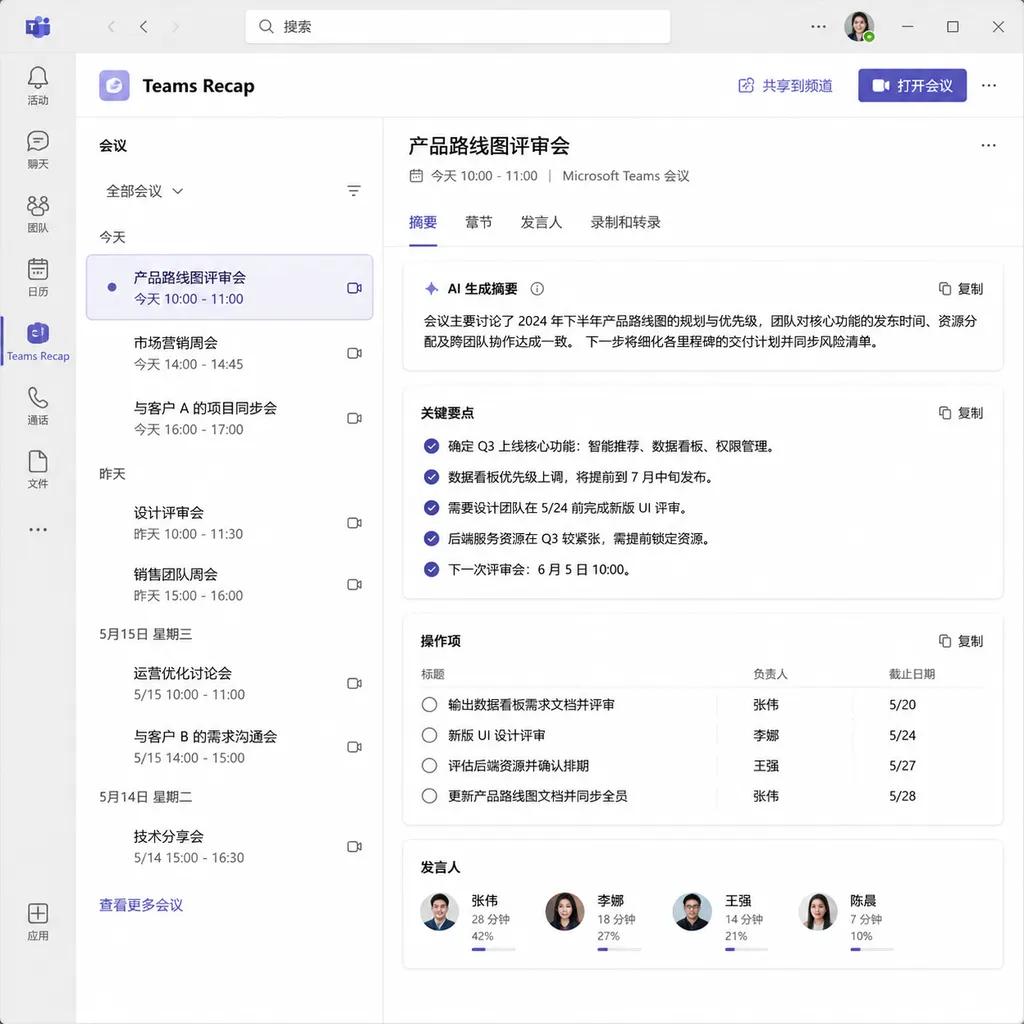
What it can do
Recap covers a wide range of content:
- Meeting recording files: Thumbnail previews of video and audio
- Text transcription: Complete meeting dialogue records
- AI notes: Automatically generated meeting highlights
- Topic segmentation: Auto-divided by subject matter
- Speaker identification: Who said what and when
- Mentions: Sections where someone was @mentioned or called out
- Suggested tasks: AI-identified to-dos
- Audio summaries and video highlights: Quick access to key clips
For search, it supports keyword queries and conditional filtering, offering both thumbnail and list views. The 30-day window covers most “I remember we discussed this recently” scenarios.
The design concept is straightforward—tasks that previously required switching between multiple apps are now built into Teams and handled automatically. Technically, there’s nothing groundbreaking, but it does solve a real problem.
Permissions and pricing
It’s important to distinguish two layers of functionality:
Basic features follow the existing access control logic—users can only see recordings and transcripts they have permission for. This part doesn’t require extra payment and is included with existing Teams licensing.
Advanced AI features require a Microsoft 365 Copilot license, including:
- Intelligent summary generation
- Audio recap
- Video recap
- Natural language queries (e.g., “What did Alex say about the budget?”)
This tiered strategy is consistent with Microsoft’s approach: free basic features for broad adoption, monetizing AI capabilities. For enterprise users already using Copilot, Recap is an added benefit; without it, the basic aggregation and search will still suffice.
Custom summary templates
A notable detail is that Recap supports user-customized AI summary formats and styles.
Microsoft offers two ways to customize:
Use preset templates: Ready-made summary formats for different meeting types (weekly meetings, project reviews, client discussions, etc.).
Create custom templates: Users can describe in natural language the format they want, such as “only keep decisions and to-dos, remove background discussion,” or paste a sample summary they like for the AI to replicate.
This is valuable because different teams and meetings have different needs. Sales teams may care about client feedback and next steps; product teams may focus on requirement details and prioritization; R&D teams may only want technical solutions and risk points. One fixed template can hardly fit all scenarios.
Templates can be saved for reuse, edited anytime, or deleted. The mobile version also supports templates created on the desktop.
Technical implementation
According to Microsoft’s official documentation, Recap is powered by both Copilot and Intelligent Recap capabilities:
- Speech to text: Teams uses real-time transcription to convert spoken content into text—this is the foundation.
- Natural language understanding: Copilot semantically analyzes transcripts to identify topics, decision points, to-dos, etc.
- Summary generation: Structured meeting summaries are generated based on these results.
For admins, enabling Recap requires ensuring transcription is turned on. Configuration paths vary slightly depending on the scenario:
- PSTN and one-on-one VoIP calls: Enable transcription in call recording settings.
- Meetings, events, and group calls: Enable transcription in meeting settings.
For a complete meeting recap experience (including video recording), users must also be assigned policies allowing recording.
How it compares to competitors
The meeting AI sector is already crowded. Zoom has AI Companion, Google Meet offers “note-taking,” and there are numerous startups specializing in meeting notes: Otter.ai, Fireflies.ai, Grain, etc.
Teams Recap’s advantage lies in native integration. It’s not an extra plugin to install, nor does it require inviting an “AI assistant” to the meeting. For companies already using Teams as their main collaboration tool, this feature is a natural extension with no added friction.
Another advantage is data integration. Since recordings, transcripts, chats, and files are already in Microsoft’s ecosystem, aggregation is easier and doesn’t involve cross-platform data migration.
Its main disadvantage: pricing threshold. Advanced AI features require a Copilot license, currently priced at $30 per user/month—a significant expense. In comparison, Otter.ai’s Pro version costs under $17/month with similarly robust features.
For SMEs, buying Copilot licenses just for AI summaries may not be cost-effective. For large enterprises already using Microsoft 365 E5 or Copilot, Recap is a bonus.
Value assessment
Frankly, Recap isn’t an innovative feature—many tools already offer similar capabilities. Microsoft is simply building it directly into Teams, lowering the usage barrier.
That’s precisely where its value lies.
One of the biggest headaches in enterprise IT procurement is “tool sprawl”—buying multiple standalone SaaS products for niche needs, resulting in higher management, training, and data security costs. If the main work platform can natively cover this need, even if it’s not the most powerful, most companies will prefer it.
From a product design standpoint, Recap addresses a real pain point. Fragmentation of meeting output affects many people, especially those who attend dozens of meetings per week. Aggregating everything in one place with search and filtering is inherently valuable.
As for the 30-day window, it should suffice for day-to-day work. If you need to revisit older meetings, the recordings and transcripts still exist—they just won’t be shown in Recap’s aggregated view.
Launch in July, gradual rollout
According to Microsoft’s plan, Recap will start rolling out updates in July 2026, covering Windows, macOS, and the web version of Teams. Mobile support details are still unclear.
Given Microsoft’s usual practice, the feature will likely be tested with a limited group first, then expanded gradually. If you don’t see the Recap entry in Teams yet, you may need to wait a few weeks.
For IT admins, two things to check: Ensure transcription and recording are properly configured, and confirm Copilot license allocation (if advanced AI features are required).
A moderate yet useful upgrade
Overall, Recap is an experience optimization for Teams—not revolutionary, but it does solve a real problem. For heavy Teams users, it’s a noteworthy update; for occasional users, its impact might not be significant.
Microsoft’s commercialization strategy for AI features remains “basic free, advanced paid.” For enterprises, this layered approach makes sense—basic aggregation and search already meet most needs, while those requiring in-depth AI analysis are typically willing to pay.
Competition in the meeting AI sector will continue. Microsoft’s advantage is ecosystem integration; its drawback is price. Ultimately, the choice for users depends on their specific needs and budget.
References


