
Alibaba Qianwen Input Method for macOS Launches Today: 300 Characters/Minute + 9 Dialects + AI Polishing
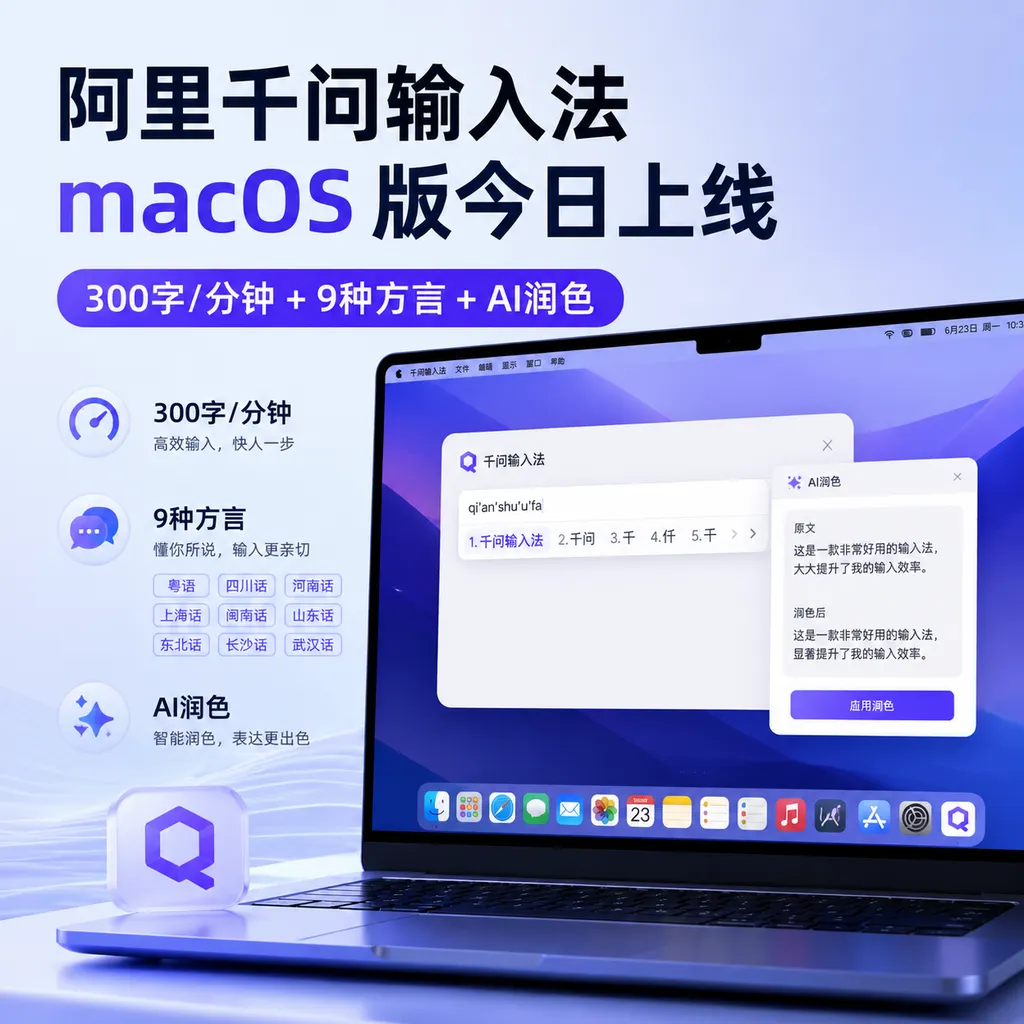
On June 27, the macOS version of Alibaba Qianwen Input Method officially launched on the official website, featuring "draft completed right after speaking," supporting up to 300 characters per minute input speed, built-in AI automatic polishing, and recognition of 9 dialects. The iOS, Android, and Windows versions will be released in the coming days.
Alibaba Qwen Input Method for macOS Goes Live Today: 300 Characters/Minute Ultra-Fast Entry, AI Polishing + 9 Dialects Fully Supported
June 27, 2026—The Alibaba Qwen team has made another major move today. According to the latest information on the official website, Qwen Input Method for macOS has officially launched, and users can directly download it from the Qwen website. The official announcement also teased that iOS, Android, and Windows versions will be released in the coming days, meaning Qwen has finally completed its full-platform layout for input methods, covering both desktop and mobile.
The core slogan for this new product is "Speak and it becomes text," and several key figures stand out on the promotional page: up to 300 characters per minute recognition speed, support for 9 dialects, AI automatic polishing, and a "clean and ad-free" promise. In today’s competitive landscape of AI voice input methods, Qwen’s decision to launch an independent macOS client marks Alibaba’s intent to treat voice input as a serious product line, rather than just a subordinate feature within the Qwen App.

1. From App Component to Standalone Product: The Evolution of Qwen Input Method
To understand the significance of today’s launch, we need to look back at Qwen Input Method’s journey.
According to information revealed on Qwen’s official site, Qwen Voice Input Method first introduced AI voice input capabilities this May, but it wasn’t yet a standalone product—it was a component within the Qwen App. At that time, it already featured several imaginative capabilities:
- Automatically removing filler words from spoken content (“uh,” “like,” “you know,” etc.)
- Error correction and formatting, turning fragmented spoken sentences into structured written text
- Intelligent replies based on context
- Direct execution of creation, Q&A, and translation commands
In other words, the May version of Qwen Voice Input was more like a capability slice of the Qwen App — you had to open the Qwen App first to use it. While this was convenient for heavy AI users, it posed a higher barrier for those who just wanted "a good voice input method."
The macOS version launched today (industry-leaked version number 1.0.0.13) is a genuinely standalone input method client. It no longer depends on the Qwen App and can be invoked anytime in any macOS application—writing emails, taking notes, chatting, writing code comments—without changing context.
This represents a clear product positioning upgrade: from a voice component in an AI app to an OS-level input gateway.
2. Product Highlights: 300 Characters/Minute, AI Polishing, 9 Dialects
Based on official and media information, the core selling points of Qwen Input Method for macOS can be broken down into four areas.
1. Ultra-Fast Recognition: Up to 300 Characters/Minute
The official figure given is "up to 300 characters per minute." For comparison, an average person’s normal speaking speed is roughly 200–250 characters/minute, and professional broadcasters can reach 300+. In other words, Qwen Input Method matches the "upper limit of normal speech speed."
Behind this figure is continued refinement of Alibaba’s Qwen large model in the ASR (Automatic Speech Recognition) field. Notably, based on prior comparative reviews, Qwen Voice Input Method uses a "speak the whole segment, then recognize all at once" approach rather than real-time transcription. This mode may be 2–3 seconds slower than real-time transcription for short sentences, but the advantage is: the model gets complete context for more accurate correction and polishing.
2. AI Automatic Polishing: Turn Speech into Well-Formatted Text
This is Qwen’s most distinctive capability. Traditional voice input methods simply solve "what you say is what you get," while Qwen aims to solve "what you say becomes what should be written."
For example, if you say:
"Uh… like, I think, this plan, it’s kind of problematic, I mean, maybe in the second part, it needs some adjustment."
Qwen Input Method’s AI polishing will transform it into:
"I think this plan has some issues and may need adjustment in the second part."
This real-time "spoken → written" conversion relies on Qwen’s large model’s understanding of Chinese semantics, context, and writing norms. In the May release of Qwen App’s voice component, this feature had already undergone real-world testing, with its accuracy and natural sentence breaking rated among the top tier of domestic voice input methods.

3. Recognition of 9 Dialects
Dialect support is another clear selling point for this macOS release. The official site specifies "support for 9 dialects." While the exact list isn’t disclosed, based on coverage in mainstream domestic dialect input methods, it likely includes Cantonese, Sichuanese, Shanghainese, Minnan, Northeastern Mandarin, Henanese, and other common dialects.
In prior comparative reviews, Qwen Voice Input ranked top tier for recognizing southern dialects like Cantonese—capable of fully transcribing entire segments without omissions. Minor issues like recognizing "yueyin" as "yu" occurred rarely and were acceptable. For users in Guangdong, Fujian, and Sichuan dialect regions, this capability determines whether an input method is truly usable.
4. Mixed Chinese-English Recognition + Clean and Ad-Free
The official description also emphasizes "mixed Chinese-English recognition" and "clean and ad-free." The former addresses pain points in scenarios where technical professionals and researchers frequently use English terms—you don’t need to switch between Chinese and English input methods; you can say something like "我们用 GPT 做了个 RAG demo" all in one go.
“Clean and ad-free” directly targets a common complaint about traditional input methods. Sogou, Baidu, and other brands have been criticized for ads, push notifications, and theme stores over the years. Qwen opts for the "minimalist AI style," which is a clear selling point for efficiency-minded professionals.
3. Horizontal Comparison: Doubao, Qwen, Sogou, Typeless—Who’s the Strongest Voice Assistant?
The launch of Qwen Input Method for macOS is not an isolated event. In fact, the AI voice input method track has undergone intensive reshuffling in the first half of 2026.
Recent industry comparative reviews show that the four most mainstream AI voice input products on macOS are:
| Product | Company | Workflow | Core Strength | |---------|---------|----------|---------------| | Qwen Input Method | Alibaba | Post-segment recognition | Complete AI polishing + Agent capabilities | | Doubao Input Method | ByteDance | Real-time transcription | Fast speed, strong Cantonese support | | Sogou Input Method | Tencent (via Yuanbao) | Real-time transcription + AI polishing | Seamless transition, friendly for old users | | Typeless | Overseas independent dev | Post-segment recognition | Strong mixed Chinese-English, minimalist menu bar |
From a workflow perspective, the market shows two clear technical routes:
- Real-time transcription (Doubao, Sogou): text appears as you speak, fastest recognition speed, but needs AI correction afterward
- Post-segment recognition (Qwen, Typeless): processes after you finish speaking, higher accuracy and polishing quality, but with more perceived delay
Recent reviews show Doubao ranked first in overall speed and stability thanks to real-time transcription, even in long speech. Meanwhile, Qwen was deemed "the most complete in AI capabilities"—beyond input, it can directly invoke Qwen Agent to carry out translation, summarization, writing tasks, etc., making it truly an "AI-era input method" rather than merely a voice version of Sogou.
One review noted:
"If you have scenarios that use both AI voice input and AI Agent, Qwen is clearly most suited for you."
This explains why Qwen wanted to make its input method standalone—it’s not just competing for the "input" action, but for "the go-to entry point whenever users think of using AI."
4. Why Are Big Tech Companies All Eyeing the Input Method Track?
Over the past six months, Alibaba, ByteDance, Tencent (Sogou + Yuanbao), iFlyTek, and overseas players Typeless, Wispr Flow, Superwhisper have all made voice input methods a strategic priority.
Why has this seemingly "dead" track suddenly become so competitive?
1. Input Methods Are “The Most Frequently Used Cross-App Basic Tool”
Whether chatting in WeChat, searching in a browser, writing docs in Feishu, or adding comments in VS Code—if you need to type, you’ll invoke the input method. This is, aside from browsers, the highest-frequency cross-app entry point.
For companies with large models, input method = daily AI invocation muscle memory training ground.
2. Voice Interaction Returns to Human Instinct
Keyboards and mice are essentially a "compromise" humans made for machines. Voice input returns to humans’ most instinctive way of communication. In an era where large models can understand natural language, obstacles to voice input are no longer technical, but habitual. Once experience crosses a usability threshold, the habit change is irreversible.
3. Input Method Is the Most Natural Form of Large Model Deployment
You might not open ChatGPT, but you can’t avoid typing. Input methods seamlessly embed AI capability into existing workflows, without requiring users to actively “use AI”—this is one of the most elegant paths for large model deployment to consumers.
5. What Does This Mean for Developers and Creators?
The launch of Qwen Input Method for macOS has direct implications for several groups:
- Content creators / writers: 300 characters/min + AI polishing means writing efficiency could multiply. A 2,000-character article could theoretically be dictated in 10 minutes for a first draft.
- Dialect region users: 9 dialects supported means users in Guangdong, Sichuan, Fujian no longer need to be “bound” to Mandarin.
- Developers / researchers: Mixed Chinese-English recognition solves term-switching pain points—technical docs, comments, commit messages become smoother.
- Multi-device users: Upcoming iOS, Android, and Windows versions point to full-platform account sync capability, potentially enabling cross-device integration of custom dictionaries, habits, and context.
That said—Qwen’s current "post-segment recognition" mode may feel less “snappy” than real-time transcription products like Doubao for short sentences and instant messaging. Long-form text and formal writing are Qwen’s comfort zone, while fragmented instant messaging may have to wait for future iterations.
6. Final Thoughts: The Battle for AI-Era Input Gateways Has Just Begun
From debuting in May as a component within Qwen App to becoming a standalone macOS client today—Qwen Input Method took just over a month to leap from "capability" to "product."
More importantly, the official teaser says “iOS, Android, Windows versions soon to be released”—meaning Qwen will confront Doubao, Sogou, and iFlyTek head-on in the second half of 2026, extending the battle from single-platform to full-platform.
In this era of large models, traditional keyboard input won’t vanish overnight, but the "speak and it acts" experience is proving its worth. The launch of Qwen Input Method for macOS is not just another expansion of Alibaba’s product matrix, but a landmark signaling the AI voice input method industry’s entry into a "full-platform, standalone, Agent-based" new phase.
As for who will be the ultimate winner—Alibaba, ByteDance, or some overseas independent developer—that answer may only become clear in 2027. One thing is certain: this seemingly traditional input method track is becoming one of the most critical ‘super gateways’ of the AI era.

References
- Alibaba Qwen Input Method launches macOS version: Up to 300 chars/min, AI automatic polishing - IT Home — IT Home’s first report on Qwen Input Method for macOS, including official core specs and full-platform release plan


