
Gemini can now directly generate 3D models — large models have entered the visualization battlefield.
Google launches interactive 3D model and physics simulation generation features for Gemini, allowing users to obtain rotatable and parameter-adjustable three-dimensional visual scenes directly within conversations. Competition among major model providers in the "visual answer" domain is entering a new stage.
Google didn’t do any teaser this time—it just launched the feature directly: Gemini can now generate interactive 3D models and physics simulation scenes in conversations. Not static images, not Markdown tables, but genuinely manipulable 3D visualizations where you can drag, rotate, zoom in for detail, and adjust parameters with sliders.
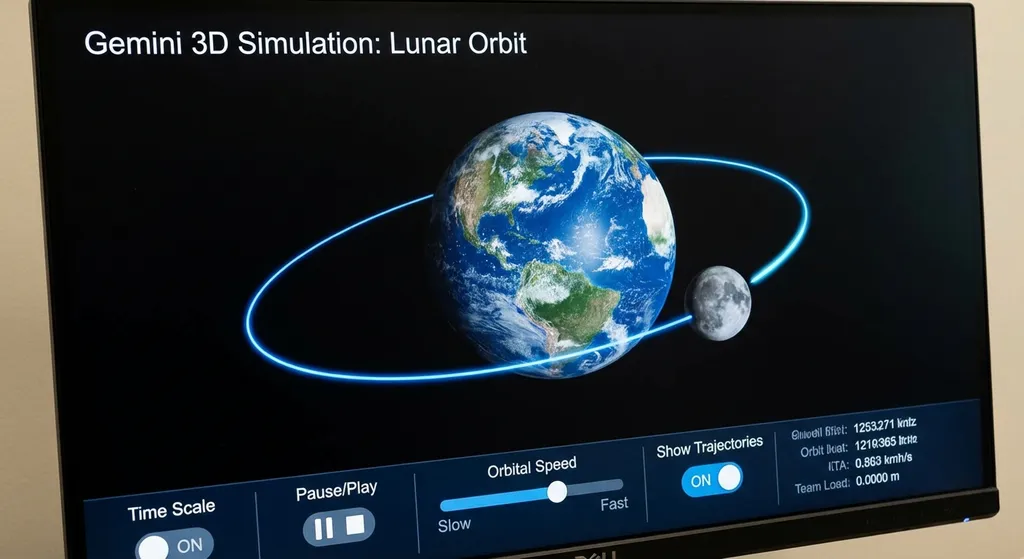
To put it simply: when you ask it “how does the Moon orbit the Earth,” it no longer just throws text at you—it directly renders a 3D orbital model. You can drag the Moon around, tweak the orbital speed with sliders, turn trajectory lines on or off, and even pause the entire animation to inspect it frame by frame.
This is something worth unpacking carefully.
What It Can Actually Do
Based on Google’s introduction and hands-on feedback, this upgrade can be broken down into three core layers:
The first layer is 3D model generation. Gemini can generate a 3D model directly from a natural language description. It’s not calling an external modeling tool’s API, but natively rendering within the chat interface. The model supports standard 3D interactions—rotation, zoom, and pan—just like any 3D viewer.
The second layer is physics simulation. This is where things get really interesting. Gemini doesn’t just produce a static 3D object; it can create dynamic simulations with a timeline. From a double pendulum’s chaotic motion, to waveforms showing Doppler effect shifts, to planetary orbits—Gemini can make these physical processes run interactively.
The third layer is parameter interactivity. The generated visualization isn’t a “watch-only” animation—it comes with a control panel. Sliders for speed, input boxes for values, switches for display elements—the user can adjust parameters in real time and see the changes instantly. It’s no longer just an “answer,” but more like an on-demand mini simulation app.
How to Use It
The process isn’t complicated, but there’s one prerequisite—you need to switch to the Pro model inside the Gemini app.
Here’s the step-by-step:
- Open the Gemini app and switch the model to Pro
- Use natural language to request a visualization, such as “show a double pendulum system,” “visualize the Doppler effect,” or “generate a simulation of the Moon orbiting the Earth”
- Gemini first replies with a text explanation
- A “Show me the visualization” button appears below the response
- Click it to generate the corresponding 3D model or simulated scene
Notice step 4—it doesn’t automatically generate 3D models; it gives you text first, then lets you trigger the visualization manually. That’s actually smart: not every question needs 3D. By letting users choose whether to “see” the answer, Google avoids unnecessary rendering costs and waiting time.
Currently, this feature is available to all Gemini app users at no extra charge—just select the Pro model.
From 2D to 3D: The Path of Gemini’s Visualization Capabilities
This upgrade didn’t come out of nowhere. Looking back, Gemini’s visualization ability has evolved step by step:
At first, Gemini’s answers—like other LLMs—were pure text. Then it gained code execution to run Python and plot with Matplotlib—but that was still “generate and run code,” not native visualization.
Later, Gemini supported generating interactive 2D images from prompts. You could click and drag, but interaction was limited to a flat plane.
Now it’s leapt straight to 3D models with dynamic physics simulation. The dimension increased, and so did interaction depth—shifting from “seeing images” to “playing with models.”
If we draw this progression, it looks roughly like this:
Text only → Code-generated charts → Interactive 2D images → Interactive 3D models + physics simulations
Each step is a major leap. Especially the last one—from 2D to 3D—doesn’t just add a dimension. The rendering pipeline, physics engine integration, and real-time interactive framework all require an entirely different tech stack.
Technical Implementation
Google hasn’t disclosed detailed technical design, but based on observations and available info, a few reasonable inferences can be made.
Gemini likely isn’t running a full 3D rendering engine on the server and streaming video to clients—that would be inefficient in both latency and bandwidth. A more plausible approach: Gemini generates structured data describing a 3D scene (similar to glTF, USD, or some internal DSL), and the client’s WebGL/WebGPU renderer handles the real-time rendering and interaction.
The physics simulation works similarly. Instead of calculating every frame’s physics state during inference, Gemini probably generates simulation parameters and rule definitions, then passes them to a lightweight client-side physics engine (like one based on cannon.js or ammo.js).
In other words, Gemini acts more like a “scene orchestrator”—it understands your intent, generates scene descriptions and interaction logic, and leaves the heavy lifting of rendering and simulation to the client. That’s fundamentally different from the old “AI generates code → user runs it” model. The user never sees code; the whole experience is seamless.
Based on additional sources, Google is also exploring how to extend these capabilities into XR. With Samsung’s Galaxy XR headset and Gemini 3 Pro, users could generate immersive, gesture-controlled 3D interactive experiences. That shows Google’s commitment to a full roadmap from screens to spatial computing.
The "Visual Answer" Arms Race Among LLMs
Zooming out, Gemini’s update isn’t an isolated event—it’s a snapshot of a broader race among LLM vendors to enable visualized answer generation.
Anthropic recently gave Claude the ability to auto-generate charts, diagrams, and interactive visual content. Ask Claude a data analysis question, and it can draw interactive charts directly—no need to fiddle around in Excel.
OpenAI is also moving fast. ChatGPT now includes visualization tools for math and science concepts—function plots, geometric relationships, physical processes—all directly embedded in the chat.
Each of the three is focusing on a different angle:
- OpenAI: mathematical and science education use cases (“smart blackboard”)
- Anthropic: data analysis and business visualization (“smart dashboard”)
- Google: full 3D and physics simulation—most ambitious, broadest scope
But at the core, everyone’s chasing the same direction: turning LLM output from “pure text” into “multimodal interactivity.”
Text is dense and expressive, but not always the best medium. You could write ten thousand words describing a double pendulum’s chaotic motion—or you could let someone flick it themselves.
This points to a deeper trend: LLMs are moving from “tools that answer questions” to “platforms that construct experiences.” They don’t just tell you the answer—they help you experience understanding.
What It Means for Developers
If you develop educational, scientific visualization, or data presentation products, this update is worth serious attention.
First, the capability frontier has shifted. Previously, building an interactive 3D physics simulation required Three.js + a physics engine + lots of frontend work—a skilled developer might need a day or two. Now Gemini can generate a working prototype from a single sentence. The customization may not rival hand-coded results, but for quick prototyping or teaching demos, it’s already enough.
Second, interaction habits will evolve. Once users get used to asking “show me an interactive 3D scene” and getting it instantly, their tolerance for static charts and text-only explanations will plummet. Think about how ChatGPT reshaped expectations toward traditional search engines.
For developers using Gemini APIs, note that this 3D visualization feature currently lives only within the Gemini app—no API exposure yet. But the core text generation and multimodal understanding capabilities are fully accessible through the API.
If you need to invoke Gemini or other major models programmatically, you can use OpenAI Hub, which provides a unified, OpenAI-compatible API format, saving integration work. For example:
import openai

client = openai.OpenAI(
    api_key="your-openai-hub-key",
    base_url="https://api.openai-hub.net/v1"
)

response = client.chat.completions.create(
    model="gemini-pro",
    messages=[
        {"role": "user", "content": "Explain the principles of chaotic motion in a double pendulum and provide the key parameter equations."}
    ]
)

print(response.choices[0].message.content)
// Node.js example
import OpenAI from 'openai';

const client = new OpenAI({
  apiKey: 'your-openai-hub-key',
  baseURL: 'https://api.openai-hub.net/v1',
});

const response = await client.chat.completions.create({
  model: 'gemini-pro',
  messages: [
    { role: 'user', content: 'Describe the physical process of the Doppler effect and derive the frequency shift formula.' }
  ],
});

console.log(response.choices[0].message.content);
The same structure applies—just replace model with gpt-4o, claude-sonnet-4, or deepseek-chat to switch models. The interface stays identical. For model benchmarking or multi-model fallback, this unified approach saves a lot of effort.
Let's Stay Rational
The feature is great—but we should stay clear-eyed about a few things.
First, how high is the quality ceiling? For canonical physical scenarios—like Moon orbits or double pendulums—Gemini performs well thanks to abundant training examples. But if you ask for non-standard, niche-domain simulations (say, “simulate the phonon dispersion relation of a given crystal structure”), expect quality drop-offs.
Second, how deep is interactivity? So far, interactions include rotation, zooming, and basic slider controls. More complex capabilities—like adding new objects, changing physical rules, or exporting model data—seem unsupported. It’s more “read-only + tweak parameters” than a full modeling tool.
Third, performance and compatibility. 3D rendering stresses client hardware; low-end devices or legacy browsers may struggle. How well Google optimized this remains to be seen from user feedback.
Fourth—and most important—how often will it be used? For students and educators, interactive 3D simulations are valuable. But for the average user, chat scenarios rarely require 3D visualization. This will likely be a “low-frequency but high-value” feature, not a mainstream habit-shifting one.
Looking Ahead
Beyond the specific feature, this update sends a clear signal: the output modes of large models are rapidly diversifying.
From pure text to images, from images to code execution, from code to interactive 2D, and now to interactive 3D with physics.
What’s next? Given Google’s XR investments, spatial computing and immersive interactions seem like the obvious future.
For developers, this means the boundary of “what AI can help you build” is expanding fast. Today it can create a 3D simulation; tomorrow it might produce a full interactive app prototype. Stay alert, stay hands-on—when these capabilities mature and open via API, be ready to integrate them early. That’s probably the most pragmatic move right now.
References:
- Google Gemini launches new feature for generating interactive 3D models and simulations - Linux.do — Release details and hands-on reports


