
Apple Added an MCP to Safari, and AI Agents Can Finally Control the Browser Directly

Safari Technology Preview 247 includes a built-in MCP Server, allowing AI agents to directly inspect the DOM, read the console, capture screenshots, and run network requests. This time, Apple has caught up with Chrome DevTools MCP, formally completing the automated closed loop for Web debugging within the macOS ecosystem.
Apple quietly dropped something fairly significant on the WebKit blog yesterday: starting with Safari Technology Preview 247, Safari now includes a built-in MCP Server. AI agents can connect directly to Safari windows, read context, and perform actions.
For developers, this means coding agents like Claude Code, Cursor, and Windsurf no longer have to “code blind” against source files alone — they can actually see how the code they wrote renders in the browser, what errors appear in the console, whether network requests are returning 404s, and even take screenshots for their own debugging loop.
This is one of the rare cases where Apple is keeping pace relatively closely in the AI tooling stack. Chrome DevTools MCP only entered public preview last September, and Safari followed roughly nine months later. Considering the WebKit team’s traditionally conservative style, that’s honestly not slow.
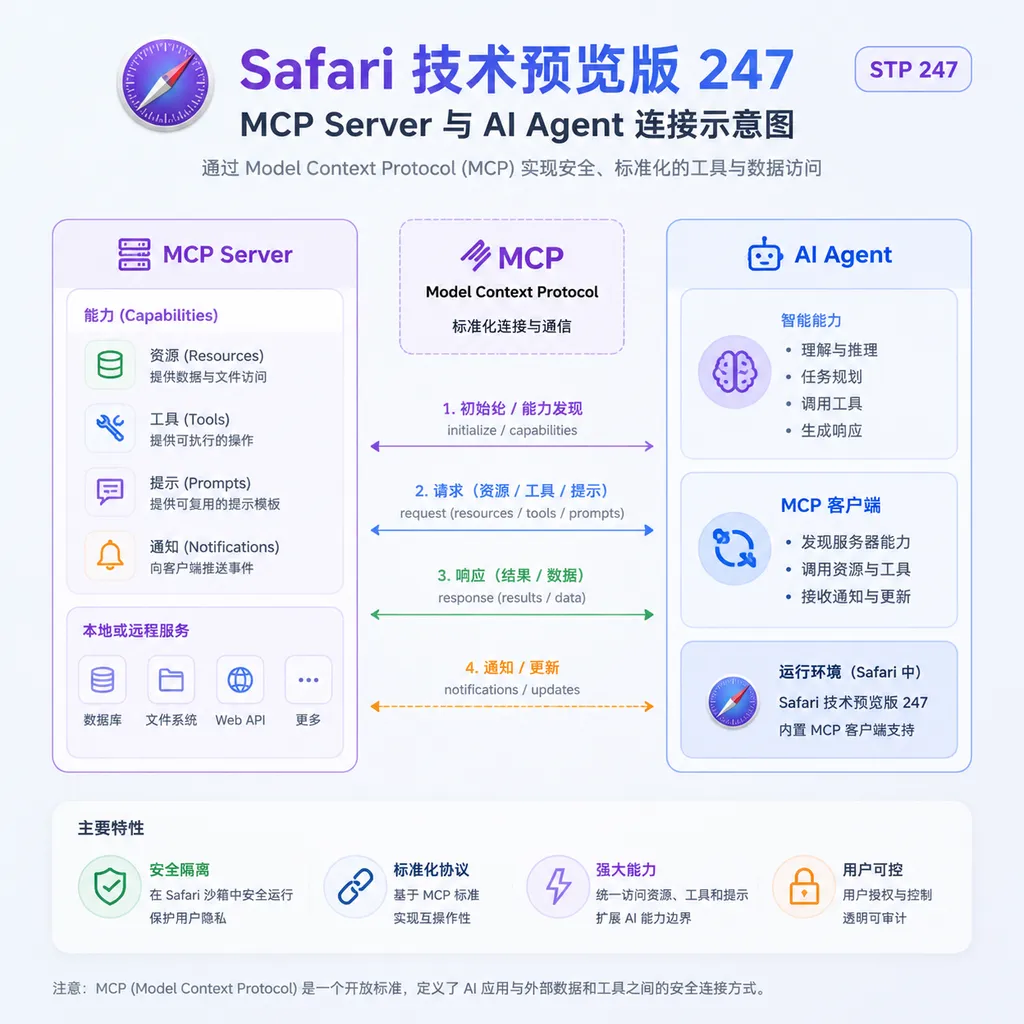
What problem does this actually solve?
First, let’s clarify what MCP is. The Model Context Protocol is an open standard introduced by Anthropic late last year. Essentially, it defines a universal interface for how LLMs call external tools. You can think of it as USB‑C for the AI world: previously, every agent needed custom glue code for every tool; now, as long as a tool exposes an MCP Server, any compatible client (Claude Desktop, Cursor, Devin, VS Code Copilot Chat, etc.) can plug in directly.
Browsers are currently one of the hottest MCP integration targets, for a simple reason: if a frontend coding agent cannot see the actual rendered result in a browser, it’s effectively taking a closed-book exam.
Here’s a real example. Suppose you ask Cursor to fix a bug where “the login button doesn’t work in Safari.” Traditionally, the workflow looks like this:
- The agent reads the code and guesses it might be a
pointer-eventsor event bubbling issue - It generates a patch
- You manually open Safari to test it
- It still doesn’t work, so you go back to step 1
With Safari MCP, the workflow becomes:
- The agent tells Safari to open the page
- It inspects the DOM, checks for console warnings, and captures a screenshot
- It discovers an overlay element blocking the button and directly fixes the CSS
- It reloads the page to verify the fix
All the tedious steps where you manually switch windows, copy error logs, and paste them back into the chat disappear. This is not a 10% or 20% efficiency improvement — it’s about completely removing humans from the debugging loop.
What can Safari MCP actually do?
According to Apple’s blog post, once configured, coding agents can at least perform the following tasks:
- Inspect web elements: Read the DOM tree, computed styles, and box model, similar to manually opening Web Inspector
- Access console logs: Retrieve
console.error,console.warn, and uncaught exception stacks - Capture network requests: Inspect each XHR/fetch request’s URL, status code, response body, and timing
- Take screenshots: Capture full-page screenshots or screenshots of specific elements
- Interact with pages: Click, type, scroll, and navigate
Apple specifically highlighted several use cases: website debugging, identifying Safari compatibility issues, performance analysis, accessibility (a11y) checks, and UI state verification.
That last one — accessibility checks — deserves special attention. Frontend accessibility has long been one of those “everyone knows they should do it, but almost nobody actually does” areas because validation is expensive. You have to launch a screen reader, run axe-core, inspect color contrast ratios — half an hour disappears immediately. Once agents take over this process, they could theoretically run accessibility checks automatically before every commit and prioritize the results for you. That may end up being even more useful than the use cases Apple itself mentioned.
How does it compare to Chrome DevTools MCP?
The comparison is unavoidable, because both companies are now building almost the same thing.
Chrome’s public preview, released in September 2025, uses the npx chrome-devtools-mcp@latest npm package approach. It’s cross-platform and works on Windows, Linux, and macOS. Configuration is standard MCP JSON:
{
  "mcpServers": {
    "chrome-devtools": {
      "command": "npx",
      "args": ["chrome-devtools-mcp@latest"]
    }
  }
}
Safari’s implementation, by contrast, is integrated natively into the browser’s Technology Preview build. No additional package installation is required, but the tradeoff is that it only works on macOS, and for now only in the Technology Preview branch (there’s no timeline yet for integration into stable Safari).
In terms of capabilities, Chrome DevTools MCP has one killer feature: performance_start_trace, which can trigger a full performance trace. The LLM can then analyze flame graphs and Core Web Vitals data directly. Apple didn’t explicitly mention performance tracing tools this time, but since it already hooks into the underlying Web Inspector infrastructure, adding them later would be straightforward.
If your project’s primary users are on iOS/macOS Safari, this changes the equation completely. Previously, cross-browser compatibility bugs could only really be debugged by running Playwright + WebKit in CI and inspecting logs afterward. Now agents can debug directly against real Safari instances, which should dramatically improve accuracy. That’s something Chrome DevTools MCP cannot replace.
One detail that can’t be ignored: security boundaries
Giving agents browser control through MCP is powerful, but it also means that if a prompt injection attack compromises the agent, an attacker could theoretically make your Safari do anything — including accessing your logged-in bank account, email, or internal company systems.
Apple’s stated mitigation is “authorized operations,” though the blog post doesn’t go into detail. Looking at the third-party MCPSafari project on GitHub, a sensible approach would involve explicit permission controls through a Safari Web Extension, allowing users to authorize operations by domain and action type individually. Hopefully Apple’s official implementation is at least as robust as the community version.
Safari Technology Preview 247’s MCP implementation is explicitly intended for “development and debugging,” meaning it connects to pages you’re developing locally. If Apple eventually expands this to ordinary browsing sessions (for example, letting agents book flights on your behalf), the security model will need a complete redesign. Neither Apple nor Google has fully solved that problem yet.
What this means for the ecosystem
Stepping back a bit, MCP has transformed over the past six months from “Anthropic’s protocol” into a de facto industry standard. OpenAI supports it natively in the Agents SDK, Google supports it in Gemini CLI, Microsoft supports it in Copilot, Devin has its own MCP marketplace, and Cursor and Windsurf are already deeply integrated. Now even Apple — historically reluctant to follow trends — is integrating MCP into one of its core products. That more or less cements the protocol’s position.
What’s even more interesting is Apple’s choice here: it didn’t invent a proprietary “Safari Agent API.” It adopted MCP directly. Historically, Apple has been famous for the “Not Invented Here” mindset, so this departure suggests the company’s urgency around AI integration is greater internally than outsiders may realize.
For developers, the benefits are obvious: eventually, you’ll configure a single MCP server list in Cursor and simultaneously manage VS Code, Chrome DevTools, Safari, GitHub, Notion, Postgres, and more — one client controlling the entire toolchain. This “one agent, multiple backends” model closely mirrors the idea behind AI API aggregation: users should interact with a unified interface while the platform absorbs the underlying complexity. (On OpenAI Hub, for example, one API key can already access GPT, Claude, Gemini, and DeepSeek models. If your own agent integrates Safari MCP, the model layer could run entirely through OpenAI Hub, eliminating the hassle of applying for APIs from each provider separately.)
How to get started
If you want to try it right now, the process looks like this:
- Download Safari Technology Preview 247 from Apple Developer (macOS 14+)
- Enable MCP Server from Safari’s developer menu (Apple hasn’t fully published the documentation yet, but it’s expected under “Develop > MCP”)
- Add the Safari server to your MCP configuration in your agent client (Claude Desktop, Cursor, etc.)
- Let the agent open a local development URL and inspect it itself
Because this is still the Technology Preview branch, it’s probably not ideal as your primary production browser. Fortunately, it installs alongside stable Safari, so you can keep both.
Is it worth paying attention to?
Absolutely.
This isn’t one of those features that looks impressive in demos but falls apart in practice. Browser debugging is actually one of the areas where AI agents are already delivering immediate, measurable productivity gains. Nine months after Chrome DevTools MCP launched, some frontend teams have already converted visual regression testing pipelines in CI into fully agent-driven workflows. Safari filling this gap means that, for the first time, the 20-year-old problem of cross-browser compatibility debugging finally has a viable “let the AI solve it itself” path.
In the short term, the biggest beneficiaries will be teams building products primarily for macOS/iOS users. Long term, if Apple moves MCP integration from Technology Preview into stable Safari — and especially if it expands to iOS Safari (imagine agents directly debugging pages on real iPhones) — the impact will go far beyond “saving a little time.” Mobile developers would, for the first time, gain the same level of agent-assisted capability desktop developers already enjoy.
Whether Apple takes that next step likely depends on how urgently it wants a post–Vision Pro “AI-native” story.
Sources
- ITHome: Apple Safari Technology Preview 247 introduces MCP services, accelerating web development and debugging with AI agents — Original Chinese report including translated excerpts from Apple’s WebKit blog
- GitHub: Epistates/MCPSafari — Third-party Safari MCP project that predates Apple’s official implementation; useful reference for architecture and permission models


